


A browser Word document editor with one document model, one web component and thin adapters for your framework. An early implementation: not Microsoft Word parity, and not lossless export.



Live demo · Documentation · Getting started · Packages
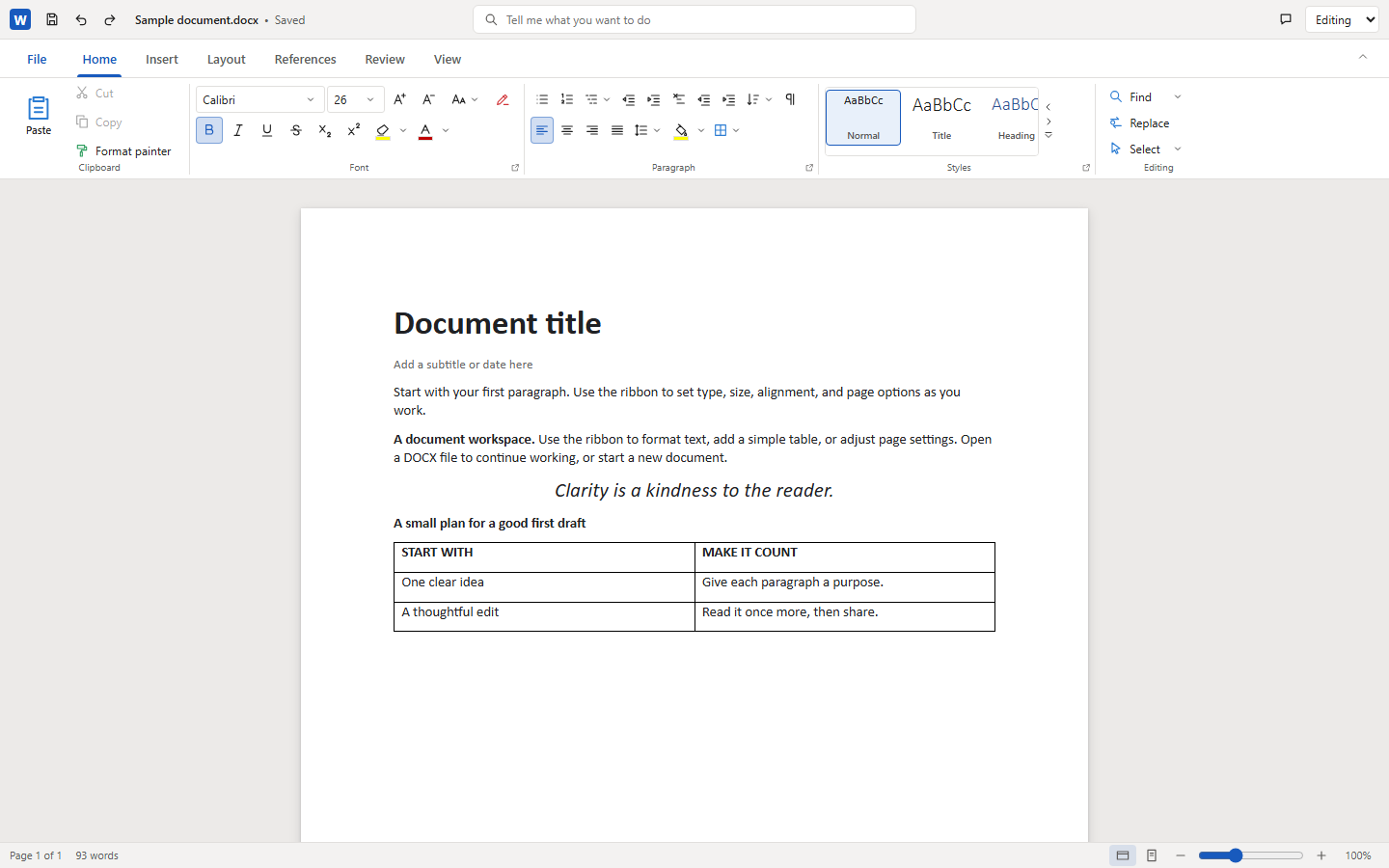
- One editor, every framework. A ProseMirror-backed
<docx-editor>web component owns rendering, selection, commands, history and styling. React, Vue, Angular, Svelte, Solid and vanilla adapters only handle lifecycle and events. - One document model. A framework-neutral DOCX model, parser and serializer sit under the editor.
- Careful preservation. A no-op save returns the original bytes, supported edits keep package parts outside the model, and unsafe edits are rejected instead of silently dropped.
- Honest limits. Unsupported features are reported, not hidden. See the support roadmap and outstanding work.
| Editor | Word-style ribbon, title bar, File backstage, status bar, undo/redo, find and replace, zoom and read-only mode in one web component. |
| Print Layout | Paginated view with line breaking, widow/orphan and keep rules, columns, table row splitting and printing. An approximation of Word, not Word's pagination. |
| Document structure | Styles, lists and numbering, tables, sections and columns, headers and footers, footnotes and fields such as TOC. Inline text boxes, header watermark and page borders. SmartArt shows its saved drawing, read-only (see below). |
| Review | Tracked changes (accept, reject, navigate) and a comments pane with replies and resolve. |
| File formats | DOCX, and legacy Word 97-2003 .doc via the shared ole2 codecs inside ooxml-core (main-body text and constrained paragraph edits). Password-protected files are unsupported. |
| Collaboration | A transport-neutral protocol over validated ProseMirror steps with transient presence. Your application owns networking, identity, permissions and storage. |
| Localization | Editor interface in English, French, German, Spanish and Simplified Chinese through a locale option. Document content is never translated. |
npm install docx-react-viewerChoose the package for your framework in the package table below. The editor installs its core and shared UI dependencies and re-exports its model API. For source development, see Development.
Install one self-contained editor package for your framework, for example npm install docx-react-viewer react. The editor packages are docx-react-viewer, -vue-viewer, -angular-viewer, -svelte-viewer, -solid-viewer and -vanilla-viewer. Each one bundles the editor UI and adapter, delegates layout and legacy .doc loading to core, brings the document model (docx-core) with it, and re-exports it, so a single install and a single import path are all an application needs. Install docx-core on its own only for headless use (parsing and serializing without an editor).
import { createDocument, WordEditor } from 'docx-react-viewer';

export function Editor() {
	const [model, setModel] = useState(() => createDocument());
	return <WordEditor documentModel={model} onDocumentChange={setModel} />;
}
Vue 3
<script setup lang="ts">
import { ref } from 'vue';
import { createDocument, WordEditor } from 'docx-vue-viewer';

const model = ref(createDocument());
</script>
<template>
	<WordEditor :document-model="model" @document-change="model = $event" />
</template>
Angular
import { createDocument, WordEditorComponent } from 'docx-angular-viewer';

@Component({
	standalone: true,
	imports: [WordEditorComponent],
	template: '<word-editor [documentModel]="model" (documentChange)="model = $event" />',
})
export class EditorComponent {
	model = createDocument();
}
Svelte 5
<script>
  import WordEditor from 'docx-svelte-viewer';
  import { createDocument } from 'docx-svelte-viewer/runtime';
  let model = $state(createDocument());
</script>
<WordEditor documentModel={model} ondocumentchange={next => model = next} />
SolidJS
import { createSignal } from 'solid-js';
import { createDocument, WordEditor } from 'docx-solid-viewer';

export function Editor() {
	const [model, setModel] = createSignal(createDocument());
	return <WordEditor documentModel={model()} onDocumentChange={setModel} />;
}
Vanilla JavaScript
import { createDocument, mountEditor } from 'docx-vanilla-viewer';

const editor = mountEditor(container, {
	documentModel: createDocument(),
	onDocumentChange: (model) => console.log(model),
	onDocumentError: (error) => console.error(error),
});
await editor.load(bytes);
const saved = await editor.save();
editor.destroy();
See the bindings guide for props, events, saving and file commands.
Seven packages are published on npm, each versioned independently:
| Package | What it is |
|---|---|
docx-core |
DOCX model, parser and preserving serializer (packages/core, a thin entry point over ooxml-core/docx). DOCX only. |
docx-react-viewer |
React component (packages/react). |
docx-vue-viewer |
Vue 3 component (packages/vue). |
docx-angular-viewer |
Angular standalone component (packages/angular). |
docx-svelte-viewer |
Svelte 5 component (packages/svelte). |
docx-solid-viewer |
Solid component (packages/solid). |
docx-vanilla-viewer |
mountEditor and the plain <docx-editor> web component, no framework (packages/vanilla). |
Each *-viewer package is self-contained: the editor, layout engine, document loading and the legacy .doc reader come from ooxml-core (/docx/layout, /docx/load, which inlines the shared ole2 codecs). A package depends on docx-core, ooxml-core, ooxml-ui (the shared web components that draw SmartArt; installed for you, never imported by your code), the ProseMirror libraries and its framework peer, so @christophervr/ole2 does not need to be published or installed. DOCX and legacy .doc files are both opened by every editor package.
The workspace also holds private packages that are never published and are inlined into each editor package at build time: web-component (the shared <docx-editor>, including the browser text measurer behind Print Layout) and bindings (framework lifecycle and event adapters). The pagination engine, document loading and collaboration helpers are in ooxml-core. Shared OOXML logic is moving into the public ooxml-core, leaving this repository with only the UI; that migration is in progress, not a shipped feature.
A SmartArt graphic (inline or floating) is displayed from the drawing the producing application saved in the file (dsp:drawing), drawn as SVG by <office-ui-smartart>. It is read-only: the diagram is not editable, its layout is not recomputed, and it is not claimed to look like Word. Preset outlines the renderer cannot draw appear as rectangles, gradient and pattern fills are approximated, transparency and 3D are dropped, and text is one line per shape without autofit; each case is listed in the diagram's info popover (the small i button) together with the file's own notices. A diagram with no saved drawing shows a labelled box listing its node text. Its parts and markup are preserved byte for byte on save, including when other text is edited. The accessible name comes from the diagram's alt text, title or object name.
bun run typecheck       # tsc and svelte-check
bun run test            # Vitest
bun run check:shared    # shared-code boundary check
bun run build:packages
bun run check:published   # no tarball may import an internal package or ole2
bun run pack:smoke
bunx playwright install chromium
bun run test:browser    # Playwright contract tests
bun run fmt:check       # oxfmt
bun install --cwd docs && bun run --cwd docs docs:build   # site and all demos
PLAYWRIGHT_CHROMIUM_EXECUTABLE selects an explicit Chromium and PLAYWRIGHT_PORT (default 4180) the preview port. Publishing is not enabled yet; see the release policy.
Architecture · Framework bindings · Editing text · Collaboration · Support roadmap · Outstanding work · ooxml-core plan · Reuse audit
Apache License 2.0. See NOTICE for attributions.