Repository navigation
Padding and alignment on compose field for iOS looks misaligned #1500
Description

Platform - version:
iOS 14
iPhone X
Action Performed (reproducible steps):
Open expensify.cash and login. Observe the Compose box. The text inside of the compose box is misaligned. It is not vertically centered.
Expected Result:
I would expect the text to be vertically aligned within the compose area. See below, it is sitting too low in the box.
Actual Result:
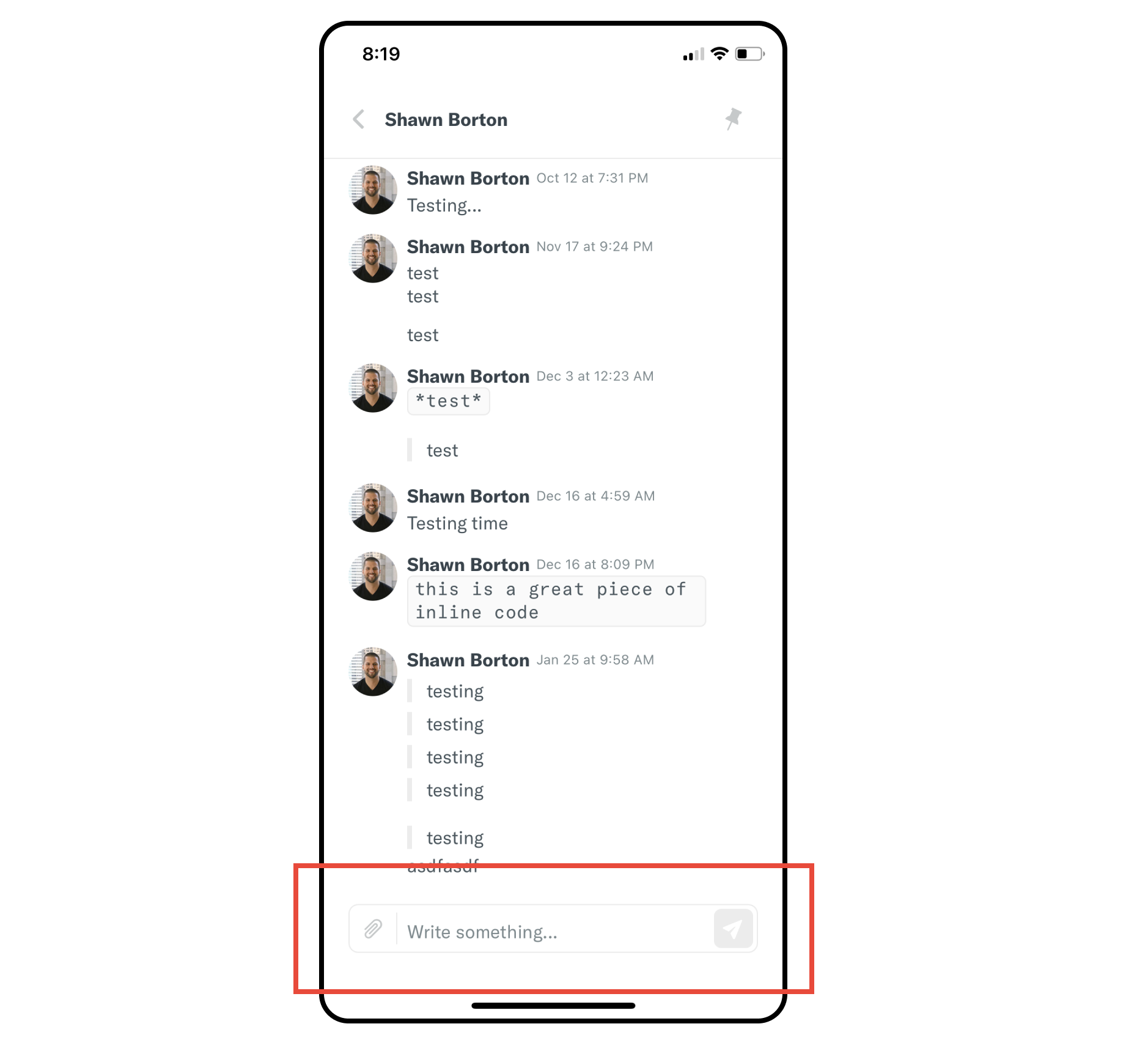
Notes/Photos/Videos:
Logs - JS/Android/iOS (if applicable):
Activity
kadiealexander commentedon Feb 18, 2021
Upwork listing: https://www.upwork.com/jobs/~01c80596a92bad7845
aliabbasmalik8 commentedon Feb 18, 2021
Please remove alignSelf: 'center', from this style object textInputCompose that located in src/styles/styles.js it's on line # 661 in the belowLatest screen after fix this

shawnborton commentedon Feb 19, 2021
@aliabbasmalik8 can you confirm that your proposed change will not break other platforms as well?
aliabbasmalik8 commentedon Feb 19, 2021
Here is an updated solution that tested on web app as well as mobile devices
We need to import
import { Platform } from 'react-native';at the top ofsrc/styles/stylesand add this code in
textInputComposestyle Object...Platform.select({ web: { alignSelf: 'center', } }),Actually, we need this property only for web
alignSelf: 'center'https://reactnative.dev/docs/platform-specific-code
shawnborton commentedon Feb 19, 2021
@marcaaron curious for your thoughts on the above... I know we try to avoid platform-specific instances like the above proposal, but I'm not sure how else to solve for this one.
marcaaron commentedon Feb 19, 2021
Yes, well there is nothing wrong with having a platform specific implementation. It just needs to follow the guidance here as we have decided to avoid using
Platformin the code. Instead we'd add something like this:aliabbasmalik8 commentedon Feb 19, 2021
Got it. so updated solution according to guidance is here
Added textInputAlignSelf utility like this
and import at top
import textInputAlignSelf from './utilities/textInputAlignSelf';and updated
textInputComposestyle object like thismarcaaron commentedon Feb 19, 2021
yep, you got it
aliabbasmalik8 commentedon Feb 23, 2021
@kadiealexander can I do this Ticket?
kadiealexander commentedon Mar 2, 2021
@aliabbasmalik8 Hey! Thanks for sharing this fix. My colleague wanted to confirm if this will also fix the issue for Android, as we discovered the issue exists here too. Thanks in advance!
aliabbasmalik8 commentedon Mar 5, 2021
@kadiealexander I tested it on all platforms and it's working well and also attached a screenshot for the android platform.
Please let me know the device name if you still face this issue
Thanks