Repository navigation
[HOLD for payment 2023-06-13] Polish codes screen in managing 2FA in newdot #19180


Description

Problem
Here in the 2FA codes screen, we have Copy and Download buttons. We need to add an icon that turns into a check box and provides response that code has been copied or downloaded.
In the main PR, we discussed we'll make a follow up PR to address those issues as it requires updating main Button component.

Solution
Discuss design Done!
and Implement that.
We need to make our button component accept icons on the right hand side, and once pressed, turn that icons into a check icon indicating that the action succeeded.
Mockups here
https://user-images.githubusercontent.com/2319350/239196300-67a7d86f-79b3-41c6-ba5b-02b5b6af1d0c.png
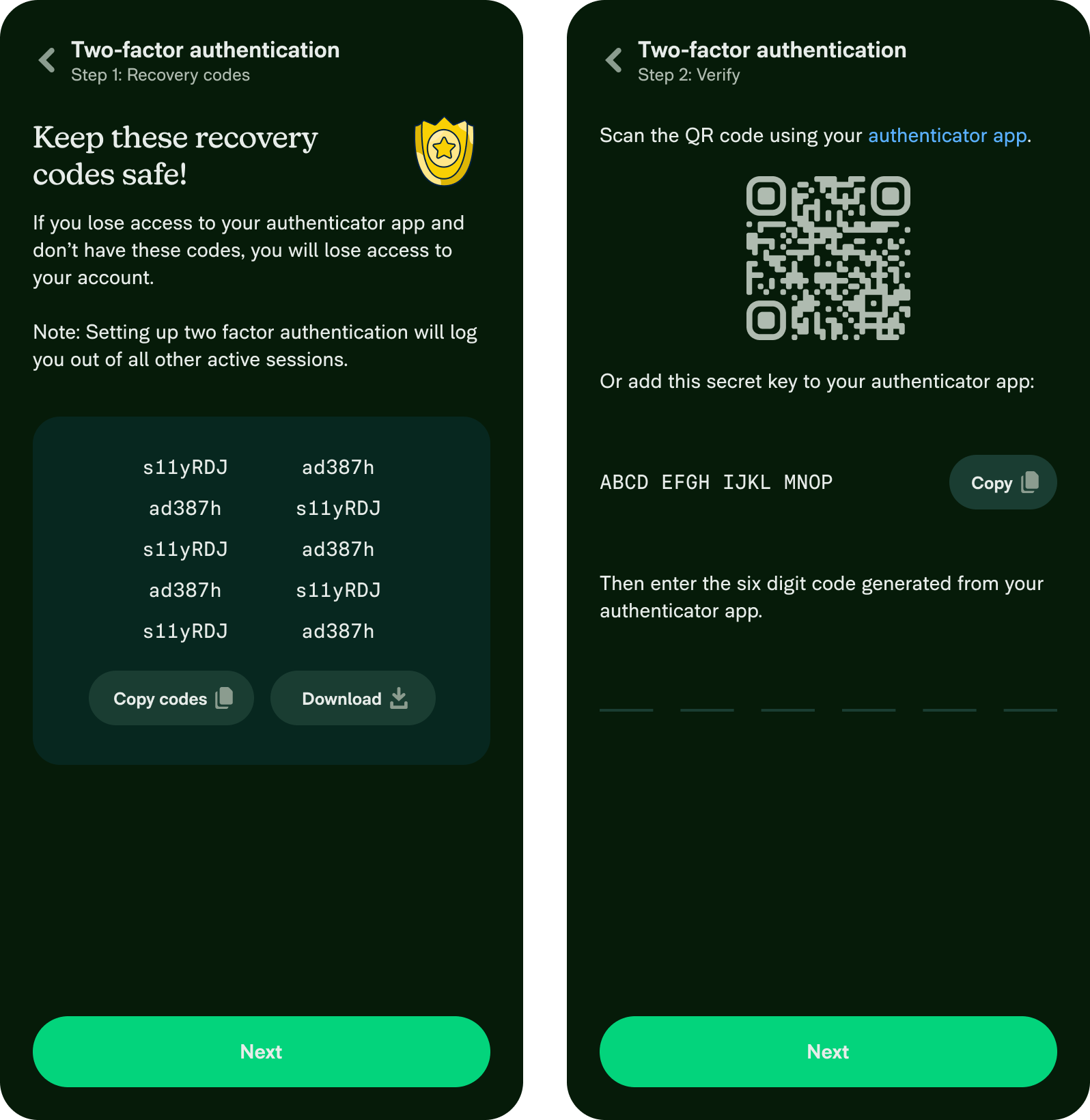
Why it is important
Provide proper response on user action is an important part of the UX
Upwork Automation - Do Not Edit
- Upwork Job URL: https://www.upwork.com/jobs/~01a61f676ec916b6ec
- Upwork Job ID: 1670753035689127936
- Last Price Increase: 2023-06-19
Activity
MonilBhavsar commentedon May 18, 2023
@shawnborton can we please get thoughts on the design.
Also, keeping it daily for now. Feel free to bump it to weekly.
shawnborton commentedon May 18, 2023
Yup, let's just use buttons with icons and the copy icon can turn into a green check once it has been copied:

MonilBhavsar commentedon May 18, 2023
Thanks! Should we only turn update copy button or download button too?
I would say both.
shawnborton commentedon May 18, 2023
Yeah, let's do both!
MonilBhavsar commentedon May 18, 2023
Thanks sounds good 👍
BeeMargarida commentedon May 18, 2023
Hi, Ana from Callstack here 👋 , as mentioned in Slack, I can pick this up!
BeeMargarida commentedon May 18, 2023
Proposal
Please re-state the problem that we are trying to solve in this issue.
Make the buttons in 2FA screens have an icon and change icons when they have been pressed
What is the root cause of that problem?
There are two things that need change:
Buttonwhere theiconRightis not being shown if noiconis providedPressableandWithDelayToggleButtonStateto allow changing the icon and text when it has been pressed (similar toCopyTextToClipboardbut more general and usingPressable)What changes do you think we should make in order to solve the problem?
Buttonthis.props.iconshould also includethis.props.shouldShowRightIconiconStylesand also apply thesmallprop to the right iconPressableWithDelayTogglethat usesWithDelayToggleButtonStateand allows passing a checked icon, style and text. It should use a similar setup asCopyTextToClipboard, allowing to set text with an icon or just an iconCopyTextToClipboard,ContextMenuItemand the buttons mentioned in this issue to use this new componentWhat alternative solutions did you explore? (Optional)
We could go without a new component, but it would require implementing the delay toggle logic directly on the page.
Screen.Recording.2023-05-18.at.14.20.46.mov
MonilBhavsar commentedon May 18, 2023
@BeeMargarida thank you for the proposal. Looks good to me!
Just curious if we can reuse this component
src/components/ContextMenuItem.jsAs we are using this to copy user's personal details on "Details" page
BeeMargarida commentedon May 18, 2023
@MonilBhavsar Hum, we could refactor and make both
ContextMenuItemandCopyTextToClipboarduse the same base component that contains this logic and then use that same component in this use case.A question that I have is if we want this new component to be based upon the
Buttoncomponent, or if it's alright to just usePressable(like inContextMenuItemandCopyTextToClipboard).MonilBhavsar commentedon May 18, 2023
Sounds good to me 👍
It is fine using Pressable. There is no necessary requirement to use Button component.
BeeMargarida commentedon May 18, 2023
Got it, I'll use
Pressableinstead! Do you want me to still fix theiconRightproblem mentioned in the proposal?Also updated the proposal with these changes
49 remaining items
MonilBhavsar commentedon Jun 29, 2023
Not overdue, waiting for @rushatgabhane to accept the contract.
MonilBhavsar commentedon Jul 3, 2023
@rushatgabhane 👋
rushatgabhane commentedon Jul 3, 2023
@MonilBhavsar @adelekennedy sorry i forgot to update this issue! :/
I made a manual request on new dot - https://staging.new.expensify.com/r/4376364486675252
ref: https://expensify.slack.com/archives/C02NK2DQWUX/p1687970684314839?thread_ts=1686871517.189609&cid=C02NK2DQWUX
MonilBhavsar commentedon Jul 3, 2023
Oh thanks! So I think we can close this out, correct?
rushatgabhane commentedon Jul 3, 2023
I think @adelekennedy will need to approve the manual request.
adelekennedy commentedon Jul 3, 2023
This is new for me - let me see how this works
adelekennedy commentedon Jul 3, 2023
adelekennedy commentedon Jul 3, 2023
@rushatgabhane do you mind resubmitting or posting your steps here? For some reason I can't access it!
rushatgabhane commentedon Jul 3, 2023
@adelekennedy I think @anmurali would be the best person to help with this :)
adelekennedy commentedon Jul 5, 2023
thread started here waiting fro Anu and Jason to follow up on next steps
adelekennedy commentedon Jul 5, 2023
@rushatgabhane anu and jason will approve these! closing for now