Repository navigation
[HOLD for payment 2021-12-06] Change Password - Error message not displayed in red for incorrect new password #4995


Description

If you haven’t already, check out our contributing guidelines for onboarding and email contributors@expensify.com to request to join our Slack channel!
Action Performed:
- Launch the app and login
- Navigate to settings by clicking on the user avatar over LHN
- Click on change password
- Enter correct old password
- Enter password not meeting the requirement for new password
Expected Result:
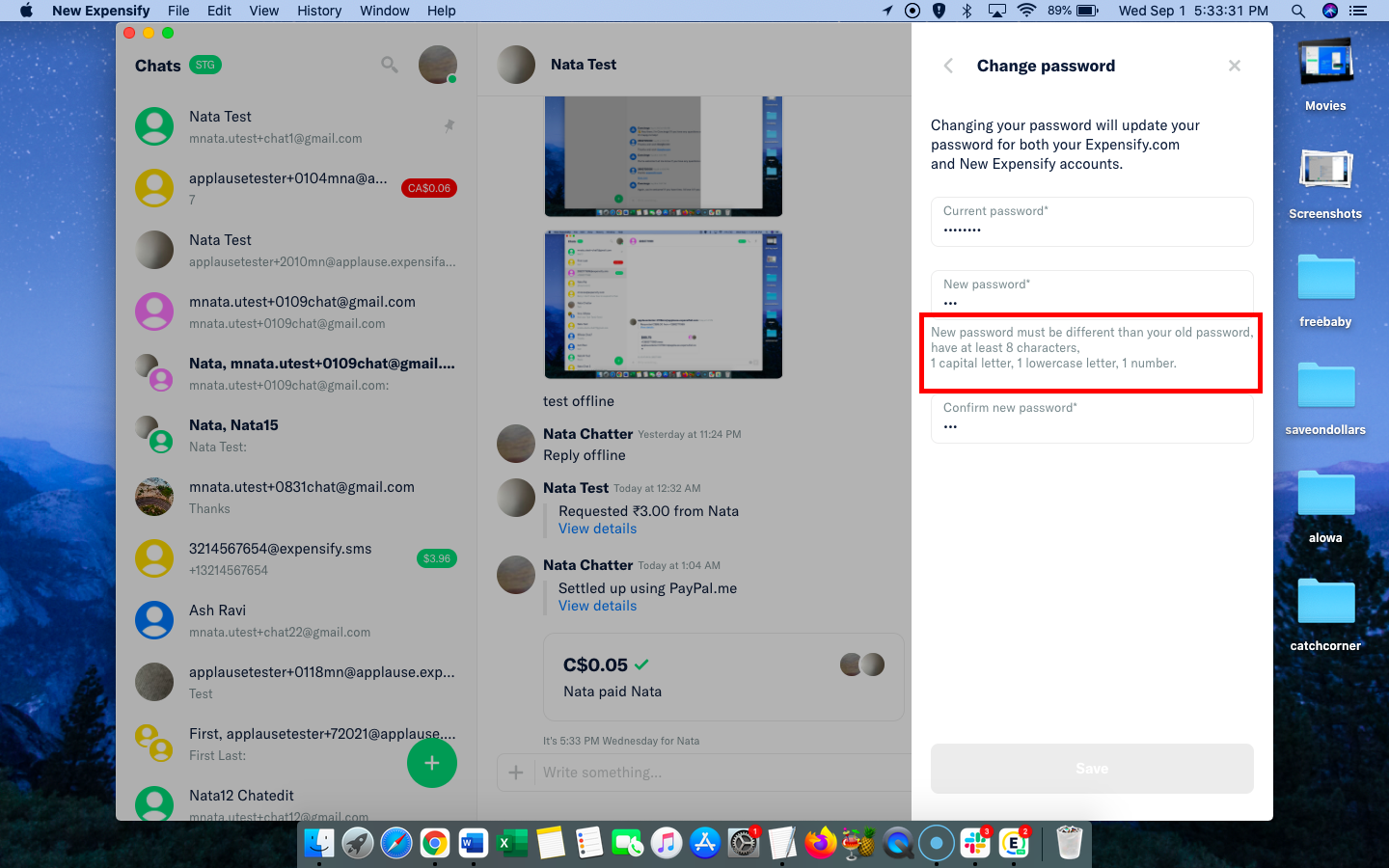
Error message displayed in red
Actual Result:
No error message displayed and only message displayed in black about password requirement
Workaround:
None needed, visual issue.
Platform:
Where is this issue occurring?
- Web
- iOS
- Android
- Desktop App
- Mobile Web
Version Number: 1.0.92-0
Logs: https://stackoverflow.com/c/expensify/questions/4856
Notes/Photos/Videos: Any additional supporting documentation
Expensify/Expensify Issue URL:
Activity
MelvinBot commentedon Sep 1, 2021
Triggered auto assignment to @Jag96 (
Engineering), see https://stackoverflow.com/c/expensify/questions/4319 for more details.mananjadhav commentedon Sep 2, 2021
I had worked on the confirm password error message on this page. I would propose a very small fix here,
We should retain the prompt and only change the color of the message when the password doesn't match the requirement. So basically remove
this.state.isPasswordRequirementsVisibleand change the block to the following:PrashantMangukiya commentedon Sep 3, 2021
Here is my suggestion. We need to start validating (i.e. 1 capital letter, 1 lowercase letter, 1 number) new password as soon as some character entered. So as soon as start entering character in new password field, it will show message in red color due to password not match with rule initially. Now user go on typing new password and as soon as it become valid, the message shows in normal color.
So based on my thinking I will suggest to add condition at line 150 (within PasswordPage.js file), So overall behaviour remain same and it will just show message in red color whenever new password input value is not valid.
Code Before Update:
App/src/pages/settings/PasswordPage.js
Lines 149 to 153 in c2f83f3
Code After Update ( condition added at line 150):
Below is the screen recording how its looks once the suggested solution implemented.
Screen.Recording.2021-09-03.at.7.23.58.PM.mov
I understand that External label not set with this issue. So at present consider this as my suggestion. I hope it will be helpful to someone who handle it internally. If this issue considered as external and my solution accepted then kindly invite me on Upwork once project posted. Here is my upwork profile: https://www.upwork.com/freelancers/~01c718889ed7821f82 Thanks.
Jag96 commentedon Sep 3, 2021
@isagoico was there a slack thread for this one? I didn't see one but just double-checking so I can have all the context
isagoico commentedon Sep 3, 2021
@Jag96 This was raised as part of our internal QA that's why there's no slack thread linked in this one.
isagoico commentedon Sep 5, 2021
Issue reproducible during KI retests
MelvinBot commentedon Sep 7, 2021
@Jag96 Uh oh! This issue is overdue by 2 days. Don't forget to update your issues!
Jag96 commentedon Sep 7, 2021
I think for this one we should keep the same convention from #5093, where:
passwordPage.newPasswordPromptmessage shows with grey text, even when the user hasn't typed anythingpasswordPage.newPasswordPromptmessage shows w/ formError stylespasswordPage.newPasswordPromptmessage shows w/ grey text again, even when the user goes to the next fieldSo the message will always be shown if that makes sense. @mananjadhav @PrashantMangukiya can you post updated proposals to match that convention?
MelvinBot commentedon Sep 7, 2021
Triggered auto assignment to @puneetlath (
External), see https://stackoverflow.com/c/expensify/questions/8582 for more details.44 remaining items
puneetlath commentedon Nov 22, 2021
@mananjadhav @Jag96 how's this going?
mananjadhav commentedon Nov 22, 2021
PR is on the finish line. Hopefully it should get merged today.
mvtglobally commentedon Nov 29, 2021
Issue not reproducible during KI retests. (First week)
[-]Change Password - Error message not displayed in red for incorrect new password[/-][+][HOLD for payment 2021-12-06] Change Password - Error message not displayed in red for incorrect new password[/+]botify commentedon Nov 29, 2021
The solution for this issue has been 🚀 deployed to production 🚀 in version 1.1.16-10 and is now subject to a 7-day regression period 📆. Here is the list of pull requests that resolve this issue:
If no regressions arise, payment will be issued on 2021-12-06. 🎊
mvtglobally commentedon Dec 6, 2021
Issue not reproducible during KI retests. (Second week)
puneetlath commentedon Dec 6, 2021
Paid along along with n6 hold bonus. Thanks @mananjadhav!
mananjadhav commentedon Dec 7, 2021
@puneetlath I received $250 for PR and $250 for
n6-hold. But I guess I am eligible forcompany-offsitehold bonus as well.Also while this PR was done for a specific requirement, we also updated the form validation styles and @Jag96 mentioned here #5130 (comment) if I take it up, there'll be additional bonus, so that should be an additional $250. @Jag96 Can you please help here?
Jag96 commentedon Dec 7, 2021
@puneetlath @mananjadhav is right, we should also pay out another $250 for the
company-offsitehold and then an additional $250 for the updated scope of work agreed upon in #5130 (comment). So a total of $500 additional.puneetlath commentedon Dec 7, 2021
Got it, no problem! @mananjadhav I've sent you an offer through Upwork for the additional $500.
mananjadhav commentedon Dec 7, 2021
Thanks @puneetlath, applied.
Thanks @Jag96