Repository navigation
VBA - Placeholder text for address field in company information page is displayed as "Personal address" #6928


Description

If you haven’t already, check out our contributing guidelines for onboarding and email contributors@expensify.com to request to join our Slack channel!
Action Performed:
- Create NewDot account, verify it.
- Create workspace and start the add VBA flow
- Check the placeholder text for address field in "Company information" step
Expected Result:
You should see the inputs for the fields Company address, City, Zip Code, and State
Actual Result:
'Personal address' placeholder instead "Company address' on Company information page.
Workaround:
Unknown
Platform:
Where is this issue occurring?
- Web
- iOS
- Android
- Desktop App
- Mobile Web
Version Number: v1.1.24
Reproducible in staging?: Yes
Reproducible in production?: No
Logs: https://stackoverflow.com/c/expensify/questions/4856
Notes/Photos/Videos:
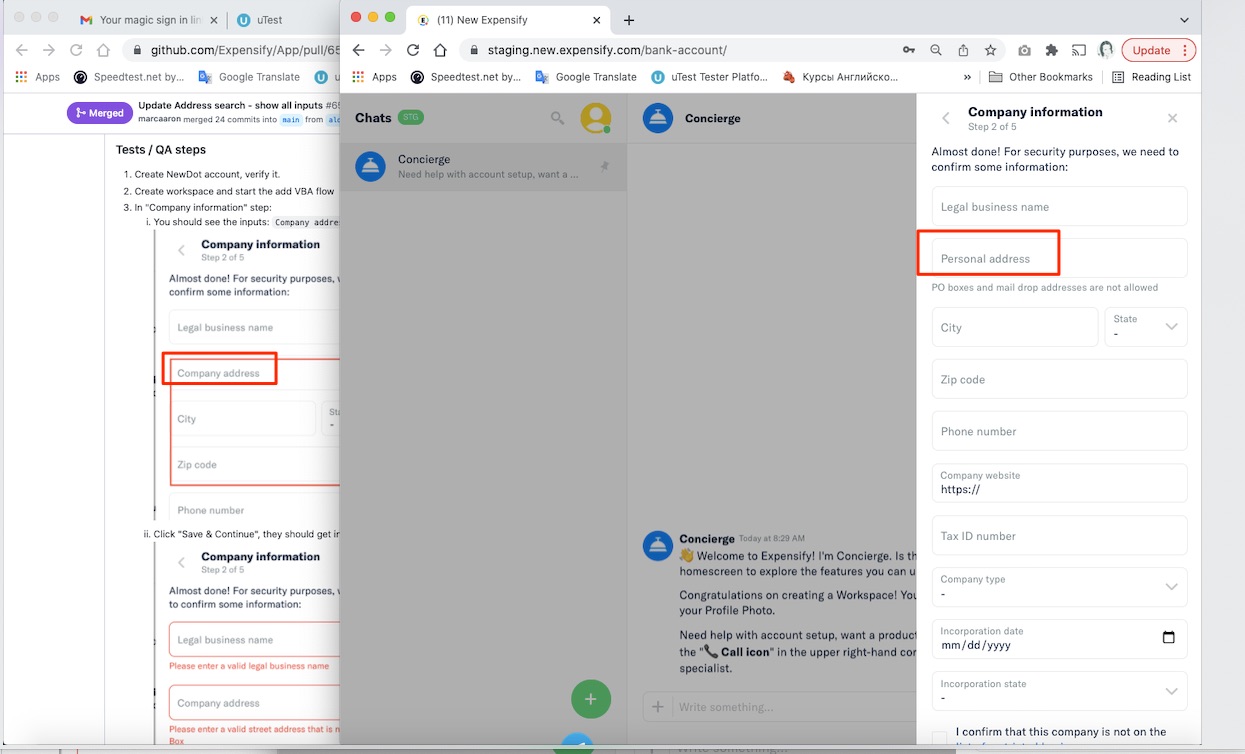
Bug5390496_address.mp4
Expensify/Expensify Issue URL:
Issue reported by: Applause
Slack conversation:
Activity
OSBotify commentedon Dec 29, 2021
👋 Friendly reminder that deploy blockers are time-sensitive ⏱ issues! Check out the open
StagingDeployCashdeploy checklist to see the list of PRs included in this release, then work quickly to do one of the following:MelvinBot commentedon Dec 29, 2021
Triggered auto assignment to @ctkochan22 (
Engineering), see https://stackoverflow.com/c/expensify/questions/4319 for more details.mananjadhav commentedon Dec 29, 2021
This commit here is causing the issue
3cddfcf
Basically, we moved the "AddressSearch" from "Personal" and "Company" step to a separate component but kept the placeholder as
common.personalAddressonly.We can quickly resolve this:
addressTranslateKeyand passingcommon.personalAddressandcommon.companyAddressrespectively.Tagging @aldo-expensify as he seems to be the author of the commit.
aldo-expensify commentedon Dec 29, 2021
@mananjadhav You are right, thanks for finding that. I'll start working on it now.
mananjadhav commentedon Dec 29, 2021
@aldo-expensify I wasn't sure if the team is working due to holidays. I've created a quick PR as it was a deploy blocker. You can use it if you want.
aldo-expensify commentedon Dec 29, 2021
Thanks, looks fine. I was just doubting if we wanted to go this way or
we make a generic key that works for both. I guess this way is better because even if it makes the code a bit uglier, it is better for the user experience than having a common text.If later we decide that it was better to have a common translation, we can change it later.
mananjadhav commentedon Dec 29, 2021
Exactly.
aldo-expensify commentedon Dec 29, 2021
PR has been merged to staging and looks fixed now.