Repository navigation
[Pay on 6/16] [$250] Inconsistent position of the maximum number of participants reached message on different screens - reported by @adeel0202 #8847


Description

If you haven’t already, check out our contributing guidelines for onboarding and email contributors@expensify.com to request to join our Slack channel!
Action Performed:
- Press + icon
- Select New group
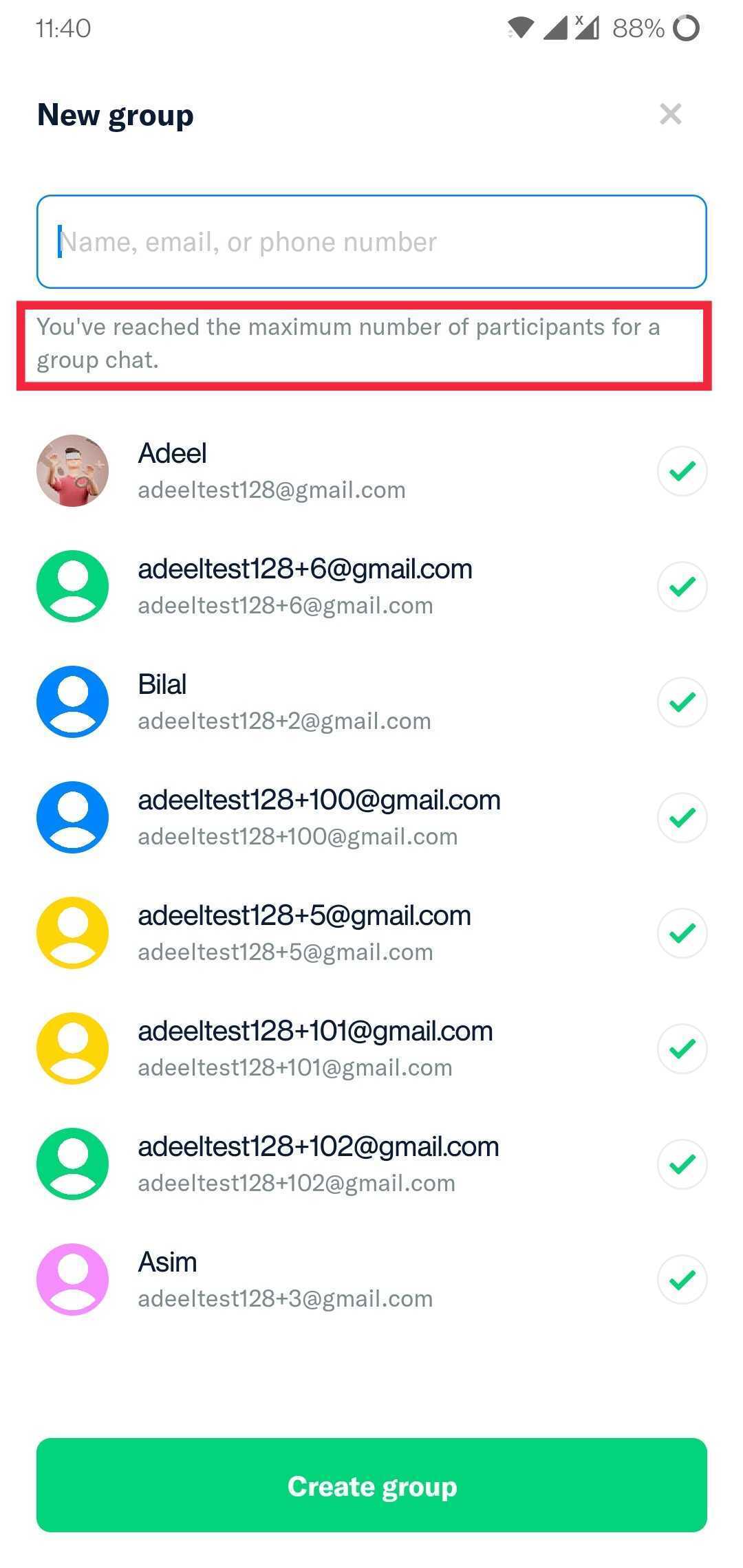
- Choose 8 participants
- Observe that the maximum number of participants reached message is on top
- Press + icon
- Select Split bill
- Enter any amount and press Next
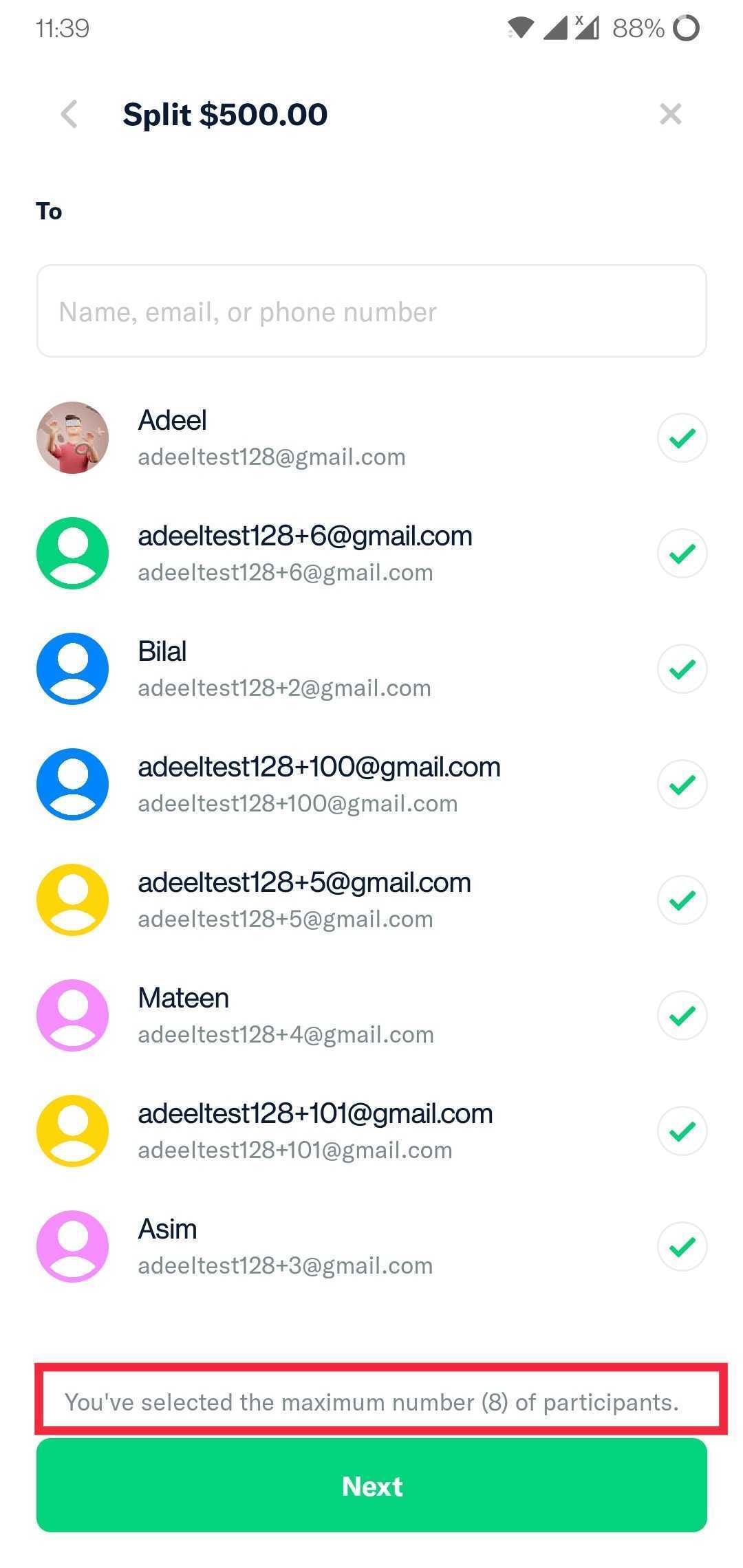
- Choose 8 participants
- Observe that the maximum number of participants reached message is on bottom
Expected Result:
The position of maximum number of participants reached message should be consistent
Actual Result:
The position of maximum number of participants reached message is not consistent
Workaround:
unknown
Platform:
Where is this issue occurring?
- Web
- iOS
- Android
- Desktop App
- Mobile Web
Version Number: 1.1.57-0
Reproducible in staging?: Y
Reproducible in production?: Y
Email or phone of affected tester (no customers):
Logs: https://stackoverflow.com/c/expensify/questions/4856
Notes/Photos/Videos: Any additional supporting documentation
Expensify/Expensify Issue URL:
Issue reported by: @adeel0202
Slack conversation: https://expensify.slack.com/archives/C01GTK53T8Q/p1649272255080289
Activity
melvin-bot commentedon May 2, 2022
melvin-bot commentedon May 2, 2022
melvin-bot commentedon May 2, 2022
Triggered auto assignment to @johncschuster (
AutoAssignerTriage), see https://stackoverflow.com/c/expensify/questions/4749 for more details.adeel0202 commentedon May 2, 2022
Proposal (If External)
(Early as I reported the issue)
On
NewChatPage, we can removemaxParticipantsReachedfromline 221App/src/pages/NewChatPage.js
Lines 217 to 222 in f174c32
And add the message text inside the
FixedFootercomponent online 271like thisWe can also move the
iou.maxParticipantsReachedtocommon.maxParticipantsReached, so that the same error message is used onNew group chatscreen andSplit billscreen. This will require replacingiou.maxParticipantsReachedtocommon.maxParticipantsReachedonIOUParticipantsSplit'sline 239as well.Tushu17 commentedon May 2, 2022
Proposal
We have different message for maximum group participants. so instead of using
iou.maxParticipantsReachedwe should usemessages.maxParticipantsReached.To solve the issue:-
We can remove message from the header by removing line 221
App/src/pages/NewChatPage.js
Lines 219 to 222 in fc3e13e
then we just need to add
below line 270
App/src/pages/NewChatPage.js
Lines 269 to 271 in fc3e13e
melvin-bot commentedon May 2, 2022
Triggered auto assignment to @Beamanator (
Engineering), see https://stackoverflow.com/c/expensify/questions/4319 for more details.Beamanator commentedon May 2, 2022
Confirmed this bug currently exists 👍 Marking
External25 remaining items
mananjadhav commentedon May 18, 2022
Apologies for the delay @Beamanator
@adeel0202's updated proposal #8847 (comment) is good to go
🎀 👀 🎀
C+ reviewed
Beamanator commentedon May 18, 2022
Thanks @mananjadhav - I agree it looks great 👍
melvin-bot commentedon May 18, 2022
📣 @adeel0202 You have been assigned to this job by @Beamanator!
Please apply to this job in Upwork and leave a comment on the Github issue letting us know when we can expect a PR to be ready for review 🧑💻
Keep in mind: Code of Conduct | Contributing 📖
adeel0202 commentedon May 23, 2022
@Beamanator, I'm getting errors on API calls in android and web (please refer to this thread). I can raise the PR but I will only be able to attach screenshots for iOS and desktop app. Will that work?
cc: @mananjadhav
adeel0202 commentedon May 23, 2022
Note: Since I'm already signed into the web app so I think I will be able to provide web screenshots too, however, I'm not signed into the android app and I get error while trying to sign in, so I won't be able to provide android screenshots.
Beamanator commentedon May 23, 2022
@adeel0202 since this is a pretty small PR, I'm ok with that - @mananjadhav or I can test your PR on android 👍
adeel0202 commentedon May 24, 2022
Thank you @Beamanator. I have raised the PR.
mananjadhav commentedon Jun 15, 2022
@bfitzexpensify This deployed to production 6 days ago but its title for the payment hasn't changed.
Also for me it seems the Upwork job is expired. Can you help with that please?
[-][$250] Inconsistent position of the maximum number of participants reached message on different screens - reported by @adeel0202[/-][+][Pay on 6/16] [$250] Inconsistent position of the maximum number of participants reached message on different screens - reported by @adeel0202[/+]bfitzexpensify commentedon Jun 15, 2022
Thanks for letting me know! Updated the title to remind myself to process payment tomorrow.
bfitzexpensify commentedon Jun 16, 2022
Alright, contracts all paid out. Thanks for the work here!