Repository navigation
[$250] When using the app in spanish, the currency selector is not showing the currencies' symbol #9494


Description

If you haven’t already, check out our contributing guidelines for onboarding and email contributors@expensify.com to request to join our Slack channel!
Action Performed:
- Open app
- Select IUO
- Click on currency selector
- check Currencies display
Expected Result:
When using the app in spanish, the currency selector should show the currencies' symbol
Actual Result:
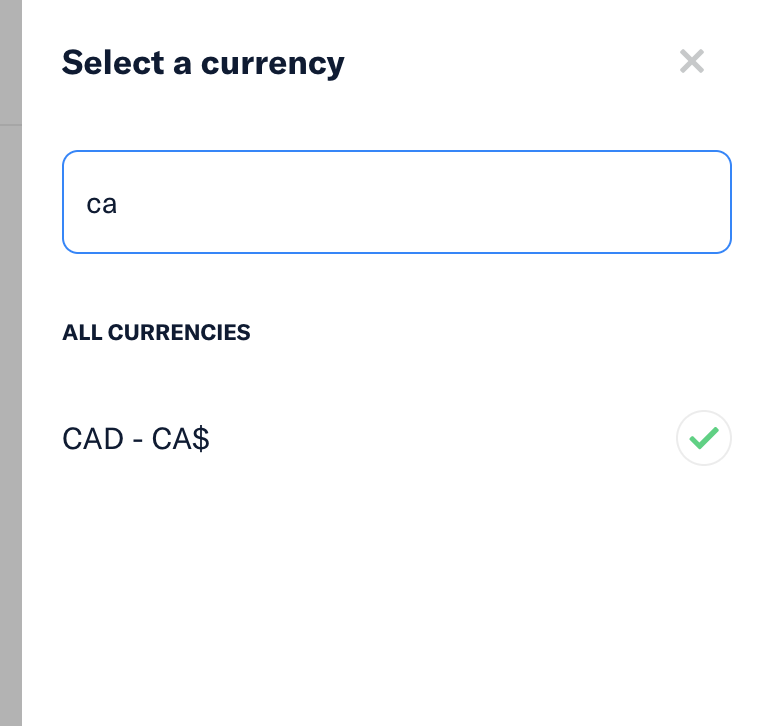
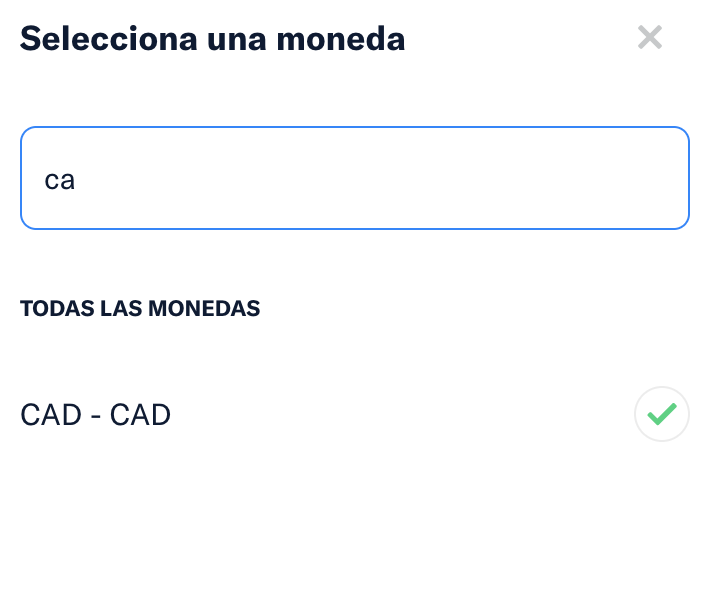
When using the app in spanish, the currency selector is not showing the currencies' symbol like it does in english (ie: CA$ in the screenshot)
Workaround:
unknown
Platform:
Where is this issue occurring?
- Web
- iOS
- Android
- Desktop App
- Mobile Web
Version Number: 1.1.77-0
Reproducible in staging?: Y
Reproducible in production?: Y
Email or phone of affected tester (no customers):
Logs: https://stackoverflow.com/c/expensify/questions/4856
Notes/Photos/Videos: Any additional supporting documentation
Expensify/Expensify Issue URL:
Issue reported by: @iwiznia
Slack conversation: https://expensify.slack.com/archives/C01GTK53T8Q/p1655499458203209
Activity
melvin-bot commentedon Jun 20, 2022
Triggered auto assignment to @PauloGasparSv (
Engineering), see https://stackoverflow.com/c/expensify/questions/4319 for more details.melvin-bot commentedon Jun 20, 2022
Triggered auto assignment to @jboniface (
External), see https://stackoverflow.com/c/expensify/questions/8582 for more details.PauloGasparSv commentedon Jun 20, 2022
Related to the changes in this P.R. #8299, this line.
Not sure if this is a problem in Intl.NumberFormat itself, because not all currencies are lacking the symbol! USD and EUR for example still show the correct currency symbol.
At first I thought the option currencyDisplay might have been overwritten, but that is not the problem.
Not sure how to solve this prob, this may be the way Intl.NumberFormat works with 'es'. Needs more investigation!
jboniface commentedon Jun 20, 2022
https://www.upwork.com/jobs/~01c0c036ab07fc3bf0
melvin-bot commentedon Jun 20, 2022
Triggered auto assignment to Contributor-plus team member for initial proposal review - @parasharrajat (
Exported)melvin-bot commentedon Jun 20, 2022
Triggered auto assignment to @tgolen (
Exported), see https://stackoverflow.com/c/expensify/questions/7972 for more details.[-]When using the app in spanish, the currency selector is not showing the currencies' symbol [/-][+][$250] When using the app in spanish, the currency selector is not showing the currencies' symbol [/+]tgolen commentedon Jun 20, 2022
@iwiznia Could you take a quick look at this one and recommend what the desired behavior should be?
iwiznia commentedon Jun 20, 2022
Oh damn, you are right. Why the hell is CA$ in english and CAD in spanish?!?
I guess that's how the standard in spanish is defined and I don't think we should deviate from it, so we should do nothing and do not consider this a bug.
Thanks for investigating!
parasharrajat commentedon Jun 20, 2022
I am not sure how to handle this. Brower returns
CADforCADin the Spanish locale.