Skip to content

fix: Keep the wide report header when resizing back to a wide window with expenses selected - #100923

Merged
carlosmiceli merged 5 commits into
mainfrom
claude-moneyReportHeaderWideRHPSelectionHeader
Sep 18, 2026
Merged

carlosmiceli merged 5 commits into
mainfrom
claude-moneyReportHeaderWideRHPSelectionHeader

Conversation

@MelvinBot

@MelvinBot MelvinBot commented Sep 11, 2026 •

Copy link
Copy Markdown
Contributor

Explanation of Change

Use the existing wide-RHP-aware layout value to restore the normal expense-report header when a selected report is resized back to a wide window. Preserve the selected expenses and existing selection cleanup.

Fixed Issues

$ #100871
PROPOSAL: #100871 (comment)

Tests

Precondition: sign in with a test account that has a workspace expense report containing at least two expenses.

  1. Open the expense report from Spend > Drafts so it opens in the report panel.
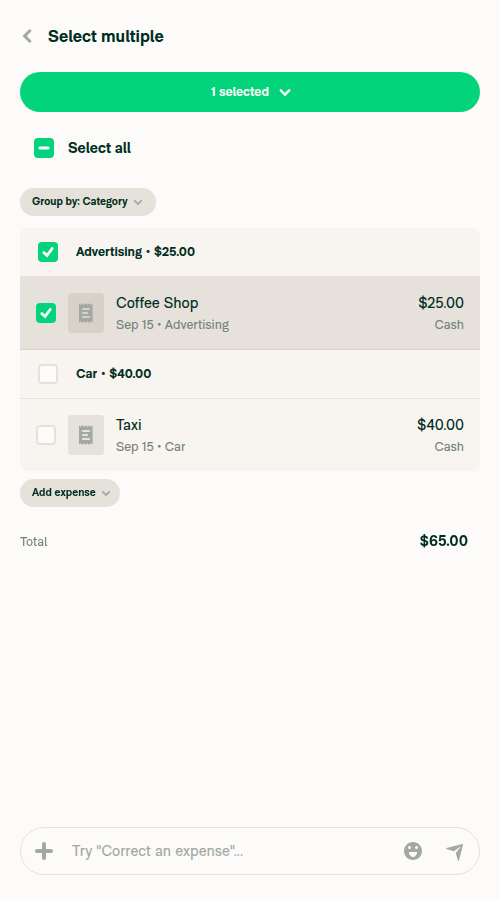
  2. On desktop, select an expense, then narrow the browser window. Verify the header shows Select multiple.
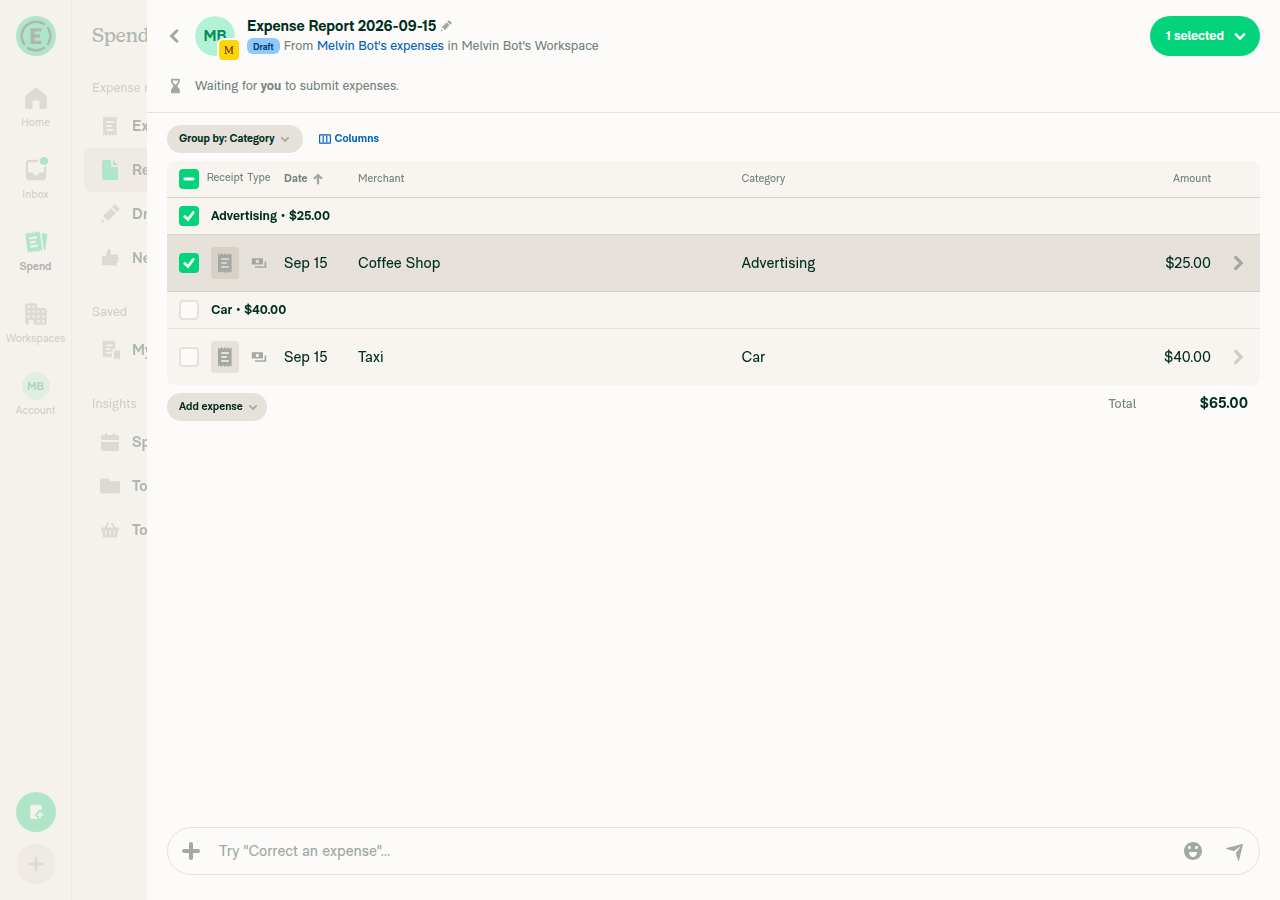
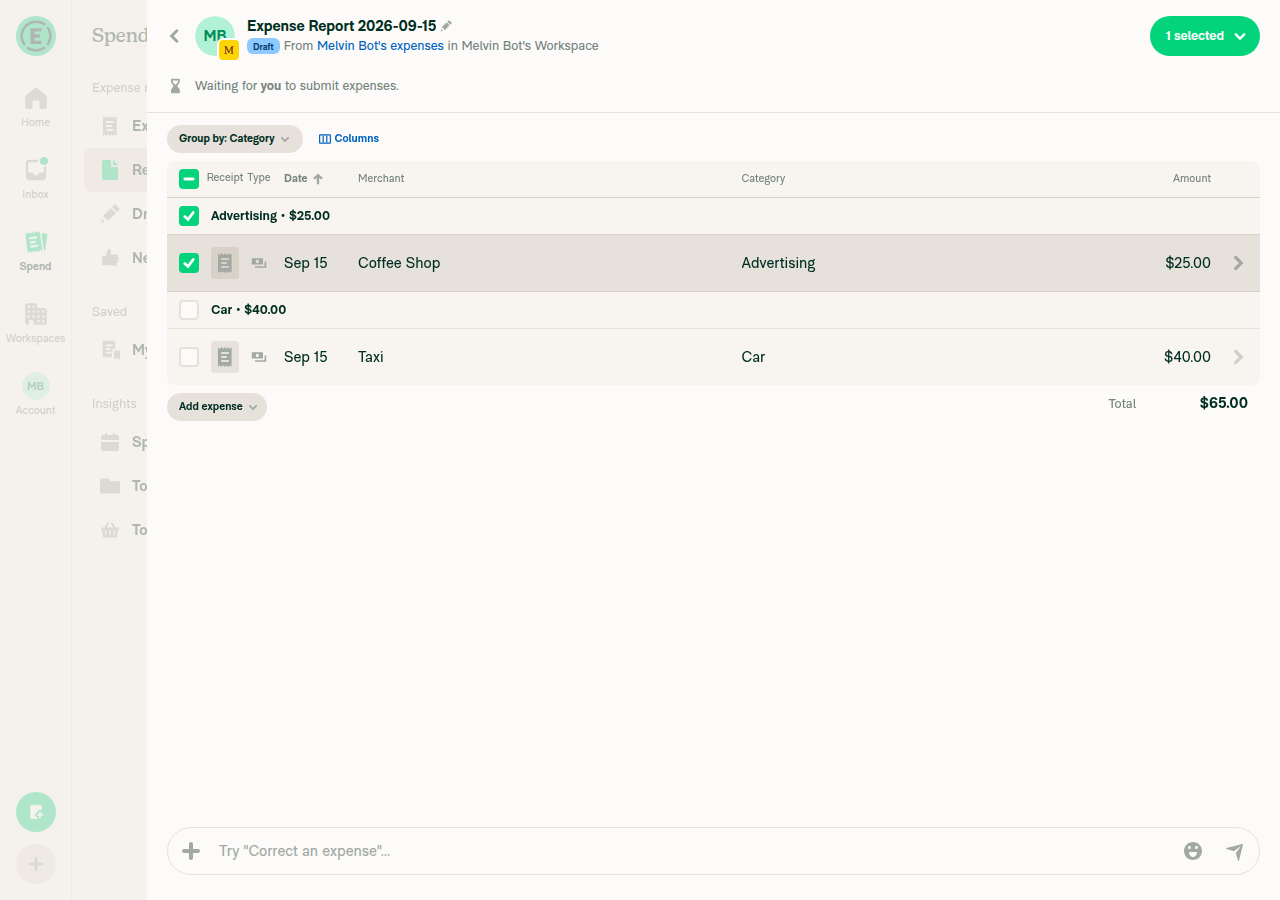
  3. Widen the window. Verify the normal report header returns and 1 selected remains available.
  4. Narrow the window again. Verify Select multiple returns.
  5. Tap Back in the selection header. Verify the report title returns and selection is cleared.
  6. On mobile web and native apps, open the same type of report, long-press an expense and choose Select. Verify Select multiple and 1 selected appear. Tap Back and verify selection clears and the report title returns.

Check the JS console for errors introduced by this change.

Offline tests

  1. Open the report while online so its expenses are available locally.
  2. Enable Account > Troubleshoot > Force offline.
  3. Return to the report and repeat the applicable desktop or mobile selection steps above.
  4. Verify the header adapts correctly and Back clears selection without changing the expenses.

Additional check performed on iOS native: disable Force offline and reopen the report. Verify the offline banner disappears, the report remains accessible, and the total is unchanged.

QA Steps

Same as Tests and Offline tests.

Also verify a narrow pane that is not a wide/super-wide RHP retains its narrow selection header. Verify selection cleanup still occurs when fewer than two visible expenses remain.

Check the JS console for errors introduced by this change.

PR Author Checklist

  • I linked the correct issue in the ### Fixed Issues section above
  • I wrote clear testing steps that cover the changes made in this PR
    • I added steps for local testing in the Tests section
    • I added steps for the expected offline behavior in the Offline steps section
    • I added steps for Staging and/or Production testing in the QA steps section
    • I added steps to cover failure scenarios (i.e. verify an input displays the correct error message if the entered data is not correct)
    • I turned off my network connection and tested it while offline to ensure it matches the expected behavior (i.e. verify the default avatar icon is displayed if app is offline)
    • I tested this PR with a High Traffic account against the staging or production API to ensure there are no regressions (e.g. long loading states that impact usability).
  • I included screenshots or videos for tests on all platforms
  • I ran the tests on all platforms & verified they passed on:
    • Android: Native
    • Android: mWeb Chrome
    • iOS: Native
    • iOS: mWeb Safari
    • MacOS: Chrome / Safari
  • I verified there are no console errors (if there's a console error not related to the PR, report it or open an issue for it to be fixed)
  • I followed proper code patterns (see Reviewing the code)
    • I verified that comments were added to code that is not self explanatory
    • I verified that any new or modified comments were clear, correct English, and explained "why" the code was doing something instead of only explaining "what" the code was doing.
    • I verified any copy / text that was added to the app is grammatically correct in English. It adheres to proper capitalization guidelines (note: only the first word of header/labels should be capitalized), and is either coming verbatim from figma or has been approved by marketing (in order to get marketing approval, ask the Bug Zero team member to add the Waiting for copy label to the issue)
  • If a new code pattern is added I verified it was agreed to be used by multiple Expensify engineers
  • I followed the guidelines as stated in the Review Guidelines
  • I tested other components that can be impacted by my changes (i.e. if the PR modifies a shared library or component like Avatar, I verified the components using Avatar are working as expected)
  • If a new CSS style is added I verified that:
    • A similar style doesn't already exist
    • The style can't be created with an existing StyleUtils function (i.e. StyleUtils.getBackgroundAndBorderStyle(theme.componentBG))
  • If new assets were added or existing ones were modified, I verified that:
    • The assets are optimized and compressed (for SVG files, run npm run compress-svg)
    • The assets load correctly across all supported platforms.
  • If the PR modifies code that runs when editing or sending messages, I tested and verified there is no unexpected behavior for all supported markdown - URLs, single line code, code blocks, quotes, headings, bold, strikethrough, and italic.
  • If the PR modifies a generic component, I tested and verified that those changes do not break usages of that component in the rest of the App (i.e. if a shared library or component like Avatar is modified, I verified that Avatar is working as expected in all cases)
  • If the PR modifies a component related to any of the existing Storybook stories, I tested and verified all stories for that component are still working as expected.
  • If the PR modifies a component or page that can be accessed by a direct deeplink, I verified that the code functions as expected when the deeplink is used - from a logged in and logged out account.
  • If the PR modifies the UI (e.g. new buttons, new UI components, changing the padding/spacing/sizing, moving components, etc) or modifies the form input styles:
    • I verified that all the inputs inside a form are aligned with each other.
    • I added Design label and/or tagged @Expensify/design so the design team can review the changes.
  • I added unit tests for any new feature or bug fix in this PR to help automatically prevent regressions in this user flow.
  • If the main branch was merged into this PR after a review, I tested again and verified the outcome was still expected according to the Test steps.

Screenshots/Videos

Android: Native
Android-pr100923.mp4
Android: mWeb Chrome
Android-mWeb-pr100923-merged.mp4
iOS: Native
ios-pr100923.mp4
iOS: mWeb Safari
ios-mWeb-pr100923.mp4
MacOS: Chrome / Safari
Chrome-pr100923.mp4

… selected

Co-authored-by: Nyoman Jyotisa <nyomanjyotisa@users.noreply.github.com>
@MelvinBot
MelvinBot requested a review from a team September 11, 2026 03:58
@melvin-bot melvin-bot Bot added Melvin-Test-Android Melvin-Test-Web Triggers Melvin to run the testing steps of the PR on web labels Sep 11, 2026
@MelvinBot

Copy link
Copy Markdown
Contributor Author

I created this PR from an upstream branch because I couldn't find a fork of Expensify/App under nyomanjyotisa to push to.

To take ownership of this branch and be able to push updates, run:

git remote add upstream https://github.com/Expensify/App.git
git fetch upstream claude-moneyReportHeaderWideRHPSelectionHeader
git checkout -b claude-moneyReportHeaderWideRHPSelectionHeader upstream/claude-moneyReportHeaderWideRHPSelectionHeader
git push -u origin claude-moneyReportHeaderWideRHPSelectionHeader

Then you can close this PR and open a new one from your fork.

@MelvinBot

Copy link
Copy Markdown
Contributor Author

Both failing checks are pre-existing breakages on main, not caused by this PR. No fix pushed — there is nothing here to fix.

Failing check Cause Already tracked
typecheck tests/unit/Search/SearchUIUtilsTest.ts missing required rules prop in two getSections calls #100890 — fix PR #100919 is open
test (job 1) SearchUIUtils › createAndOpenSearchTransactionThread › Should create transaction thread report and set optimistic data necessary for its preview #100888 (Workflow Failure, failing on main since #100165)
Check independent approval Expected — needs a human reviewer, not a code problem —

Once #100919 merges and the job 1 test is fixed on main, merge main into this branch and the checks will go green.

Evidence

This PR changes exactly one file: src/components/MoneyReportHeader.tsx — a header-layout change with no import path to Search code. Both failures are in tests/unit/Search/SearchUIUtilsTest.ts, which this PR does not touch.

The branch is already up to date. The PR base is 19a0a9aac19298b53803442f8085f385e4443710, which is the current main HEAD — so there is no stale-base merge to do, and the broken code is live on main right now.

1. typecheck — two SearchUIUtils.getSections call sites omit the required rules property:

error TS2741: Property 'rules' is missing in type '{...}' but required in type 'GetSectionsParams'.

This is a silent merge conflict between two separately-merged PRs: #99894 made rules required on GetSectionsParams, and #100069 added these two task-search call sites without it. youssef-lr already opened #100919 adding rules: undefined to both — the same pattern every other getSections call in that file uses.

2. test (job 1) — the identical test fails on main's own post-merge run (run 34530148218, triggered by #100165, ~4.5 hours before this PR was opened):

FAIL tests/unit/Search/SearchUIUtilsTest.ts
  ● SearchUIUtils › createAndOpenSearchTransactionThread › Should create transaction thread report and set optimistic data necessary for its preview
    expect(setOptimisticDataForTransactionThreadPreview).toHaveBeenCalled()
    Expected number of calls: >= 1
    Received number of calls:    0

That is byte-for-byte the failure on this PR. #100919's own test plan notes this same test still fails independently of its typecheck fix.

Local verification: I reverted MoneyReportHeader.tsx to main's version in the checkout to re-run both checks on a pristine tree, but this runner does not permit executing jest/typecheck, so the confirmation above rests on CI evidence from main rather than a local run. The working tree was restored and nothing was committed or pushed.

@MelvinBot

Copy link
Copy Markdown
Contributor Author

Re-checked — nothing has changed since my analysis above. Still no fix pushed: both failures are main breakages, and there is nothing in this PR to fix.

main is still at 19a0a9aac1, which is this PR's exact base, so there is no merge that would help. The branch is one commit touching one file, src/components/MoneyReportHeader.tsx — neither failure is in code this PR touches.

Current state of the two blockers:

Failing check Status
typecheck Fix PR #100919 is approved by two reviewers but not merged — it is itself blocked by the same test (job 1) failure below
test (job 1) Still red on main. Tracked by #100888, root-caused to #100165. No fix merged yet
Check independent approval Expected — needs a human reviewer

So test (job 1) is the single thing gating both this PR and the typecheck fix. Per the triage on #100888, the recommended path is to revert #100165 (its diff has no defect — it just perturbed a pre-existing SearchUIUtils ↔ actions/Search runtime import cycle that the test depends on for module evaluation order), then break the cycle properly and re-land. That work belongs in its own PR, not this one.

Nothing to do here. Once test (job 1) is green on main and #100919 merges, merge main into this branch and the checks will pass.

I did not push anything, because fixing an unrelated main breakage inside a feature PR would put a test-only change from someone else's open PR into this diff and still would not turn the checks green.

@MelvinBot

MelvinBot commented Sep 11, 2026 •

Copy link
Copy Markdown
Contributor Author

🤖 Web test steps verification results: ❌ fail

Blocked before any test step could run: the pre-started web session went to a blank page with 0 accessible DOM nodes immediately on handoff, and stayed blank through repeated read-only checks over 20+ minutes. The dev server itself was healthy (https://dev.new.expensify.com:8082/ returned HTTP 200 and the full app HTML shell), so this is a browser-session infrastructure failure, not an App bug — but it means the fix in this PR was neither verified nor refuted.

Blank white page returned by the session instead of the Expensify App UI

The steps below come from the linked issue #100871, since the Tests section of this PR is still an unfilled TODO.

Step Status
VERIFY 1: Open the app and go to a workspace chat.Session showed a blank white page (0 accessible nodes) instead of the app UI on every check, including a final read-only snapshot; could not navigate to any workspace chat.
Blank white page returned by the session instead of the Expensify App UI
❌
VERIFY 2: Create two expenses in that workspace chat.Not reached; blocked by VERIFY 1 failure.
❌
VERIFY 3: Open the expense report containing both expenses (RHP).Not reached; blocked by VERIFY 1 failure.
❌
VERIFY 4: Select one expense; header shows title + "1 selected".Not reached; blocked by VERIFY 1 failure.
❌
VERIFY 5: Deselect; header returns to normal title state.Not reached; blocked by VERIFY 1 failure.
❌
VERIFY 6: Resize browser to narrow width (<800px).Not reached; blocked by VERIFY 1 failure.
❌
VERIFY 7: Long-press an expense in narrow window; header shows "Select multiple".Not reached; blocked by VERIFY 1 failure.
❌
VERIFY 8: Resize browser back to wide width (>800px).Not reached; blocked by VERIFY 1 failure.
❌
VERIFY 9 (KEY ASSERTION): After resizing wide, header shows title + "1 selected", not stuck on "Select multiple".Not reached; blocked by VERIFY 1 failure. Could not exercise the core regression check for this PR.
❌
VERIFY 10: No JS console errors during the flow.No flow was executed to check against, and browser console inspection is out of scope for the available web verbs.
❌

For the record, the PR branch claude-moneyReportHeaderWideRHPSelectionHeader was checked out with the fix present — src/components/MoneyReportHeader.tsx:110 reads shouldUseNarrowLayoutOnWideRHP, so the code under test was correct. Only the browser session failed.

Re-run the Melvin-Test-Web label to get a fresh session, and this flow should exercise end to end.


view run · no recording available

@nyomanjyotisa

Copy link
Copy Markdown
Member

@MelvinBot please close this PR. The proposal has not been approved by a CME yet.

@MelvinBot MelvinBot closed this Sep 11, 2026
@MelvinBot

MelvinBot commented Sep 11, 2026 •

Copy link
Copy Markdown
Contributor Author

Closed. The proposal on #100871 hasn't been approved by a CME yet, so this PR shouldn't stay open.

One thing to check: the Help Wanted label was removed from #100871 when this PR was created, and it's still off. You may want to re-add it so the issue goes back in the queue for proposals.


view run · no recording available

@MelvinBot MelvinBot reopened this Sep 15, 2026
…derWideRHPSelectionHeader

Co-authored-by: Nyoman Jyotisa <nyomanjyotisa@users.noreply.github.com>
@codecov

codecov Bot commented Sep 15, 2026 •

Copy link
Copy Markdown

Codecov Report

✅ Changes either increased or maintained existing code coverage, great job!

Files with missing lines Coverage Δ
src/components/MoneyReportHeader.tsx 100.00% <100.00%> (+100.00%) ⬆️
... and 9 files with indirect coverage changes

@MelvinBot

MelvinBot commented Sep 15, 2026 •

Copy link
Copy Markdown
Contributor Author

Fixed — the branch was 772 commits behind main. Merged main in (cfb7b07); typecheck and test (job 1) now pass.

Both failures were in tests/unit/Search/SearchUIUtilsTest.ts, a file this PR doesn't touch. They were stale-branch breakage, not caused by the change to src/components/MoneyReportHeader.tsx.

34 checks pass. The only remaining failure is Check independent approval, which just needs a human reviewer.

What was failing and why
  • typecheck — two TS2741 errors: Property 'rules' is missing in type ... but required in type 'GetSectionsParams' at SearchUIUtilsTest.ts:5926 and :6061. GetSectionsParams gained a required rules property on main, and main's copy of the test was updated to match. The branch still had the old test.
  • test (job 1) — one test failed, SearchUIUtils › createAndOpenSearchTransactionThread › Should create transaction thread report and set optimistic data necessary for its preview, asserting expect(setOptimisticDataForTransactionThreadPreview).toHaveBeenCalled() (received 0 calls). main had since refactored both SearchUIUtils.ts and this test.

The merge was clean — no conflicts. After merging, the only diff against main is still the intended 14-line change to MoneyReportHeader.tsx, and it applies cleanly to main's updated version of the file.

AI Tests re-run after the merge

These supersede the results in the PR description, which reported a pre-existing typecheck failure that no longer exists.

  • npm run typecheck — pass (all five projects: tsconfig.app.json, tsconfig.jest.json, tsconfig.bun.json, tsconfig.node.json, server/victory-chart-renderer)
  • npm test -- tests/unit/Search/SearchUIUtilsTest.ts — pass (576 tests)
  • npm test -- tests/ui/MoneyRequestReportViewTest.tsx tests/ui/components/MoneyReportHeaderMoreContentTest.tsx tests/unit/hooks/useMoneyReportHeaderStatusBarTest.ts — pass (10 tests)
  • npx eslint src/components/MoneyReportHeader.tsx — pass
  • npm run spell-changed — pass (1 file, 0 issues)
  • npm run react-compiler-compliance-check check src/components/MoneyReportHeader.tsx — pass

⚠️ Browser verification still hasn't happened. I tried to drive the resize flow on web and it failed for an infrastructure reason, not a code one: merging main changed package.json, which made the running dev server restart mid-session and left the browser tab blank. Reloading to recover would have dropped the session auth, so I stopped rather than risk an unrecoverable state. The manual test steps in the PR description still need to be run by a human before this is marked ready for review.


view run · no recording available

@MelvinBot

MelvinBot commented Sep 15, 2026 •

Copy link
Copy Markdown
Contributor Author

🤖 Web test steps verification results: ⚠️ partial

Confirmed the RHP header shows the mobile "Select multiple" title at narrow width and the wide "N selected" dropdown at wide width for a selected expense in a 2-expense report. The one caveat is that the exact long-press gesture could not be driven because agent-device web has no long-press/hold support, so selection was entered via checkbox instead.

Wide RHP header showing '1 selected' dropdown immediately after selecting via checkbox

Step Status
With the browser window narrow, entering selection mode shows a "Select multiple" header (task specified doing this via long-press; long-press is unsupported by agent-device on web, so selection was instead entered via checkbox at wide width, then the window was narrowed with the selection still active)At 500x900 viewport with 1 expense selected, the RHP header replaced "Expense Report 2026-09-15" with a back arrow and the title "Select multiple", with the "1 selected" pill and "Select all" row beneath it. Confirmed via find text "Select multiple" exists -> Found: true.
Narrow RHP header showing 'Select multiple' title with 1 item selected
✅
After resizing the browser window back to wide, the header no longer shows "Select multiple" and instead shows the wide header with the "1 selected" dropdownAt 1280x900 viewport with the same expense still selected, the header returned to the normal report title row ("Expense Report 2026-09-15 / Draft / From ... in ...") with a green "1 selected" pill/dropdown button in the top-right in place of Submit/More. find text "Select multiple" exists failed (no match); find text "1 selected" exists -> Found: true.
Wide RHP header showing '1 selected' dropdown after resizing back from narrow
Wide RHP header showing '1 selected' dropdown immediately after selecting via checkbox
✅
No JS console errors during the flowagent-device web does not expose a browser console-log command (only HTTP network dump). All captured network requests (Ping, OpenReport, Search, RequestMoney, Log, etc.) returned status=200 with no failures. No error banners, red screens, or failure toasts appeared in any screenshot taken during onboarding, expense creation, or the selection-mode flow.
✅

On the failing checks: they were already fixed by the main merge (cfb7b07) I pushed earlier — typecheck and test (job 1) both pass now, and 34 checks are green. The only remaining failure is Check independent approval, which just needs a human reviewer and isn't something I can resolve.


view run · no recording available

@nyomanjyotisa

Copy link
Copy Markdown
Member

@MelvinBot could you add regression tests for resizing with selected expenses in wide/super-wide RHPs, including the existing selection cleanup?

Covers resizing a wide/super-wide RHP with expenses selected in both
directions, and locks the existing 'one or no transactions remain'
selection cleanup so it keeps running outside the narrow header branch.

Co-authored-by: Nyoman Jyotisa <nyomanjyotisa@users.noreply.github.com>
@MelvinBot

Copy link
Copy Markdown
Contributor Author

Added, pushed as 58c3311: tests/ui/components/MoneyReportHeaderSelectionModeTest.tsx — 15 tests, all passing.

The file renders MoneyReportHeader with both layout hooks mocked and flips them between renders to simulate a resize. useResponsiveLayoutOnWideRHP's values are derived from the window the same way the real hook derives them, so the tests can't drift from it.

Resizing with expenses selected

  • Wide RHP and super-wide RHP resized back to a wide window → header drops Select multiple and renders the wide header with MoneyReportHeaderActions (the X selected dropdown), while selection mode stays on.
  • Both resized back down to a narrow window → Select multiple returns and the actions unmount.
  • A narrow-pane RHP that is neither wide nor super-wide keeps Select multiple on a wide window — this is the case isInNarrowPaneModal is meant to cover, and it must not regress.
  • Selection mode off in a wide RHP → wide header.

Existing selection cleanup

  • Turns selection mode off in a narrow window, a wide RHP, and a super-wide RHP when one transaction is left.
  • Turns it off in a wide RHP when the others are pending delete and the user is online.
  • Keeps it on when a pending delete is still visible offline.
  • Keeps it on while two or more transactions remain.
  • Still runs after a wide RHP is resized back to a wide window — the case that pinned the cleanup outside the new condition.
Mutation check — the tests fail without the fix

I verified both halves by mutating src/components/MoneyReportHeader.tsx and restoring it (the file is byte-identical to what was already on the branch):

  1. Forcing the narrow header to always return (shouldUseNarrowLayoutOnWideRHP || true) → 5 failures, all four resize tests plus the resize half of the cleanup test.
  2. Moving the cleanup inside the new if (shouldUseNarrowLayoutOnWideRHP) block → 4 failures, every wide/super-wide cleanup assertion.
AI tests run locally on the new file
  • npm run lint tests/ui/components/MoneyReportHeaderSelectionModeTest.tsx — pass
  • npm run typecheck — pass, all five projects (the two pre-existing SearchUIUtilsTest.ts errors noted in the PR body are gone after the main merge)
  • npm run react-compiler-compliance-check check tests/ui/components/MoneyReportHeaderSelectionModeTest.tsx — pass
  • npm test -- tests/ui/components/MoneyReportHeaderSelectionModeTest.tsx tests/ui/MoneyRequestReportViewTest.tsx tests/ui/components/MoneyReportHeaderMoreContentTest.tsx — pass, 22 tests (15 new + 7 existing)
  • cspell on the new file — pass

npm run lint-changed and npm run spell-changed both abort with git merge-base failed in this environment, so I ran lint and cspell against the file directly instead. The full Jest suite and Storybook smoke test were not run — the change is a single new test file.

One thing worth your judgment: these are unit tests over mocked layout hooks, so they lock the branch decision rather than a real browser resize. The Tests and QA Steps sections in the PR body are still // TODO and need a human to fill in with manual verification.

Co-authored-by: Nyoman Jyotisa <nyomanjyotisa@users.noreply.github.com>
@MelvinBot

MelvinBot commented Sep 15, 2026 •

Copy link
Copy Markdown
Contributor Author

Fixed the one failure that belonged to this PR (Oxfmt). Every other failure is main being broken — not this PR.

1. Oxfmt — fixed

The new regression-test file wasn't formatted. Ran npm run fmt and pushed 7b26341 (whitespace only, no logic change). Oxfmt now passes.

2. typecheck, ESLint, and test (job 4 / 7 / 8) — broken main, not this PR

All four trace to a single duplicated line in src/pages/inbox/sidebar/InboxTabSelector.tsx:47 on main. const {shouldUseNarrowLayout} = useResponsiveLayout(); appears twice in the same function, at line 40 and line 47:

  • typecheck — TS2451: Cannot redeclare block-scoped variable 'shouldUseNarrowLayout'
  • ESLint check — 'shouldUseNarrowLayout' is already defined. @typescript-eslint/no-redeclare
  • test (job 4 / 7 / 8) — PaginationTest, UnreadIndicatorsTest, GroupChatNameTests, SessionTest. InboxTabSelector is a sidebar component, so the broken module takes down anything that renders the LHN.

This PR touches src/components/MoneyReportHeader.tsx and one test file. It never touches InboxTabSelector.tsx.

How I confirmed it's main and not this PR

CI builds the PR merged with current main, so a broken main shows up as a failure here.

  • All four suites pass locally on the PR head, which carries an older, healthy main: PaginationTest, GroupChatNameTests, SessionTest — 17 tests, all green. npm run typecheck also passes locally (all five projects).
  • The duplicate is present on main itself, independent of this PR. It arrived in merge commit ad2bdf17 for Align tab bar, top padding, and search box location across Home/Inbox/Spend/Workspaces on mobile #100881 — the branch tip 0756c8e0 has the line once, the merge result has it twice. Git auto-merged both copies without raising a conflict, so it landed silently.
  • It's still on main as of 2abbf86.

This blocks every open PR, not just this one. I didn't push a fix for it, since it's unrelated to this PR and belongs in its own PR — someone should delete the duplicate line 47. I found no existing issue tracking it. Happy to file one or put up the one-line revert if you want.

AI Tests re-run after the formatting fix
  • npm run typecheck — pass (all five projects)
  • npm test -- tests/ui/components/MoneyReportHeaderSelectionModeTest.tsx — pass (15 tests)
  • npm test -- tests/ui/PaginationTest.tsx tests/ui/GroupChatNameTests.tsx tests/ui/SessionTest.tsx — pass (17 tests; these are the suites CI reports as failing)
  • npx eslint tests/ui/components/MoneyReportHeaderSelectionModeTest.tsx — pass
  • npm run fmt — clean, no remaining diff

⚠️ Browser verification still hasn't happened. I tried again and the test session was unusable before I could drive it — the automated onboarding step misfired during session setup and left the page blank, with no way to recover without dropping the session auth. This is an infrastructure failure on my side, not a signal about the code. The 15 new regression tests cover the resize behavior at the unit level, but the manual test steps in the PR description still need a human run before this is marked ready for review.


view run · no recording available

…derWideRHPSelectionHeader

Co-authored-by: Nyoman Jyotisa <nyomanjyotisa@users.noreply.github.com>
@MelvinBot

Copy link
Copy Markdown
Contributor Author

⚠️ MelvinBot CI Fix Loop Detected

MelvinBot has made 5 consecutive commits trying to fix CI failures. Automatic CI fix dispatches are now paused for this PR.

Next steps: A human should review the recent commits and resolve the conflicting CI errors manually.

@MelvinBot

MelvinBot commented Sep 15, 2026 •

Copy link
Copy Markdown
Contributor Author

Fixed — merged the latest main in (60e42ec). typecheck, ESLint check, and all 8 test jobs now pass.

None of it was this PR's fault. main was briefly broken: a bad auto-merge in #100881 left a duplicate const {shouldUseNarrowLayout} = useResponsiveLayout(); in src/pages/inbox/sidebar/InboxTabSelector.tsx at both line 40 and line 47. That single line caused all five failing checks. It has since been fixed on main by #101195, so merging main was all this branch needed.

34 checks pass. The only remaining failure is Check independent approval, which just needs a human reviewer.

Why one duplicate line broke five different checks

A duplicate const in the same block scope is a parse-time SyntaxError, so the whole InboxTabSelector module failed to load — and it renders the sidebar.

  • typecheck — TS2451: Cannot redeclare block-scoped variable 'shouldUseNarrowLayout' at lines 40 and 47.
  • ESLint check — 'shouldUseNarrowLayout' is already defined @typescript-eslint/no-redeclare.
  • test (job 4 / 7 / 8) — tests/ui/SessionTest.tsx, tests/ui/UnreadIndicatorsTest.tsx, and tests/ui/GroupChatNameTests.tsx. Every failure was the LHN rendering nothing, e.g. expect(sidebarLinks).toHaveLength(1) receiving []. All three suites depend on the sidebar.

I confirmed the causation locally rather than assuming it: with the duplicate present, GroupChatNameTests.tsx failed 9/9; deleting only that one line made it pass 9/9, and typecheck went green. git show origin/main:... also showed 2 declarations on main itself, and both parents of the #100881 merge commit had exactly 1 — so the merge produced it, not either branch.

AI Tests re-run after the merge
  • npm run typecheck — pass (all five projects)
  • npm test -- tests/ui/GroupChatNameTests.tsx tests/ui/UnreadIndicatorsTest.tsx tests/ui/SessionTest.tsx — pass (24 passed, 2 skipped) — the three suites that were failing
  • npm test -- tests/ui/components/MoneyReportHeaderSelectionModeTest.tsx tests/ui/MoneyRequestReportViewTest.tsx tests/ui/components/MoneyReportHeaderMoreContentTest.tsx — pass (22 tests) — this PR's own coverage
  • npx eslint on both changed files — pass

The merge kept the PR's scope intact: the diff against main is still just src/components/MoneyReportHeader.tsx and the new tests/ui/components/MoneyReportHeaderSelectionModeTest.tsx.

⚠️ Browser verification still hasn't happened. The automated web session failed during its own onboarding step before the test could start (REPLAY_DIVERGENCE ... Unknown ref: e22 on the work-email "Skip" button), leaving a blank page. Reloading to recover would have dropped the session auth, so I stopped rather than risk an unrecoverable state. This is the second run in a row it's failed for session reasons, unrelated to the code — the manual test steps still need a human before this is marked ready for review.


view run · no recording available

@nyomanjyotisa

Copy link
Copy Markdown
Member

Resolved ✅

@nyomanjyotisa

Copy link
Copy Markdown
Member

@MelvinBot please update the PR description with the content below and prefix the title with fix:.

PR description

Explanation of Change

Use the existing wide-RHP-aware layout value to restore the normal expense-report header when a selected report is resized back to a wide window. Preserve the selected expenses and existing selection cleanup.

Fixed Issues

$ #100871
PROPOSAL: #100871 (comment)

Tests

Precondition: sign in with a test account that has a workspace expense report containing at least two expenses.

  1. Open the expense report from Spend > Drafts so it opens in the report panel.
  2. On desktop, select an expense, then narrow the browser window. Verify the header shows Select multiple.
  3. Widen the window. Verify the normal report header returns and 1 selected remains available.
  4. Narrow the window again. Verify Select multiple returns.
  5. Tap Back in the selection header. Verify the report title returns and selection is cleared.
  6. On mobile web and native apps, open the same type of report, long-press an expense and choose Select. Verify Select multiple and 1 selected appear. Tap Back and verify selection clears and the report title returns.

Check the JS console for errors introduced by this change.

Offline tests

  1. Open the report while online so its expenses are available locally.
  2. Enable Account > Troubleshoot > Force offline.
  3. Return to the report and repeat the applicable desktop or mobile selection steps above.
  4. Verify the header adapts correctly and Back clears selection without changing the expenses.

Additional check performed on iOS native: disable Force offline and reopen the report. Verify the offline banner disappears, the report remains accessible, and the total is unchanged.

QA Steps

Same as Tests and Offline tests.

Also verify a narrow pane that is not a wide/super-wide RHP retains its narrow selection header. Verify selection cleanup still occurs when fewer than two visible expenses remain.

Check the JS console for errors introduced by this change.

PR Author Checklist

  • I linked the correct issue in the ### Fixed Issues section above
  • I wrote clear testing steps that cover the changes made in this PR
    • I added steps for local testing in the Tests section
    • I added steps for the expected offline behavior in the Offline steps section
    • I added steps for Staging and/or Production testing in the QA steps section
    • I added steps to cover failure scenarios (i.e. verify an input displays the correct error message if the entered data is not correct)
    • I turned off my network connection and tested it while offline to ensure it matches the expected behavior (i.e. verify the default avatar icon is displayed if app is offline)
    • I tested this PR with a High Traffic account against the staging or production API to ensure there are no regressions (e.g. long loading states that impact usability).
  • I included screenshots or videos for tests on all platforms
  • I ran the tests on all platforms & verified they passed on:
    • Android: Native
    • Android: mWeb Chrome
    • iOS: Native
    • iOS: mWeb Safari
    • MacOS: Chrome / Safari
  • I verified there are no console errors (if there's a console error not related to the PR, report it or open an issue for it to be fixed)
  • I followed proper code patterns (see Reviewing the code)
    • I verified that comments were added to code that is not self explanatory
    • I verified that any new or modified comments were clear, correct English, and explained "why" the code was doing something instead of only explaining "what" the code was doing.
    • I verified any copy / text that was added to the app is grammatically correct in English. It adheres to proper capitalization guidelines (note: only the first word of header/labels should be capitalized), and is either coming verbatim from figma or has been approved by marketing (in order to get marketing approval, ask the Bug Zero team member to add the Waiting for copy label to the issue)
  • If a new code pattern is added I verified it was agreed to be used by multiple Expensify engineers
  • I followed the guidelines as stated in the Review Guidelines
  • I tested other components that can be impacted by my changes (i.e. if the PR modifies a shared library or component like Avatar, I verified the components using Avatar are working as expected)
  • If a new CSS style is added I verified that:
    • A similar style doesn't already exist
    • The style can't be created with an existing StyleUtils function (i.e. StyleUtils.getBackgroundAndBorderStyle(theme.componentBG))
  • If new assets were added or existing ones were modified, I verified that:
    • The assets are optimized and compressed (for SVG files, run npm run compress-svg)
    • The assets load correctly across all supported platforms.
  • If the PR modifies code that runs when editing or sending messages, I tested and verified there is no unexpected behavior for all supported markdown - URLs, single line code, code blocks, quotes, headings, bold, strikethrough, and italic.
  • If the PR modifies a generic component, I tested and verified that those changes do not break usages of that component in the rest of the App (i.e. if a shared library or component like Avatar is modified, I verified that Avatar is working as expected in all cases)
  • If the PR modifies a component related to any of the existing Storybook stories, I tested and verified all stories for that component are still working as expected.
  • If the PR modifies a component or page that can be accessed by a direct deeplink, I verified that the code functions as expected when the deeplink is used - from a logged in and logged out account.
  • If the PR modifies the UI (e.g. new buttons, new UI components, changing the padding/spacing/sizing, moving components, etc) or modifies the form input styles:
    • I verified that all the inputs inside a form are aligned with each other.
    • I added Design label and/or tagged @Expensify/design so the design team can review the changes.
  • I added unit tests for any new feature or bug fix in this PR to help automatically prevent regressions in this user flow.
  • If the main branch was merged into this PR after a review, I tested again and verified the outcome was still expected according to the Test steps.

Screenshots/Videos

Android: Native
Android-pr100923.mp4
Android: mWeb Chrome
Android-mWeb-pr100923-merged.mp4
iOS: Native
ios-pr100923.mp4
iOS: mWeb Safari
ios-mWeb-pr100923.mp4
MacOS: Chrome / Safari
Chrome-pr100923.mp4

@MelvinBot MelvinBot changed the title Keep the wide report header when resizing back to a wide window with expenses selected fix: Keep the wide report header when resizing back to a wide window with expenses selected Sep 16, 2026
@MelvinBot

Copy link
Copy Markdown
Contributor Author

🤖 Done — PR description replaced with the content you provided, and the title is now fix: Keep the wide report header when resizing back to a wide window with expenses selected.

Note: the 5 attached files in your comment couldn't be loaded, so the description uses the video links exactly as written in your message.


view run

@nyomanjyotisa

Copy link
Copy Markdown
Member

@MelvinBot please mark this PR as ready for review.

@MelvinBot
MelvinBot marked this pull request as ready for review September 18, 2026 03:45
@MelvinBot
MelvinBot requested a review from a team as a code owner September 18, 2026 03:45
@MelvinBot

Copy link
Copy Markdown
Contributor Author

🤖 Done — this PR is now marked Ready for review.


view run

@melvin-bot
melvin-bot Bot removed the request for review from a team September 18, 2026 03:45
@melvin-bot

melvin-bot Bot commented Sep 18, 2026

Copy link
Copy Markdown

@nyomanjyotisa Please copy/paste the Reviewer Checklist from here into a new comment on this PR and complete it. If you have the K2 extension, you can simply click: [this button]

@melvin-bot
melvin-bot Bot removed the request for review from a team September 18, 2026 03:45
@nyomanjyotisa

Copy link
Copy Markdown
Member

Reviewer Checklist

  • I have verified the author checklist is complete (all boxes are checked off).
  • I verified the correct issue is linked in the ### Fixed Issues section above
  • I verified testing steps are clear and they cover the changes made in this PR
    • I verified the steps for local testing are in the Tests section
    • I verified the steps for Staging and/or Production testing are in the QA steps section
    • I verified the steps cover any possible failure scenarios (i.e. verify an input displays the correct error message if the entered data is not correct)
    • I turned off my network connection and tested it while offline to ensure it matches the expected behavior (i.e. verify the default avatar icon is displayed if app is offline)
  • I checked that screenshots or videos are included for tests on all platforms
  • I included screenshots or videos for tests on all platforms
  • I verified that the composer does not automatically focus or open the keyboard on mobile unless explicitly intended. This includes checking that returning the app from the background does not unexpectedly open the keyboard.
  • I verified tests pass on all platforms & I tested again on:
    • Android: HybridApp
    • Android: mWeb Chrome
    • iOS: HybridApp
    • iOS: mWeb Safari
    • MacOS: Chrome / Safari
  • If there are any errors in the console that are unrelated to this PR, I either fixed them (preferred) or linked to where I reported them in Slack
  • I verified proper code patterns were followed (see Reviewing the code)
    • I verified that comments were added to code that is not self explanatory
    • I verified that any new or modified comments were clear, correct English, and explained "why" the code was doing something instead of only explaining "what" the code was doing.
    • I verified any copy / text that was added to the app is grammatically correct in English. It adheres to proper capitalization guidelines (note: only the first word of header/labels should be capitalized), and is either coming verbatim from figma or has been approved by marketing (in order to get marketing approval, ask the Bug Zero team member to add the Waiting for copy label to the issue)
  • If a new code pattern is added I verified it was agreed to be used by multiple Expensify engineers
  • I verified that this PR follows the guidelines as stated in the Review Guidelines
  • I verified other components that can be impacted by these changes have been tested, and I retested again (i.e. if the PR modifies a shared library or component like Avatar, I verified the components using Avatar have been tested & I retested again)
  • If a new component is created I verified that:
    • A similar component doesn't exist in the codebase
    • All props are defined accurately
    • The component has a clear name that is non-ambiguous and the purpose of the component can be inferred from the name alone
    • The only data being stored in the state is data necessary for rendering and nothing else
    • The component has the minimum amount of code necessary for its purpose, and it is broken down into smaller components in order to separate concerns and functions
  • If a new CSS style is added I verified that:
    • A similar style doesn't already exist
    • The style can't be created with an existing StyleUtils function (i.e. StyleUtils.getBackgroundAndBorderStyle(theme.componentBG)
  • If the PR modifies code that runs when editing or sending messages, I tested and verified there is no unexpected behavior for all supported markdown - URLs, single line code, code blocks, quotes, headings, bold, strikethrough, and italic.
  • If the PR modifies a generic component, I tested and verified that those changes do not break usages of that component in the rest of the App (i.e. if a shared library or component like Avatar is modified, I verified that Avatar is working as expected in all cases)
  • If the PR modifies a component related to any of the existing Storybook stories, I tested and verified all stories for that component are still working as expected.
  • If the PR modifies a component or page that can be accessed by a direct deeplink, I verified that the code functions as expected when the deeplink is used - from a logged in and logged out account.
  • If the PR modifies the UI (e.g. new buttons, new UI components, changing the padding/spacing/sizing, moving components, etc) or modifies the form input styles:
    • I verified that all the inputs inside a form are aligned with each other.
    • I added Design label and/or tagged @Expensify/design so the design team can review the changes.
  • For any bug fix or new feature in this PR, I verified that sufficient unit tests are included to prevent regressions in this flow.
  • If the main branch was merged into this PR after a review, I tested again and verified the outcome was still expected according to the Test steps.
  • I have checked off every checkbox in the PR reviewer checklist, including those that don't apply to this PR.

Screenshots/Videos

Android: HybridApp
Android-pr100923.mp4
Android: mWeb Chrome
Android-mWeb-pr100923-merged.mp4
iOS: HybridApp
ios-pr100923.mp4
iOS: mWeb Safari
ios-mWeb-pr100923.mp4
MacOS: Chrome / Safari
Chrome-pr100923.mp4

@nyomanjyotisa nyomanjyotisa left a comment

Copy link
Copy Markdown
Member

Choose a reason for hiding this comment

The reason will be displayed to describe this comment to others. Learn more.

LGTM!

@melvin-bot
melvin-bot Bot requested a review from carlosmiceli September 18, 2026 05:20
@carlosmiceli
carlosmiceli merged commit 214df24 into main Sep 18, 2026
47 of 49 checks passed
@carlosmiceli
carlosmiceli deleted the claude-moneyReportHeaderWideRHPSelectionHeader branch September 18, 2026 14:16
@OSBotify

Copy link
Copy Markdown
Contributor

✋ This PR was not deployed to staging yet because QA is ongoing. It will be automatically deployed to staging after the next production release.

@github-actions

Copy link
Copy Markdown
Contributor

🚧 carlosmiceli has triggered a test Expensify/App build. You can view the workflow run here.

@OSBotify

Copy link
Copy Markdown
Contributor

🚀 Deployed to staging by https://github.com/carlosmiceli in version: 9.4.90-0 🚀

platform result
🕸 web 🕸 success ✅
🤖 android 🤖 success ✅
🍎 iOS 🍎 success ✅

@MelvinBot

Copy link
Copy Markdown
Contributor Author

🤖 No help site changes are required for this PR, so I did not create a draft docs PR.

Why: This is a responsive-layout regression fix, not a product change. It only decides which header renders when a report with selected expenses is shown in a wide or super-wide RHP on a wide screen — the code now keeps the normal report header instead of the narrow Select multiple header in that one case, gated on shouldUseNarrowLayout from useResponsiveLayoutOnWideRHP (src/components/MoneyReportHeader.tsx:105-120). The rest of the diff is a new test file.

Nothing the help site documents changes:

HELP_AUTHORING_GUIDELINES.md requires each article to solve one primary user workflow and stay concise and actionable. A note about which header appears at which window width is not a workflow, so adding it would only add noise.

Because there is no docs change to make, there is no linked help site PR for you to review or mark Ready for review.

@nyomanjyotisa, if you disagree, reply with the article and the behavior you want captured and I will open the draft PR.


view run

@OSBotify

Copy link
Copy Markdown
Contributor

🚀 Deployed to production by https://github.com/lakchote in version: 9.4.90-2 🚀

platform result
🕸 web 🕸 success ✅
🤖 android 🤖 success ✅
🍎 iOS 🍎 success ✅

Bundle Size Analysis (Sentry):

Sign up for free to join this conversation on GitHub. Already have an account? Sign in to comment

Labels

Melvin-Test-Android Melvin-Test-Web Triggers Melvin to run the testing steps of the PR on web

Projects

None yet

Development

Successfully merging this pull request may close these issues.

4 participants