Skip to content

Part 1 - Fix review workspace settings onboarding task completion - #95766

Merged
robertjchen merged 7 commits into
Expensify:mainfrom
FitseTLT:fix-review-workspace-settings-onboarding-task-completion
Aug 3, 2026
Merged

robertjchen merged 7 commits into
Expensify:mainfrom
FitseTLT:fix-review-workspace-settings-onboarding-task-completion

Conversation

@FitseTLT

@FitseTLT FitseTLT commented Jul 9, 2026 •

Copy link
Copy Markdown
Contributor

Explanation of Change

This PR adds the optimistic Onyx data that completes the "Review your workspace settings" onboarding task when a workspace setting is changed. The backend already completes the task when it processes these commands, so the client only mirrors that completion optimistically — no CompleteTask request is sent.

Wired for 10 workspace-settings commands:

WRITE_COMMAND Entry point
UPDATE_WORKSPACE_DESCRIPTION Overview → Description
UPDATE_WORKSPACE_GENERAL_SETTINGS Overview → Name, Overview → Currency
SET_WORKSPACE_AUTO_REPORTING_FREQUENCY Workflows → Report frequency
SET_WORKSPACE_AUTO_REPORTING_MONTHLY_OFFSET Workflows → Monthly offset
SET_POLICY_EXPENSE_MAX_AGE Rules → Max expense age
SET_POLICY_EXPENSE_MAX_AMOUNT Rules → Max expense amount
SET_POLICY_EXPENSE_MAX_AMOUNT_NO_RECEIPT Rules → Receipt required amount, Rules → Require receipts
SET_POLICY_BILLABLE_MODE Rules → Billable default
SET_POLICY_DEFAULT_REPORT_TITLE Reports → Default title
SET_POLICY_PREVENT_MEMBER_CREATED_TITLE Reports → Enforce title toggle, Upgrade page

Fixed Issues

$ #67648
PROPOSAL: #67648 (comment)

Tests

Precondition: sign in with an account onboarded as newDotAdmin (invited to a workspace as an admin) so the "Review your workspace settings" task exists in the onboarding/Concierge chat.

  1. Open the onboarding chat and verify "Review your workspace settings" is unchecked.
  2. Go to Workspace → Overview → Description, change the description and press Save.
  3. Return to the onboarding chat and verify the task is now checked immediately, with no app refresh.
  4. Open the Network tab and verify only the settings command is sent (e.g. UpdateWorkspaceDescription) — there must be no CompleteTask request.
  5. Verify exactly one "marked as complete" action is added to the task (no duplicates).
  6. Repeat steps 1-3 on a fresh admin-onboarded account for each remaining entry point, verifying the task completes each time:
    Overview → Name; Overview → Currency; Workflows → Report frequency; Workflows → Monthly offset; Rules → Max expense age; Rules → Max expense amount; Rules → Receipt required amount; Rules → Require receipts; Rules → Billable default; Reports → Default title; Reports → Enforce title toggle.
  7. Verify the setting itself still saves correctly in every case (no regression).
  8. No-op case: sign in with an account onboarded with any other choice (e.g. newDotManageTeam). Change a workspace setting and verify the setting saves normally and no task-completed action is created.
  9. Already-complete case: change a second workspace setting after the task is already complete. Verify the setting saves and no duplicate "marked as complete" action is added.
  10. Regression — other task flows still send CompleteTask: complete a task from the task header/preview, finish the Test Drive task, and create a workspace category/tag during onboarding. Verify each still completes and still sends its CompleteTask request.
  • Verify that no errors appear in the JS console

Offline tests

  1. Complete the precondition above, then turn off your network connection.
  2. Change any workspace setting (e.g. Overview → Description) and press Save.
  3. Verify the task is optimistically marked complete while offline.
  4. Reconnect and verify the task remains complete after the request succeeds, and that no duplicate task-completed action appears.
  5. Failure case: force the request to fail (e.g. invalid value / server error). Verify the task reverts to incomplete and the setting shows its error state.

QA Steps

Same as tests.

  • Verify that no errors appear in the JS console

PR Author Checklist

  • I linked the correct issue in the ### Fixed Issues section above
  • I wrote clear testing steps that cover the changes made in this PR
    • I added steps for local testing in the Tests section
    • I added steps for the expected offline behavior in the Offline steps section
    • I added steps for Staging and/or Production testing in the QA steps section
    • I added steps to cover failure scenarios (i.e. verify an input displays the correct error message if the entered data is not correct)
    • I turned off my network connection and tested it while offline to ensure it matches the expected behavior (i.e. verify the default avatar icon is displayed if app is offline)
    • I tested this PR with a High Traffic account against the staging or production API to ensure there are no regressions (e.g. long loading states that impact usability).
  • I included screenshots or videos for tests on all platforms
  • I ran the tests on all platforms & verified they passed on:
    • Android: Native
    • Android: mWeb Chrome
    • iOS: Native
    • iOS: mWeb Safari
    • MacOS: Chrome / Safari
  • I verified there are no console errors (if there's a console error not related to the PR, report it or open an issue for it to be fixed)
  • I followed proper code patterns (see Reviewing the code)
    • I verified that comments were added to code that is not self explanatory
    • I verified that any new or modified comments were clear, correct English, and explained "why" the code was doing something instead of only explaining "what" the code was doing.
    • I verified any copy / text that was added to the app is grammatically correct in English. It adheres to proper capitalization guidelines (note: only the first word of header/labels should be capitalized), and is either coming verbatim from figma or has been approved by marketing (in order to get marketing approval, ask the Bug Zero team member to add the Waiting for copy label to the issue)
  • If a new code pattern is added I verified it was agreed to be used by multiple Expensify engineers
  • I followed the guidelines as stated in the Review Guidelines
  • I tested other components that can be impacted by my changes (i.e. if the PR modifies a shared library or component like Avatar, I verified the components using Avatar are working as expected)
  • If a new CSS style is added I verified that:
    • A similar style doesn't already exist
    • The style can't be created with an existing StyleUtils function (i.e. StyleUtils.getBackgroundAndBorderStyle(theme.componentBG))
  • If new assets were added or existing ones were modified, I verified that:
    • The assets are optimized and compressed (for SVG files, run npm run compress-svg)
    • The assets load correctly across all supported platforms.
  • If the PR modifies code that runs when editing or sending messages, I tested and verified there is no unexpected behavior for all supported markdown - URLs, single line code, code blocks, quotes, headings, bold, strikethrough, and italic.
  • If the PR modifies a generic component, I tested and verified that those changes do not break usages of that component in the rest of the App (i.e. if a shared library or component like Avatar is modified, I verified that Avatar is working as expected in all cases)
  • If the PR modifies a component related to any of the existing Storybook stories, I tested and verified all stories for that component are still working as expected.
  • If the PR modifies a component or page that can be accessed by a direct deeplink, I verified that the code functions as expected when the deeplink is used - from a logged in and logged out account.
  • If the PR modifies the UI (e.g. new buttons, new UI components, changing the padding/spacing/sizing, moving components, etc) or modifies the form input styles:
    • I verified that all the inputs inside a form are aligned with each other.
    • I added Design label and/or tagged @Expensify/design so the design team can review the changes.
  • I added unit tests for any new feature or bug fix in this PR to help automatically prevent regressions in this user flow.
  • If the main branch was merged into this PR after a review, I tested again and verified the outcome was still expected according to the Test steps.

Screenshots/Videos

Android: Native
Android: mWeb Chrome
iOS: Native
iOS: mWeb Safari
MacOS: Chrome / Safari
2026-07-28.18-11-41.mp4

@FitseTLT
FitseTLT requested review from a team as code owners July 9, 2026 21:12
@melvin-bot
melvin-bot Bot requested review from flaviadefaria and jayeshmangwani and removed request for a team and flaviadefaria July 9, 2026 21:12
@melvin-bot

melvin-bot Bot commented Jul 9, 2026

Copy link
Copy Markdown

@jayeshmangwani Please copy/paste the Reviewer Checklist from here into a new comment on this PR and complete it. If you have the K2 extension, you can simply click: [this button]

@melvin-bot
melvin-bot Bot removed the request for review from a team July 9, 2026 21:12
@FitseTLT FitseTLT changed the title Fix review workspace settings onboarding task completion Part 1 - Fix review workspace settings onboarding task completion Jul 9, 2026
@codecov

codecov Bot commented Jul 9, 2026 •

Copy link
Copy Markdown

@chatgpt-codex-connector chatgpt-codex-connector Bot left a comment

Copy link
Copy Markdown

Choose a reason for hiding this comment

The reason will be displayed to describe this comment to others. Learn more.

💡 Codex Review

Here are some automated review suggestions for this pull request.

Reviewed commit: 56ce09dba7

ℹ️ About Codex in GitHub

Codex has been enabled to automatically review pull requests in this repo. Reviews are triggered when you

  • Open a pull request for review
  • Mark a draft as ready
  • Comment "@codex review".

If Codex has suggestions, it will comment; otherwise it will react with 👍.

When you sign up for Codex through ChatGPT, Codex can also answer questions or update the PR, like "@codex address that feedback".

Comment thread src/libs/actions/Task.ts Resolved
@FitseTLT
FitseTLT marked this pull request as draft July 9, 2026 21:34
@dukenv0307

Copy link
Copy Markdown
Contributor

@FitseTLT BE PRs are merged, can you please check again?

…settings-onboarding-task-completion

# Conflicts:
#	src/libs/actions/Policy/Policy.ts
#	src/pages/workspace/rules/RulesBillableDefaultPage.tsx
#	src/pages/workspace/upgrade/WorkspaceUpgradePage.tsx
#	src/pages/workspace/workflows/WorkspaceAutoReportingFrequencyPage.tsx
#	src/pages/workspace/workflows/WorkspaceAutoReportingMonthlyOffsetPage.tsx
@FitseTLT

Copy link
Copy Markdown
Contributor Author

@dukenv0307 what's the param name for the reportActionID that I will send to the BE?

@dukenv0307

Copy link
Copy Markdown
Contributor

@FitseTLT It's completedTaskReportActionID

@FitseTLT
FitseTLT marked this pull request as ready for review July 28, 2026 15:39
@FitseTLT

FitseTLT commented Jul 28, 2026 •

Copy link
Copy Markdown
Contributor Author

@situchan pls review it ASAP before it gets caught up with conflicts. We will need to do it in parts some three prs still left after this.

@chatgpt-codex-connector chatgpt-codex-connector Bot left a comment

Copy link
Copy Markdown

Choose a reason for hiding this comment

The reason will be displayed to describe this comment to others. Learn more.

💡 Codex Review

Here are some automated review suggestions for this pull request.

Reviewed commit: d5bf839303

ℹ️ About Codex in GitHub

Codex has been enabled to automatically review pull requests in this repo. Reviews are triggered when you

  • Open a pull request for review
  • Mark a draft as ready
  • Comment "@codex review".

If Codex has suggestions, it will comment; otherwise it will react with 👍.

When you sign up for Codex through ChatGPT, Codex can also answer questions or update the PR, like "@codex address that feedback".

@MelvinBot

Copy link
Copy Markdown
Contributor

Review

The core design is sound: each save mints one optimistic TASK_COMPLETED action and forwards its completedTaskReportActionID to the settings command so the backend reuses it instead of creating a duplicate — no extra CompleteTask request. The no-op ({} returned by getFinishOnboardingTaskOnyxData) and already-complete guards are handled correctly, and the merge helper preserves finallyData via spread. A few things worth a second look before merge:

1. The avatar/actor refactor silently changes all auto-completed onboarding tasks — verify visually (medium)

buildOptimisticTaskReportAction now derives the avatar and person from actorAccountID instead of always using getCurrentUserAvatar() / current-user display name.

  • For the default/existing callers (reopenTask, cancelTask), actorAccountID defaults to deprecatedCurrentUserAccountID, so allPersonalDetails[currentUser].avatar === the old getCurrentUserAvatar() — no change. ✅
  • But the pre-existing onboarding caller at ReportUtils.ts:12233 already passes actorAccountID = shouldPostTasksInAdminsRoom ? assignedGuideAccountID : CONCIERGE. Previously the avatar was ignored and the current user was shown; now auto-completed onboarding tasks (e.g. viewTour, inviteAccountant) will render Concierge's / the guide's avatar and name.

This is arguably more correct (it matches what the backend attributes), and the code comment says as much — but it's a behavior change beyond this PR's stated scope, and the test steps don't cover it. Please confirm the auto-completed onboarding "marked as complete" actions still look right visually. Also note: if allPersonalDetails[CONCIERGE] isn't loaded when the optimistic action is built, avatar becomes undefined (no fallback icon, unlike the old getCurrentUserAvatar() path) and the person text falls back to the current user's account ID as a string.

2. No unit tests, but the checklist claims otherwise (medium)

The diff adds no test file, yet "I added unit tests for any new feature or bug fix" is checked. This PR adds logic-heavy branching (the shouldSendCompleteTaskRequest: false path, completedTaskReportActionID reuse, the {} no-op/already-complete guards, the merge helper) that's well suited to a unit test in tests/actions/. Either add coverage or uncheck the box.

3. Minor

  • Offline "create workspace" path drops the completion. In updateGeneralSettings, when a name change is folded into a still-pending CREATE_WORKSPACE request, it early-returns before API.write, so reviewWorkspaceSettingsTaskData is silently discarded. The outcome is consistent (backend won't complete the task either, since CREATE_WORKSPACE isn't a side-effect command), so this is fine as-is — just worth a comment noting the intentional drop.
  • Getter stability. useReviewWorkspaceSettingsTaskCompletion returns a fresh arrow each render. It's added to useCallback/useMemo dep arrays in several pages (e.g. WorkspaceNamePage, WorkspaceAutoReportingFrequencyPage), which would defeat those memos unless React Compiler stabilizes it. Wrapping the returned getter in useCallback([taskInformation, accountID]) would make the intent explicit and independent of compiler behavior.
Things I checked that are fine
  • getReviewWorkspaceSettingsTaskCompletionData correctly separates the permission subject (currentUserAccountID for canActionTask) from the display actor (CONCIERGE).
  • The getter is called lazily at submit time, so each save mints a distinct reportActionID (matches the doc comment).
  • Failure data reverts the optimistic completion; since the backend only completes the task as a side effect of the settings command, reverting on that command's failure is correct.
  • Rapid successive edits: the first edit's optimistic data flips the task to APPROVED, so the second edit's getFinishOnboardingTaskOnyxData returns {} — no duplicate action.
  • IntroSelected / CONST.ONBOARDING_TASK_TYPE.REVIEW_WORKSPACE_SETTINGS / CONCIERGE all resolve.

Reply with @MelvinBot <feedback> to refine this review.

@chatgpt-codex-connector chatgpt-codex-connector Bot left a comment

Copy link
Copy Markdown

Choose a reason for hiding this comment

The reason will be displayed to describe this comment to others. Learn more.

💡 Codex Review

Here are some automated review suggestions for this pull request.

Reviewed commit: 79074fac66

ℹ️ About Codex in GitHub

Codex has been enabled to automatically review pull requests in this repo. Reviews are triggered when you

  • Open a pull request for review
  • Mark a draft as ready
  • Comment "@codex review".

If Codex has suggestions, it will comment; otherwise it will react with 👍.

When you sign up for Codex through ChatGPT, Codex can also answer questions or update the PR, like "@codex address that feedback".

Comment thread src/libs/actions/Policy/Policy.ts Resolved
@situchan

situchan commented Aug 2, 2026 •

Copy link
Copy Markdown
Contributor

Reviewer Checklist

  • I have verified the author checklist is complete (all boxes are checked off).
  • I verified the correct issue is linked in the ### Fixed Issues section above
  • I verified testing steps are clear and they cover the changes made in this PR
    • I verified the steps for local testing are in the Tests section
    • I verified the steps for Staging and/or Production testing are in the QA steps section
    • I verified the steps cover any possible failure scenarios (i.e. verify an input displays the correct error message if the entered data is not correct)
    • I turned off my network connection and tested it while offline to ensure it matches the expected behavior (i.e. verify the default avatar icon is displayed if app is offline)
  • I checked that screenshots or videos are included for tests on all platforms
  • I included screenshots or videos for tests on all platforms
  • I verified that the composer does not automatically focus or open the keyboard on mobile unless explicitly intended. This includes checking that returning the app from the background does not unexpectedly open the keyboard.
  • I verified tests pass on all platforms & I tested again on:
    • Android: HybridApp
    • Android: mWeb Chrome
    • iOS: HybridApp
    • iOS: mWeb Safari
    • MacOS: Chrome / Safari
  • If there are any errors in the console that are unrelated to this PR, I either fixed them (preferred) or linked to where I reported them in Slack
  • I verified proper code patterns were followed (see Reviewing the code)
    • I verified that any callback methods that were added or modified are named for what the method does and never what callback they handle (i.e. toggleReport and not onIconClick).
    • I verified that comments were added to code that is not self explanatory
    • I verified that any new or modified comments were clear, correct English, and explained "why" the code was doing something instead of only explaining "what" the code was doing.
    • I verified any copy / text that was added to the app is grammatically correct in English. It adheres to proper capitalization guidelines (note: only the first word of header/labels should be capitalized), and is either coming verbatim from figma or has been approved by marketing (in order to get marketing approval, ask the Bug Zero team member to add the Waiting for copy label to the issue)
  • If a new code pattern is added I verified it was agreed to be used by multiple Expensify engineers
  • I verified that this PR follows the guidelines as stated in the Review Guidelines
  • I verified other components that can be impacted by these changes have been tested, and I retested again (i.e. if the PR modifies a shared library or component like Avatar, I verified the components using Avatar have been tested & I retested again)
  • If a new component is created I verified that:
    • A similar component doesn't exist in the codebase
    • All props are defined accurately and each prop has a /** comment above it */
    • The file is named correctly
    • The component has a clear name that is non-ambiguous and the purpose of the component can be inferred from the name alone
    • The only data being stored in the state is data necessary for rendering and nothing else
    • For Class Components, any internal methods passed to components event handlers are bound to this properly so there are no scoping issues (i.e. for onClick={this.submit} the method this.submit should be bound to this in the constructor)
    • Any internal methods bound to this are necessary to be bound (i.e. avoid this.submit = this.submit.bind(this); if this.submit is never passed to a component event handler like onClick)
    • All JSX used for rendering exists in the render method
    • The component has the minimum amount of code necessary for its purpose, and it is broken down into smaller components in order to separate concerns and functions
  • If any new file was added I verified that:
    • The file has a description of what it does and/or why is needed at the top of the file if the code is not self explanatory
  • If a new CSS style is added I verified that:
    • A similar style doesn't already exist
    • The style can't be created with an existing StyleUtils function (i.e. StyleUtils.getBackgroundAndBorderStyle(theme.componentBG)
  • If the PR modifies code that runs when editing or sending messages, I tested and verified there is no unexpected behavior for all supported markdown - URLs, single line code, code blocks, quotes, headings, bold, strikethrough, and italic.
  • If the PR modifies a generic component, I tested and verified that those changes do not break usages of that component in the rest of the App (i.e. if a shared library or component like Avatar is modified, I verified that Avatar is working as expected in all cases)
  • If the PR modifies a component related to any of the existing Storybook stories, I tested and verified all stories for that component are still working as expected.
  • If the PR modifies a component or page that can be accessed by a direct deeplink, I verified that the code functions as expected when the deeplink is used - from a logged in and logged out account.
  • If the PR modifies the UI (e.g. new buttons, new UI components, changing the padding/spacing/sizing, moving components, etc) or modifies the form input styles:
    • I verified that all the inputs inside a form are aligned with each other.
    • I added Design label and/or tagged @Expensify/design so the design team can review the changes.
  • For any bug fix or new feature in this PR, I verified that sufficient unit tests are included to prevent regressions in this flow.
  • If the main branch was merged into this PR after a review, I tested again and verified the outcome was still expected according to the Test steps.
  • I have checked off every checkbox in the PR reviewer checklist, including those that don't apply to this PR.

Screenshots/Videos

Android: HybridApp
Android: mWeb Chrome
iOS: HybridApp
iOS: mWeb Safari
MacOS: Chrome / Safari
setPolicyBillableMode.mov
setPolicyDefaultReportTitle.mov
setPolicyMaxExpenseAge.mov
setPolicyMaxExpenseAmount.mov
setPolicyMaxExpenseAmountNoReceipt.mov
setPolicyPreventMemberCreatedTitle.mov
setWorkspaceAutoReportingFrequency.mov
setWorkspaceAutoReportingMonthlyOffset.mov
updateGeneralSettings.mov
updateWorkspaceDescription.mov

@situchan

situchan commented Aug 2, 2026

Copy link
Copy Markdown
Contributor

Tested all 10 suites and looks good.

setPolicyBillableMode.mov
setPolicyDefaultReportTitle.mov
setPolicyMaxExpenseAge.mov
setPolicyMaxExpenseAmount.mov
setPolicyMaxExpenseAmountNoReceipt.mov
setPolicyPreventMemberCreatedTitle.mov
setWorkspaceAutoReportingFrequency.mov
setWorkspaceAutoReportingMonthlyOffset.mov
updateGeneralSettings.mov
updateWorkspaceDescription.mov

@situchan

situchan commented Aug 2, 2026

Copy link
Copy Markdown
Contributor

One issue I found is that "Task" action badge disappears optimistically even if "Create an expense" task is still remaining.

setPolicyDefaultReportTitle.mov

This also happens in production (when check off "Review your workspace settings" task item manually) so out of scope.

Screen.Recording.2026-08-02.at.5.46.29.PM.mov

@melvin-bot
melvin-bot Bot requested a review from robertjchen August 2, 2026 16:53
@MelvinBot

Copy link
Copy Markdown
Contributor

Regression scan — no regressions found ✅

I reviewed the diff and live-tested the modified save flows on web. This PR is well-isolated: for any user without a pending "Review your workspace settings" task, every touched code path collapses to a no-op, so existing behavior is unchanged.

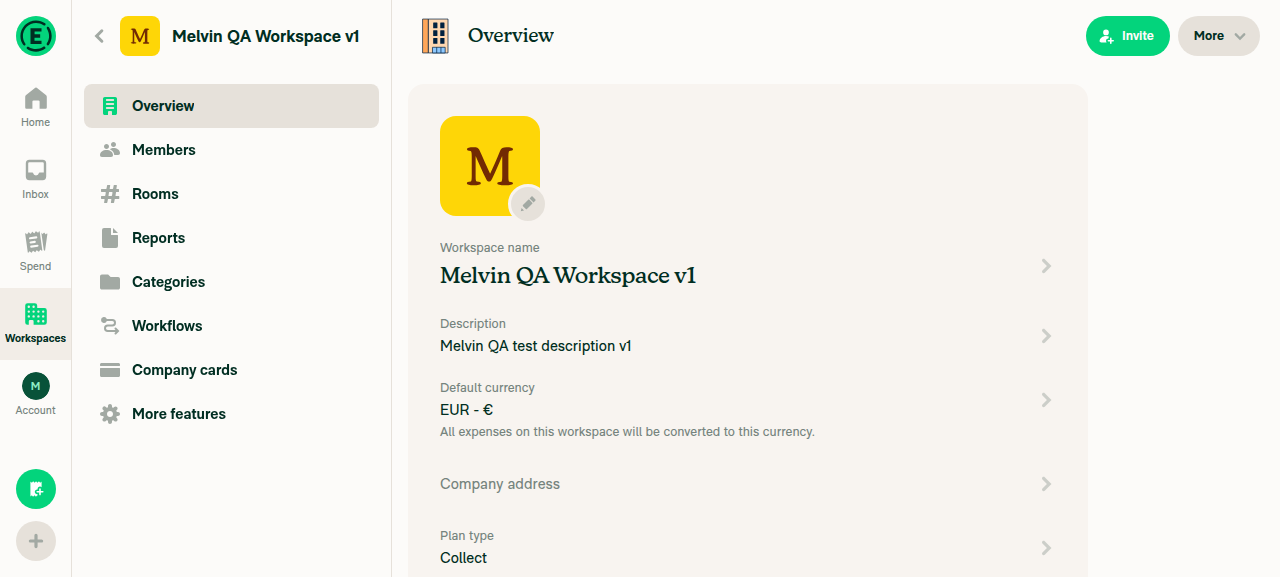
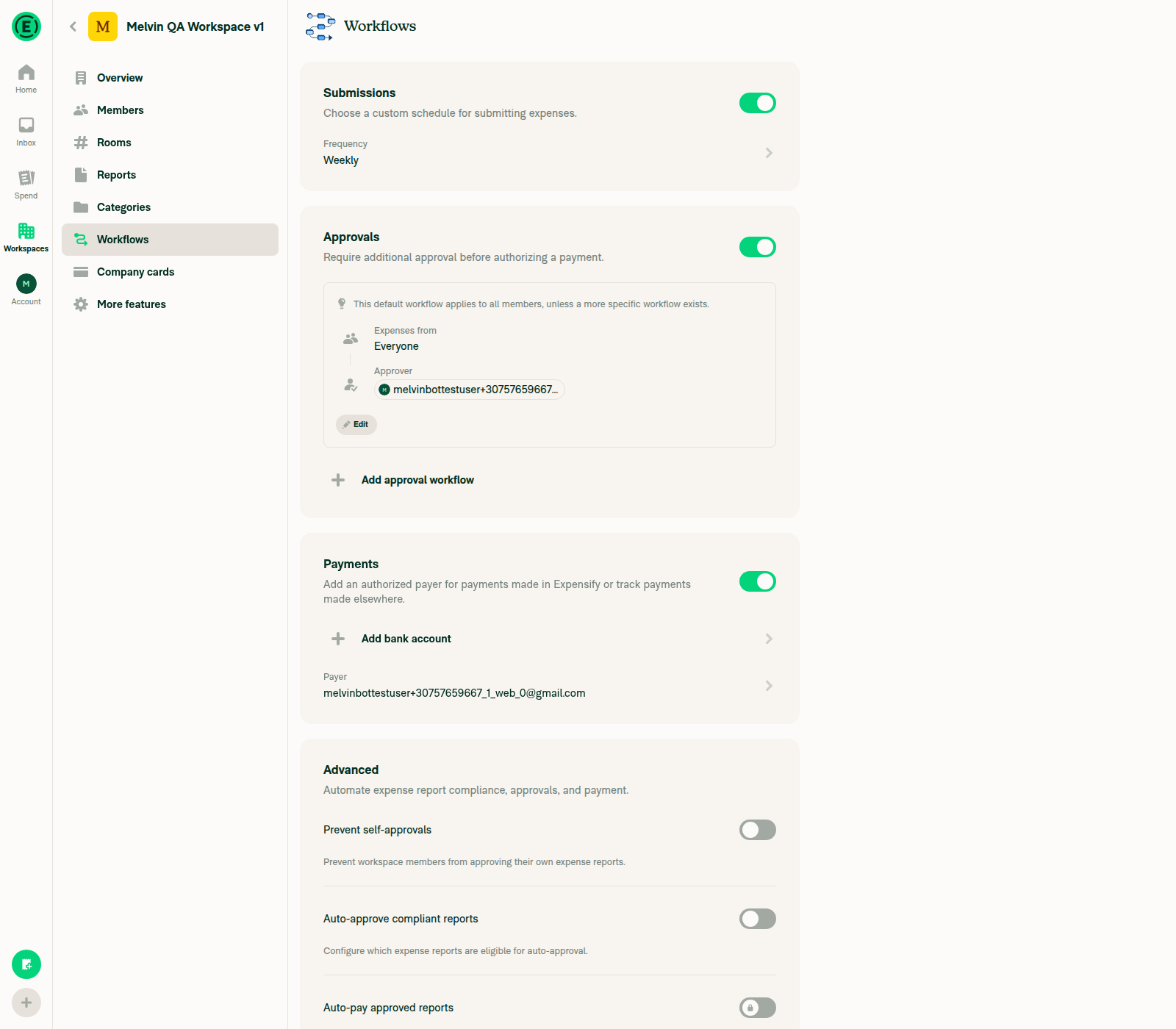
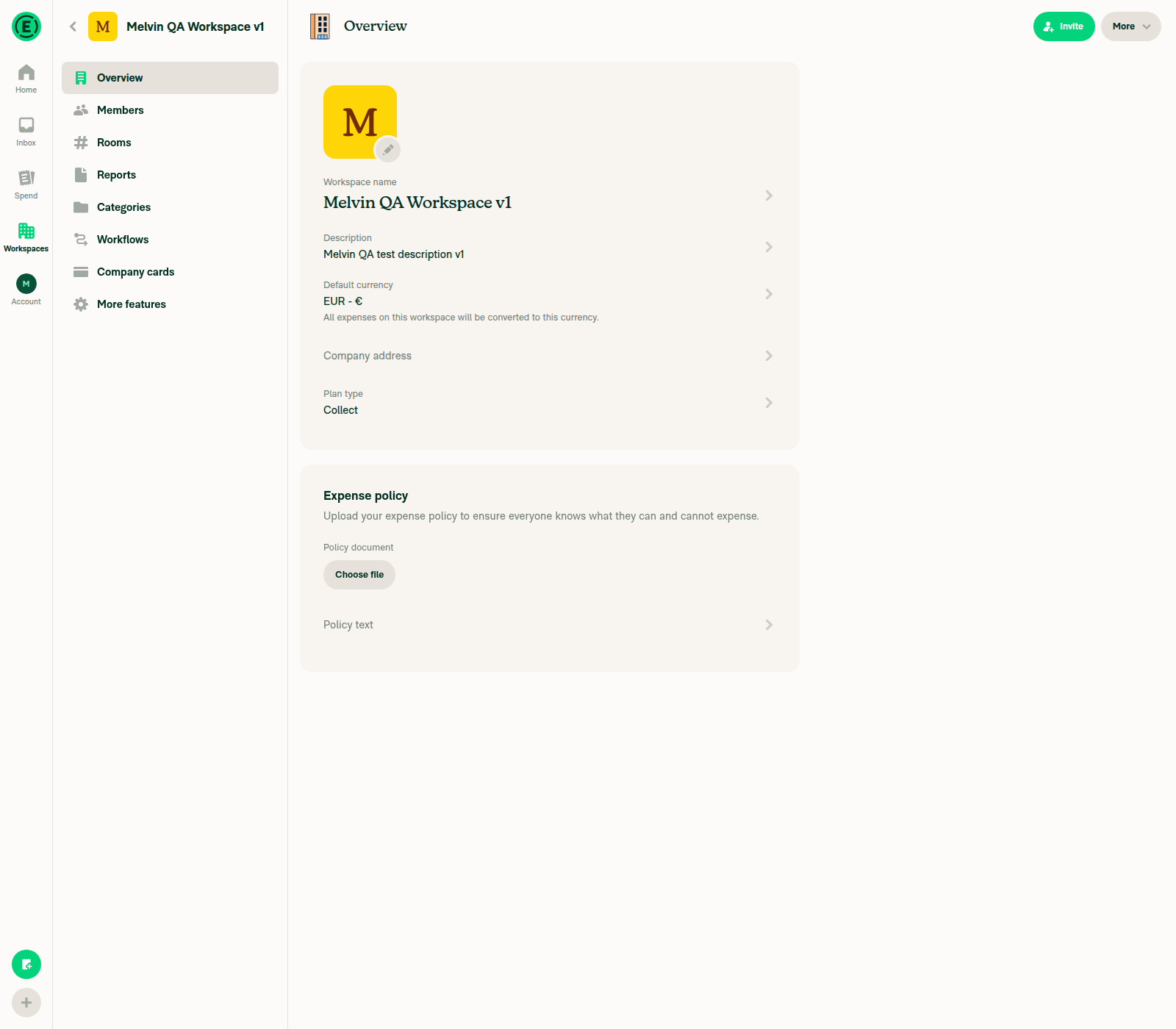
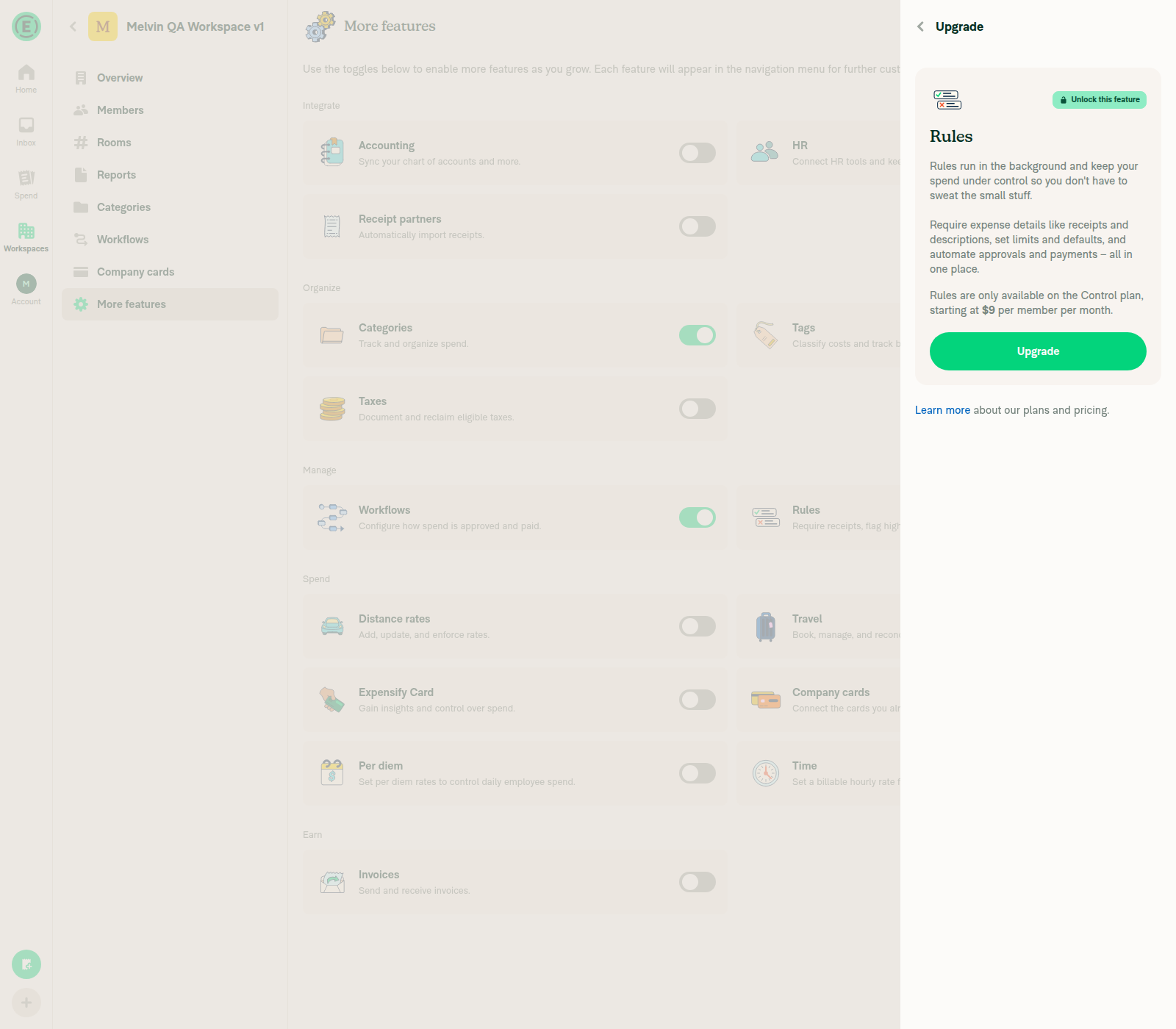
Live web test (dev NewDot): changed workspace Description, Name, Default currency, and Workflows report frequency — all saved and persisted correctly, no console/HTTP errors (all requests 200), no red-box. Rules → Max expense amount couldn't be exercised (gated behind a Control-plan paywall on the free test workspace — a plan restriction, not a regression).

Why the common path is safe (code analysis)

1. The no-task path is a true no-op. getReviewWorkspaceSettingsTaskCompletionData returns empty OnyxData when the task doesn't exist / can't be actioned, so withReviewWorkspaceSettingsTaskData merges empty arrays (identical onyxData) and completedTaskReportActionID is undefined. So the ~99% of users who aren't a freshly newDotAdmin-onboarded admin see zero behavioral change across all 10 commands.

2. The shared buildOptimisticTaskReportAction change is behavior-preserving. The avatar/person now derive from actorAccountID — this function is used by every task complete/reopen/cancel, so it's the highest-risk edit. But actorAccountID defaults to deprecatedCurrentUserAccountID, and allPersonalDetails[currentUserAccountID] is exactly what currentUserPersonalDetails is set to. The old code read getCurrentUserAvatar() = currentUserPersonalDetails?.avatar and currentUserPersonalDetails?.displayName; the new code resolves to the same values for existing callers. Only the new onboarding caller passes a different actor (CONCIERGE), which is intended.

3. finallyData is preserved through the merge (spread ...onyxData), so updateGeneralSettings / updateWorkspaceDescription keep their finally handlers.

One minor gap (not a regression — pre-existing edge case)

In updateGeneralSettings, when a CREATE_WORKSPACE request is still pending (offline-created workspace renamed before it syncs), the function early-returns and never calls API.write — so reviewWorkspaceSettingsTaskData is silently dropped and the task wouldn't be optimistically completed in that narrow case. This doesn't break any existing behavior (the backend also wouldn't complete the task, since UpdateWorkspaceGeneralSettings isn't sent), so it's not a regression — just flagging in case you want the task completion to still fire there. Worth confirming in QA the offline failure-revert path (test step 5).

Note: I couldn't verify the actual task-completion flow (steps 1–6, 8–10) end-to-end because the shared web session isn't onboarded as a newDotAdmin with the task pending — those still need a manual pass on a correctly-onboarded account.


Next Steps: Reply with @MelvinBot <feedback> to dig into any specific flow.

Evidence

Overview after Name/Description/Currency saves persisted

Overview after Name/Description/Currency saves persisted

Workflows report frequency saved as Weekly

Workflows report frequency saved as Weekly

Final Overview confirming Name, Description, Currency persisted

Final Overview confirming Name, Description, Currency persisted

Rules gated behind Control-plan upgrade paywall (plan restriction, not a regression)

Rules gated behind Control-plan upgrade paywall (plan restriction, not a regression)

@robertjchen robertjchen left a comment

Copy link
Copy Markdown
Contributor

Choose a reason for hiding this comment

The reason will be displayed to describe this comment to others. Learn more.

LGTM, thanks!

@robertjchen
robertjchen merged commit 7bdb3bf into Expensify:main Aug 3, 2026
34 of 36 checks passed
@OSBotify

OSBotify commented Aug 3, 2026

Copy link
Copy Markdown
Contributor

✋ This PR was not deployed to staging yet because QA is ongoing. It will be automatically deployed to staging after the next production release.

@github-actions

github-actions Bot commented Aug 3, 2026

Copy link
Copy Markdown
Contributor

🚧 robertjchen has triggered a test Expensify/App build. You can view the workflow run here.

@OSBotify OSBotify mentioned this pull request Aug 3, 2026
77 tasks done
@OSBotify

OSBotify commented Aug 3, 2026

Copy link
Copy Markdown
Contributor

🚀 Deployed to staging by https://github.com/robertjchen in version: 9.4.49-0 🚀

platform result
🕸 web 🕸 success ✅
🤖 android 🤖 success ✅
🍎 iOS 🍎 success ✅

@MelvinBot

Copy link
Copy Markdown
Contributor

🤖 Help site review: no changes required

I reviewed the changes in this PR against Expensify's help site files under App/docs/articles and no documentation updates are needed.

Why: This PR is an internal, optimistic-data fix. It adds client-side Onyx data so the "Review your workspace settings" onboarding task is marked complete instantly when an admin changes a workspace setting — behavior the backend already performs. There's no new feature, no changed UI label/tab/button, and no change to how any setting works or is saved.

What I checked:

  • Searched all 936 help articles under App/docs/articles for the onboarding task name and related onboarding/checklist copy — no article documents this "Review your workspace settings" onboarding task, so there's nothing to update.
  • The affected surfaces (Workspace → Overview, Workflows, Rules, Reports) are unchanged in behavior; only the optimistic task-completion mirroring was added.

Because no help site content describes this behavior, there's nothing to add or correct, and I did not open a draft docs PR.

If you believe a specific help article should document the onboarding checklist / "Review your workspace settings" task, let me know which one and I'll draft the update.

@OSBotify

OSBotify commented Aug 4, 2026

Copy link
Copy Markdown
Contributor

🚀 Deployed to production by https://github.com/arosiclair in version: 9.4.49-3 🚀

platform result
🕸 web 🕸 success ✅
🤖 android 🤖 success ✅
🍎 iOS 🍎 success ✅

Bundle Size Analysis (Sentry):

Sign up for free to join this conversation on GitHub. Already have an account? Sign in to comment

Labels

None yet

Projects

None yet

Development

Successfully merging this pull request may close these issues.

6 participants