Skip to content

Split held expenses onto a new Draft report when submitting offline - #96922

Merged
NikkiWines merged 28 commits into
Expensify:mainfrom
c3024:chaitanya/91080-offline-hold-split
Aug 19, 2026
Merged

NikkiWines merged 28 commits into
Expensify:mainfrom
c3024:chaitanya/91080-offline-hold-split

Conversation

@c3024

@c3024 c3024 commented Jul 24, 2026 •

Copy link
Copy Markdown
Contributor

Explanation of Change

The backend splits held expenses onto a new Draft report on submit, but the App's optimistic data didn't mirror that, so offline submission left held expenses on the submitted report until reconnect.

This PR mirrors the backend split in submitReport(), reusing getReportFromHoldRequestsOnyxData (same pattern as approveMoneyRequest):

  • Held transactions move to a new Draft report with a preview in the workspace chat; unheld expenses stay on the submitted report.
  • Optimistic IDs (optimisticHoldReportID, optimisticHoldActionID, optimisticHoldReportExpenseActionIDs) let the backend reconcile without duplicates after sync.
  • The submitted report's optimistic amount uses the unheld total when held expenses exist.

Backend/API dependencies (merged & deployed):

Fixed Issues

$ #91080
PROPOSAL:

Tests

  1. As the submitter, create an expense report with two expenses in the workspace chat.
  2. Hold one of the two expenses.
  3. Submit the report.
  4. Verify the held expense moves to a new report in the Draft state, and the unheld expense stays on the submitted report.
  5. Create a report with an expense and hold the expense.
  6. Click on Submit.
  7. Verify that you see "Unable to submit report
    You can't submit this report because all expenses are on hold. Remove the hold to submit."
Screenshot 2026-08-13 at 3 00 18 PM
Screen.Recording.2026-07-31.at.1.08.03.PM.mov
  • Verify that no errors appear in the JS console

Offline tests

  1. As the submitter, create an expense report with two expenses in the workspace chat.
  2. Hold one of the two expenses.
  3. Go offline.
  4. Submit the report.
  5. Verify (still offline) the held expense is shown on a new Draft report and the submitted report only contains the unheld expense, with the submitted amount equal to the unheld total.
  6. Reconnect.
  7. Verify the state is unchanged after sync: no duplicate reports or report actions, the held expense stays on the new Draft report, and the unheld expense stays on the submitted report.

QA Steps

Same as tests.

  • Verify that no errors appear in the JS console

PR Author Checklist

  • I linked the correct issue in the ### Fixed Issues section above
  • I wrote clear testing steps that cover the changes made in this PR
    • I added steps for local testing in the Tests section
    • I added steps for the expected offline behavior in the Offline steps section
    • I added steps for Staging and/or Production testing in the QA steps section
    • I added steps to cover failure scenarios (i.e. verify an input displays the correct error message if the entered data is not correct)
    • I turned off my network connection and tested it while offline to ensure it matches the expected behavior (i.e. verify the default avatar icon is displayed if app is offline)
    • I tested this PR with a High Traffic account against the staging or production API to ensure there are no regressions (e.g. long loading states that impact usability).
  • I included screenshots or videos for tests on all platforms
  • I ran the tests on all platforms & verified they passed on:
    • Android: Native
    • Android: mWeb Chrome
    • iOS: Native
    • iOS: mWeb Safari
    • MacOS: Chrome / Safari
  • I verified there are no console errors (if there's a console error not related to the PR, report it or open an issue for it to be fixed)
  • I followed proper code patterns (see Reviewing the code)
    • I verified that comments were added to code that is not self explanatory
    • I verified that any new or modified comments were clear, correct English, and explained "why" the code was doing something instead of only explaining "what" the code was doing.
    • I verified any copy / text that was added to the app is grammatically correct in English. It adheres to proper capitalization guidelines (note: only the first word of header/labels should be capitalized), and is either coming verbatim from figma or has been approved by marketing (in order to get marketing approval, ask the Bug Zero team member to add the Waiting for copy label to the issue)
  • If a new code pattern is added I verified it was agreed to be used by multiple Expensify engineers
  • I followed the guidelines as stated in the Review Guidelines
  • I tested other components that can be impacted by my changes (i.e. if the PR modifies a shared library or component like Avatar, I verified the components using Avatar are working as expected)
  • If a new CSS style is added I verified that:
    • A similar style doesn't already exist
    • The style can't be created with an existing StyleUtils function (i.e. StyleUtils.getBackgroundAndBorderStyle(theme.componentBG))
  • If new assets were added or existing ones were modified, I verified that:
    • The assets are optimized and compressed (for SVG files, run npm run compress-svg)
    • The assets load correctly across all supported platforms.
  • If the PR modifies code that runs when editing or sending messages, I tested and verified there is no unexpected behavior for all supported markdown - URLs, single line code, code blocks, quotes, headings, bold, strikethrough, and italic.
  • If the PR modifies a generic component, I tested and verified that those changes do not break usages of that component in the rest of the App (i.e. if a shared library or component like Avatar is modified, I verified that Avatar is working as expected in all cases)
  • If the PR modifies a component related to any of the existing Storybook stories, I tested and verified all stories for that component are still working as expected.
  • If the PR modifies a component or page that can be accessed by a direct deeplink, I verified that the code functions as expected when the deeplink is used - from a logged in and logged out account.
  • If the PR modifies the UI (e.g. new buttons, new UI components, changing the padding/spacing/sizing, moving components, etc) or modifies the form input styles:
    • I verified that all the inputs inside a form are aligned with each other.
    • I added Design label and/or tagged @Expensify/design so the design team can review the changes.
  • I added unit tests for any new feature or bug fix in this PR to help automatically prevent regressions in this user flow.
  • If the main branch was merged into this PR after a review, I tested again and verified the outcome was still expected according to the Test steps.

Screenshots/Videos

Android: Native

Android: mWeb Chrome

iOS: Native

iOS: mWeb Safari

MacOS: Chrome / Safari

Screen.Recording.2026-07-31.at.1.08.03.PM.mov

Mirror the backend SubmitReport held-transaction split (Auth Expensify#21958) in the
App's optimistic data so the offline/manual submit path matches: held expenses
move to a new Draft report while only unheld expenses stay on the submitted
report. Reuses getReportFromHoldRequestsOnyxData with the ApproveMoneyRequest
param convention. The submitted report action now reflects the unheld total.

Fixes Expensify#91080
c3024 added 3 commits July 24, 2026 10:07
…ne-hold-split

# Conflicts:
#	src/libs/actions/IOU/ReportWorkflow.ts
#	tests/actions/IOUTest/ReportWorkflowTest.ts
…ne-hold-split

# Conflicts:
#	tests/actions/IOUTest/ReportWorkflowTest.ts
@c3024

c3024 commented Jul 31, 2026

Copy link
Copy Markdown
Contributor Author

@codex review.

@c3024
c3024 marked this pull request as ready for review July 31, 2026 07:41
@c3024
c3024 requested review from a team as code owners July 31, 2026 07:41
@melvin-bot
melvin-bot Bot requested review from huult and removed request for a team July 31, 2026 07:41
@melvin-bot

melvin-bot Bot commented Jul 31, 2026

Copy link
Copy Markdown

@huult Please copy/paste the Reviewer Checklist from here into a new comment on this PR and complete it. If you have the K2 extension, you can simply click: [this button]

@melvin-bot
melvin-bot Bot requested review from joekaufmanexpensify and removed request for a team July 31, 2026 07:41

@chatgpt-codex-connector chatgpt-codex-connector Bot left a comment

Copy link
Copy Markdown

Choose a reason for hiding this comment

The reason will be displayed to describe this comment to others. Learn more.

💡 Codex Review

Here are some automated review suggestions for this pull request.

Reviewed commit: 7c55470c5d

ℹ️ About Codex in GitHub

Codex has been enabled to automatically review pull requests in this repo. Reviews are triggered when you

  • Open a pull request for review
  • Mark a draft as ready
  • Comment "@codex review".

If Codex has suggestions, it will comment; otherwise it will react with 👍.

When you sign up for Codex through ChatGPT, Codex can also answer questions or update the PR, like "@codex address that feedback".

Comment thread src/libs/actions/IOU/ReportWorkflow.ts Resolved
Auth splits held transactions on every submit path regardless of approval
mode, but the App's optimistic guard skipped Submit and Close policies,
leaving held expenses stuck on the report after it closes offline.
@c3024

c3024 commented Jul 31, 2026

Copy link
Copy Markdown
Contributor Author

@codex review

@chatgpt-codex-connector chatgpt-codex-connector Bot left a comment

Copy link
Copy Markdown

Choose a reason for hiding this comment

The reason will be displayed to describe this comment to others. Learn more.

💡 Codex Review

Here are some automated review suggestions for this pull request.

Reviewed commit: 2e0d2ac279

ℹ️ About Codex in GitHub

Codex has been enabled to automatically review pull requests in this repo. Reviews are triggered when you

  • Open a pull request for review
  • Mark a draft as ready
  • Comment "@codex review".

If Codex has suggestions, it will comment; otherwise it will react with 👍.

When you sign up for Codex through ChatGPT, Codex can also answer questions or update the PR, like "@codex address that feedback".

Comment thread src/libs/actions/IOU/ReportWorkflow.ts Resolved
@c3024

c3024 commented Jul 31, 2026

Copy link
Copy Markdown
Contributor Author

@codex review

@chatgpt-codex-connector

Copy link
Copy Markdown

Codex Review: Didn't find any major issues. More of your lovely PRs please.

Reviewed commit: 2e0d2ac279

ℹ️ About Codex in GitHub

Codex has been enabled to automatically review pull requests in this repo. Reviews are triggered when you

  • Open a pull request for review
  • Mark a draft as ready
  • Comment "@codex review".

If Codex has suggestions, it will comment; otherwise it will react with 👍.

When you sign up for Codex through ChatGPT, Codex can also answer questions or update the PR, like "@codex address that feedback".

@joekaufmanexpensify joekaufmanexpensify left a comment

Copy link
Copy Markdown
Contributor

Choose a reason for hiding this comment

The reason will be displayed to describe this comment to others. Learn more.

Good for product

@huult

huult commented Aug 2, 2026

Copy link
Copy Markdown
Contributor

@c3024 Tag me when it's ready for review

@c3024

c3024 commented Aug 2, 2026

Copy link
Copy Markdown
Contributor Author

@huult this is ready for review.

@huult

huult commented Aug 2, 2026 •

Copy link
Copy Markdown
Contributor

Reviewer Checklist

  • I have verified the author checklist is complete (all boxes are checked off).
  • I verified the correct issue is linked in the ### Fixed Issues section above
  • I verified testing steps are clear and they cover the changes made in this PR
    • I verified the steps for local testing are in the Tests section
    • I verified the steps for Staging and/or Production testing are in the QA steps section
    • I verified the steps cover any possible failure scenarios (i.e. verify an input displays the correct error message if the entered data is not correct)
    • I turned off my network connection and tested it while offline to ensure it matches the expected behavior (i.e. verify the default avatar icon is displayed if app is offline)
  • I checked that screenshots or videos are included for tests on all platforms
  • I included screenshots or videos for tests on all platforms
  • I verified that the composer does not automatically focus or open the keyboard on mobile unless explicitly intended. This includes checking that returning the app from the background does not unexpectedly open the keyboard.
  • I verified tests pass on all platforms & I tested again on:
    • Android: HybridApp
    • Android: mWeb Chrome
    • iOS: HybridApp
    • iOS: mWeb Safari
    • MacOS: Chrome / Safari
  • If there are any errors in the console that are unrelated to this PR, I either fixed them (preferred) or linked to where I reported them in Slack
  • I verified proper code patterns were followed (see Reviewing the code)
    • I verified that comments were added to code that is not self explanatory
    • I verified that any new or modified comments were clear, correct English, and explained "why" the code was doing something instead of only explaining "what" the code was doing.
    • I verified any copy / text that was added to the app is grammatically correct in English. It adheres to proper capitalization guidelines (note: only the first word of header/labels should be capitalized), and is either coming verbatim from figma or has been approved by marketing (in order to get marketing approval, ask the Bug Zero team member to add the Waiting for copy label to the issue)
  • If a new code pattern is added I verified it was agreed to be used by multiple Expensify engineers
  • I verified that this PR follows the guidelines as stated in the Review Guidelines
  • I verified other components that can be impacted by these changes have been tested, and I retested again (i.e. if the PR modifies a shared library or component like Avatar, I verified the components using Avatar have been tested & I retested again)
  • If a new component is created I verified that:
    • A similar component doesn't exist in the codebase
    • All props are defined accurately
    • The component has a clear name that is non-ambiguous and the purpose of the component can be inferred from the name alone
    • The only data being stored in the state is data necessary for rendering and nothing else
    • The component has the minimum amount of code necessary for its purpose, and it is broken down into smaller components in order to separate concerns and functions
  • If a new CSS style is added I verified that:
    • A similar style doesn't already exist
    • The style can't be created with an existing StyleUtils function (i.e. StyleUtils.getBackgroundAndBorderStyle(theme.componentBG)
  • If the PR modifies code that runs when editing or sending messages, I tested and verified there is no unexpected behavior for all supported markdown - URLs, single line code, code blocks, quotes, headings, bold, strikethrough, and italic.
  • If the PR modifies a generic component, I tested and verified that those changes do not break usages of that component in the rest of the App (i.e. if a shared library or component like Avatar is modified, I verified that Avatar is working as expected in all cases)
  • If the PR modifies a component related to any of the existing Storybook stories, I tested and verified all stories for that component are still working as expected.
  • If the PR modifies a component or page that can be accessed by a direct deeplink, I verified that the code functions as expected when the deeplink is used - from a logged in and logged out account.
  • If the PR modifies the UI (e.g. new buttons, new UI components, changing the padding/spacing/sizing, moving components, etc) or modifies the form input styles:
    • I verified that all the inputs inside a form are aligned with each other.
    • I added Design label and/or tagged @Expensify/design so the design team can review the changes.
  • For any bug fix or new feature in this PR, I verified that sufficient unit tests are included to prevent regressions in this flow.
  • If the main branch was merged into this PR after a review, I tested again and verified the outcome was still expected according to the Test steps.
  • I have checked off every checkbox in the PR reviewer checklist, including those that don't apply to this PR.

Screenshots/Videos

Android: HybridApp
Screen.Recording.2026-08-14.at.11.18.14.mp4
Android: mWeb Chrome
Screen.Recording.2026-08-14.at.11.13.51.mp4
iOS: HybridApp
Screen.Recording.2026-08-14.at.11.29.42.mp4
iOS: mWeb Safari
Screen.Recording.2026-08-14.at.11.25.01.mp4
MacOS: Chrome / Safari
Screen.Recording.2026-08-14.at.11.06.55.mp4

@huult

huult commented Aug 3, 2026

Copy link
Copy Markdown
Contributor
Screen.Recording.2026-08-03.at.13.33.44.mov

@c3024 When a report contains only one held expense and is submitted offline, it is optimistically marked as submitted. Once the app comes back online, the report is moved back to Draft

huult flagged an offline single-held-expense report getting optimistically marked as submitted, then flipping back to Draft once the app reconnects. isTransactionSubmittable now returns false for held transactions, which flows into the primary Submit button and canSubmitReport. isSubmitAction (secondary menu) gets the same guard, placed after the retracted-report bypass so resubmitting a retracted report still works. submitReport() also no-ops when every transaction on the report is held, as a defensive backstop.
@c3024

c3024 commented Aug 3, 2026 •

Copy link
Copy Markdown
Contributor Author

Good catch. Pushed a fix: isTransactionSubmittable now returns false for held transactions, so Submit is hidden (primary and secondary) whenever every expense on the report is held. Added a defensive no-op in submitReport() too, plus unit tests.

pr96922-verify-no-submit-when-held

@huult

huult commented Aug 3, 2026

Copy link
Copy Markdown
Contributor
Screen.Recording.2026-08-03.at.16.41.47.mov

@c3024 Could you take a look at this video? It looks like tapping the Submit button doesn't do anything when the report contains only one held expense. I think we should show the "Remove Hold to Submit" modal in this case.

…reports

huult reported that hiding Submit for all-held reports left the secondary More menu, report-preview button, and search entry points inconsistent. Each Submit entry point now shows a remove-the-hold-to-submit modal when every expense on the report is held, matching the existing pending-card-transactions pattern, while partial-held reports still submit and split as before. The report-header primary button keeps its existing, separate all-held gate unchanged.
c3024 added 4 commits August 18, 2026 13:28
The backend splits held transactions on every submit path, DEW included,
so the optimistic split no longer excludes DEW policies. Report state
predictions stay suppressed for DEW as before.
Extract shouldSplitHeldExpenses and use it for both the submitted
action amount and the split block, so the action shows the unheld
total only when the held expenses are actually split optimistically.
The client makes no optimistic workflow predictions for DEW policies, so
the hold split gate keeps the isDEWPolicy exclusion to stay consistent
with that convention, even though the backend splits on every submit
path.
@c3024

c3024 commented Aug 18, 2026

Copy link
Copy Markdown
Contributor Author

Implemented all the review suggestions!

@c3024
c3024 requested a review from NikkiWines August 18, 2026 10:28
NikkiWines
NikkiWines previously approved these changes Aug 18, 2026

@NikkiWines NikkiWines left a comment

Copy link
Copy Markdown
Contributor

Choose a reason for hiding this comment

The reason will be displayed to describe this comment to others. Learn more.

:shipit:

@huult

huult commented Aug 19, 2026

Copy link
Copy Markdown
Contributor

@c3024 could you sync with main?

@c3024

c3024 commented Aug 19, 2026

Copy link
Copy Markdown
Contributor Author

Done!

@c3024
c3024 requested a review from NikkiWines August 19, 2026 06:20

@NikkiWines NikkiWines left a comment

Copy link
Copy Markdown
Contributor

Choose a reason for hiding this comment

The reason will be displayed to describe this comment to others. Learn more.

🚢

@NikkiWines
NikkiWines merged commit 07a4f68 into Expensify:main Aug 19, 2026
37 of 38 checks passed
@github-actions

Copy link
Copy Markdown
Contributor

🚧 NikkiWines has triggered a test Expensify/App build. You can view the workflow run here.

@OSBotify

Copy link
Copy Markdown
Contributor

✋ This PR was not deployed to staging yet because QA is ongoing. It will be automatically deployed to staging after the next production release.

@OSBotify

Copy link
Copy Markdown
Contributor

🚀 Deployed to staging by https://github.com/NikkiWines in version: 9.4.57-0 🚀

platform result
🕸 web 🕸 success ✅
🤖 android 🤖 success ✅
🍎 iOS 🍎 success ✅

@MelvinBot

Copy link
Copy Markdown
Contributor

Help site changes are required — the behavior this PR mirrors (submitting a report with held expenses) wasn't documented on the help site.

Draft PR: #99026

What I documented

Updated Create-and-Submit-Reports.md:

  • A note under How to manually submit an expense report that held expenses move to a new Draft report on submit, while unheld expenses stay on the submitted report.
  • FAQ: What happens to held expenses when I submit a report?
  • FAQ: Why can't I submit a report when all expenses are on hold? (with the exact in-app error copy).

Verified against the live web UI

  • Report with one held + one unheld expense → on Submit, the held expense splits onto a new Draft report; the unheld expense stays and moves to Outstanding.
  • Report where every expense is on hold → Submit is blocked with "Unable to submit report" / "You can't submit this report because all expenses are on hold. Remove the hold to submit."
  • Primary action stays labeled Submit on approval-workflow workspaces.
Verification screenshots

Draft report with two expenses, Submit button
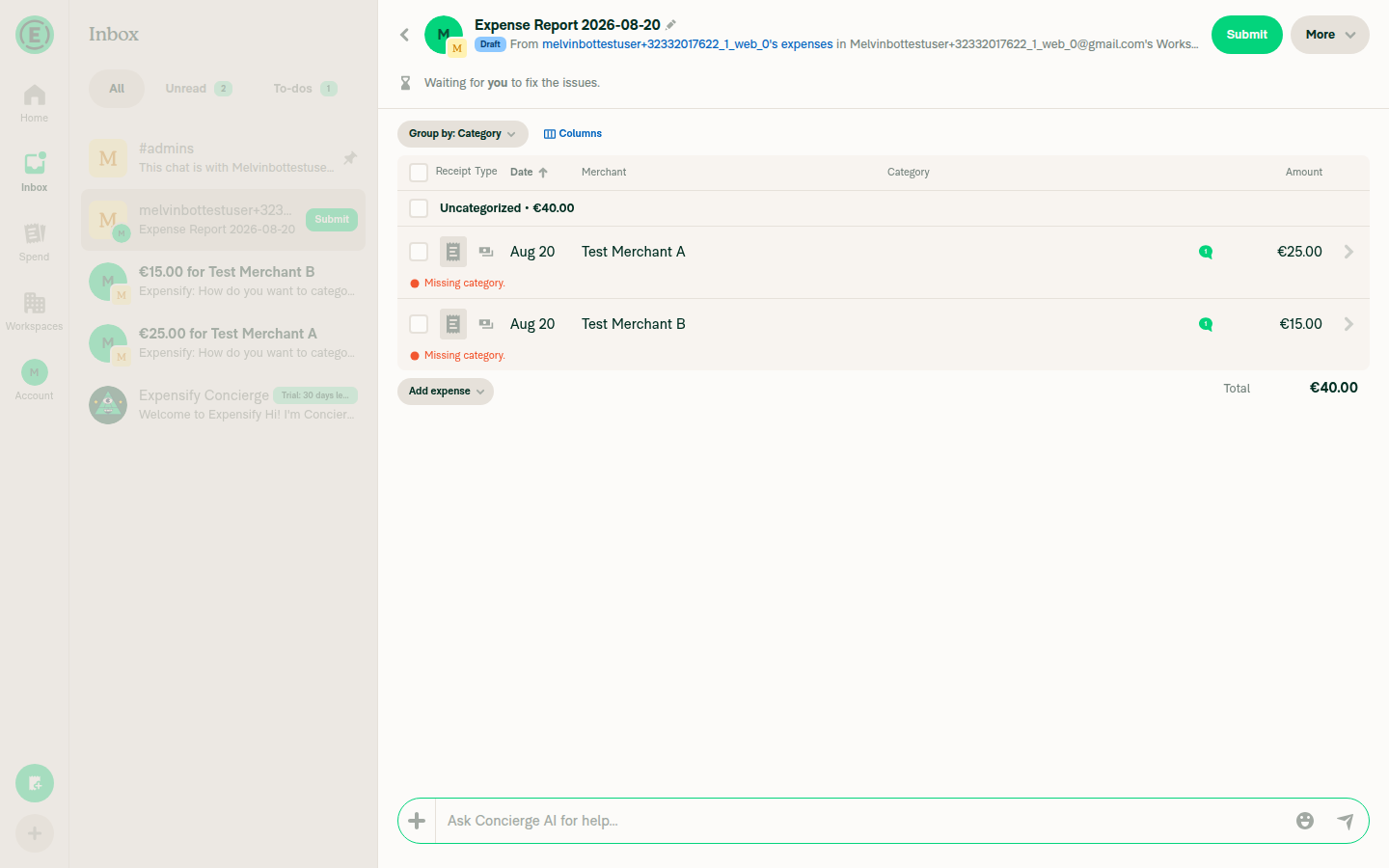
Draft report with two expenses (25 EUR + 15 EUR), Submit button

After submit: unheld expense on Outstanding report, held expense split onto a new Draft report
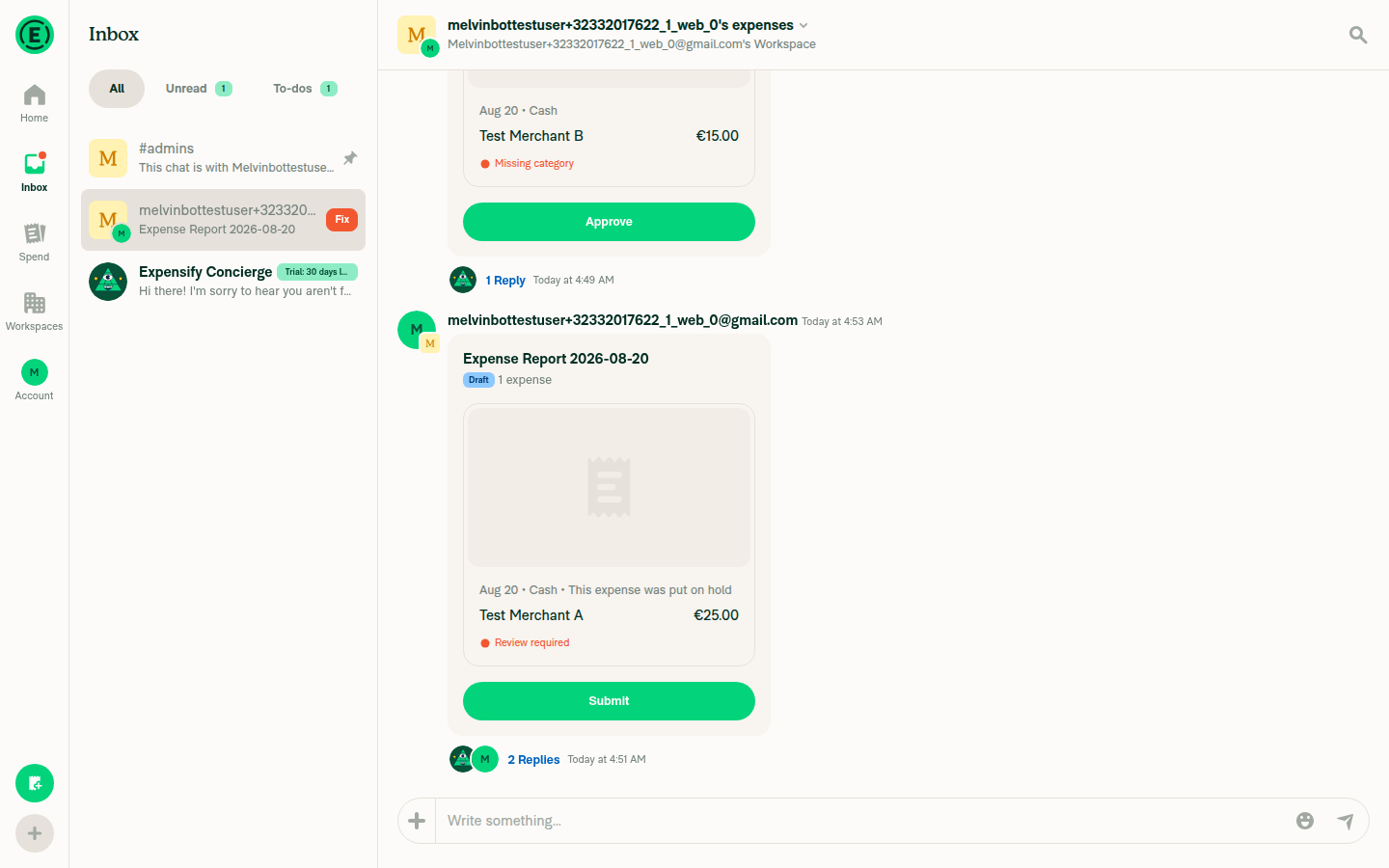
After submit: unheld expense on Outstanding report, held expense split onto a new Draft report

Unable to submit report: all expenses on hold error
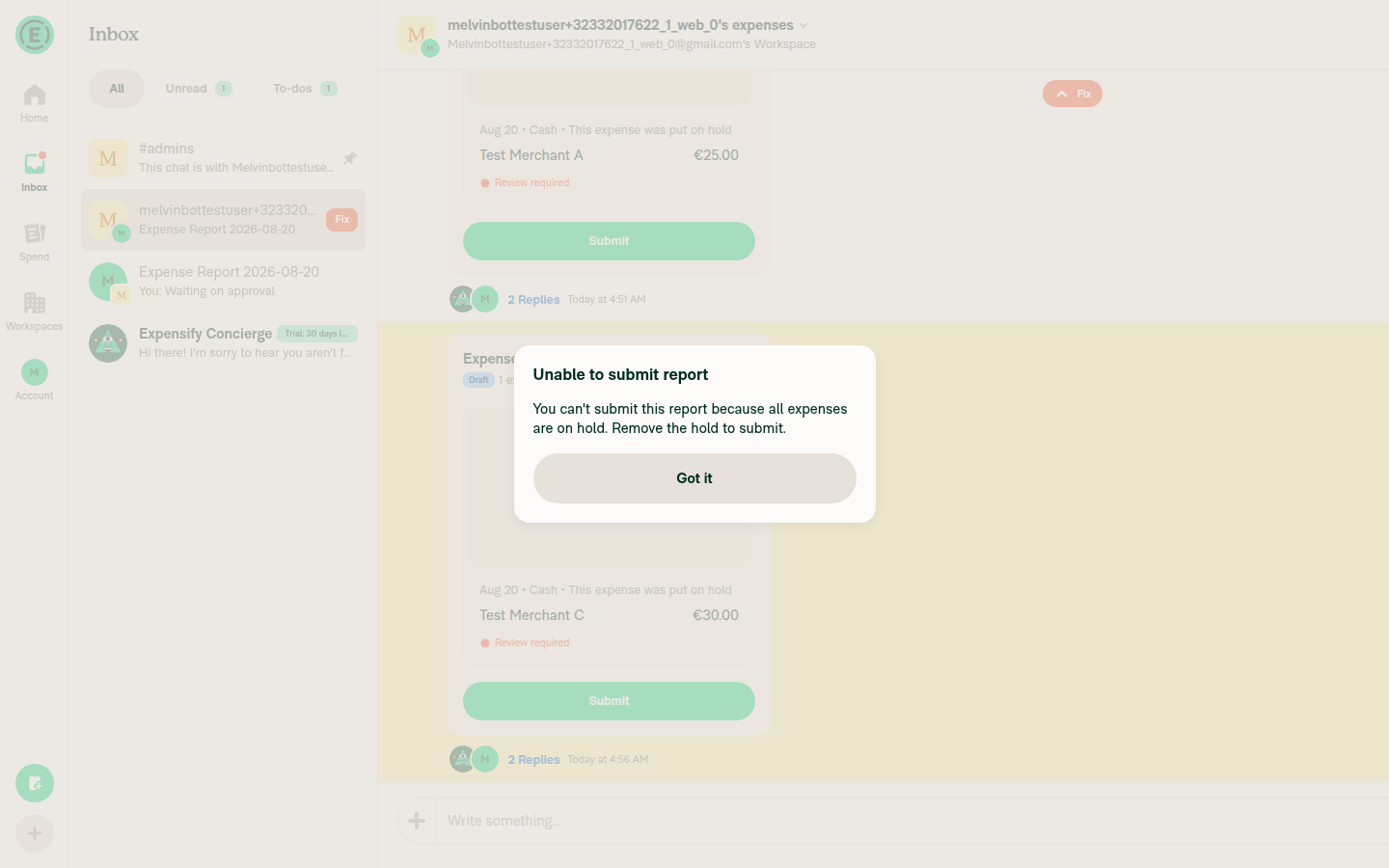
Unable to submit report dialog: all expenses on hold error message

@MelvinBot, please review the linked help site PR and confirm it reflects the current behavior. Then mark the linked help site PR Ready for review


view run

@mitarachim

Copy link
Copy Markdown

Deploy Blocker #99028 was identified to be related to this PR.

@mitarachim

Copy link
Copy Markdown

Deploy Blocker #99029 was identified to be related to this PR.

@OSBotify

Copy link
Copy Markdown
Contributor

🚀 Deployed to production by https://github.com/Beamanator in version: 9.4.57-3 🚀

platform result
🕸 web 🕸 success ✅
🤖 android 🤖 success ✅
🍎 iOS 🍎 success ✅

Bundle Size Analysis (Sentry):

Sign up for free to join this conversation on GitHub. Already have an account? Sign in to comment

Labels

None yet

Projects

None yet

Development

Successfully merging this pull request may close these issues.

8 participants