

Local traffic visibility and privacy controls for coding agents.
getshim.tech




shim-cli shows you what your coding agent actually sends to the model — how
many tokens went where, what the turn cost, and which secrets and personal data
were in it — and masks what it can before the model sees it. The hook and
detector add no network destination, account, API key, or telemetry. The opt-in
shim watch proxy forwards only to the provider the client already uses.
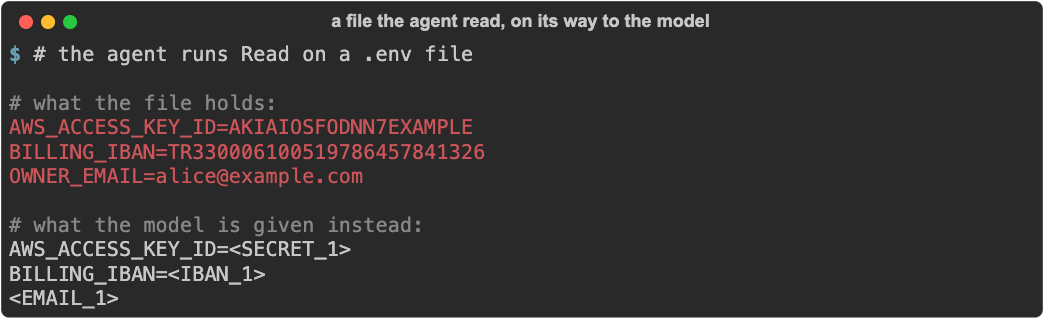
Two commands, two different questions:
| Command | Answers |
|---|---|
shim watch -- claude |
What did this session actually send, and what did it cost? |
shim install claude |
Mask secrets and personal data in eligible tool results, every session, automatically. |
Warning
shim-cli is a best-effort guard, not a data-loss prevention boundary. Read the privacy limitations before using it with sensitive data.
shim watch puts a local proxy in front of the client for one command, forwards
every byte unchanged, and reports what went past:
shim watch -- claude
shim watch -- claude -p "explain this repo"
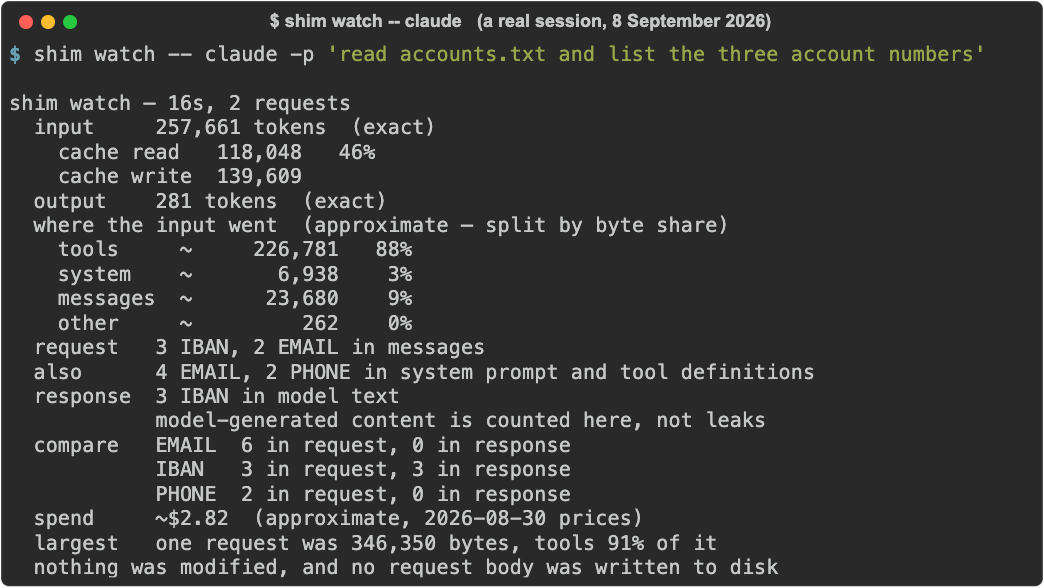
On the session above, the tools array was 88% of the input tokens — before
a single line of the user's own code. That is one session on one repository.
Claude Code's /context shows the same split for the session in front of you;
shim watch adds what was in each part and what came back.
The three IBANs came from a file the agent read with a tool: shim scans every
text field the model reads, including tool results, and says which part of the
request each finding was in.
If you sign in with a subscription, the spend line is what the same traffic
would cost on an API key, not a bill. shim reads the tokens the provider
reports and prices each request by kind — input, 5-minute and 1-hour cache
writes, cache reads, output — from a table read off Anthropic's pricing page on
the date the line prints; it cannot see what your plan charges. A model the
table does not name exactly is listed as not priced rather than guessed, and
once the table is more than 90 days old the line says so. --json carries the
cost of every request.
The response line is the other direction — what the model wrote back, with
its thinking counted apart from its answer. It is a recall measurement, not a
leak report: on your own key there is no other tenant to leak from, and a value
the model wrote may be one it was given or one it made up. compare puts the
two sides next to each other: three account numbers went in through a tool
result and the same three came back, which is the round trip made visible. A
response that stopped at the provider's output limit adds a cut off line.
Four more lines name the waste when there is some: images (distinct images
and their estimated input tokens, every time history replays them), largest tool result (which tool, how many bytes, carried by how many requests),
cache (requests that wrote again a prefix the previous one had cached) and
duplicates (identical requests sent while one was still in flight, both
forwarded). They report; watch never resends, merges or reorders anything.
Token counts come from the provider's own usage block and are exact. How
they divide between sections has no ground truth on the wire, so it is
inferred from byte share, marked ~, and always sums to the exact total of the
requests it measured.
Exact and inferred figures never share a column.
It also covers what hooks cannot change: files pulled in with @ are inlined
by the client while it builds the prompt, so the prompt hook can read them and
warn before they are sent (or stop the prompt under enforce), but cannot mask
them; and the system prompt, the tools array and the token counts are never
handed to a hook at all.
It forwards and measures. It does not modify. Not one byte of a request is changed, no request body is ever written to disk, and nothing is transmitted anywhere except to the provider the client was already talking to. The proxy binds to loopback, exists for the length of the command, and nothing is left behind — no shell profile is edited and no setting is changed.
Overhead measured against a live session: about 6 ms of proxy plumbing plus a 23 ms TLS handshake per request. Scanning the body costs more than that, but it runs after the response has been relayed. Request inspection retains at most 8 MB per request, with two concurrent inspection slots and no pending queue. Larger requests still pass through in full; skipped or unfinished measurements are reported as incomplete. Usage can be known, partial, or unavailable.
shim watch refuses a non-empty ANTHROPIC_BASE_URL before startup. Custom
upstreams are not supported. Requests need an unambiguous non-negative
Content-Length; transfer coding (including chunked requests) is rejected.
Request-body reads have a 30-second deadline.
shim watch supports Claude Code only. Codex is refused, because it takes
its endpoint from its own configuration rather than the environment: a proxy
would be started and the whole session would run past it, reported as empty.
That was measured, not assumed — the September 2026
probe
also shows the transport itself works, so this is a limitation with a fix
rather than a dead end. The Codex prompt hook is unaffected. Copilot is out of
scope: it accepts a custom endpoint only through bring-your-own-key, which
removes GitHub authentication altogether, so there is nothing to watch.
Everything above starts at install, but the months before are on your disk:
Claude Code keeps every session under ~/.claude/projects. shim audit reads
that history and counts what reached the model, by kind, by project and by the
way it came in:
shim auditshim audit — Claude Code history, 3 sessions in 2 projects, 2026-09-28 to 2026-09-30
reached the model
SECRET 10 in 2 sessions @.env 5 · failed Bash 5
EMAIL 3 in 3 sessions @.env 1 · failed Bash 1 · your prompt 1
DB_URI 2 in 2 sessions @.env 1 · failed Bash 1
by project
~/work/kasa-mutabakat SECRET 10, DB_URI 2, EMAIL 2 · last 2026-09-30
~/work/site EMAIL 1 · last 2026-09-29
already masked by shim 3 values in 1 session
model output 2 EMAIL (written by the model; it may repeat values it was given)
scanned 3 sessions, 5 KB, in 0.0 s. Nothing was changed, written or sent.
It prints no value, keeps nothing and sends nothing; without --purge it opens
no file for writing. It reads Claude Code's history only, and only when you run
it. --since 2026-09-01 and --project ~/work/kasa-mutabakat narrow it, and
--json gives the same counts per session.
shim audit --purge deletes the transcripts of the sessions that sent
something, and their lines in history.jsonl, after you type a confirmation. It
leaves the other files Claude Code keeps per session, such as its backups of the
files the agent edited in file-history/, and it does not change what the
model provider already received. Claude Code also deletes transcripts on its
own, after cleanupPeriodDays in its settings (30 by default).
| Client | Your typed prompt | Tool input and results |
|---|---|---|
| Claude Code | Reports what it found and lets it through; blocks under enforce |
Eligible structured arguments and inbound results are masked, and a call with masked arguments still goes through your permission rules; commands and local writes are report-or-deny only; the output of a failed call is reported, not masked |
| Codex CLI | Reports what it found and lets it through; blocks under enforce |
Not installed — no verified native tool-event adapter |
| GitHub Copilot CLI | Replaces the model-facing prompt with the redacted text | Not installed — no verified native tool-event adapter |
| VS Code | Reports what it found and lets it through; stops the prompt before it is sent under enforce |
A call is reported, and denied under enforce, before it runs. A result can only be reported: by then the model has it, and nothing takes it back. Never masked |
Tool coverage is verified against a running client, not derived from
documentation. shim doctor <client> prints exactly which events are installed
and what shim can and cannot change at each one.
What shim-cli detects, and masks wherever the client allows it:
- Personal data: email addresses (also written
name[at]domain.tld), phone numbers, payment cards that pass the Luhn check (Troy and the Mastercard 2-series included), IBANs (lowercase, spaced, or broken over a line), IP and MAC addresses, US SSNs, and Turkish national IDs (also in100 000 001 46or100 000 00 146groups) and tax IDs. Turkish licence plates are the one opt-in type:shim config --enable TR_LICENSE_PLATE, because coding traffic is full of plate-shaped strings such as[12 GET 200]. - Keys and tokens: Anthropic, OpenAI, Stripe and SendGrid keys; Slack
tokens, and Slack and Discord webhook URLs; AWS access key IDs; GitHub,
GitLab, npm, Hugging Face and Google API tokens; JWTs; private keys in PEM
form; Azure storage
AccountKeyvalues; HTTPAuthorization: BasicandBearerheaders. - Credentials by context: the value of a named key such as
DB_PASSWORD,AWS_SECRET_ACCESS_KEYor, in Turkish,şifreandparolawith=or:,password,token,secretorAPI_KEYfollowed on the same line by a value with a digit or a symbol in it (password hunter2abc), a--passwordargument, the user and password in a connection string or URL, Docker and npm registry logins, and a base64 block that decodes to one of these.
What it does not detect: person names, postal addresses, a password with no key
name or known prefix (the login is Synthetic-pass-0000), and an email address
at an internal domain such as ops@acme.internal. Your own
patterns cover what your project has that these do not.
Checksums are verified where they exist, so a mistyped IBAN or national ID is not reported.
It deliberately stays quiet on values that name nobody: loopback and
unspecified addresses (127.0.0.1, 0.0.0.0, ::1) and connection strings
that carry no credentials (redis://cache.example.com:6379/0). Private and
public IP addresses are still detected. A connection string keeps its
scheme, host, port and database and loses only its credentials:
postgresql://kasa_app:synthetic-password@db-prod.kasa.internal:5432/kasa
reaches the model as postgresql://<DB_URI_1>@db-prod.kasa.internal:5432/kasa,
so the agent can still tell production from staging. Once
0.0.0.0 and 127.0.0.1 both read as <IP_ADDRESS_1>, the model can no
longer tell "listen on every interface" from "loopback only" — detection that
fires where there is nothing to find is how people learn to ignore it. It also
leaves bare timestamps, ids and decimals alone: a run of digits is a phone
number only when it is Turkish-shaped or follows a cue such as tel, phone
or a phone_number key, and order no or sipariş no is not a cue. Dated
model ids (claude-sonnet-4-5-20250929) and version strings (version 1.2.3.4, numpy==1.26.4.1) reach the model unchanged, so an Edit on that
line still applies; an address after a flag (curl -v 203.0.113.9) or a
comparison (host == 10.0.0.5) is still an address.
Detection runs locally without an account, API key, network request, daemon, telemetry, or prompt history.
shim-cli runs on macOS and Linux. It does not support Windows yet; inside WSL it
runs as it does on Linux (not yet verified). The shim package needs CPython
3.10 or newer, and the plugin's bundled hook also runs on 3.9, which is what a
stock macOS provides.
Choose one package manager:
uv tool install --python 3.12 --compile-bytecode shim
# or
pipx install --python python3.12 --fetch-missing-python shim
--python matters on a machine whose only Python is the system 3.9:
without it uv quietly installs the last release that ran there, 0.2.0.
Neither line needs Python 3.12 installed first: uv fetches it itself, and
--fetch-missing-python makes pipx do the same. When python3 --version
already says 3.10 or newer, pipx install shim is enough.
Preview and install the hook for your client:
shim install codex --dry-run
shim install codex
shim doctor codex
Replace codex with claude or copilot as needed. Run shim help for all
commands. --dry-run shows the target file and the exact fragment; without it,
shim install asks before writing but does not show the change.
One more step in Codex: a hook does not run until you trust it. Codex keeps
a trust record per hook and skips any hook without one — no warning, and your
prompts reach the model uninspected. Open /hooks in Codex, review the shim
entry, and enable it. shim doctor codex ends by reminding you, because that
record lives in Codex and shim cannot read it.
Check that it works. Start a new session of your client after installing, then:
-
Claude Code: run
/hooksand find shim underUserPromptSubmit,PreToolUse,PostToolUse,PostToolUseFailure,StopandSessionEnd. Then, in a scratch folder, putAWS_ACCESS_KEY_ID=AKIAIOSFODNN7EXAMPLEin a.envand ask Claude to read it. The model getsAWS_ACCESS_KEY_ID=<SECRET_1>, and the turn ends with shim's summary:shim — this session masked 1 SECRET (Read .env) overhead 58 ms median, 58 ms p95 -
Codex: once the hook is trusted in
/hooks, a prompt holdingops@example.comshowsshim: found EMAIL (1) in your prompt. Not modified.Codex lets shim report a prompt, not change it. -
GitHub Copilot CLI: there is no trust step. Ask the model to repeat a prompt holding
ops@example.comword for word; it answers with<EMAIL_1>.
shim doctor claude and shim doctor codex warn that hook activation is
client UI state and tell you to verify shim with /hooks: that is the check
above, and doctor still exits 0. GitHub Copilot CLI has no trust step; its
hook runs from the next session. If the check shows nothing, start with
shim doctor <client>. VS Code is checked with a test prompt, under
VS Code below.
VS Code is reached through the plugin only; there is no shim install vscode,
and the shim package does not carry the plugin folder. Clone the newest
release tag to a folder you keep:
git clone --depth 1 --branch v1.2.0 https://github.com/GetSHIM/shim-cli ~/.local/share/shim-cliThen add the plugin folder to your user settings.json (Command Palette,
"Preferences: Open User Settings (JSON)"), by the absolute path that
echo ~/.local/share/shim-cli/plugins/shim-cli prints. Workspace settings do
not apply to this key:
"chat.pluginLocations": { "/Users/you/.local/share/shim-cli/plugins/shim-cli": true }To update, fetch and check out the next tag in that folder:
git -C ~/.local/share/shim-cli fetch --depth 1 origin tag <tag>, then
git -C ~/.local/share/shim-cli checkout <tag>. To remove it, delete the
setting and the folder.
To check it, type a prompt holding ops@example.com into Copilot Chat and
expect shim: found EMAIL (1) in your prompt. Not modified. No shim line at
all means the plugin is not running. shim doctor has no VS Code target, and
VS Code releases newer than 1.137.0 are untested, so run this check after a
VS Code update too.
In VS Code shim reports, and refuses only where refusing works. This was measured against VS Code 1.137.0 rather than read out of its documentation:
| Moment | What shim can do |
|---|---|
| Your prompt | Report. Under enforce the prompt is stopped before it is sent. |
| Before a tool runs | Report. Under enforce the call is denied and never runs. |
| After a tool has run | Report only. A block there was read straight through by the model, and so was continue: false. |
Nothing is ever masked: no VS Code hook output replaces a prompt, a tool input
or a tool result. And a read_file result reaches the hook empty, so file
contents are never inspected: an agent reading .env is neither masked nor
reported. Only values in the path text itself are caught, before the read. A
terminal result does arrive in full and is inspected.
Because a refusal is the only enforcement available, tool events report by default there, and refusing waits until you ask for it:
[mode]
outbound = "enforce"
That refuses a call carrying a finding, such as a run_in_terminal command,
before it runs. inbound covers results, which VS Code lets shim report but
not change, so inbound = "enforce", already the default, refuses nothing
there.
The same plugin file is read by GitHub Copilot CLI and the Copilot app, where
shim install copilot is the supported route. The hook stands down in those
clients so nothing is inspected twice.
Claude Code users can install the repository's marketplace plugin:
/plugin marketplace add GetSHIM/shim-cli
/plugin install shim-cli@shim-cli
The marketplace plugin and shim install claude register the same hook two
ways: use one, not both; shim doctor claude fails when it finds two. You need
the package either way for shim audit, shim keys, shim report and
shim config, which it alone carries. The plugin carries the hook archive,
bin/shim.pyz, on main and on every tag; it needs Python 3.9 or newer and
nothing else installed.
Codex: use shim install codex, not the plugin. Current Codex installs the
plugin and lists it as enabled, but does not load its hook: /hooks shows
nothing, and prompts reach the model uninspected without a warning. If you
installed the plugin, replace it:
codex plugin remove shim-cli@shim-cli
shim install codex
shim doctor codex
Then open /hooks in Codex and trust the shim entry.
1.0 no longer runs the hook 0.2.0 wrote. A client settings file that still
carries -m shim_guard.hook reports No module named shim_guard on every
prompt, and nothing is inspected until you run, once per client:
shim install <client>That rewrites the hook line and, on Copilot, replaces the old hook file.
shim doctor <client> reports a hook left in the 0.2.0 shape as FAIL with the
same command. Your settings and ledger move to shim/ on the next shim
command that touches them, and each move is reported once.
A Claude Code plugin installed as shim-guard@shim-guard stopped updating at
0.3.2. Move it:
/plugin uninstall shim-guard@shim-guard
/plugin marketplace add GetSHIM/shim-cli
/plugin install shim-cli@shim-cli
A Codex plugin under either name no longer runs; replace it with
shim install codex as described under "Marketplace plugins".
Once the hook is installed, use your client normally. To inspect text directly,
pipe it through scan or redact:
printf '%s' 'Contact me at alice@example.com' | shim scan
printf '%s' 'Contact me at alice@example.com' | shim redact
Both commands read standard input. Do not pass real prompts as command-line arguments, where they may be recorded in shell history or process listings.
shim keys .env lists the variables a .env or INI file defines, whether each
is set and what shim would call its value, and never the value; the
cookbook
shows how to point an agent at it instead of cat.
Important
With the default configuration, shim-cli does not prevent a secret you
type into a prompt from reaching the model. It tells you afterwards.
Codex and Claude Code offer no field for rewriting a submitted prompt, so the
only way to stop one is to refuse the sentence you just typed — which is
disruptive and rare enough that it is not the default. Set
user-prompt = "enforce" in [mode] to block instead. Copilot's
userPromptTransformed event does support a model-facing replacement. Claude
tool results are masked at the verified installed events.
The modes are observe, warn and enforce. Any other value, block
included, makes shim withhold every prompt until it is fixed, and shim config
does not show [mode], so the
cookbook
walks through creating the settings file and checking that blocking is on.
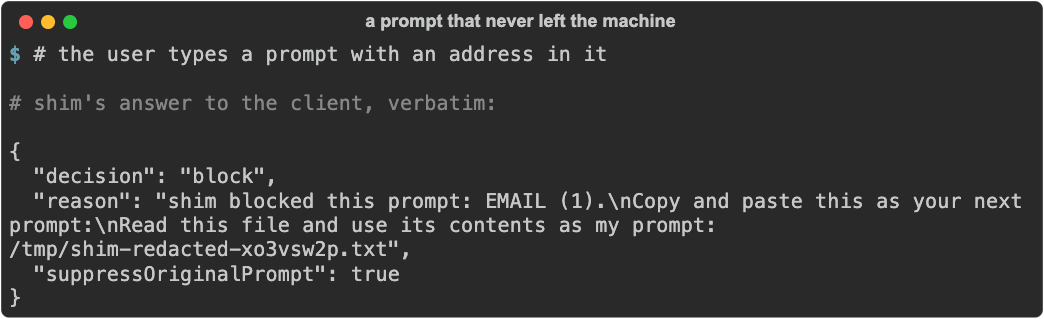
Under enforce, the prompt is withheld and you are handed a redacted copy to
resend:
shim says nothing when it works, so it keeps a short record of its own
decisions. The model is told when values were masked, so it does not describe
your file as full of placeholders. Claude's verified Stop hook shows the total at the end of a turn
where something changed:
shim — this session
  masked    60 EMAIL  (Read customers.csv)
            60 IBAN  (Read customers.csv)
            60 PHONE  (Read customers.csv)
            60 TR_NATIONAL_ID  (Read customers.csv)
  flagged   1 INSTRUCTION_OVERRIDE  (Read runbook.md)
            1 HIDDEN_TEXT  (Read runbook.md)
  overhead  62 ms median, 119 ms p95
That is a real session against Claude Code, not an illustration: a 5.5 KB
customer file, every value in it replaced before the model saw it, and a
document in the repository caught trying to give the agent instructions. Run
under shim watch at the same time, the proxy — which reads the actual wire,
independently of the hook — reported two email addresses in the whole session,
both from the client's own system messages. None of the sixty reached the
model.
More lines appear when they have something to say. unmasked counts what a
failed command printed, which Claude Code does not let shim mask; a session with
your own patterns names which one matched; and a scanned model reply gets a
line of its own, because the model wrote it (the daily totals of
shim ledger show include it):
  unmasked  5 SECRET  (failed Bash)
  masked    3 CUSTOM  (Read config/settings.py)
  custom    2 PROJECT_CODENAME, 1 INTERNAL_HOST
  model     1 EMAIL in its replies (written by the model; it may repeat values it was given)
shim report prints the same summary on demand, and --json makes it
scriptable. It reads the newest temporary spool first; if none remains, it
falls back to the retained ledger, if you turned that on. Claude Code deletes
the spool when the session ends, so run shim report in a second terminal
while the session is still open, or turn the ledger on first with
shim config --ledger --yes. WARN No session on record. means there is
nothing to read, not that nothing was found. The report shows the most recent
session from any client and does not name the client.
With --json, shim doctor, shim report and shim watch also list
findings in shim's published schema, each with its severity, evidence and fix
(Findings).
At Claude's verified PostToolUse event, shim compacts eligible tool results
before the model reads them, so the context window fills more slowly. Nothing
is ever truncated or summarised, and a result that cannot be shrunk safely is
left unchanged by the diet. Three transforms ship; only lossless JSON
compaction is on by default:
| Transform | What it does |
|---|---|
json |
Removes the whitespace between JSON tokens. Every number literal, duplicate key and string survives byte-for-byte, because this is a lexer rather than a parse and re-serialise. Lossless. |
html |
Turns a whole HTML page in command or MCP output into text. Not lossless: markup, scripts and styles are dropped; links keep their address. Opt in. |
whitespace |
Strips trailing spaces and tabs from the end of each line. Line count is never changed. Not byte-for-byte: a Markdown hard line break is two trailing spaces, and it does not survive this. |
It applies to tool results only — never to a tool's arguments, never to
anything written to your disk, and never under mode = "observe".
The diet also never touches a result that shows you a file. Edit matches its
old_string against what is on disk, not against what the model was shown, so
compacting a pretty-printed file on the way in makes the next edit of that file
miss. Reads, notebooks and edit results are unchanged by the diet; sensitive
values can still be masked according to policy. Fetched pages, command output
and tool results are where the saving comes from.
Turn it off with shim config --no-diet, or name individual transforms in the
config file. Trailing-whitespace removal is opt in because it can remove a
Markdown hard line break:
diet = ["json", "whitespace"]   # or false to disable entirely
diet = ["json", "html"]         # also turn whole HTML pages into text
html converts only a result that is a whole page (it starts with
<!doctype html or <html, after an XML declaration for XHTML) of at least
2,048 characters, and only when the text is at most half the size. The model is
told so in the first line, [shim: converted from HTML to text; markup removed. Save the page to a file and Read it to see the markup.], and a masked value
such as <EMAIL_1> stays as it is. The text is scanned again before the model
reads it, because conversion can assemble a value the markup hid: an address
written as ops@example.com, or an IBAN split across two <span>s, is
masked and counted like any other. A page cut short, as Claude Code cuts long
command output, is converted without its last unfinished tag (up to 4,096
characters of it); a page that leaves more unparsed, or leaves a <script>,
<svg>, <iframe>, <noscript> or <template> open, is left unchanged,
because the rest of it would be dropped without a word. shim config --diet
keeps meaning the default, so it never turns html on.
Documents. WebFetch already returns text: Claude Code hands the model its
own summary of the page, not the HTML. A PDF or Word file you Read is a file
view and is never converted: the model receives the document as Claude Code
sends it, a PDF as the document itself and a .docx not at all (Claude Code
refuses to read it). An HTML file you cat through Bash, or a page an MCP
server returns, is converted when html is on, while Read of the same file
shows the markup. Claude Code keeps only the first 30,000 characters of a
command's output and shows the model a 2 KB preview of anything longer, so a
long page fetched through Bash reaches the model as the start of its text; an
MCP result arrives whole.
While reading results shim also flags text that is trying to give the model
orders, in English or Turkish — "ignore all previous instructions", "önceki tüm
talimatları yok say", impersonated system messages, invisible characters.
Turkish is read however it is typed (capitals, no accents, separate accent
marks); a commit subject such as fix: eski komutları unut, a data line such as
Sistem: Linux 6.1 or a noun phrase such as kullanıcıya gösterme mantığı is
not flagged. These are reported and never acted on: rewriting a tool result because it reads
as imperative would corrupt legitimate content, and nothing is ever blocked for
it. They appear in the session summary as flagged, naming the file they came
from — which is the only part you can act on:
  flagged   1 INSTRUCTION_OVERRIDE  (Read release-notes.md)
            1 HIDDEN_TEXT  (Read release-notes.md)
To have the model told as well, set markers = "note" in the settings file:
in Claude Code, a result that carries a marker then gets one sentence beside
it saying it reads as instructions and is data from the tool. The result
itself is unchanged, and the sentence names marker ids only. Remove the key
before downgrading: an older shim-cli refuses a settings file it does not know.
The record holds entity names, counts and the file or URL involved — never the
value that was found, and never a shell command. It lives in a private OS
temporary file. Claude's installed SessionEnd hook deletes that session's
file; clients without a verified lifecycle hook leave it to operating-system
temporary cleanup. shim config --ledger opts in to monthly retained copies.
A month becomes eligible for pruning 30 days after its end and is removed on a
later ledger write; shim ledger purge deletes all ledger files immediately.
Nothing is ever transmitted. See
Privacy.
Every built-in type except Turkish licence plates is enabled by default. View or change the local policy with:
shim config
shim config --only EMAIL --only SECRET
shim config --disable IP_ADDRESS --disable MAC_ADDRESS
shim config --reset
shim config --ledger        # keep the session record past the session
shim config --no-diet       # stop shrinking tool results
shim config with no arguments prints the entity table plus the current
ledger and diet state, so what shim keeps and what it rewrites is answerable
without opening the file. It does not show [mode] or per-tool [entities],
which live only in the file; the
command reference
says how to check them.
Detection can also be narrowed for one tool at a time, which the CLI has no flag for — scan commands for secrets without scanning every file read for phone numbers:
[entities]
Bash = ["SECRET", "DB_URI"]
Read = ["SECRET", "DB_URI", "CREDIT_CARD"]
A tool's list replaces the full set for that tool: a type left out is neither
masked nor reported in its events and reaches the model unchanged, so with the
Read line above an email address in a file goes through as it is.
Every key in the file is optional. A file holding only [mode] or only
[entities] is valid and everything else keeps its shipped default.
Changes are previewed before they are saved. The CLI, installed hook, scan,
and redact all use the same policy.
The built-in types do not know your project's code name, your internal
host format, or your customer id shape. Name a pattern and shim masks it like
any other type, as CUSTOM:
shim config --custom PROJECT_CODENAME='\bATLAS-[0-9]{4}\b'
shim config --custom-literal INTERNAL_HOST='build.corp.internal'
shim config --remove-custom PROJECT_CODENAME[[custom]]
name = "PROJECT_CODENAME"
pattern = '\bATLAS-[0-9]{4}\b'
[[custom]]
name = "INTERNAL_HOST"
literal = "build.corp.internal"
ignore_case = trueA match is replaced by <CUSTOM_1> — the name stays out of the model's
context — and the session summary says which pattern matched:
  masked    3 CUSTOM  (Read config/settings.py)
  custom    2 PROJECT_CODENAME, 1 INTERNAL_HOST
A literal matches whole words unless you set whole_word = false; a pattern is
a Python regular expression and writes its own boundaries. At most 32 patterns,
and a built-in type wins wherever the two overlap, so a custom pattern can add
detection but never take an email away from EMAIL.
The pattern is checked when you write it, not when it runs. The hook is
synchronous and Python's re has no per-match timeout, so a pattern that
backtracks would overrun the client's own timeout on a large tool result.
shim config refuses one before writing it, shim doctor re-checks the file,
and 32 patterns cost no measurable time on the hook path:
$ shim config --custom BAD='(a+)+$'
FAIL pattern BAD backtracks on repeated input; simplify itEvery finding is replaced whole, so three masked accounts on three lines read the same and neither you nor the model can tell which is which. Opt in per entity and shim keeps the trailing digits banks and card issuers already print for exactly that purpose:
shim config --reveal IBAN=4
shim config --no-reveal IBAN
- move <IBAN_1> to <IBAN_2>
+ move <IBAN_1:1326> to <IBAN_2:6819>Only IBAN, CREDIT_CARD and PHONE may reveal a tail, one to four digits;
anything else is refused. Separators are skipped, so a value printed as
TR33 0006 1005 1978 6457 8413 26 still reveals 1326. It is off by default
and changes nothing else: the same spans are found and the same counts are
reported.
- The host client receives the raw prompt before its hook runs, and other hooks may receive it concurrently.
- Detection is best-effort and may miss sensitive values.
- The output of a failed tool call cannot be masked: Claude Code does not
allow it. shim tells you what was in it, tells the model not to repeat it,
and counts it as
unmaskedin the session summary. A command such ascat .env && cat missing-fileexits non-zero, and the model reads.envas it is. - A disabled, untrusted, crashed, or timed-out hook may fail open according to client behavior.
- Clients, providers, and other tools may retain data independently of shim.
- Redacted temporary files may still contain missed sensitive content. Review them before resubmission and delete them when finished.
See Privacy for the full trust boundary and Compatibility for tested versions and evidence.
Every figure here was measured on the released build, not estimated.
| Tests | 2,300+, one command: python scripts/check.py — lock, lint, format, types, suite, wheel, sdist |
| Hook cost | 70 ms median end to end, interpreter start included; 42 ms for a session summary |
| With 32 custom patterns | +0.6 ms median against the same prompt with none |
| Detector corpus | 727 cases, graded on exact redacted output rather than category presence, and the gateway's own 140-case corpus, against which every difference is pinned with its reason |
| Release evidence | SBOM, provenance and Sigstore bundles on the release page from 0.3.2, with the gh attestation verify command in the compatibility record |
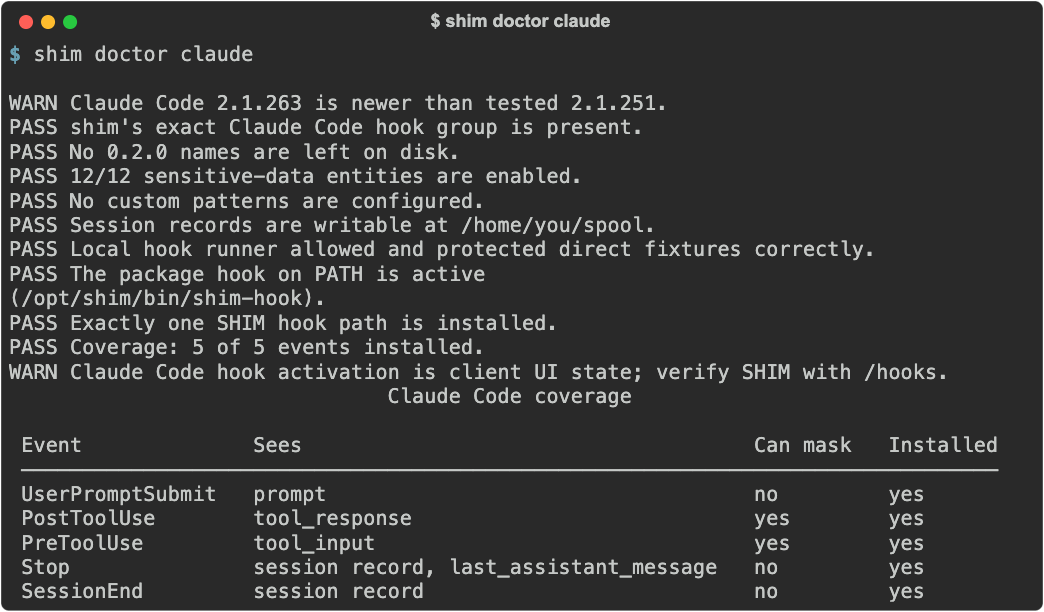
Hook output is asserted byte for byte, not by shape: a safe event must produce exactly zero bytes on stdout and stderr. 428 contract tests hold that, plus the import boundaries, the rule that no committed file carries the machine it was written on, and a byte-identical rebuild of the shipped plugin archive.
The detector scores 1.0 precision and recall on that corpus, and the metrics file states in the same breath why that is a weaker claim than it looks: synthetic fixture-bound evidence only; not a real-world statistical claim. A perfect score on a corpus you wrote is a regression guard, not a measurement of the world.
Three things were learned by running the tool against a live client rather than reasoning about it, and each one changed the code:
- One working request carried 4,402 text fields across 35 levels of nesting,
the depth coming from an MCP tool's recursive JSON schema. The hook's own
traversal stops at 24, so
shim watchcarries its own budget. - The tools array was 88% of the input tokens on a real session, before a single line of the user's own code.
- Claude Code's
Stopevent hands the hook only the turn's last text block, so anything the model said before a tool call in the same turn is not counted there.shim watchsees all of it.
Tested client versions, captured fixtures and the full evidence table are in Compatibility.
In this order, because each step needs the one before it:
shim revert claude          # once per client you installed
shim ledger purge           # only if you turned the ledger on (shim ledger show reads it)
uv tool uninstall shim      # or: pipx uninstall shim
rm -r ~/.config/shim        # your settings, if you want them gone too
If you also used the Claude Code plugin, remove it with
/plugin uninstall shim-cli@shim-cli; for VS Code, delete the
chat.pluginLocations entry and the folder you cloned.
shim revert removes only shim's own hook group and leaves every other hook in
the file in place, though it writes the file back as 2-space JSON and leaves a
settings file it created itself as {}; for Copilot it also deletes the hook
file, which is shim's alone. shim ledger purge deletes the retained records —
skip it and they age out after 30 days on their own. Uninstalling the package
leaves
~/.config/shim/config.toml in place, which is why the last line is separate:
reinstalling later finds your entity choices and custom patterns still there.
A few files can outlast the package. shim ledger purge leaves the empty
ledger folder, ~/.local/state/shim (or $XDG_STATE_HOME/shim). Codex,
GitHub Copilot CLI and VS Code send no session-end event, so their session
records and any copies of withheld prompts stay in your temporary folder until
the operating
system clears it. To remove them now:
rm -rf ~/.local/state/shim "${TMPDIR:-/tmp}"/shim-session-* "${TMPDIR:-/tmp}"/shim-redacted-*In a script, shim ledger purge --yes skips the question.
shim watch needs no uninstall: it edits nothing, so there is nothing to undo.
- llms.txt — the documentation map that agents and Context7 read
- Command reference — every command, flag and exit code
- Cookbook — recipes for getting more out of it once it runs
- Architecture
- Compatibility
- Privacy
- 1.2.0 release notes
- 1.1.2 release notes
- 1.1.1 release notes
- 1.1.0 release notes
- 1.0.3 release notes
- 1.0.2 release notes
- 1.0.1 release notes
- 1.0.0 release notes
- 0.3.3 release notes
- 0.3.2 release notes
- 0.3.1 release notes
- 0.3.0 release notes
- 0.2.0 release notes
- Contributing
- Security policy
Clone the shim-cli repository and run the complete local check from its root:
git clone https://github.com/GetSHIM/shim-cli.git
cd shim-cli
python scripts/check.pyApache-2.0. See LICENSE.