




External runtime safety supervision for MLX workloads on Apple Silicon.
mlx-guard runs any command under a memory limit and a time limit that you choose, from outside the
process. It stops a job that passes your limit, which lowers the chance that one runaway run takes
the Mac down. It leaves a report that says what happened and why.
Contents: example · install · quick start · when a run stops · limits · documentation · MetalGuard comparison
A runaway MLX run does not fail politely. Unified memory lets one training or generation process push the whole machine into a paging storm. A limit set inside that process shares the fate of the process it is supposed to stop.
mlx-guard supervises from outside. A small native parent launches your command in a process group
of its own. About twenty times a second by default, it adds up the memory footprint macOS charges to
every process in that group. When the total crosses your limit, the parent can first ask the
workload to save a checkpoint. It then sends TERM, then KILL, and leaves a crash-resilient JSON
report. The enforcement loop never runs inside Python or the MLX process. The workload needs no
changes to be supervised; only the optional checkpoint takes a few lines in the worker.
It is for MLX work you launch and do not watch: fine-tunes, generation batches, benchmarks, servers, shell scripts. It does not fix a leak for you, and it cannot stop a kernel or driver failure; Limits lists what it cannot do.
Version 0.3 is an alpha release. The stability table says which surfaces may still change before 1.0. If you already use MetalGuard, the two tools guard against different failures and work together; the comparison is near the end of this page.
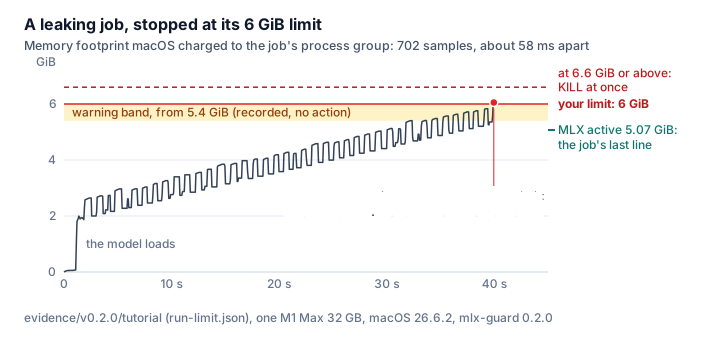
A document summarizer with a memory leak runs under a 6 GiB limit on an M1 Max. The figure is drawn from the report that run produced: every footprint sample, the warning band, the limit, and the moment the supervisor sent TERM.
The transcript is abridged from the
tutorial, which records the whole
session. The report is committed with the
tutorial bundle, and
scripts/render_limit_figure.py redraws the figure from it. Everything after -- is the job's
own command line; this run switched the job's checkpoints off.
$ mlx-guard run --max-footprint 6GiB --wall-time 10m --report reports/run-limit.json -- python examples/tutorial/summarize_docs.py --no-checkpoint --progress reports/run-limit-progress.json
mlx-guard: enforcing a 6442450944-byte footprint limit; emergency KILL at 7086696038 bytes, about 10% above the limit
71 pages, 71 to do, keep_caches=True
page 1/71 in 1.2s; mlx active 1.79 GiB; caches held 1
...
page 39/71 in 1.0s; mlx active 4.99 GiB; caches held 39
page 40/71 in 0.8s; mlx active 5.07 GiB; caches held 40
mlx-guard: policy_intervention at 40016ms; 702 samples, 1 signal
$ echo $?
75
Forty seconds in, two consecutive samples were at or above the limit. The supervisor sent SIGTERM
to the whole process group. The command exited 75, the code reserved for a policy intervention. An
excerpt of the report says the same thing in a form a script can read:
"outcome": {
  "at_ms": 40016,
  "kind": "policy_intervention",
  "final_footprint_bytes": { "status": "available", "value": 6499453256 },
  "child_status": { "status": "signaled", "signal": 15 }
},
"signals": [
  { "at_ms": 39964, "signal": 15, "target": "owned_process_group", "result": "delivered", "reason": "footprint" }
],
"checkpoint": { "status": "not_negotiated", "reason": "footprint" }
The job's last line says 5.07 GiB under a 6 GiB limit, so why was it stopped? The job prints that figure once per page, about once a second. The supervisor took 702 samples in the same forty seconds. The footprint rises and falls by several hundred megabytes about once per page. In the last half second of the run it went from 5.26 GiB to 6.05 GiB. A counter the job reads at its own safe points misses the peaks between them. MLX's active-memory figure also leaves out its buffer cache, the Metal runtime and Python. The supervisor samples the operating system's number from outside on a 50 ms timer, whatever the job is doing.
pip install mlx-guardThe CLI also works without a Python project: uvx mlx-guard … runs it on demand, and
pipx install mlx-guard keeps it on your PATH.
Wheels are built for Apple Silicon with Python 3.10 through 3.14. They contain the precompiled
supervisor, so installing needs no Rust toolchain. Their macosx_11_0_arm64 tag is the build's
deployment target, not a runtime claim. The hardware and macOS builds with measured evidence are in
the compatibility matrix.
Building from source needs Rust 1.93 and maturin.
Measure first, then choose a limit, then enforce it. The measuring run is short, and it is where a wrong limit shows up cheaply.
-
Create an owner-only directory. Every run writes its report into it.
mkdir -m 700 reports
-
Observe a short, representative run. Observe mode samples the footprint and never intervenes.
mlx-guard observe --report reports/observe-1.json -- python train.py --epochs 1
Typed into a terminal, this prints one extra line: the command reads
/dev/nullinstead of the terminal, because a supervised command cannot take keyboard input. A file or a pipe on standard input (CI, cron,< data.txt) reaches the command unchanged. -
Choose a limit. Start from the peak in the report's
calibrationsection and add headroom for your workload; do not start from the machine's total memory. The calibration guide explains the procedure.The limit is not a ceiling. Two consecutive samples at or above it start the checkpoint and TERM path, and a sample about 10 % above it skips straight to KILL. After the first signal the job still holds its memory while it checkpoints and exits, a second or two by default. A job that only spikes above the limit for one sample at a time, by less than 10 %, is never stopped. Leave that room below what the machine can take.
-
Enforce the limit, with a wall-clock cap.
mlx-guard run --max-footprint 24GiB --wall-time 2h \
  --report reports/train.json -- python train.py --epochs 10
Use a new report name for every run. The owner-only journal beside the report is kept as recovery evidence, and you must archive or remove it before you reuse a report path.
from pathlib import Path

import mlx_guard

result = mlx_guard.run(
    mlx_guard.RunConfig(
        command=("python", "train.py"),
        report=Path("reports/train.json"),
        max_footprint_bytes=24 * 1024**3,
        wall_time_ms=2 * 60 * 60 * 1000,
    )
)
print(result.returncode, result.report.outcome.kind)
Commands are literal argument tuples and never pass through a shell. The supervisor inherits the
script's standard input; if that is a terminal, the command reads /dev/null instead and the
supervisor prints one line on stderr to say so. Since 0.2, if the process that launched the supervisor dies, the
supervised command is stopped with it. Pass on_parent_exit="detach" (or
--on-parent-exit detach) to let it keep running. The
Python API guide covers
incremental runs, cancellation, output capture, and the dependency-free CheckpointWorker
helper that lets a worker save state when the supervisor asks.
The exit code says which party ended the run, and the report says why. Start here when something went wrong.
| Exit code | What happened | What to do |
|---|---|---|
| The command's own code | The command ended by itself and nothing intervened | Nothing. The report holds the footprint samples (the latest 4,096 on a long run) and, for observe, the peak |
75 |
A policy intervention: usually the footprint limit, the wall-time cap, or the launching parent exiting. Rarer reasons, such as an ignored Ctrl-C, appear in signals[].reason |
Read outcome and signals[].reason in the report. For footprint, observe again, then fix the growth or raise the limit. If the job saves checkpoints, use checkpoint.request_id to find the saved state |
64 |
Invalid command or configuration, and nothing was launched | Fix the option the message names |
70 |
The supervisor failed, usually because it lost its measurements three samples in a row or could not deliver KILL. run sends TERM, then KILL; observe sends nothing |
First check whether the command is still alive: observe leaves it running, and a failed KILL may too. Then read signals and rerun. If it repeats, open an issue with the redacted report |
74 |
The report or journal could not be written. Before launch: the directory is missing or not owner-only, or the report path was already used. After launch: the run finished but the report is incomplete | Read the message. Use a new report name, or fix the directory (mkdir -m 700 reports) |
126, 127 |
The executable after -- was not runnable, or was not found |
Fix the command line |
128 + n |
The command was ended by signal n, for example a forwarded Ctrl-C |
Nothing, if you sent the signal |
A command may return a number the supervisor also uses. The report's outcome.kind always tells the
cases apart; the CLI contract has the
precedence rules and the
report reference defines every
field.
mlx-guard reduces risk. It is not a hard memory boundary.
-
It controls one process group, created for one trusted command run by the same user. A descendant that leaves the group leaves both the total and the reach of TERM and KILL. The report counts the escapes it notices, not every one.
-
Sampling is periodic and a tree total is not atomic, so a fast allocation can pass the limit before the next sample.
-
KILL does not make the Metal driver give memory back at once.
-
It never chooses a destructive limit for you.
-
It cannot act during a kernel or system-wide failure. One such failure has a name: the IOGPU driver bug that panics macOS 26.4 and later under Metal workloads (unfixed as of late August 2026). It can fire with the footprint well inside any limit, and no external supervisor can reach it. The compatibility matrix carries its signature, and MetalGuard works around that failure from inside the MLX process.
-
Not supported: a command that reads the keyboard (it gets
/dev/nullinstead), shell job control, sandboxed execution, and Mac App Store distribution. Direct CLI and Python-wheel distribution are the target.
Learn the tool:
| Document | Covers |
|---|---|
| Tutorial | One summarizer job with a memory leak, followed through observe, a limit, a checkpoint, a resume, and the fix |
| Examples | The shortest working commands, with one captured run |
| Observe and calibration | Advisory system metrics, pre-launch warnings, choosing a limit |
Supervise your own workload:
| Document | Covers |
|---|---|
| Wrap a command | Supervising a command-line workload with no adapter, from bare to a forced intervention |
| Python API | Typed configuration, incremental runs, cancellation, report loading, worker checkpoints |
| Python adapter pattern | Supervising a workload your own library launches, with a cooperative checkpoint and a resume key |
| mlx-train-perf integration | Optional external supervision for its runner, keeping the direct-launch fallback |
| Python packaging | Wheel support, native-binary discovery, editable installs, sdist policy |
Look up a contract. There is one per subsystem, and a behavior change updates the matching document in the same release:
| Contract | Defines |
|---|---|
| CLI | Unit grammar, exit codes, signal rules, what the command gets on standard input |
| Policy | Thresholds, measurement quality, checkpoint evidence, escalation timelines |
| Reports and privacy | Schema v1 and default redaction |
| Footprint sampling | Measurement windows, freshness, partial results, sleep/wake behavior |
| Process control | The owned group, direct exec, signal targets |
| Identity and containment | PID reuse, descendant discovery, escape evidence, cleanup limits |
| Checkpoint protocol | FD-only readiness, nonce-bound frames, deadlines, redacted acknowledgements |
| Intervention execution | Action targets, policy-owned deadlines, typed failures, post-action observation |
Understand the design. The two papers are published at ineshin.space with
the rest of my Apple Silicon work. Their source Markdown lives under docs/papers/.
| Document | Covers |
|---|---|
| Why the memory limit must live outside the process | Why an in-process cap shares the fate of the process it guards, what macOS gives a supervisor in place of cgroups, and what external supervision still cannot promise |
| Measuring a macOS process tree honestly | Which OS signal a supervisor can act on, why a PID is not an identity, and why a partial total must never trigger a limit |
| Threat model | Trust boundaries and supported failures |
| Stability | What may still change before 1.0, how, and what freezes |
Check support and evidence:
| Document | Covers |
|---|---|
| Support matrix | Supported platforms and release boundaries |
| Compatibility matrix | Which hardware setups have measured evidence, which are untested, and how to fill a cell |
| M1 Max 32 GB evidence | Raw 0.2 accuracy, timing, endurance, lifecycle, false-intervention, and escalation-envelope measurements |
| Security policy | Vulnerability reporting |
| Changelog | What changed in each release |
Rust 1.93 is pinned in rust-toolchain.toml. The workspace contains the native supervisor, the core
platform and policy library, and hard-bounded real-process fixtures. Full local verification needs
cargo-audit; artifact and Metal scripts use the baseline macOS command-line tools. The release
workflow installs its locked cargo-audit version.
./scripts/test-fast.sh          # formatting, Clippy, and all Rust tests
./scripts/test-full.sh          # fast suite plus RustSec and dependency policy
./scripts/test-metal-fixture.sh # 4 KiB Metal worker on macOS
./scripts/test-wheel.sh         # macOS arm64 wheel across Python 3.10 through 3.14
./scripts/build-release.sh dist # wheel, sdist, SBOM, and SHA-256 manifest
The main suite runs on macOS and Linux. The Metal test compiles Objective-C with warnings denied and uses a 4 KiB shared buffer for no more than five seconds. Synthetic allocation fixtures reject more than 128 MiB or ten seconds before doing work. The Metal fixture also arms a six-second process alarm so device setup or a wedged command wait cannot hang the test indefinitely.
Both projects exist because MLX work can take a whole Mac down. They go after different failures from different places.
| MetalGuard | mlx-guard | |
|---|---|---|
| The failure it goes after | The Apple GPU driver bug that kernel-panics the whole Mac during MLX work. It avoids the known triggers, and after a panic it explains the report and holds new runs back for a cooldown | One command whose memory footprint or run time gets out of hand: a leak, a paging storm, a stuck job |
| Where it runs | Mostly inside your Python process, as a library around the MLX code you write. It also ships a CLI, an optional shell guard that pauses MLX launches during a cooldown, and a runner that puts MLX in a child process | Outside, as a separate native parent of any command |
| What it measures | For its memory-headroom checks, mx.metal.get_active_memory(), with vm_stat system totals as fallback |
The phys_footprint macOS accounts to each process in the owned group, summed |
| What it needs from you | Import it and route model loads, unloads and inference through its gates, or install the shell guard | Nothing inside the workload: a command line and a byte limit |
| When things go wrong | Load and unload checks, OOM catch and retry, crash-burst and kernel-panic cooldowns, panic postmortems, a registry of known-panic models | An optional cooperative checkpoint request, then TERM and KILL against the explicit limit, plus a redacted JSON report and, after a checkpoint, a resume key |
| Across runs | Remembers load cadence and panic history, with a circuit breaker and a lockout that survive a reboot | Remembers nothing: each run stands alone and hands over one report |
| Fits | MLX apps, servers and pipelines that load and unload models and want panic avoidance and recovery built in | Trainers, servers, benches, shell scripts, anything you can launch, in any language |
Running both is reasonable. MetalGuard keeps the workload healthy from the inside and is the only one of the two that does anything about the driver panic. mlx-guard is the outer ring for the case where the process itself can no longer be trusted. A limit set inside a process shares that process's fate.
An outside, OS-accounted number also cross-checks the in-process counters. The run at the top of this page was stopped at 6.05 GiB when the last figure the job had printed was 5.07 GiB. MetalGuard's maintainer also notes that in-process counters may not see every allocation. He reviewed this boundary and called the projects complementary, with no overlapping code (metal-guard #7). The measurement and cooldown details in the table follow his description there.
More MLX tooling for Apple Silicon by the same author:
- mlx-train-perf: fused, logit-free linear-cross-entropy loss, RAM-fit planner, and benchmark harness for MLX fine-tuning; the first integration target for external supervision (guide above).
- mlx-model-doctor: validate an MLX / Hugging Face model repository before you load it.
- mlx-quant-fidelity: measure what quantization costs: KL divergence, perplexity, and top-token agreement for KV cache and weights.
- mlx-teacache: TeaCache step-skipping for FLUX, Qwen-Image, and Z-Image diffusion in pure MLX.
- mlx-taef: tiny autoencoders (TAESD family) for live previews and low-memory latent decode for FLUX and SD models.
Independent community project; not affiliated with or endorsed by Apple.
Apache License 2.0. The licence permits commercial use without royalties or mandatory payment. Commercial opportunities, if the project earns adoption, are support, integration, hosted observability, and enterprise services around the open-source core. Bundled dependency terms are listed in THIRD_PARTY_LICENSES.md.