Repository navigation
menuShouldScrollIntoView does not scroll all menu into view #4615
Description

React-select with menuShouldScrollIntoView set to true does not scrolled into view properly.
Although menu is scrolled into view, last options are still invisible.
On the screenshot below, only option 1 to 4 is visible and options 5 and 6 are not. Parent size is expanded to accommodate full menu and parent can be scrolled manually to see full menu.
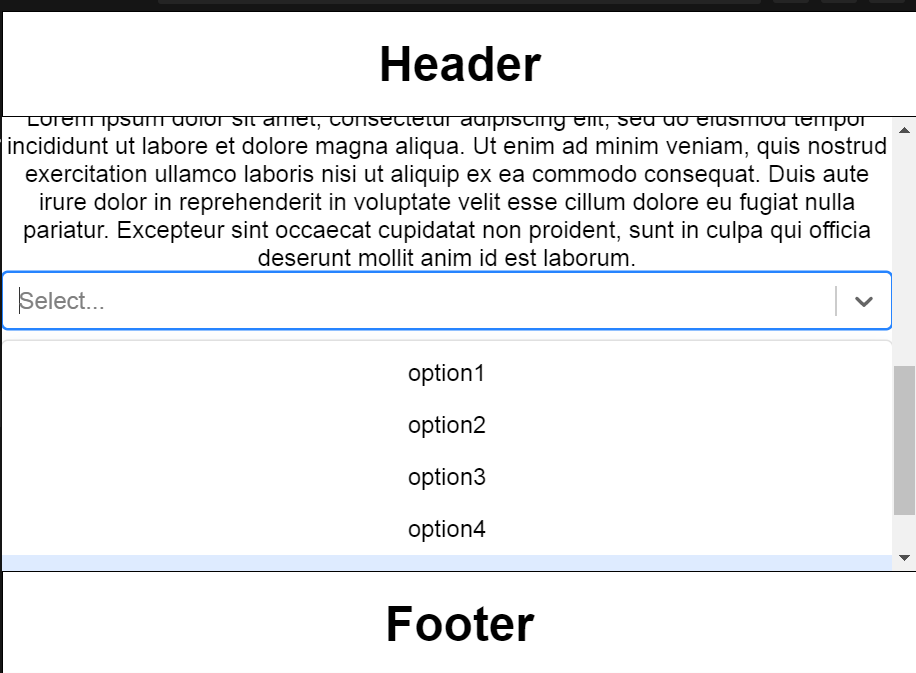
Sandbox is here https://codesandbox.io/s/reactselectscrollintoview-44b7n
To reproduce:
- Make sure, that react select is located at the very bottom of the window, Just above the footer. There should be no empty space between react-select and footer. (it may be required to decrease browser window size)
- Open react-select.
- Observe, that although container has been scrolled down, it is not scrolled down enough to include all options. To see last options, manual scrolling of the container is required.
Expected result: container is scrolled to accommodate all options.
Also, if header and footer will not be present, parent will be scrolled properly.
Reacted by Igor Baesse de Araujo, Rahul Kurumkar, Ryan Conry, Christian Castillejo, Jairo Odeli Junior and Michael Hays
Activity
ChristianCastillejo commentedon Jun 16, 2021
You can check this solution.
Hope it works for you 💚
luizpaulo165 commentedon Sep 23, 2021
Work for me! Thank you!
irshatharis commentedon Oct 10, 2024
For the future people.
menuShouldScrollIntoViewdoesn't always work, especially if there is a re-render. To fix this, memoize thevalueandoptionsprops when addingmenuShouldScrollIntoView.