Repository navigation
Cannot create new stack #4
Description

Honestly speaking, it's my first experience with this exact action and with Actions in general, so maybe I'm just doing something wrong.
Reason why I chooses your action among others — it supports both TokenAuth and stack creation with file from GIT address.
So, the situation:
I'm trying to push a set of parameters to my Portainer BE v2.17.1 launched on Synology, to create a new stack based on docker-compose.yml stored in my repo, that Portainer have to retrieve.
Already tried the same operation with Portainer's web interface with same user account — worked fine.
Tried with this config from GitHub Actions:
steps:
      - name: portainer
        uses: LGinC/portainer-stack-deploy@master
        with:
          serverurl: ${{ secrets.SYNOLOGY_PORTAINER_URL }}
          access_token: ${{ secrets.SYNOLOGY_PORTAINER_TOKEN }}
          endpointId: 2
          stackname: test-stack
          docker_compose_path: test-stack/docker-compose.yml
          repo_username: ${{ secrets.COMMON_GIT_USERNAME }}
          repo_password: ${{ secrets.SYNOLOGY_PORTAINER_GIT_ACCESS }}
Receiving this error:
Run LGinC/portainer-stack-deploy@master
with:
serverurl: ***
access_token: ***
endpointId: 2
stackname: test-stack
docker_compose_path: test-stack/docker-compose.yml
repo_username: ***
repo_password: ***
/usr/bin/docker run --name ghcriolgincportainerstackdeploy_436ca4 --label 6c0442 --workdir /github/workspace --rm -e "INPUT_SERVERURL" -e "INPUT_ACCESS_TOKEN" -e "INPUT_ENDPOINTID" -e "INPUT_STACKNAME" -e "INPUT_DOCKER_COMPOSE_PATH" -e "INPUT_REPO_USERNAME" -e "INPUT_REPO_PASSWORD" -e "INPUT_USERNAME" -e "INPUT_PASSWORD" -e "INPUT_IMAGENAMES" -e "INPUT_ENV" -e "INPUT_VARIABLES" -e "INPUT_DOCKER_COMPOSE" -e "HOME" -e "GITHUB_JOB" -e "GITHUB_REF" -e "GITHUB_SHA" -e "GITHUB_REPOSITORY" -e "GITHUB_REPOSITORY_OWNER" -e "GITHUB_REPOSITORY_OWNER_ID" -e "GITHUB_RUN_ID" -e "GITHUB_RUN_NUMBER" -e "GITHUB_RETENTION_DAYS" -e "GITHUB_RUN_ATTEMPT" -e "GITHUB_REPOSITORY_ID" -e "GITHUB_ACTOR_ID" -e "GITHUB_ACTOR" -e "GITHUB_TRIGGERING_ACTOR" -e "GITHUB_WORKFLOW" -e "GITHUB_HEAD_REF" -e "GITHUB_BASE_REF" -e "GITHUB_EVENT_NAME" -e "GITHUB_SERVER_URL" -e "GITHUB_API_URL" -e "GITHUB_GRAPHQL_URL" -e "GITHUB_REF_NAME" -e "GITHUB_REF_PROTECTED" -e "GITHUB_REF_TYPE" -e "GITHUB_WORKFLOW_REF" -e "GITHUB_WORKFLOW_SHA" -e "GITHUB_WORKSPACE" -e "GITHUB_ACTION" -e "GITHUB_EVENT_PATH" -e "GITHUB_ACTION_REPOSITORY" -e "GITHUB_ACTION_REF" -e "GITHUB_PATH" -e "GITHUB_ENV" -e "GITHUB_STEP_SUMMARY" -e "GITHUB_STATE" -e "GITHUB_OUTPUT" -e "RUNNER_OS" -e "RUNNER_ARCH" -e "RUNNER_NAME" -e "RUNNER_TOOL_CACHE" -e "RUNNER_TEMP" -e "RUNNER_WORKSPACE" -e "ACTIONS_RUNTIME_URL" -e "ACTIONS_RUNTIME_TOKEN" -e "ACTIONS_CACHE_URL" -e GITHUB_ACTIONS=true -e CI=true -v "/var/run/docker.sock":"/var/run/docker.sock" -v "/home/runner/work/_temp/_github_home":"/github/home" -v "/home/runner/work/_temp/_github_workflow":"/github/workflow" -v "/home/runner/work/_temp/_runner_file_commands":"/github/file_commands" -v "/home/runner/work/test-repo/test-repo":"/github/workspace" ghcr.io/lginc/portainer-stack-deploy
create stack failed: Invalid request payload
thread 'main' panicked at 'create stack failed', src/main.rs:284:13
note: run withRUST_BACKTRACE=1environment variable to display a backtrace
Does Invalid request payload means that any of the passing parameters is wrong or missing?
Btw, it works (at least no errors reported) when the stack is already exist on Portainer.
Activity
3apa3a-b-ta3e commentedon Apr 14, 2023
Just tested a refreshing of already created stack with edited
docker-compose.yml— nope, it doesn't work, despite sayingupdate stack id: 9, update stack success.Redeploy wasn't triggered on Portainer side, stack settings are the same as previous.
LGinC commentedon Apr 15, 2023
fixed it, you can try again
LGinC commentedon Apr 15, 2023
if your repository is public, and you can remove
repo_usernameandrepo_password3apa3a-b-ta3e commentedon Apr 15, 2023
Thank you, I've tried the latest fix, it works differently, but still unexpectedly, I have to test more.
Creating stack from scratch is working fine when repo is public (
repo_usernameandrepo_passwordaren't supplied).But after changing a file specified at
docker_compose_pathand second commit a Portaner's stack becomes detached from GIT (and now looks like it was created with Editor option), but no stack settings were updated. Should a stack be deleted first and then redeployed as new one instead?Also on one update I've added a complex (long running) compose sequence (2-3 min), deployment step got response
'504 Gateway Timeout' for ***/api/stacks/9?endpointId=2and failed.LGinC commentedon Apr 16, 2023
github action runner node access your server timeout, maybe you can try again later
JoDrm commentedon Apr 18, 2023
Hello, i have the same issue, but the only difference is I work on private repository.
The error display is :
My configuration behind :
Btw, it works (at least no errors reported) when the stack is already exist on Portainer.
JoDrm commentedon Apr 20, 2023
After a lot of trying I managed to deploy new stack (from the private repository) by incorporating the
docker_composefield, which makes the created stacks detached from Github.When I try this time to create new stacks with the
docker_compose_pathfield with this config:I get this error:
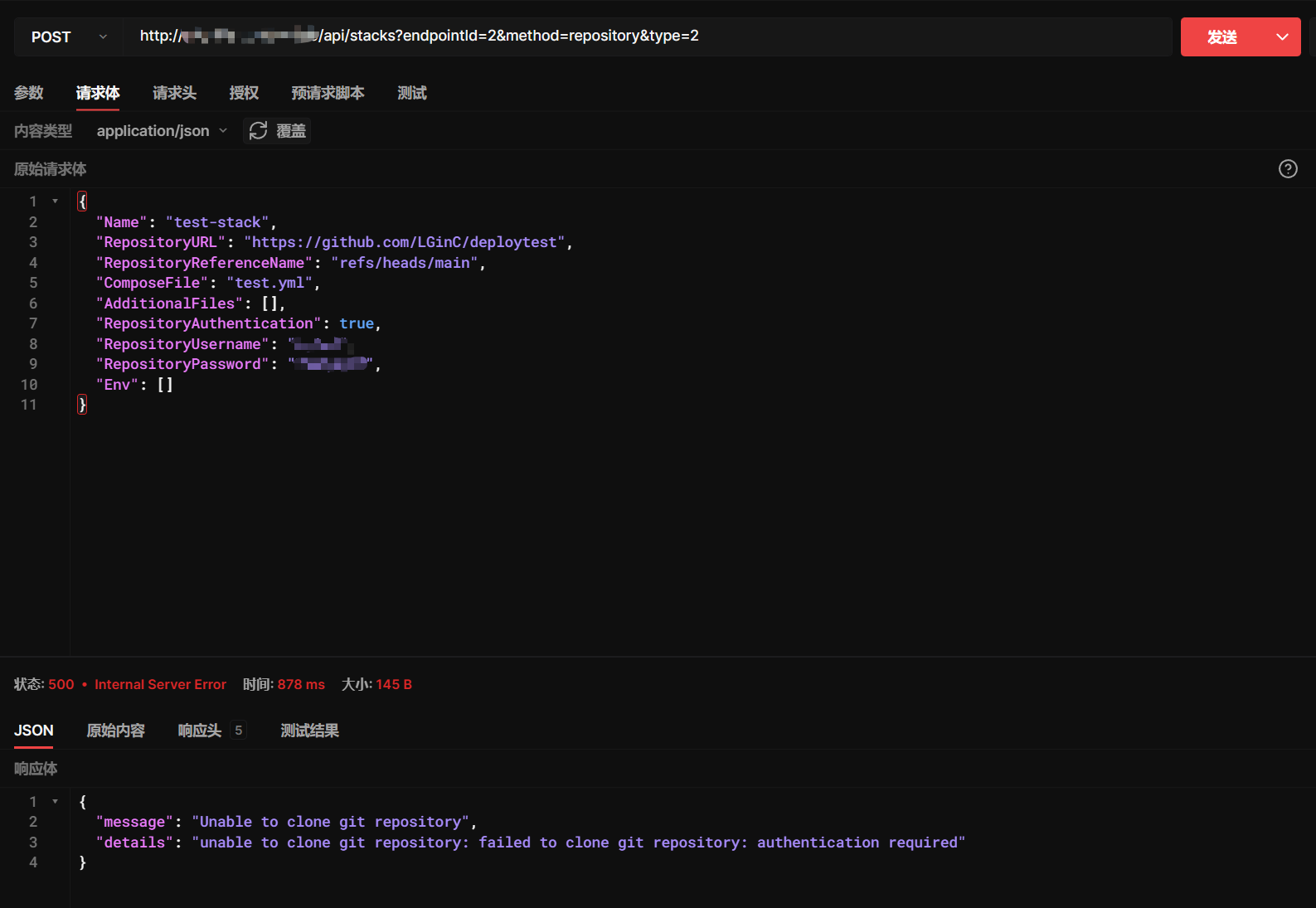
So I tried via the API to port directly with Postman with this body:
I have this time my new stack which is created and which is well linked to Github.
So what I understand is that if the stack does not exist it cannot be created from a private repository with the
docker_compose_pathparameter but it can be updated if it exists on Portainer beforehand.But also that with the
docker_composeparameter followed by the written docker compose we can create and update a stack (which is therefore not subsequently linked to Github).LGinC commentedon Apr 25, 2023
some problem occured when create stack in private repo

3apa3a-b-ta3e commentedon May 9, 2023
So you say that the problem is in Portainer API itself?