
Llaminar runs large language models on CPUs, NVIDIA GPUs, AMD GPUs, or a mix of all three. It is written in C++ and includes its own kernels for quantised models. You can serve a model from one machine or share the work across a cluster.
Give Llaminar a GGUF model and a context size, and its auto planner chooses how to use your hardware. You can start serving immediately, or save the plan to inspect and reuse it. Tensor parallelism, pipeline parallelism, and MoE expert placement let you make use of additional GPUs and CPU memory as your needs grow.
Llaminar is in alpha. Expect rough edges while development continues.
Release benchmarks · Quickstart · Documentation · Tested configurations · Planning and topology · Run a benchmark · Development · Architecture
Discord: https://discord.com/channels/1404857025854312528/1519609695793446979
The current builds target the following hardware:
| Hardware | Support |
|---|---|
| x86-64 CPUs | Separate AVX512-VNNI and AVX2 images |
| NVIDIA GPUs | CUDA sm86, initially tested on RTX 3090 |
| AMD GPUs | ROCm gfx906, including the Instinct MI50 |
You can combine supported CPUs and GPUs in the same deployment, including NVIDIA and AMD cards together. The recipes below show the configurations covered by our end-to-end tests.
Use a GGUF file from one of these supported model families:
- Qwen 2.5 (dense)
- Qwen 3 (dense)
- Qwen 3.5/3.6 (dense and MoE), including Qwen 3.8 dense GGUFs
The tested examples below include Qwen 3.8 27B, Qwen 3.6 MoE 35B, Ornith 1.5 MoE 35B, and Qwen 3.5 MoE 122B.
The latest release includes HTTP end-to-end test certificates and benchmark certificates for both the AVX512 and AVX2 images. The chart below shows that release's measured results.
Prefill is how quickly the model reads your prompt. Decode is how quickly it writes the answer. Both are measured in tokens per second; higher is faster. Click the chart to download the full-size SVG.
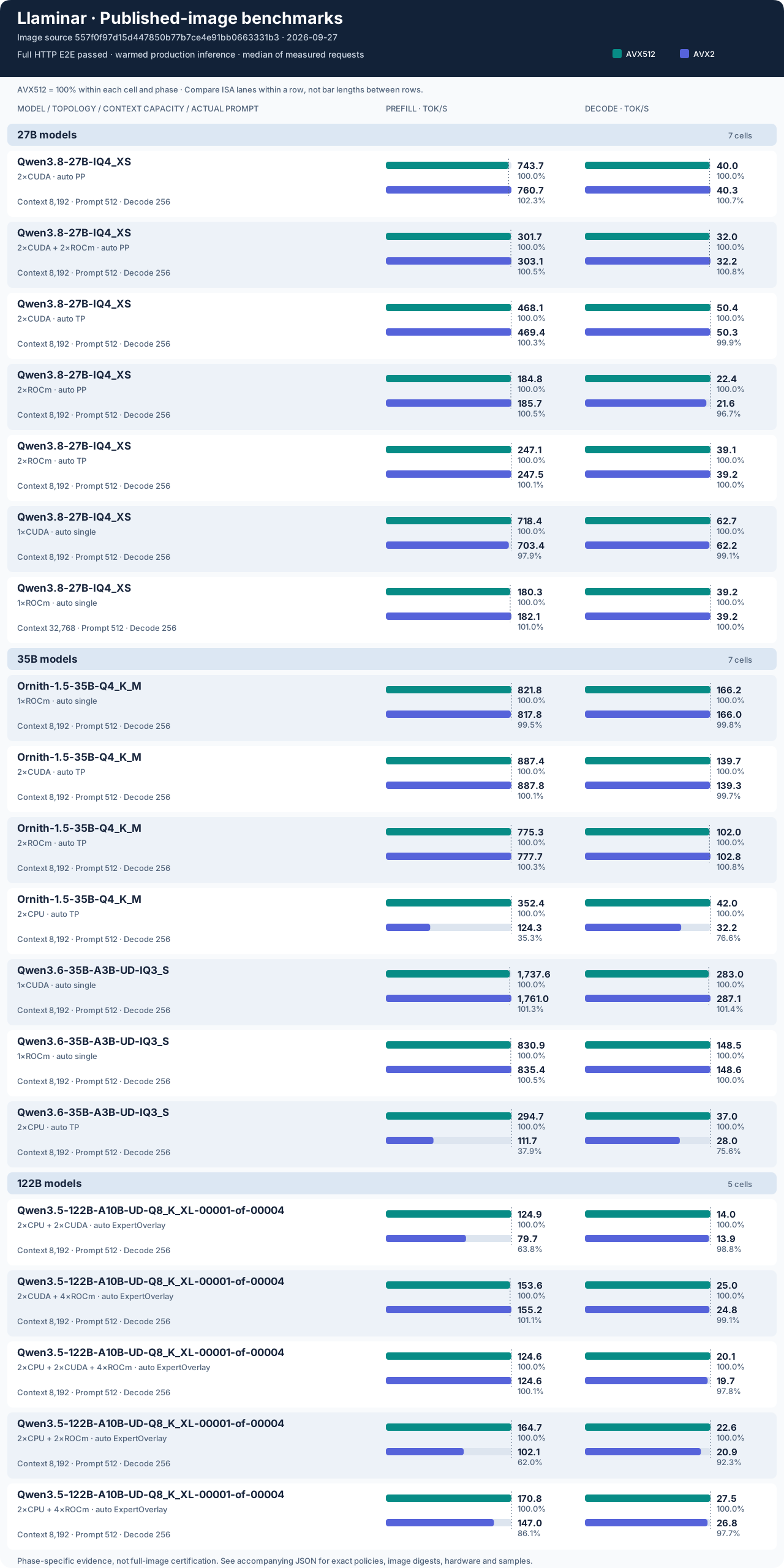
Each pair of bars compares the two CPU builds on the same model and hardware. Use the printed token rates to compare different configurations: each pair has its own scale, with AVX512 as the reference. The chart also lists the prompt and output lengths used for each measurement.
Release notes and test reports · Detailed results and image digests (JSON) · Benchmark your own hardware
The easiest way to get started is with Docker. You will need a Linux x86-64 machine, a supported GGUF model, and enough RAM or GPU memory to hold it. The image includes Llaminar and its runtime libraries. Install your GPU's driver on the host and download the model separately.
The three steps below start an OpenAI-compatible HTTP server. Run the setup commands in the same Bash terminal so their variables stay available.
Choose the image that matches your CPU, even if you will run inference on a GPU. Both images support CPU, NVIDIA, and AMD execution. If your CPU does not support AVX512-VNNI, use the AVX2 image.
| Host CPU | Certified release (default) | Nightly development |
|---|---|---|
| AVX512-VNNI | ghcr.io/llaminar/llaminar:master |
ghcr.io/llaminar/llaminar:develop |
| AVX2 | ghcr.io/llaminar/llaminar:master-avx2 |
ghcr.io/llaminar/llaminar:develop-avx2 |
Use master for the latest tested release. The optional develop tags provide
nightly builds with newer changes; they pass unit and integration preflight
tests but have not completed release certification. These tags move as new
images are published. To keep a deployment on one version, use a dated release
tag or image digest from the release notes.
Set MODEL_DIR to the folder where you downloaded your model. Docker makes
that folder available as /models inside the container, so LLAMINAR_MODEL
uses the same filename with a /models/ prefix. Replace the example filename
with your own GGUF.
export MODEL_DIR=/opt/llaminar-models
export LLAMINAR_MODEL=/models/Qwen3.8-27B-IQ4_XS.gguf
export LLAMINAR_IMAGE=ghcr.io/llaminar/llaminar:master
# For an AVX2 host, use ghcr.io/llaminar/llaminar:master-avx2 instead.
# For a nightly build, use the corresponding develop tag in the table above.

docker pull "$LLAMINAR_IMAGE"

COMMON_RUN=(
  --network host
  --shm-size=16g
  --security-opt seccomp=unconfined
  --cap-add SYS_NICE
  -v "$MODEL_DIR:/models:ro"
)
COMMON_RUN holds the Docker options shared by the examples below, including
the model folder and the network settings.
Expand the option that matches your machine and run its setup commands. These give the container access to your GPUs; Llaminar will decide how to use them when it loads the model.
NVIDIA GPUs (CUDA)
Use this on a host with the NVIDIA driver and NVIDIA Container Toolkit installed.
DEVICE_ARGS=(--gpus all)AMD GPUs (ROCm), or a mix of AMD and NVIDIA GPUs
This exposes the AMD GPU devices and gives the container access to their device groups. The group IDs are read from your host automatically.
DEVICE_ARGS=(--device=/dev/kfd --device=/dev/dri --cap-add SYS_PTRACE)
for node in /dev/kfd /dev/dri/card* /dev/dri/renderD*; do
  if [[ -e "$node" ]]; then
    DEVICE_ARGS+=(--group-add "$(stat -c '%g' "$node")")
  fi
done
If the same machine also has NVIDIA GPUs, add access to those after running the AMD block:
DEVICE_ARGS+=(--gpus all)CPU only
The same image works without GPU drivers. No device mappings are needed:
DEVICE_ARGS=()Host setup and container permissions
Install Docker Engine first.
NVIDIA hosts need a compatible driver and the
NVIDIA Container Toolkit.
AMD hosts need the AMDGPU kernel driver and accessible /dev/kfd and /dev/dri
nodes; see ROCm container setup.
The image supplies the user-space GPU libraries; their pinned versions live in
the Dockerfile and its install scripts.
The image runs as a non-root user. The AMD block supplies the host's actual
device-group IDs instead of assuming a particular render or video GID.
SYS_NICE and the seccomp setting permit NUMA/placement operations;
SYS_PTRACE is included for ROCm runtime access. Normal launches do not need
--privileged.
The examples use host networking and a private 16 GiB shared-memory allowance
for MPI/GPU collectives. Do not add Docker -p port mappings with host networking,
or combine --ipc=host with --shm-size expecting it to resize the host's memory.
docker run --rm "${COMMON_RUN[@]}" "${DEVICE_ARGS[@]}" \
  --name llaminar "$LLAMINAR_IMAGE" serve \
  -m "$LLAMINAR_MODEL" --context-length 8192 \
  --host 127.0.0.1 --port 8080
Llaminar checks the model and available memory, then chooses a device layout automatically. The server stays in the foreground so you can see its startup progress. The 8,192-token context allows room for both your prompt and the generated answer.
You can add these options to the command when you need them:
| What you want | What to add or change |
|---|---|
| Use only AMD, NVIDIA, or CPU compute | --only-backends rocm, cuda, or cpu |
| Allow a longer conversation | Increase --context-length, within available memory |
| Enable multi-token prediction (MTP) | Add --mtp --mtp-depth-policy dynamic; the GGUF must include MTP weights |
| Connect from another machine | Change to --host 0.0.0.0 and use the server's IP address |
MTP lets the model propose and verify several output tokens at a time. Dynamic depth adapts how many it proposes. It works with both ordinary temperature-based chat sampling and greedy requests; you do not need an extra verification flag. Prefix caching, which reuses work from previous prompts, is enabled by default. If you expose the server to other machines, use a trusted network or an authenticated proxy.
Head placement is automatic too: CPU tensor-parallel execution splits the
vocabulary projection across participants; CUDA and ROCm keep a mirrored head.
For experiments, --mtp-terminal-head-policy vocabulary-sharded or
--mtp-terminal-head-policy mirrored-full-vocabulary overrides that choice.
Wait for the server to become ready, then use another terminal:
curl --fail http://127.0.0.1:8080/health

curl --fail-with-body --no-buffer http://127.0.0.1:8080/v1/chat/completions \
  -H 'Content-Type: application/json' \
  -d '{
    "messages": [{"role":"user","content":"Explain tensor parallelism in two sentences."}],
    "max_tokens": 128,
    "temperature": 0,
    "enable_thinking": false,
    "stream": true
  }'
The answer streams back as it is generated. Remove "stream": true if you
prefer to receive one complete JSON response.
For OpenAI-compatible apps, set the base URL to http://127.0.0.1:8080/v1.
You can query http://127.0.0.1:8080/v1/models to find the loaded model's name.
Stop the server with Ctrl+C, or run docker stop llaminar from another terminal
before trying another example on the same devices.
You can ask Llaminar to show its choice before starting a server. The plan
command checks your hardware and saves the selected layout to a JSON file.
Later, serve --config uses that layout without repeating the search.
Using the variables from Quickstart, create a plan, copy it out of the container, and start a server from it:
docker run "${COMMON_RUN[@]}" "${DEVICE_ARGS[@]}" \
  --name llaminar-plan "$LLAMINAR_IMAGE" plan \
  -m "$LLAMINAR_MODEL" --context-length 8192 \
  --output /tmp/llaminar-plan.json

docker cp llaminar-plan:/tmp/llaminar-plan.json ./llaminar-plan.json
docker rm llaminar-plan

docker run --rm "${COMMON_RUN[@]}" "${DEVICE_ARGS[@]}" \
  -v "$PWD/llaminar-plan.json:/config/plan.json:ro" \
  "$LLAMINAR_IMAGE" serve --config /config/plan.json
The planning container is kept until docker cp has retrieved the file, then
removed. You can open llaminar-plan.json to review the selection before
running the final command.
Use the same context size, KV-cache precision, and MTP settings when planning
and serving: each affects how much memory the model needs. To guide the
planner, add any of these options to plan or to an automatic serve command:
| Intent | Option |
|---|---|
| Only ROCm compute | --only-backends rocm |
| Exactly two ROCm devices, with automatic placement | --only-backends rocm --auto-device-counts rocm=2 |
| Consider only tensor or pipeline parallelism | --only-strategies tp,pp |
| Prefer AMD when two choices have similar estimated performance | --prefer-backend rocm |
| Optimize for roughly 512 prompt tokens and 384 output tokens | --plan-workload 512,384 |
| Require compute on every discovered host | --auto-hosts all |
Auto may choose fewer devices if it expects them to be faster. Set
--auto-device-counts when you want an exact count; otherwise leave it out.
For CPUs, a device count means NUMA nodes: groups of CPU cores with their own
local memory, often one per socket. It does not mean a thread count.
--plan-workload helps estimate performance for your expected request size;
it does not send a prompt or limit the output. You can
benchmark the selected layout to see how it performs in practice.
Choosing a parallelism strategy
| Strategy | How the work is shared |
|---|---|
| Single device | One GPU or CPU NUMA node runs the model. |
| Tensor parallelism (TP) | Devices work together on each layer, each computing part of it. |
| Pipeline parallelism (PP) | Devices run different consecutive sections of the model's layers. |
| ExpertOverlay | An MoE model's experts are spread across device groups, which can include both GPUs and CPUs. |
For most uses, let auto choose the strategy too. The recipes below constrain it so you can try a particular tested configuration.
One naming detail matters when you supply --only-strategies: a group of
same-vendor devices running MoE is listed as tp by the planner, although its
experts use ExpertOverlay. The two-GPU MoE recipes use that spelling. The
expert-overlay filter selects layouts with separate expert groups or tiers.
Auto filters guide a new selection. When using --config or specifying devices
and tiers yourself, omit those filters because the placement is already given.
Choose your model, then expand the hardware configuration you want to try. There is an example for every configuration in our HTTP end-to-end (E2E) test suite, plus the remote CPU tests. Each local command starts one server using the image and Docker options you set up in Quickstart.
Before running a recipe, download its named GGUF into MODEL_DIR and select
the matching NVIDIA, AMD, mixed-GPU, or CPU-only DEVICE_ARGS setup. All
examples use dynamic MTP and FP16 KV-cache storage. Multi-device MoE examples
also enable dynamic expert movement, so busy experts can move between devices
as demand changes. Model activations remain FP32.
The commands ask auto to use a particular device count and strategy. The planner still chooses the individual devices, how layers or experts are distributed, and how much memory each group can use. If the requested layout does not fit, it reports the problem. For unrestricted selection, use the shorter Quickstart command.
These are serving examples for the tested layouts. The test runner supplies its own prompts and checks when certifying a release.
Start with one GPU if the model fits. The multi-GPU examples let you try splitting work within each layer (TP) or placing different layers on different GPUs (PP). They use an 8K context; the single-ROCm example uses 32K.
1 CUDA GPU · 8K context
Run the entire model on one NVIDIA GPU. This avoids the cost of exchanging intermediate results between GPUs.
docker run --rm "${COMMON_RUN[@]}" "${DEVICE_ARGS[@]}" "$LLAMINAR_IMAGE" serve \
  -m /models/Qwen3.8-27B-IQ4_XS.gguf --context-length 8192 \
  --auto --only-backends cuda --auto-device-counts cuda=1 \
  --only-strategies single --kv-cache-precision fp16 \
  --mtp --mtp-depth-policy dynamic
1 ROCm GPU · 32K context
Run the entire model on one AMD GPU with room for a longer conversation. This 32K configuration is tested on a 32 GB MI50.
docker run --rm "${COMMON_RUN[@]}" "${DEVICE_ARGS[@]}" "$LLAMINAR_IMAGE" serve \
  -m /models/Qwen3.8-27B-IQ4_XS.gguf --context-length 32768 \
  --auto --only-backends rocm --auto-device-counts rocm=1 \
  --only-strategies single --kv-cache-precision fp16 \
  --mtp --mtp-depth-policy dynamic
2 CUDA GPUs · tensor parallel
Both NVIDIA GPUs work on each model layer together. The planner chooses two available cards and divides the layer's tensors between them.
docker run --rm "${COMMON_RUN[@]}" "${DEVICE_ARGS[@]}" "$LLAMINAR_IMAGE" serve \
  -m /models/Qwen3.8-27B-IQ4_XS.gguf --context-length 8192 \
  --auto --only-backends cuda --auto-device-counts cuda=2 \
  --only-strategies tp --kv-cache-precision fp16 \
  --mtp --mtp-depth-policy dynamic
2 ROCm GPUs · tensor parallel
Both AMD GPUs work on each layer together, sharing intermediate results through ROCm's collective communication library.
docker run --rm "${COMMON_RUN[@]}" "${DEVICE_ARGS[@]}" "$LLAMINAR_IMAGE" serve \
  -m /models/Qwen3.8-27B-IQ4_XS.gguf --context-length 8192 \
  --auto --only-backends rocm --auto-device-counts rocm=2 \
  --only-strategies tp --kv-cache-precision fp16 \
  --mtp --mtp-depth-policy dynamic
2 CUDA GPUs · pipeline parallel
One NVIDIA GPU runs the earlier layers and the other runs the later layers. The planner chooses where to split the model.
docker run --rm "${COMMON_RUN[@]}" "${DEVICE_ARGS[@]}" "$LLAMINAR_IMAGE" serve \
  -m /models/Qwen3.8-27B-IQ4_XS.gguf --context-length 8192 \
  --auto --only-backends cuda --auto-device-counts cuda=2 \
  --only-strategies pp --kv-cache-precision fp16 \
  --mtp --mtp-depth-policy dynamic
2 ROCm GPUs · pipeline parallel
One AMD GPU runs the earlier layers and the other runs the later layers. The planner chooses where to split the model.
docker run --rm "${COMMON_RUN[@]}" "${DEVICE_ARGS[@]}" "$LLAMINAR_IMAGE" serve \
  -m /models/Qwen3.8-27B-IQ4_XS.gguf --context-length 8192 \
  --auto --only-backends rocm --auto-device-counts rocm=2 \
  --only-strategies pp --kv-cache-precision fp16 \
  --mtp --mtp-depth-policy dynamic
2 CUDA + 2 ROCm GPUs · combined tensor and pipeline parallelism
Use both GPU vendors in one deployment. The two NVIDIA cards cooperate on one section of the model and the two AMD cards cooperate on another. The planner chooses the layer split and the order of those sections.
docker run --rm "${COMMON_RUN[@]}" "${DEVICE_ARGS[@]}" "$LLAMINAR_IMAGE" serve \
  -m /models/Qwen3.8-27B-IQ4_XS.gguf --context-length 8192 \
  --auto --only-backends cuda,rocm \
  --auto-device-counts cuda=2,rocm=2 --only-strategies pp \
--kv-cache-precision fp16 --mtp --mtp-depth-policy dynamicThis mixture-of-experts (MoE) model uses a subset of its experts for each token. The GPU examples keep the model on one card. The CPU example shares experts across two NUMA nodes. All three use an 8K context.
1 CUDA GPU · whole model on one card
Run the model and all of its experts on one NVIDIA GPU, with dynamic MTP enabled.
docker run --rm "${COMMON_RUN[@]}" "${DEVICE_ARGS[@]}" "$LLAMINAR_IMAGE" serve \
  -m /models/Qwen3.6-35B-A3B-UD-IQ3_S.gguf --context-length 8192 \
  --auto --only-backends cuda --auto-device-counts cuda=1 \
  --only-strategies single --kv-cache-precision fp16 \
  --mtp --mtp-depth-policy dynamic
1 ROCm GPU · whole model on one card
Run the model and all of its experts on one AMD GPU, with dynamic MTP enabled.
docker run --rm "${COMMON_RUN[@]}" "${DEVICE_ARGS[@]}" "$LLAMINAR_IMAGE" serve \
  -m /models/Qwen3.6-35B-A3B-UD-IQ3_S.gguf --context-length 8192 \
  --auto --only-backends rocm --auto-device-counts rocm=1 \
  --only-strategies single --kv-cache-precision fp16 \
  --mtp --mtp-depth-policy dynamic
CPU only · 2 NUMA nodes, typically two sockets
Use both CPU NUMA nodes on the same machine, with one worker process per node.
Experts can move between them to spread the load more evenly. Select the
Quickstart's CPU-only setup (DEVICE_ARGS=()) before running this command.
docker run --rm "${COMMON_RUN[@]}" "${DEVICE_ARGS[@]}" "$LLAMINAR_IMAGE" serve \
  -m /models/Qwen3.6-35B-A3B-UD-IQ3_S.gguf --context-length 8192 \
  --mpi-procs 2 --auto --only-backends cpu \
  --auto-device-counts cpu=2 --only-strategies tp \
  --kv-cache-precision fp16 --mtp --mtp-depth-policy dynamic \
  --moe-routed-expert-owner-order ordinal --moe-residency-maintenance dynamic
Ornith is a fine-tune of the Qwen 3.6 MoE family. Download
Ornith-1.5-35B-Q4_K_M.gguf for these examples; they all use an 8K context.
1 ROCm GPU · whole model on one card
Keep Ornith and all of its experts on one AMD GPU. This is the simplest Ornith configuration in the test suite.
docker run --rm "${COMMON_RUN[@]}" "${DEVICE_ARGS[@]}" "$LLAMINAR_IMAGE" serve \
  -m /models/Ornith-1.5-35B-Q4_K_M.gguf --context-length 8192 \
  --auto --only-backends rocm --auto-device-counts rocm=1 \
  --only-strategies single --kv-cache-precision fp16 \
  --mtp --mtp-depth-policy dynamic
2 CUDA GPUs · experts shared across both cards
Spread Ornith's experts across two NVIDIA GPUs. Dynamic movement can rebalance
the experts as the workload changes. The planner calls this same-vendor layout
tp, which is why that option appears in the command.
docker run --rm "${COMMON_RUN[@]}" "${DEVICE_ARGS[@]}" "$LLAMINAR_IMAGE" serve \
  -m /models/Ornith-1.5-35B-Q4_K_M.gguf --context-length 8192 \
  --auto --only-backends cuda --auto-device-counts cuda=2 \
  --only-strategies tp --kv-cache-precision fp16 \
  --mtp --mtp-depth-policy dynamic \
  --moe-routed-expert-owner-order ordinal --moe-residency-maintenance dynamic
2 ROCm GPUs · experts shared across both cards
Spread Ornith's experts across two AMD GPUs, with dynamic movement to rebalance
their work. As in the NVIDIA example, the planner calls this layout tp.
docker run --rm "${COMMON_RUN[@]}" "${DEVICE_ARGS[@]}" "$LLAMINAR_IMAGE" serve \
  -m /models/Ornith-1.5-35B-Q4_K_M.gguf --context-length 8192 \
  --auto --only-backends rocm --auto-device-counts rocm=2 \
  --only-strategies tp --kv-cache-precision fp16 \
  --mtp --mtp-depth-policy dynamic \
  --moe-routed-expert-owner-order ordinal --moe-residency-maintenance dynamic
CPU only · 2 NUMA nodes, typically two sockets
Run Ornith across two CPU NUMA nodes on one machine. Each node has its own
worker process and local expert weights. Use the CPU-only setup
(DEVICE_ARGS=()) first.
docker run --rm "${COMMON_RUN[@]}" "${DEVICE_ARGS[@]}" "$LLAMINAR_IMAGE" serve \
  -m /models/Ornith-1.5-35B-Q4_K_M.gguf --context-length 8192 \
  --mpi-procs 2 --auto --only-backends cpu \
  --auto-device-counts cpu=2 --only-strategies tp \
  --kv-cache-precision fp16 --mtp --mtp-depth-policy dynamic \
--moe-routed-expert-owner-order ordinal --moe-residency-maintenance dynamicThis larger model is split across four GGUF files. Download all four
Qwen3.5-122B-A10B-UD-Q8_K_XL parts into MODEL_DIR and pass the first part
to -m, as shown below. Each recipe uses an 8K context and two MPI worker
processes on the same machine.
ExpertOverlay lets different groups of devices hold different experts. The planner chooses which group runs the main model and generates the answer (the continuation), then uses the other groups for additional expert work. It also sets their memory budgets. Dynamic movement can move frequently used experts to faster groups and balance the load within each group.
2 CUDA GPUs + 2 CPU NUMA nodes
Combine two NVIDIA GPUs with CPU memory and compute on both NUMA nodes. Choose the NVIDIA Docker setup; CPU access needs no additional device flags.
docker run --rm "${COMMON_RUN[@]}" "${DEVICE_ARGS[@]}" "$LLAMINAR_IMAGE" serve \
  -m /models/Qwen3.5-122B-A10B-UD-Q8_K_XL-00001-of-00004.gguf \
  --context-length 8192 --mpi-procs 2 --auto \
  --only-backends cuda,cpu --auto-device-counts cuda=2,cpu=2 \
  --only-strategies expert-overlay --kv-cache-precision fp16 \
  --mtp --mtp-depth-policy dynamic \
  --moe-routed-expert-owner-order ordinal --moe-residency-maintenance dynamic
2 ROCm GPUs + 2 CPU NUMA nodes
Combine two AMD GPUs with the two CPU NUMA nodes. Use the AMD Docker setup; the planner decides how many experts each group can hold.
docker run --rm "${COMMON_RUN[@]}" "${DEVICE_ARGS[@]}" "$LLAMINAR_IMAGE" serve \
  -m /models/Qwen3.5-122B-A10B-UD-Q8_K_XL-00001-of-00004.gguf \
  --context-length 8192 --mpi-procs 2 --auto \
  --only-backends rocm,cpu --auto-device-counts rocm=2,cpu=2 \
  --only-strategies expert-overlay --kv-cache-precision fp16 \
  --mtp --mtp-depth-policy dynamic \
  --moe-routed-expert-owner-order ordinal --moe-residency-maintenance dynamic
4 ROCm GPUs + 2 CPU NUMA nodes
Use four AMD GPUs and both CPU NUMA nodes for expert work. This adds GPU capacity while still allowing the model to use CPU memory. Choose the AMD Docker setup.
docker run --rm "${COMMON_RUN[@]}" "${DEVICE_ARGS[@]}" "$LLAMINAR_IMAGE" serve \
  -m /models/Qwen3.5-122B-A10B-UD-Q8_K_XL-00001-of-00004.gguf \
  --context-length 8192 --mpi-procs 2 --auto \
  --only-backends rocm,cpu --auto-device-counts rocm=4,cpu=2 \
  --only-strategies expert-overlay --kv-cache-precision fp16 \
  --mtp --mtp-depth-policy dynamic \
  --moe-routed-expert-owner-order ordinal --moe-residency-maintenance dynamic
2 CUDA + 4 ROCm GPUs · GPU-only expert placement
Keep the model's compute on six GPUs. NVIDIA and AMD cards each form their own group, and auto chooses which group runs the main model. Use the mixed-GPU Docker setup so both vendors' devices are visible.
docker run --rm "${COMMON_RUN[@]}" "${DEVICE_ARGS[@]}" "$LLAMINAR_IMAGE" serve \
  -m /models/Qwen3.5-122B-A10B-UD-Q8_K_XL-00001-of-00004.gguf \
  --context-length 8192 --mpi-procs 2 --auto \
  --only-backends cuda,rocm --auto-device-counts cuda=2,rocm=4 \
  --only-strategies expert-overlay --kv-cache-precision fp16 \
  --mtp --mtp-depth-policy dynamic \
  --moe-routed-expert-owner-order ordinal --moe-residency-maintenance dynamic
2 CUDA + 4 ROCm GPUs + 2 CPU NUMA nodes · three tiers
Use all three types of hardware: NVIDIA GPUs, AMD GPUs, and CPUs. Auto assigns their roles and memory budgets, and dynamic movement can rebalance experts within and between the groups. Start with the mixed-GPU Docker setup.
docker run --rm "${COMMON_RUN[@]}" "${DEVICE_ARGS[@]}" "$LLAMINAR_IMAGE" serve \
  -m /models/Qwen3.5-122B-A10B-UD-Q8_K_XL-00001-of-00004.gguf \
  --context-length 8192 --mpi-procs 2 --auto \
  --only-backends cuda,rocm,cpu --auto-device-counts cuda=2,rocm=4,cpu=2 \
  --only-strategies expert-overlay --kv-cache-precision fp16 \
  --mtp --mtp-depth-policy dynamic \
--moe-routed-expert-owner-order ordinal --moe-residency-maintenance dynamicYou can also run the main model on a local AMD GPU while remote CPU machines compute some of its experts. We test this with one and two remote CPU hosts, using both a saved plan and direct automatic serving.
These examples need a prepared cluster. Each machine must have the matching
Llaminar image and model file, and the containers must be able to communicate
over MPI and SSH. Run the commands inside the GPU host's runtime container,
where /cluster contains your hostfiles and is writable for saving plans.
See MPI cluster setup below for the prerequisites and an
example hostfile.
1 ROCm GPU + 1 remote CPU host · auto plan/apply or direct serve
Use a hostfile at /cluster/hosts-1 listing the GPU machine and one remote CPU
machine. --auto-hosts all tells the planner to use both hosts.
First set the options shared by planning and serving:
REMOTE_ARGS=(
  --mpi-hostfile /cluster/hosts-1 --auto-hosts all
  --only-backends rocm,cpu --auto-device-counts rocm=1,cpu=1
  --only-strategies expert-overlay --context-length 8192
  --kv-cache-precision fp16 --mtp --mtp-depth-policy dynamic
  --moe-routed-expert-owner-order ordinal --moe-residency-maintenance dynamic
)
To inspect a plan before starting the server:
llaminar2 plan -m /models/Qwen3.6-35B-A3B-UD-IQ3_S.gguf \
  "${REMOTE_ARGS[@]}" --output /cluster/remote-1.json
llaminar2 serve --config /cluster/remote-1.json
Or start the server directly, letting it plan during startup:
llaminar2 serve -m /models/Qwen3.6-35B-A3B-UD-IQ3_S.gguf "${REMOTE_ARGS[@]}"1 ROCm GPU + 2 remote CPU hosts · auto plan/apply or direct serve
Use a hostfile at /cluster/hosts-2 listing the GPU machine and two separate
CPU machines. The planner distributes expert work across all three hosts.
First set the shared options:
REMOTE_ARGS=(
  --mpi-hostfile /cluster/hosts-2 --auto-hosts all
  --only-backends rocm,cpu --auto-device-counts rocm=1,cpu=2
  --only-strategies expert-overlay --context-length 8192
  --kv-cache-precision fp16 --mtp --mtp-depth-policy dynamic
  --moe-routed-expert-owner-order ordinal --moe-residency-maintenance dynamic
)
To inspect and save the plan, then serve it:
llaminar2 plan -m /models/Qwen3.6-35B-A3B-UD-IQ3_S.gguf \
  "${REMOTE_ARGS[@]}" --output /cluster/remote-2.json
llaminar2 serve --config /cluster/remote-2.json
Or let the server plan during startup:
llaminar2 serve -m /models/Qwen3.6-35B-A3B-UD-IQ3_S.gguf "${REMOTE_ARGS[@]}"Advanced: choose devices and expert tiers yourself
Explicit placement when needed
If you need a specific layout, you can choose devices directly. These examples reuse the Quickstart Docker options. Check the GPU IDs on your machine before copying them; the auto recipes handle that selection for you.
Single device: --device rocm:0 or cuda:0 selects one GPU; cpu:0 selects
one CPU NUMA endpoint. Bare --device cpu selects all local CPU NUMA endpoints.
docker run --rm "${COMMON_RUN[@]}" "${DEVICE_ARGS[@]}" "$LLAMINAR_IMAGE" serve \
  -m "$LLAMINAR_MODEL" --device rocm:0 --context-length 8192
Dense tensor parallelism: devices cooperate on each layer. The device list sets the degree; no separate degree flag or forced collective is needed.
docker run --rm "${COMMON_RUN[@]}" "${DEVICE_ARGS[@]}" "$LLAMINAR_IMAGE" serve \
  -m "$LLAMINAR_MODEL" --tp-scope rank_local \
  --tp-devices rocm:0,rocm:1 --context-length 8192
For two NVIDIA cards, change the list to cuda:0,cuda:1 and expose NVIDIA
devices. One native GPU TP group uses one vendor, not a CUDA/ROCm mixture.
Dense pipeline parallelism: successive layer ranges run on different domains. This example requires a dense model with 64 main transformer layers; adapt the contiguous, inclusive ranges to your GGUF. MTP sidecar blocks are not extra pipeline layers.
docker run --rm "${COMMON_RUN[@]}" "${DEVICE_ARGS[@]}" "$LLAMINAR_IMAGE" serve \
  -m "$LLAMINAR_MODEL" --context-length 8192 \
  --define-domain 'early=rocm:0;scope=rank_local' \
  --define-domain 'late=rocm:1;scope=rank_local' \
  --pp-stage '0=early:0-31' --pp-stage '1=late:32-63'
MoE ExpertOverlay: distribute whole experts between groups of devices. Here, two AMD GPUs run the main model and two CPU NUMA nodes provide additional capacity for expert work:
docker run --rm "${COMMON_RUN[@]}" "${DEVICE_ARGS[@]}" "$LLAMINAR_IMAGE" serve \
  -m /models/Qwen3.6-35B-A3B-UD-IQ3_S.gguf --context-length 8192 \
  --expert-tier 'accelerator=rocm:0,rocm:1;priority=0' \
  --expert-tier 'capacity=cpu:0,cpu:1;priority=10'
Each --expert-tier names a group of devices and gives it an integer priority.
Lower numbers are preferred. In this example, priority 0 selects the GPUs
to run the main model and generate tokens; priority 10 adds CPU capacity.
The names accelerator and capacity are labels you can choose yourself.
You can also define a single GPU tier without any CPU experts.
Llaminar calculates how many experts fit in each group. To impose a smaller
budget, add ;memory-mb=N or ;max-experts-per-layer=N to that tier.
Tier declarations need individual device addresses such as cpu:0,cpu:1;
use the IDs present on your host.
Dynamic expert movement is enabled by default. It considers moving busy experts to faster tiers and spreading work more evenly among devices in the same tier. Moves are made when their estimated benefit justifies the transfer cost.
Use --moe-residency-maintenance off to keep experts in their initial positions,
or observe to collect demand information without moving them. The separate
--moe-routed-expert-owner-order ordinal|random option chooses the initial
layout. Extra cached copies of experts are controlled by --moe-hot-expert-cache,
which is off by default.
For more tuning options, see serve --help and the
configuration guide. To inspect
your explicit layout before serving, add --dry-run --explain-placement.
Prepare a GPU host and remote CPU hosts
MPI coordinates the worker processes on your machines. Before using the remote recipes, prepare each host with the same version of Llaminar and the GGUF at the same path. You can use the AVX2 image on one host and AVX512 on another, provided they are from the same release. Set up passwordless SSH between the runtime containers and make sure MPI can communicate over your private network.
A hostfile lists the machines that may take part. For a GPU host at
10.10.0.10 and two CPU hosts, the file looks like this:
10.10.0.10 slots=1
10.10.0.21 slots=1
10.10.0.22 slots=1
For the one-CPU-host recipe, keep only the first two lines and save it as
/cluster/hosts-1. For the two-CPU-host recipe, use all three lines in
/cluster/hosts-2. Replace the addresses with your own. Each slots=1 entry
allows one MPI worker process on that host.
Mount the hostfile into the GPU container and run one of the remote recipes there. The hostfile describes the cluster; you still need to start and connect the remote containers and provide their model files. MPI workers must run inside those containers so they use the same runtime libraries.
For a working example of this setup, the Azure cross-host workflow prepares VMs, transfers the image and model, runs the remote tests, and manages the VMs afterward.
Want to see how your own hardware performs? The benchmark command loads the
model, warms it up, and measures prompt processing and answer generation.
It uses the same production runtime as the server. Stop other inference jobs
on the same devices before running it.
Using your Quickstart settings, this command chooses a layout automatically and requests up to 256 output tokens from a built-in prompt. It prints a timing table and saves a JSON report. The next two commands copy the report to your current directory and remove the finished container.
docker run "${COMMON_RUN[@]}" "${DEVICE_ARGS[@]}" \
  --name llaminar-benchmark "$LLAMINAR_IMAGE" benchmark \
  -m "$LLAMINAR_MODEL" --context-length 8192 \
  --n-predict 256 --temperature 0 --seed 42 \
  --benchmark-json-output /tmp/benchmark.json

docker cp llaminar-benchmark:/tmp/benchmark.json ./benchmark.json
docker rm llaminar-benchmark
To use your own prompt, add --prompt "your text", or put a text file in
MODEL_DIR and use --prompt-file /models/benchmark-prompt.txt. The benchmark
reads that text directly. Leave enough context space for both the prompt and
the requested output.
Run the same benchmark from a source build
Build in Release mode for representative performance:
./build_v2_release/llaminar2 benchmark \
  -m models/model.gguf --context-length 8192 \
  --n-predict 256 --temperature 0 --seed 42 \
  --benchmark-json-output /tmp/benchmark.json
To measure MTP, add --mtp --mtp-depth-policy dynamic for a model that includes
MTP weights. Save it as a separate result so you can compare with MTP off.
- Prefill tok/s: how quickly the model reads the prompt. The report gives its actual token count, which is usually much smaller than the context limit.
- Decode tok/s: how quickly the model generates the answer.
- Repeated measurements: by default, one warmup is followed by three timed runs. Loading the model and preparing it for inference are excluded.
- Fresh prompts: cached prefixes are cleared between runs so each prefill measurement processes the whole prompt.
The JSON report includes the individual runs, token counts, generated token IDs,
and selected settings. Check that success is true before using a result.
Repeatable comparisons and more benchmark options
For a longer sample set, pass -e LLAMINAR_BENCHMARK_ITERATIONS=5 before the
Docker image name; LLAMINAR_BENCHMARK_WARMUP_ITERATIONS controls warmup count.
With a local binary, supply these as ordinary environment variables.
When comparing two builds, keep the model, prompt, output length, context, and
runtime options the same. A saved plan helps keep the device layout fixed:
pass --config instead of -m and the placement flags, using the plan mount
from the planning example. Include MTP when
creating the plan if you intend to benchmark it.
The examples use --temperature 0 --seed 42 for greedy sampling. Avoid adding
--deterministic just for a benchmark: it also changes kernel selection.
For sampled generation, set --temperature, --top-k, and --top-p explicitly;
the same sampling settings apply with MTP on or off.
Leave profiling and debug options off while measuring throughput.
For comparisons with other engines, the JSON field
throughput_tokens_per_sec.decode_after_prefill excludes the first output
token produced at the end of prefill. Use matching token counts and timing
boundaries in both engines.
See the llama.cpp comparison workflow for matching workloads and profiling across engines.
The release chart near the top of this page links to the release and its attached JSON reports. Those reports contain the exact model files, settings, hardware, and image digests used for measurement.
CI benchmark report recorded in this checkout
This separate report is updated by benchmark CI and belongs to the source revision shown below. Use the release links above for the current release's results. Each configuration's AVX512 result sets the scale for its pair of bars.

Tested image source: ff61316f3184. Both AVX512 and AVX2 passed the full HTTP E2E suite before measurement.
Exact configurations, image digests and samples. This is E2E/benchmark evidence, not full production-image certification.
Release benchmarks run after both images pass their full HTTP E2E suites. CI also tracks previous best results to catch performance regressions. See the production CI guide for the release process and the testing workflow for running its checks.
For debugging or automated checks, the API can return token IDs and runtime statistics alongside an answer.
Request token IDs, prefix-cache statistics, and MTP details
Non-streaming /v1/chat/completions requests may include
"return_token_ids": true to receive the actual templated prompt IDs and committed
completion IDs, including framing/stop tokens. Counts agree with usage even
when displayed text omits those tokens.
"return_runtime_summary": true independently adds the completed request's
prefix-cache and MTP observations. Both options are rejected for streaming
requests; ordinary responses omit these diagnostic payloads. The summary is
available without enabling profiling or INFO logging.
Within prefix_cache, hit and partial_hit are mutually exclusive.
Optional expert_movement records are cumulative over model_lifetime, not
per-request deltas: do not sum successive responses. Movement axis and physical
transfer direction are distinct; unknown ranks are null and estimated weight
bytes are labeled as estimates. Export reads the existing immutable journal
without driving maintenance.
The recommended development environment is the repository's devcontainer. It supplies the toolchains and the patched NCCL/RCCL dependencies required for capture. Open it in VS Code and run the Build Release or Build Integration task, or follow the terminal/SSH workflow.
For a Release build inside that environment:
LLAMINAR_NINJA_BIN="$(command -v ninja)"
cmake -B build_v2_release -S src/v2 -G Ninja \
  -DCMAKE_BUILD_TYPE=Release \
  -DCMAKE_MAKE_PROGRAM:FILEPATH="${LLAMINAR_NINJA_BIN}"
cmake --build build_v2_release --parallel
Use a separate build_v2_integration tree with CMAKE_BUILD_TYPE=Integration
for instrumented tests. Configure and build with the devcontainer's same Ninja
executable; alternating versions can cause needless full rebuilds. See
AGENTS.md for native-build dependency requirements and gates.
To build a local full-backend runtime image instead of pulling GHCR:
scripts/docker/build-runtime-image.sh --cpu-isa AVX512 --tag llaminar:localUse --cpu-isa AVX2 for an AVX2 image. A local image is not CI-certified merely
because it built successfully.
Ordinary checkouts, builds, Docker images, and Unit/preflight tests do not
require downloading large corpora. Published data lives in
Llaminar/corpora, pinned by the optional
corpora/ submodule. Fetch only what your task needs:
GIT_LFS_SKIP_SMUDGE=1 git submodule update --init -- corpora
git -C corpora lfs pull --include 'native_vnni_dispatch/cpu/**' --exclude ''
Narrow the include pattern to the desired generation. Publish corpus payloads in that repository, then update the source gitlink; do not add them to the source tree or Docker build context.
Llaminar builds a compute graph for each model, assigns its work to the chosen devices, and coordinates communication between them. The same runtime supports one device, multiple GPUs, CPU sockets, and clusters of machines.
How model graphs, MPI, collectives, and GPU capture fit together
Llaminar V2 is a kernel-centric inference runtime for CPU, CUDA, ROCm, and mixed-vendor deployments. Model-specific graph builders declare the exact compute stages needed for a forward pass, and the runtime binds those stages to devices, buffers, NUMA nodes, MPI ranks, and collective backends.
The high-level pipeline is:
CLI/YAML
  -> OrchestrationConfig
  -> RankExecutionPlan
  -> GraphConfig
  -> DeviceGraphOrchestrator / RankOrchestrator
  -> ComputeGraph
  -> DeviceGraphExecutor
OrchestrationConfig is the user-facing plan: devices, tensor parallelism,
pipeline stages, backend preference, batch shape, sequence limits, and model
path. ExecutionPlanBuilder turns that into a per-rank RankExecutionPlan
with parsed runtime values, local device assignments, pipeline ranges, shard
ownership, and the NUMA node for that rank. From there, model-specific config
builders create a GraphConfig, and the runtime chooses either a
DeviceGraphOrchestrator for one device or a RankOrchestrator for local
multi-device tensor or pipeline parallelism.
OpenMPI and libnuma are hard runtime dependencies. Llaminar treats CPU sockets as first-class execution domains, not as a flat pile of cores. Each MPI rank is planned with an explicit host, rank id, socket/NUMA assignment, and shard contract. The launcher bootstraps MPI, configures OpenMP placement, pins work to sockets, and uses NUMA-aware allocation so CPU weights and activation pages live where the kernels that consume them run.
Cross-socket work uses the same distributed execution model as cross-rank work:
local compute stages produce partial results, then collective stages reconcile
them. CPU tensor parallelism uses MPI collectives such as MPI_Allreduce,
MPI_Allgather, and variable-count gather stages to combine row-parallel
projections, logits shards, or pipeline handoffs. NUMA binding is considered a
correctness and performance contract. If model-page binding is requested and
cannot be applied or verified, Llaminar fails instead of silently accepting
remote-memory execution.
Model execution is represented as a declarative ComputeGraph: a DAG of
IComputeStage nodes with named inputs, outputs, dependencies, and device
placement. Stages are the unit of real work. Examples include embedding, RMS
norm, fused QKV projection, RoPE, KV-cache append, attention, SwiGLU, residual
add, LM head projection, all-reduce, all-gather, and pipeline send/receive.
The graph system is model-agnostic. GraphBuilderRegistry maps an architecture
name such as qwen2 or qwen3 to an IGraphBuilder, while
SchemaFactoryRegistry provides the weight sharding and stage schema for that
architecture. Adding a model means registering a schema and graph builder; the
orchestration, MPI, memory, and collective layers remain shared.
DeviceGraphExecutor runs the graph through a common stage loop controlled by
StageRunPolicy. That loop handles buffer coherence, device uploads, output
ownership, validation, profiling, snapshots, and collective interception. This
keeps prefill, decode, parity testing, and fast cached decode on the same
execution semantics, with different policy knobs rather than separate
hand-written pipelines.
Graphs declare collectives abstractly. A model graph says "all-reduce this
buffer" or "all-gather these logits"; it does not hardcode MPI, NCCL, RCCL, or
host staging. At execution time, CollectiveContext and BackendRouter inspect
the participating devices and select the concrete backend.
- CPU and cross-node collectives use OpenMPI.
- Same-vendor CUDA groups use NCCL.
- Same-vendor ROCm groups use RCCL.
- Heterogeneous CPU/GPU or CUDA/ROCm paths use the available host or direct transfer path selected by the router.
This is what lets a single Llaminar process run CPU-only, CUDA-only, ROCm-only, or mixed CUDA+ROCm inference. Tensor-parallel domains can be local to a rank, spread across ranks, or composed with pipeline-parallel stages. The graph sees the same logical collective stages in each case; only the runtime routing changes.
Prefill uses captured chunks of at most 512 tokens by default, independently
of the full KV context limit. Use --prefill-max-bucket-size 1024 (or another
positive row count) to select a different maximum. Smaller chunks reduce
activation/workspace VRAM; larger chunks may improve prefill throughput.
The option replaces the startup LLAMINAR_PREFILL_GRAPH_BUCKET_SIZES list with
the canonical buckets up to that size, including the exact requested endpoint.
Without the option, an explicit environment bucket list remains authoritative.
ExpertOverlay's separate --moe-overlay-prefill-segment-rows limit may further
bound its chunk size; raise both limits to request larger overlay segments.
Production GPU inference uses retained captured graphs, including compatible NCCL/RCCL collectives. Request reset publishes new execution state without rebuilding the topology. Token positions, KV-cache counters, routing, sampling, and MTP verification remain device-owned during execution.
Homogeneous GPU execution uses complete captured generation transactions. CUDA can express conditional MTP execution within its parent graph. HIP uses retained transaction graphs selected by a small immutable scheduler ticket: the device chooses the next transaction, and the host submits it without becoming an authority for model or sampling state.
Segmentation is reserved for declared heterogeneous device/collective boundaries that cannot share one native graph. An unsupported capture configuration is an error, not a reason to silently switch to eager inference.
The result is one execution model that scales down to a single CPU socket and up to heterogeneous multi-GPU, multi-socket, and multi-rank deployments while keeping placement, collectives, and graph replay explicit.
- Tensors want to be open and free: so is Llaminar.
- Tensors want to be sliced, sharded, and pipelined: Llaminar lets them be.
- Tensors want to run on a variety of hardware types without artificial handicaps: Llaminar helps them to do so.
Production inference currently supports FP32 model activations only.
--activation-precision fp32 is the default; other activation modes fail as
unimplemented. KV-cache precision and model/expert weight formats are separate
settings and retain their own supported formats.