Repository navigation
TextBox with Height puts HintAssist.Hint right in the middle instead of the top. #3161
Description

Bug explanation
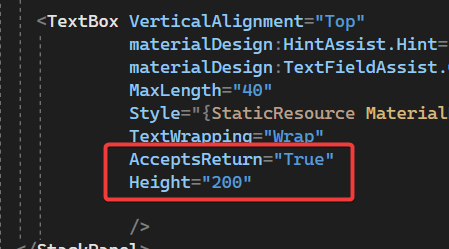
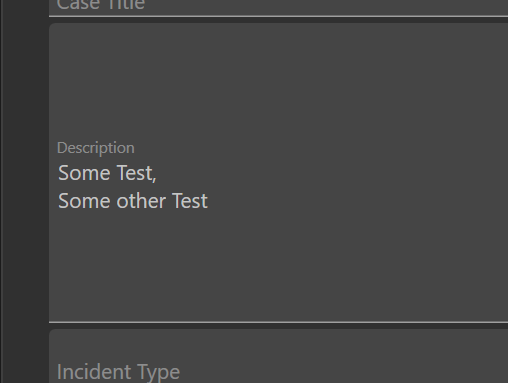
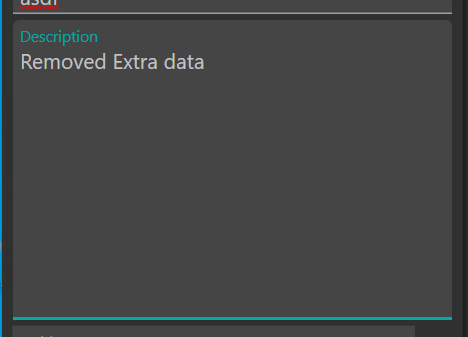
We updated MaterialDesignThemes from 4.1 to 4.8 and noticed all the TextBox we had with a configured height will result in the materialDesign:HintAssist.Hint being put right in the middle of the TextBox instead of at the top (like it was before). For a test, I pulled latest on the MaterinalDesign repo, adjusted the height in the sample app to confirm it happens there also.
Example:

In our app with v4.8:
With the previous nuget package v4.1:
I am not sure if it's related to 4.8 directly - not sure how many changes between 4.1 and 4.8, but I suspect this is not how you want it rendering even for larger size TextBoxes.
If there is a style override, I can put that in, but wanted to report it as the Demo even shows this issue. Let me know if this is the desired behavior though so I can adjust accordingly. Thanks!
Version
4.8.0
Activity
TWhidden commentedon Apr 7, 2023
As a follow up - going through the demo history - found this to be the reason. This commit added a
VerticalAlignment="Center"- Removing it, aligns it back correctlyResult:
if this is the correct rendering, do you want me to submit a pull request for it? Any other side effects that we need to be aware of?
TWhidden commentedon Apr 7, 2023
Related to #3056 change.
TWhidden commentedon Apr 7, 2023
Sorry for all the messages - This is the line specifically that impacts the rendering.
https://github.com/MaterialDesignInXAML/MaterialDesignInXamlToolkit/blob/master/MaterialDesignThemes.Wpf/Themes/MaterialDesignTheme.TextBox.xaml#L150
Keboo commentedon Apr 8, 2023
Excellent, writeup and diagnosis! Will see about getting a UI test and fix in place for this.
nicolaihenriksen commentedon Apr 8, 2023
@TWhidden @Keboo Agree, very nice diagnosis, and spot on. As I introduced this regression, I took a look and created a draft PR to revert the not needed
VerticalAlignment. I am a bit pressured on free time these days so if any of you want to take it over, please feel free to do so. The outstanding issue in the PR is the UI test(s) for the alignment scenarios.And perhaps also looking into what I mention in the PR as a potential "new" issue: that I don't believe the
TextBoxcurrently respectsTextBox.VerticalContentAlignmentwhich I would expect it to in a multiline scenario.TWhidden commentedon Apr 8, 2023
Not that this is a social forum - but really do appreciate this library. This lib has saved me many hours of styling. Thanks for knocking out a PR so fast. Not sure if 4.9 is due out any time soon, but what about just a patch-level release on 4.8? 4.8.1 ? I suspect others who have been using this lib for years will encounter it next time they update. The update is very small, no features and just a small styling bug fix. The only other option to fix this is to roll back (booo), or copy over the whole style and fix in your app (what I did). Ether way, very thankful for the quick response.
Keboo commentedon Apr 9, 2023
There are nightly releases that go out with preview nuget packages. You should be able to try updating to the latest preview to test the fix.
nicolaihenriksen commentedon Apr 10, 2023
Isn't that only from the master branch, and thus would require the PR to be merged?
Keboo commentedon Apr 16, 2023
Opps yes that was a mistake on my part, I thought I had already merged it.
🎨 Update MaterialDesignThemes to preview