Repository navigation
Dropcap changes to wrong size when navigating back to page with certain fonts (Chrome) #16
Description

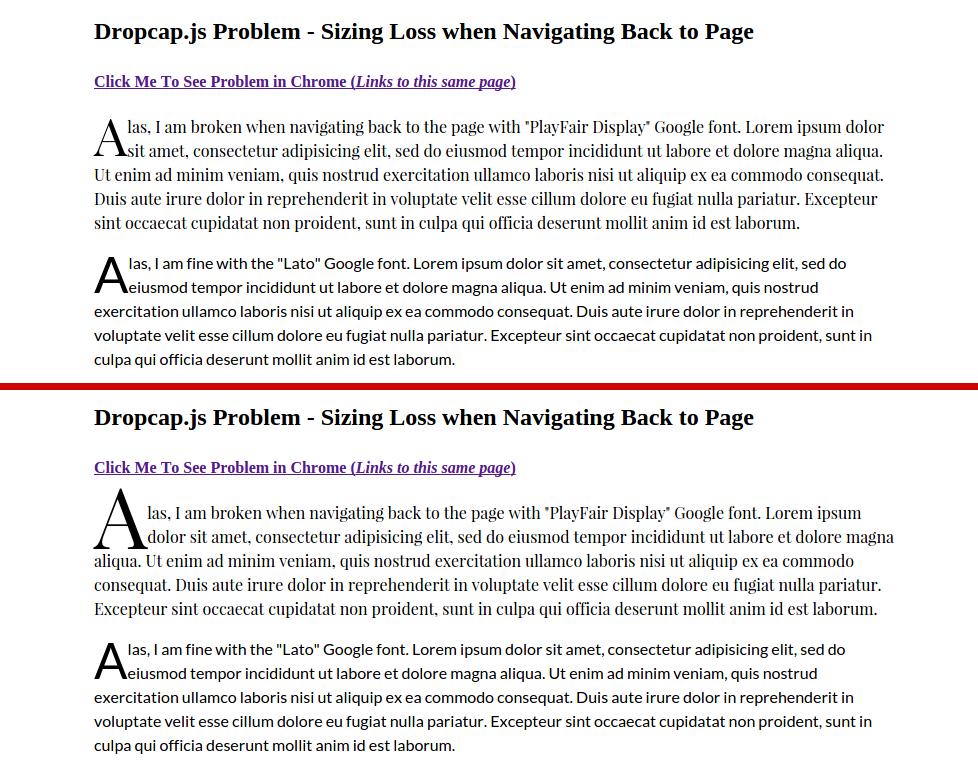
The dropcap is fine on first load. When navigating to the same page, or back/forward to the page from another page, the dropcap grows to the wrong height (default 3 line height?). This is oddly only happening with one of the fonts, Playfair Display. It does not occur with the text set to Lato. Both fonts are included via Google Fonts default LINK method. I've made a test page highlighting the issue:
http://www.joshuawinn.com/examples/dropcap/dropcap.html
And screenshot of first load and navigating to same page via link:
Activity
sylvain-galineau commentedon Jan 29, 2016
What channel/version/OS of Chrome are you using? I don't see it on your page using 48/Mac.
cedon commentedon Jan 29, 2016
I saw what he was describing in Chrome 48 under Windows 10 x64. Under Firefox 44 I saw a slight shift in the size but it did not change the overall look (a few pixels shift from what I could tell). MS Edge I had the same results as well.
sylvain-galineau commentedon Jan 29, 2016
Thank you, this is helpful.
jawinn commentedon Jan 29, 2016
Linux (Elementary OS)
Windows 10
seezee commentedon Apr 7, 2017
Still present in Chrome 57.0.2987.133 (64-bit). I'm loading Playfair Display via Zach Leatherman's "Critical FOFT with Data URI" method described here.
This doesn't seem to be specific to Playfair, either. It affects Noticia Text as well.
Both scripts are called in a custom Wordpress plugin I am writing; dropcap.js is given a low priority (200) and also placed in the footer to ensure it runs after the font loads.
Reloading the page displays the dropcap at inconsistent sizes: sometime 3 lines tall, sometimes 2. using
window.Dropcap.layout(dropcaps, 2, 2);. Regardless of the size setting the dropcap will either render at the correct size or one size too large. More text on the page increases likelihood that the size will be wrong; a page with less html has a better chance of rendering correctly.seezee commentedon Apr 7, 2017
Adding to my previous post, I've confirmed the problem persitsts on the latest production versions of Safari, Firefox, and Opera for Mac as well. I have not tested this on a phone or a PC yet. The dropcap baseline is problematic, as well. With a combination of Playfair Display Black (dropcap) and Noticia Text (body text), the dropcap consistently displays too high above the baseline.
seezee commentedon Apr 7, 2017
All screenshots use setting


2, 2, macOS Sierra, current browsers as of this writing:Chrome 1
Chrome 2
Firefox 1
Firefox 2 (note that it takes up the correct number of lines, but the size changes from the previous screenshot)
Opera 1
Opera 2
Safari 1
Safari 2
jackmcdade commentedon Jun 12, 2018
Still an issue in Chrome 66.