Skip to content

No scheduling when max_active_runs is 1 #19901

Closed

Description

@alexakra

Apache Airflow version

2.2.2 (latest released)

Operating System

Debian

Versions of Apache Airflow Providers

No response

Deployment

Official Apache Airflow Helm Chart

Deployment details

No response

What happened

Since version 2.2 a field DAG.next_dagrun_create_after is not calculated when DAG.max_active_runs is 1.

What you expected to happen

if num_active_runs.get(dag.dag_id, 0) >= orm_dag.max_active_runs:

If this condition is evaluated when a state is "running" then it is incorrect.

How to reproduce

Create a DAG with a schedule_interval and max_active_runs=1.

Anything else

No response

Are you willing to submit PR?

  • Yes I am willing to submit a PR!

Code of Conduct

Activity

  1. easontm commented on Dec 8, 2021

    @easontm
    Contributor

    Just out of curiosity, does the scheduler create another run if you modify the file?

  2. ephraimbuddy commented on Dec 8, 2021

    @ephraimbuddy
    Contributor

    @alexakra This issue need more information. What do you mean by no scheduling? Is it that dagruns are not created at all? Please explain with more information

  3. alexakra commented on Dec 9, 2021

    @alexakra
    Author

    Just out of curiosity, does the scheduler create another run if you modify the file?

    yes, just another single run

  4. alexakra commented on Dec 9, 2021

    @alexakra
    Author

    What do you mean by no scheduling? Is it that dagruns are not created at all?

    There is a record in the "dag" table in which next_dagrun_create_after remains null.
    In the description above, I pointed to the exact line in the code. It was changed in 2.2.
    And "If this condition is evaluated when a state is "running" then it is incorrect.", i.e. condition should be ">" instead of ">=".
    When next_dagrun_create_after remains null, the dag doesn't run/scheduled anymore.

  5. ephraimbuddy commented on Dec 9, 2021

    @ephraimbuddy
    Contributor

    What do you mean by no scheduling? Is it that dagruns are not created at all?

    There is a record in the "dag" table in which next_dagrun_create_after remains null. In the description above, I pointed to the exact line in the code. It was changed in 2.2. And "If this condition is evaluated when a state is "running" then it is incorrect.", i.e. condition should be ">" instead of ">=". When next_dagrun_create_after remains null, the dag doesn't run/scheduled anymore.

    max_active_runs is for dag_runs in running state. Do you mean that when you set max_active_runs=1 in your DAG that you don't see any dagruns in running state? I'm trying to understand your issue. What is the issue? Not asking for the code explanation but the issue you face when you use max_active_runs in your dag

  6. alexakra commented on Dec 9, 2021

    @alexakra
    Author

    Yes, when I set max_active_runs=1 in a DAG, I don't see any dagruns in running state. It is not triggered anymore after it ran only once.

  7. ephraimbuddy commented on Dec 9, 2021

    @ephraimbuddy
    Contributor

    Yes, when I set max_active_runs=1 in a DAG, I don't see any dagruns in running state. It is not triggered anymore after it ran only once.

    This looks like an issue with your schedule interval and not max_active_runs because I have a dag with max_active_runs=1 that is running correctly with airflow 2.2.2.
    Can you share your DAG file

  8. alexakra commented on Dec 9, 2021

    @alexakra
    Author
  9. ephraimbuddy commented on Dec 9, 2021

    @ephraimbuddy
    Contributor

    I ran your dag and it ran perfectly well

  10. alexakra commented on Dec 9, 2021

    @alexakra
    Author

    Could it be related to an upgraded from 2.1.4?

  11. ephraimbuddy commented on Dec 9, 2021

    @ephraimbuddy
    Contributor

    Could it be related to an upgraded from 2.1.4?

    Not sure but check your logs if there's anything you can see

  12. easontm commented on Dec 19, 2021

    @easontm
    Contributor

    yes, just another single run

    I think I'm experiencing a similar circumstance (on 2.2.2), however I usually get more than one run after causing a re-process.

    It's not specific to any particular DAG, but there is some kind of condition (that I can't replicate on-demand) which results in the scheduler no longer creating new DAGruns. It always happens with DAGs whose max_active_runs is easy to hit, in the 1-3 range. IIRC every time I've seen this, the column DAG.next_dagrun_create_after is empty for that DAG -- but not every DAG that has this field empty has this issue. Another correlated symptom is that affected DAGs no longer get any scheduler/processing logs (in $AIRFLOW_HOME/logs/scheduler/<DATE>/...).

    This happens to me maybe 2-3 times a month and I have all my (INFO) scheduler logs, although I haven't seen any anomalies myself. If anyone with better insight on the scheduler's state machine can tell me what to look for in the logs I can search deeper. Or I can even add some log points on my installation to collect until the anomaly occurs again.

    @alexakra do your blocked DAGs have processing logs in the above path? And just wondering, what's your setting for schedule_after_task_execution?

  13. alexakra commented on Dec 19, 2021

    @alexakra
    Author

    I didn't notice whether the processing logs were created or not.
    I have just looked for "Setting next_dagrun for %s to %s" in the logs and it was missing. This is the reason I assumed that the condition that I mentioned in the description is True, i.e. orm_dag.next_dagrun_create_after = None.
    I have dozens of scheduled DAGs and this happened for all of them immediately after upgrade to 2.2.2. So, I reverted back to 2.1.4.

  14. github-actions commented on Jan 19, 2022

    @github-actions
    Contributor

    This issue has been automatically marked as stale because it has been open for 30 days with no response from the author. It will be closed in next 7 days if no further activity occurs from the issue author.

  15. added
    staleStale PRs per the .github/workflows/stale.yml policy file
    on Jan 19, 2022
  16. github-actions commented on Jan 26, 2022

    @github-actions
    Contributor

    This issue has been closed because it has not received response from the issue author.

  17. holyachon commented on Feb 4, 2022

    @holyachon

    @easontm @alexakra
    Hello. I'm also experiencing a similar situation closer to @easontm, where the scheduler does not schedule a DAG in Airflow 2.2.3.
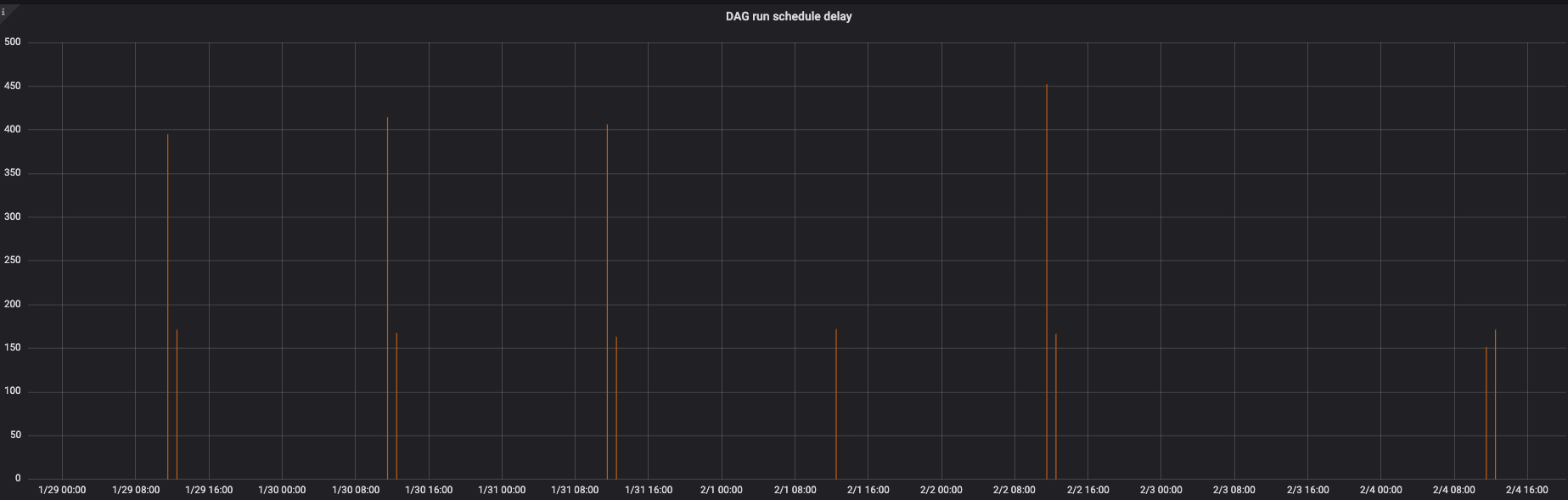
    I have a "DAG for health check" of which schedule_interval is */10 * * * * (runs every ten minutes). And almost every specific time(02:20), this dag is not scheduled and column DAG.next_dagrun_create_after is NULL.
    After a few minutes later (ex. 02:25~30), the dag is scheduled only then. So there is a delay in dag scheduling. ( airflow_dagrun_schedule_delay metric is below)
    FA1F25F3-9CB3-4B5B-AAD1-96BD4B7F81A6

    I think it happens because many tasks are running and scheduled at 02:20, but they work(run or scheduled) well except "health check DAG".

    Another correlated symptom is that affected DAGs no longer get any scheduler/processing logs (in $AIRFLOW_HOME/logs/scheduler//...).

    Also there is no scheduler log about affected DAG same as @easontm.

    Is there any other workaround or solution without downgrade?
    Thank you in advance :)

  18. easontm commented on Feb 7, 2022

    @easontm
    Contributor

    @holyachon I have created a truly horrifying script to prevent this from occurring. I actually bundled it with some scheduling delay measurement I was trying to do, because when a DAGrun isn't created the built-in schedule delay metric isn't accurate.

    The tl;dr is I look at all active DAGs, look at the latest DAG run, and use the schedule to determine if there should be a DAGrun between the latest and now. If I detect a delay, I touch the file which forces the dagprocessor to reexamine the file. I run this on an independent pod in my deployment. Just take out all the statsd stuff if you don't want measurement. And adapt the connection for whatever backend DB you're using.

    I previously just tried to touch all DAG files (in small batches spread over a couple hours), but that actually made things worse. So I have this slightly more surgical application.

    code
    import subprocess
    import sys
    import traceback
    from datetime import datetime, timedelta
    from json import loads
    from os import environ, path
    from pathlib import Path
    from pprint import pformat
    from time import sleep
    
    from mysql.connector import connection
    from statsd import StatsClient
    
    subprocess.check_call([sys.executable, "-m", "pip", "install", "croniter"])
    
    statsd = StatsClient("airflow-scheduler", 9125)
    
    SLEEP_TIME = 60
    SQL_ALCHEMY_CONN = environ["SQL_ALCHEMY_CONN"]
    user = SQL_ALCHEMY_CONN.split("://")[1].split(":")[0]
    password = SQL_ALCHEMY_CONN.split("/" + user + ":")[1].split("@")[0]
    host = SQL_ALCHEMY_CONN.split("@")[1].split(":3306/")[0]
    database = SQL_ALCHEMY_CONN.split(":3306/")[1]
    
    
    def process_dag(dag, check_time):
        from croniter import croniter
    
        exec_date = dag["execution_date"]
        end_date = dag["end_date"]
        mar = dag["max_active_runs"]
        schedule_interval = dag["schedule_interval"]
        dag_id = dag["dag_id"]
        state = dag["state"]
    
        if exec_date is None:
            print(f"[WARN] No run found for {dag_id} in the last 10 days.")
            return
        if schedule_interval[0] == "{":
            j = loads(schedule_interval)
            td = timedelta(
                days=j["attrs"]["days"],
                seconds=j["attrs"]["seconds"],
                microseconds=j["attrs"]["microseconds"],
            )
            current_theoretical_start = exec_date + td
            next_theoretical_start = exec_date + td + td
        else:
            try:
                cron = croniter(schedule_interval, exec_date)
            except Exception:
                raise Exception(
                    f"Cron gen failed: {dag_id}. schedule interval is {schedule_interval}"
                )
            current_theoretical_start = cron.get_next(datetime)
            next_theoretical_start = cron.get_next(datetime)
    
        try:
            if state == "running":
                # This gets its own case because a running DAG could either be in a backfill
                # or part of a regular run. That is, next_theoretical_start may be before
                # OR after check_time, and we can't use that switch by itself.
    
                # if we are evaluating a running DAGrun we will measure the best between
                #   1. difference between previous end and this start
                #     a. If this is negative (overlapping runs) we will use 0
                #   2. the difference between the actual and scheduled start
                return 0
            elif (
                next_theoretical_start < check_time
            ):  # if the next one should have started already
                # It's possible that a DAGrun didn't start because we reached peak concurrency for
                # some time. While this can happen for any MAR value, 1 is the most dangerous one
                # for natural reasons. In case the previous DAG took a long time, we will take the
                # delta between the previous ending and the current check time. This can probably
                # be refined in the future.
                if mar == 1:
                    return min(
                        (check_time - next_theoretical_start).total_seconds(),
                        (check_time - end_date).total_seconds(),
                    )
                else:
                    return (check_time - next_theoretical_start).total_seconds()
            else:
                # We will consider DAGs whose runs are caught up to not be in a delay state
                # even if the previous run was delayed, because this will make the metric
                # represent the current state of the system. Any delays will be present in
                # the historical values.
                return 0
        except Exception as e:
            print(f"Error processing DAG {dag}")
            print(f"current_theoretical_start: {current_theoretical_start}")
            print(f"next_theoretical_start: {next_theoretical_start}")
            print(f"check_time: {check_time}")
            print(traceback.format_exc())
            print(e)
    
    
    while True:
        now = datetime.now()
        print(f"Starting check: {now}")
        with connection.MySQLConnection(  # mysql.connector.connect(
            host=host, user=user, password=password, database=database,
        ) as mydb:
            with mydb.cursor() as cur:
                query = f"""
                    SELECT
                        dag.dag_id
                        ,fileloc
                        ,schedule_interval
                        ,max_active_runs
                        ,state
                        ,execution_date
                        ,start_date
                        ,end_date
                        ,gap
                    FROM dag
                    LEFT JOIN (
                        SELECT dag_id
                            ,execution_date
                            ,start_date
                            ,end_date
                            ,state
                            ,RANK()                       OVER (PARTITION BY dag_id ORDER BY execution_date DESC) AS rnk
                            ,TIMEDIFF(
                                start_date, LAG(end_date) OVER (PARTITION BY dag_id ORDER BY execution_date ASC)
                            )  AS gap
                        FROM dag_run
                        WHERE DATE(start_date) >= DATE'{str(now - timedelta(days=10))[:10]}'
                        AND run_id NOT LIKE 'manual%'
                    ) runs
                        ON dag.dag_id = runs.dag_id
                    WHERE NOT is_paused
                      AND is_active
                      AND NOT is_subdag
                      AND schedule_interval <> 'null'
                      AND schedule_interval <> '"@once"'
                      AND (rnk = 1 OR rnk IS NULL)
                      -- AND state <> 'running'
                """
                print(f"Executing query: \n{query}")
                cur.execute(query)
                col_names = [i[0] for i in cur.description]
                results = cur.fetchall()
                r_maps = [
                    {
                        col_names[i]: r[i] if type(r[i]) != str else r[i].strip('"')
                        for i in range(len(col_names))
                    }
                    for r in results
                ]
    
        touched = []
        delayed = []
        total_delay = 0
        for dag in r_maps:
            delay = process_dag(dag, now)
            if delay is None:
                continue
            if delay > 600:
                delayed.append((dag["dag_id"], round(delay)))
                if now.timestamp() - path.getmtime(dag["fileloc"]) > delay:
                    Path(dag["fileloc"]).touch()
                    touched.append((dag["dag_id"], round(delay)))
            total_delay += delay
            print(f"DAG: {dag['dag_id']} -- delay: {round(delay, 2)}")
            statsd.gauge(f"airflow.custom_dag_delay.{dag['dag_id']}", delay)
    
        avg_delay = round(total_delay / len(r_maps))
        # statsd.gauge(f"airflow.custom_dag_delay_avg.{avg_delay}", delay)
        print(f"Delayed DAGs: {pformat(delayed)}")
        print(f"Touched DAGs: {pformat(touched)}")
        print(
            f"Total delay: {round(total_delay)}s across {len(r_maps)} DAGs. {avg_delay}s per DAG"
        )
    
        print(f"End loop. Sleeping for {SLEEP_TIME} seconds.")
        sleep(SLEEP_TIME)
  19. holyachon commented on Feb 7, 2022

    @holyachon

    @easontm Thank you for your reply :)

    I think I don't have the confidence to manage that DAG well..

    Fortunately, the airflow's bug related the problem in this issue was found.
    Therefore, after #21214 PR is merged, we can all be happy 😄

    Thanks again for sharing your idea!

Sign up for free to join this conversation on GitHub. Already have an account? Sign in to comment

Metadata

Metadata

Assignees

No one assigned

    Labels

    Type

    No type

    Projects

    No projects

      Milestone

      No milestone

      Relationships

      None yet

      Development

      No branches or pull requests

      Issue actions