Repository navigation
Attempting to Upgrade Chart to Enable Examples Causes Postgres Error #29444
Description

Official Helm Chart version
1.8.0 (latest released)
Apache Airflow version
2.5.1
Kubernetes Version
v1.26.1
Helm Chart configuration
I'm using the official helm chart and modifying the values.yaml file to enable examples by uncommenting:

Docker Image customizations
No response
What happened
When I attempt to upgrade the release to use the modified values.yaml file, I get the following error:
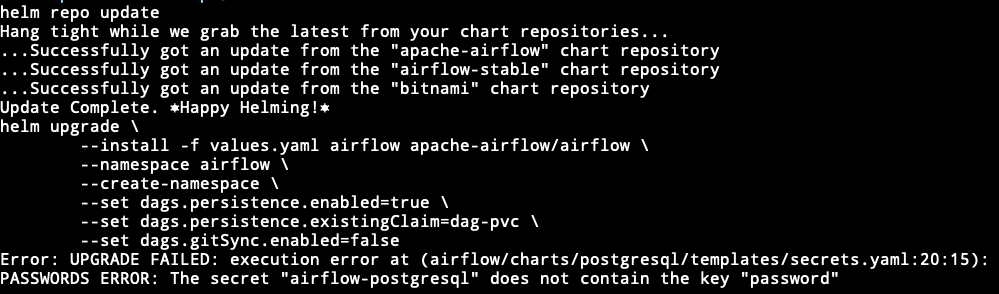
I'm extracting the values.yaml to modify via:
helm-show-values apache-airflow/airflow > values.yaml
What you think should happen instead
No response
How to reproduce
Deploy the official Airflow Helm chart to minikube, attempt to modify values.yaml to turn examples on, and upgrade the release with the new values.yaml file.
Anything else
No response
Are you willing to submit PR?
- Yes I am willing to submit a PR!
Code of Conduct
- I agree to follow this project's Code of Conduct
Activity
iuriqc commentedon Feb 11, 2023
I had a similar situation. When modifying the yaml to use gitsync and updating Airflow I had the same error. I tried modifying the "airflow-postgresql" secret to include the "password" key and the helm even completes the update, but postgres doesn't work properly. Following this orientation to delete the secret and statefulset also does not work.
hussein-awala commentedon Feb 13, 2023
Is your current version deployed with
1.8.0or earlier?If it's an earlier version, you need to update the values file, because we upgraded the postgresql chart from
10.5.3to12.1.9and the schema of the values file (PR)potiuk commentedon Mar 2, 2023
Yes. This is a known "expectation" for chart 1.8.0 and the way how to deal with it is described in release notes
agentdanger commentedon Mar 2, 2023
I can recreate this issue by doing a fresh install using the 1.8 helm image "my-airflow", in a fresh namespace on kubernetes, and customizing the values.yaml to attempt to turn on git-sync. I have the same issue the original OP is mentioning.
agentdanger commentedon Mar 2, 2023
I get the issue when I do a helm upgrade to install the custom values.
agentdanger commentedon Mar 2, 2023
I was able to resolve this issue.
Upgrading also refers to upgrading the existing 1.8.0 chart. You have to follow @potiuk suggestion within the release notes.
kubectl delete secret {RELEASE_NAME}-postgresqlkubectl delete statefulset {RELEASE_NAME}-postgresqlThen in your values.yaml file. You must set the username and password in the postgresql subchart configuration:
postgresql:
enabled: true
image:
tag: "11"
auth:
enablePostgresUser: true
postgresPassword: postgres
username: YOUR_USERNAME
password: YOUR_PASSWORD
No issues once I did all of those steps.
agentdanger commentedon Mar 2, 2023
I'm caveating my "no issue" suggestion above. I'm currently working through bugs on the git-sync but those could be my own doing. My work around was able to solve the postgresql error I was getting...
agentdanger commentedon Mar 3, 2023
I was able to solve this issue by installing 1.8 with the custom yaml file.
My namespace for this implementation was colosseum.
I had a custom yaml filed called values.yaml in the same working directory that I was performing my kubectl commands.
I also had my git secret ready in the same working directory.
kubectl commands I used are below:
kubectl create namespace colosseum --dry-run=client -o yaml | kubectl apply -f -kubectl create secret generic airflow-gke-git-secret --from-file=gitSshKey=airflow-gke-git-secret --namespace colosseum --dry-run=client -o yaml | kubectl apply -f -helm upgrade --install my-airflow apache-airflow/airflow --namespace colosseum --create-namespace -f values.yaml --debugpotiuk commentedon Mar 3, 2023
I am closing this one then as "no issue" - unless there are some new findings.