
bpmn-server is a BPMN-based workflow engine that integrates easily into your Node.js app. It supports built-in state persistence, variable management, and concurrency across clusters—ideal for long-running processes, durable services, and scheduled tasks.
This repository holds the engine (bpmn-server), its web application (bpmn-web), its REST client (bpmn-client), the documentation and the sample application: see This repository.
The following diagram illustrates the core components of bpmn-server and how they interact:
flowchart TB
  subgraph Users["People and systems"]
    Browser["Browser<br/>designers, users, administrators"]
    Remote["Another application<br/>(bpmn-client)"]
  end

  subgraph Web["bpmn-web"]
    Modeler["Model editor<br/>(bpmn.io, DMN, tests)"]
    Pages["Dashboards, tasks,<br/>administration"]
    REST["REST APIs<br/>/api2, /admin/api2"]
  end

  subgraph App["Your application"]
    Delegate["App delegate<br/>and services"]
  end

  subgraph Core["bpmn-server"]
    Engine["Engine<br/>executions, tokens, items"]
    Verify["Model checks<br/>(verifyModel)"]
    DMN["Decisions<br/>(DMN, FEEL)"]
    Connectors["Connectors<br/>(OpenAPI)"]
  end

  subgraph Storage["Storage port"]
    Mongo[("MongoDB")]
    SQLite[("SQLite")]
    Memory[("Memory")]
  end

  APIs["External REST APIs"]

  Browser --> Modeler & Pages
  Remote --> REST
  Modeler & Pages & REST --> Engine
  Modeler --> Verify
  Engine --> DMN
  Engine -- service tasks --> Delegate
  Engine -- service tasks --> Connectors
  Connectors --> APIs
  Engine --> Storage
- bpmn-web: the web application: the model editor (bpmn.io) with its checks and tests, the decision editor, dashboards and task lists, administration (users, connectors, backups), and the REST APIs.
- bpmn-server core: executes BPMN workflows, evaluates DMN decisions, checks models, and keeps each instance's state and variables.
- Your application: starts bpmn-web (or embeds the engine), and provides the app delegate and the services that service tasks call.
- Connectors: REST APIs described by OpenAPI that an administrator adds with their keys; service tasks call them with no code.
- Storage: instances, models and history through one storage port: MongoDB (the default), SQLite, or memory.
- bpmn-client: another Node.js application drives the server through the REST APIs.
npx bpmn-server init my-app      # asks for the database; --memory to try it without MongoDB
cd my-app
npm run setup                    # the database's indexes and the first user (admin / admin)
npm start                        # http://localhost:3000
Open your browser to http://localhost:3000 and sign in as admin, password admin.
init creates the sample application, with bpmn-server and bpmn-web as its dependencies;
npx bpmn-server init --help lists its options, and --minimal creates a one-model Hello application
instead. init ships with bpmn-server 3.5.
my-app/
  package.json      deps: bpmn-server, bpmn-web; scripts: start, dev, setup, cli, verify
  .env              generated keys, the database URL, what is served
  index.ts          starts bpmn-web with the settings, delegate and connectors below
  settings/         config.ts: only the settings you override; bpmn-web supplies the defaults
  processes/        the models: Hello, Buy Used Car, Leave Application, employee-onboarding, Business Rules
  connectors/       the services service tasks call (appServices.ts), and element templates (*.json)
  delegates/        the app delegate (on bpmn-web's WebAppDelegate): services, data objects, events
On a new Linux server (Ubuntu 22.04 or 24.04), one line installs everything (Node.js, MongoDB, the application,
nginx, a service; HTTPS with --domain) and prints the address and a generated admin password:
curl -fsSL https://raw.githubusercontent.com/bpmnServer/bpmn-server/main/deploy/install.sh | sudo bashIt also works as a cloud server's launch script (AWS Lightsail's "Add launch script"). See deploy/.
npm install bpmn-client
npx bpmn-client-setup            # writes .env: set API_KEY to the server's, HOST and PORT to where it runs
npx bpmn-client-cli              # a console on the server: start processes, list and invoke items
import 'dotenv/config';
import { BPMNClient2 } from 'bpmn-client';
const client = new BPMNClient2(process.env.HOST, process.env.PORT, process.env.API_KEY);
const instance = await client.engine.start('Hello', { name: 'Ada' });See bpmn-client for its API.
import { BPMNServer, Logger } from 'bpmn-server';
import { configuration } from './configuration.js';

const server = await BPMNServer.create(configuration, new Logger({ toConsole: false }));

const result = await server.engine.start('invoice', { amount: 1200 });
console.log('Process started with instance id:', result.instance.id);
For more advanced examples, see the API documentation.
bpmn-server provides a modeling tool based on bpmn.io with a customized property panel, eliminating the need to manually edit BPMN files.
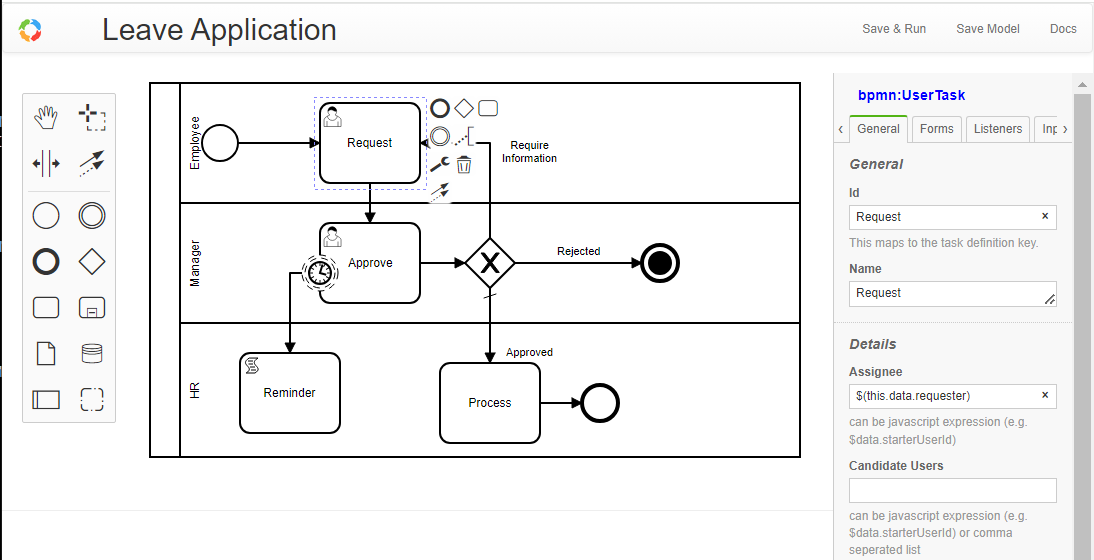
You can also import BPMN models from other tools.
Each model is defined in a BPMN XML file and consists of various elements. An element can be a node (such as events, tasks, or gateways) or a flow.
Models are managed by bpmn-server and can be queried using the Model API.
All BPMN 2.0 elements are supported. See Modeling Support
bpmn-server is primarily an execution engine for BPMN models.
Each time a model is started, an instance is created. For every element that is executed, an item is generated.
Execution follows the BPMN model logic and supports extensions such as scripting and application context access.
During execution, both Model Listeners and Application Listeners are invoked.
Access the execution engine via the Engine API.
Execution data, including instances and their elements, are persisted to a datastore (MongoDB by default).
You can query this data through the Data API.
bpmn-server delegates authentication to the front-end application, which must pass user information via the API.
- Model designers can define
assignee,candidateUsers, andcandidateUserGroupsusing static strings or JavaScript expressions. - The front-end must provide a
userServiceimplementation. bpmn-serverenforces security rules based on the current user.
The bpmn-web application demonstrates full user management using Passport and MongoDB.
Explore the `bpmn-web` application.
Features include:
- Persistent modeling tool (based on
bpmn.io) - Property panel supporting all
bpmn-serverfeatures - Execution with input forms for defined fields
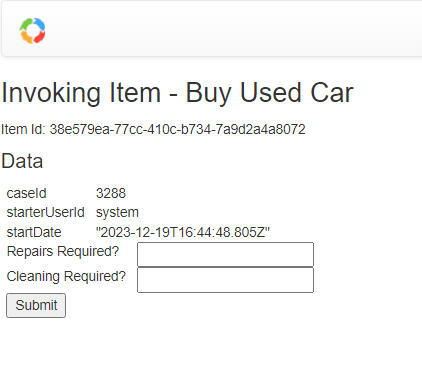
- Task and workflow lists
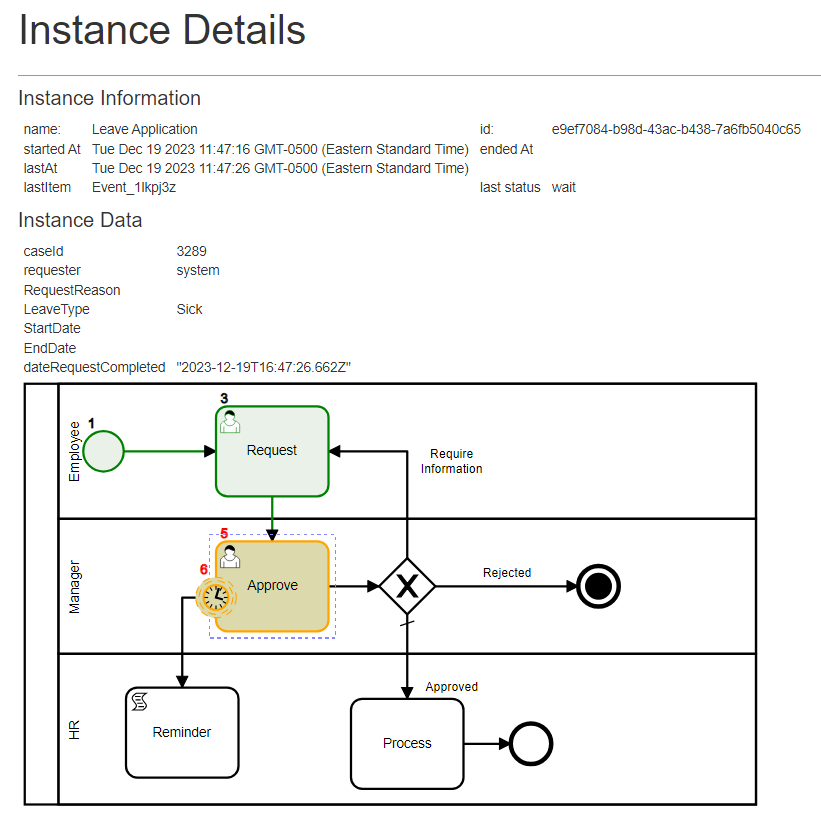
- Instance detail view
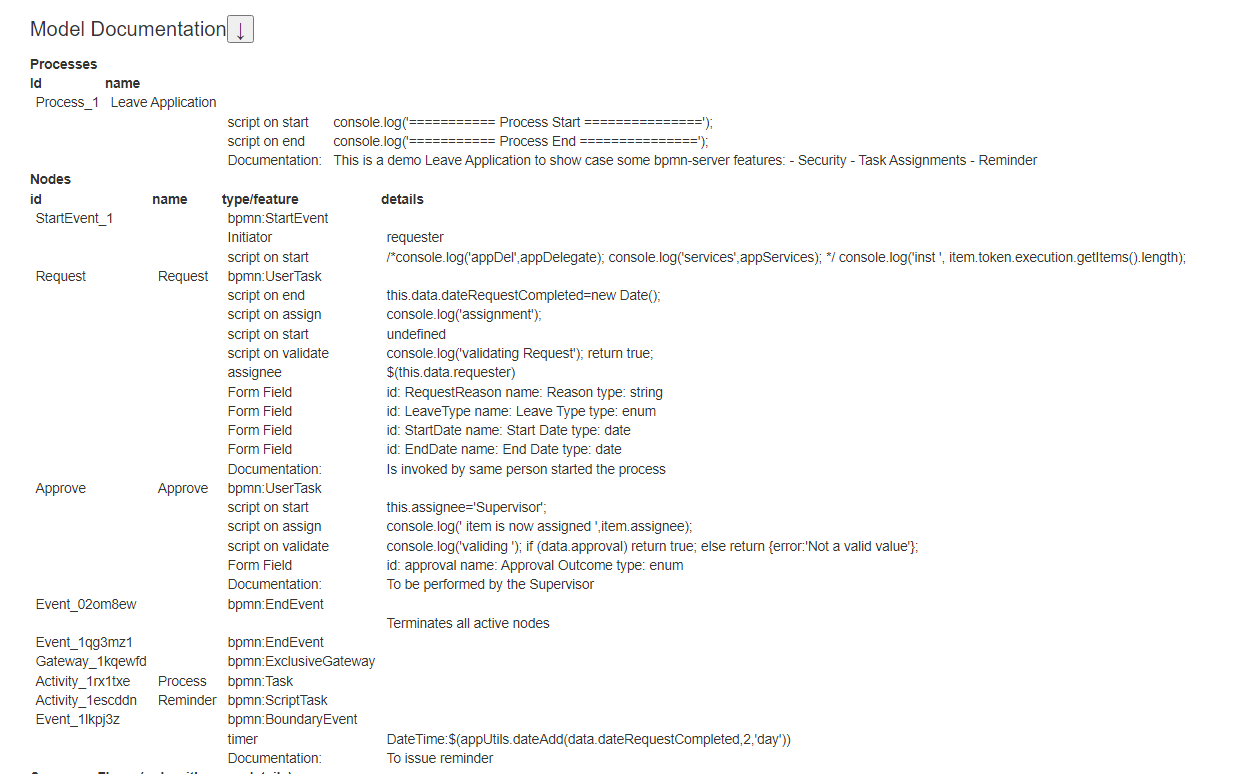
- Model specification viewer
A live demo is available at: https://bpmn.omniworkflow.com
This package requires Node.js 20 or later and MongoDB (or --memory, to try it without one).
If MongoDB is not installed, you can create a free cloud account, install it locally, or run the one init puts in the application (docker compose up -d).
npx bpmn-server init my-app --mongo mongodb://localhost:27017/my-app
cd my-app
docker compose up -d             # a MongoDB on this machine, if you do not have one
npm run setup                    # the database's indexes and the first user
npm start
The application's settings are in .env (the database, the port, the API keys, what is served) and
settings/config.ts.
Install `bpmn-server` and dependencies with Docker.
version: "3.7"
name: bpmn-server
services:
  bpmn-web:
    image: ralphhanna/bpmn-web
    command: sh -c "
        npm run setup &&
        npm run start"
    ports:
      - 3000:3000
    volumes:
      - 'app:/app'
    depends_on:
      - mongo

  mongo:
    image: mongo
    ports:
      - 27017:27017
    volumes:
      - mongodb:/data/db

volumes:
  mongodb:
    driver: local
    driver_opts:
      type: 'none'
      o: 'bind'
      device: './mongodb_volume'

  app:
    driver: local
    driver_opts:
      type: 'none'
      o: 'bind'
device: './bpmn_server_volume'docker compose up -dUse `bpmn-server` via CLI for common operations.
In your application:
npm run cli

server started..
Commands:
  q     quit
  s     start process
  lo    list outstanding items
  li    list items
  l     list instances for a process
  di    display instance information
  i     invoke task
  sgl   signal task
  msg   message task
  d     delete instances
  lm    list models
  lme   list model elements
  ck    check locked instances
  re    recover hung processes
  lu    list users
  spw   set user password
  ?     show this help menu
npx bpmn-server verify processes/ checks the models without running them.
npm update bpmn-server bpmn-webbpmn-server is designed to be embedded into your application. See customization guide
- Invoking Workflows
- Execution
- Scripting
- Security
- Data
- Examples
- API Summary
- API Reference
- Setup
- Checking models
- Testing and debugging models
- Application Integration
packages/bpmn-server |
The workflow engine (npm bpmn-server), and npx bpmn-server init. |
packages/bpmn-client |
The REST client (npm bpmn-client). |
packages/bpmn-web |
The web host: tasks, instances, the model editor, administration, the REST APIs, start() (npm bpmn-web). |
sampleApp |
The sample application (processes, connectors, delegates) on bpmn-web: what npx bpmn-server init creates. |
testSampleApp |
The working application: more models, the app to start and debug from, and the tests of bpmn-web, the engine's scenarios and the models. |
docs |
The documentation site. |
docker |
Docker images. |
catalog |
The model catalog bpmn-web browses and imports from. |
git clone https://github.com/bpmnServer/bpmn-server.git
cd bpmn-server
npm install                      # every package, linked to each other (npm workspaces)
npm run build                    # bpmn-server, bpmn-client, bpmn-web

cd testSampleApp
cp .env.example .env             # set MONGO_DB_URL
npm run setup                    # the database's indexes and the first user (admin / admin)
npm start # or npm run debug (Node inspector); npm start at the root runs it toonpm run dev # at the root: testSampleApp from the sources, and the model editor's build, both watchingnpm run dev runs testSampleApp on the TypeScript sources of bpmn-server and bpmn-web (their bpmn-source
export condition, under tsx), with node --watch: a change to packages/bpmn-server/src,
packages/bpmn-web/src or the app's code restarts it, without a build. The model editor (modeler/src) is
rebuilt as it changes; refresh the browser. Views (.pug) and public/ need only a refresh. Models
(processes/) do not restart it (the editor saves there): a model changed outside the editor loads on the
next restart.
In testSampleApp alone: npm run dev, or npm run dev:debug with the Node inspector. In VS Code, testSampleApp:
dev (debug) does the same with breakpoints in the app and both packages; Test: current file runs the
open test file under the debugger (on the builds: npm run build first).
| Tests | |
|---|---|
npm test (root) |
bpmn-server, bpmn-client and testSampleApp |
npm test (testSampleApp) |
bpmn-web's unit, client, engine and web tests, the models' tests (test/custom) and the engine's scenarios |
npm run test:ui (testSampleApp) |
the browser tests (Playwright) |
npm run test:scenarios (testSampleApp) |
the engine's feature scenarios alone |
The tests use databases of their own on a local MongoDB (mongodb://localhost:27017; TEST_MONGO_URL and
BPMN_TEST_MONGO_URL change it): bpmn-web's tests one per run, dropped when they end; the scenarios
bpmn_scenarios, emptied before each run.
Publishing: npm publish -w bpmn-server, then -w bpmn-web (it depends on the bpmn-server of the same
version); packing bpmn-server copies sampleApp into it as init's template.
Licensed under the MIT License.
bpmn-server builds upon bpmn-io/bpmn-moddle by bpmn.io, and is inspired by bpmn-engine.