You signed in with another tab or window. Reload to refresh your session.You signed out in another tab or window. Reload to refresh your session.You switched accounts on another tab or window. Reload to refresh your session.Dismiss alert
I followed the steps and I get stuck on "run node index.js" So far I received different error messages because I have changed some things (but that is when I saw that it wasn't working following the steps.
Is it possible if you send me a video on how you do it. I've retried the steps about 4-5 times and I don't know. Sorry to be such a bother, I've just been trying to set this up for hours.
Upon taking a closer look at your two screenshots I noticed that you have two different directories specified in the screenshots.
C:\Users\Owner\Desktop\Discord Bot
C:\Users\Owner\Desktop\Bot
It's very important that you are in the correct directory when running these commands or they will not work.
This new error is saying that index.js is not found. Which may mean you are in the wrong folder location. If you type dir in the console you should see index.js as one of the listed files.
A quick trick to know where exactly you need to be is navigate to the folder using the File Explorer in Windows. You can then press the folder icon to the left of the file to get a copy-able location.
You can then go into your terminal and directly say cd DIRECTORY and that will take you right where you need to be in order to run the commands. Just replace DIRECTORY with what you copied.
So following step 2 in the README, I just download a fresh zip file of the latest release. I then extracted the zip file onto my Desktop. I then right clicked the folder and pressed open. I then clicked the folder icon to the left of the folder name in the top bar.
I copied the directory and now I can cd directly to it. I then ran npm i
I then created my .env file and added the necessary information. I now have everything I need to run it by saying node index.js
invalid token error means you didn't create a .env file in the project and then added your token and channelName variables
Example of file existing:
Example of file contents:
The token is unique to your bot and should be copied from the bot you created in the previous steps of the README. You'll know you've pasted the right token when you run node index.js and it says the login was successful.
Please notice how your .env was saved as .env.txt this makes the file not-readable by the server. When you are creating the file (in Notepad for example), you need to set the file type to All Files. Then you can save the file as just .envNOT.env.txt.
Action Required Lectu
Also please be aware you just exposed your token to the internet, you should re-roll your token on discord's website immediately. There is a chance a bot could of scraped your token already and use it with malicious intentions.
You have to type the commands in the channel you specified in channelName. This is to avoid the bot listening on all your text channels. So if it didn't work, there is a mismatch. I don't think you can use spaces in text channels. The bot has to be tied to a text channel.
In your most recent screenshot it looks like you are typing in 6mans but on your last screenshot the channelName was set to Rumble 6mans Test. If you want the bot to listen in 6mans set the channelName to 6mans in your .env file.
Please note any time you change the contents of .env, the server needs to be restarted.
changed the title [-]Running `node index.js` does not work. (Common mistakes when getting started)[/-][+]Common mistakes when getting started[/+]on Apr 13, 2020


Activity
devlemire commentedon Apr 12, 2020
Please try running the command
npm iwhen you are in theC:\Users\Owner\Desktop\Discord Botdirectory in the terminal.Cannot find modulemeans the node_modules folder is most likely missing.Lectu commentedon Apr 12, 2020
Is it possible if you send me a video on how you do it. I've retried the steps about 4-5 times and I don't know. Sorry to be such a bother, I've just been trying to set this up for hours.
devlemire commentedon Apr 12, 2020
Upon taking a closer look at your two screenshots I noticed that you have two different directories specified in the screenshots.
It's very important that you are in the correct directory when running these commands or they will not work.
This new error is saying that
index.jsis not found. Which may mean you are in the wrong folder location. If you typedirin the console you should seeindex.jsas one of the listed files.devlemire commentedon Apr 13, 2020
A quick trick to know where exactly you need to be is navigate to the folder using the
File Explorerin Windows. You can then press the folder icon to the left of the file to get a copy-able location.You can then go into your terminal and directly say
cd DIRECTORYand that will take you right where you need to be in order to run the commands. Just replaceDIRECTORYwith what you copied.Lectu commentedon Apr 13, 2020
Ok, it's progress. Now I have this problem. It says I have entered an invalid token?
devlemire commentedon Apr 13, 2020
So following step 2 in the README, I just download a fresh
zipfile of the latestrelease. I then extracted thezipfile onto my Desktop. I then right clicked the folder and pressedopen. I then clicked the folder icon to the left of the folder name in the top bar.I copied the directory and now I can
cddirectly to it. I then rannpm iI then created my
.envfile and added the necessary information. I now have everything I need to run it by sayingnode index.jsdevlemire commentedon Apr 13, 2020
invalid tokenerror means you didn't create a.envfile in the project and then added yourtokenandchannelNamevariablesExample of file existing:
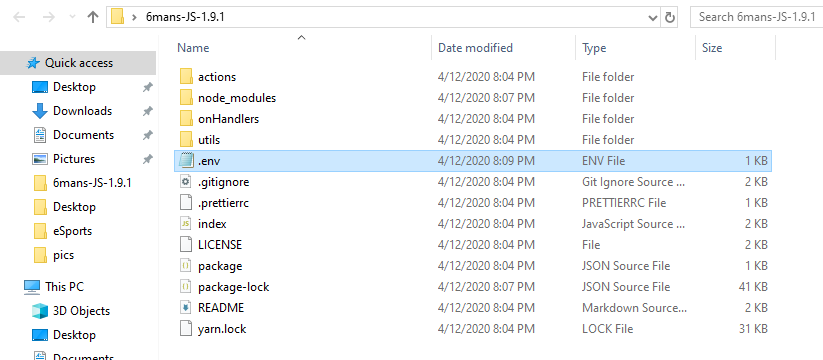
Example of file contents:
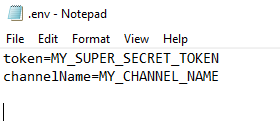
The token is unique to your bot and should be copied from the bot you created in the previous steps of the README. You'll know you've pasted the right token when you run
node index.jsand it says the login was successful.Lectu commentedon Apr 13, 2020
I'm doing something wrong.
Could it be that I'm doing the channel name incorrectly? I tried with General at first
Lectu commentedon Apr 13, 2020
I see the problem. I did not save it as a env file but I do not know how to save it as an env file
devlemire commentedon Apr 13, 2020
Please notice how your
.envwas saved as.env.txtthis makes the file not-readable by the server. When you are creating the file (in Notepad for example), you need to set the file type toAll Files. Then you can save the file as just.envNOT.env.txt.Action Required Lectu
Also please be aware you just exposed your token to the internet, you should re-roll your token on discord's website immediately. There is a chance a bot could of scraped your token already and use it with malicious intentions.
devlemire commentedon Apr 13, 2020
As for the
channelNamevariable it just needs to match the spelling of your channel name in the channel list on the left side.For example I set mine to
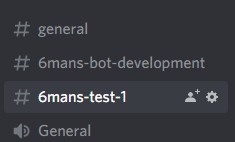
6mans-test-1because that's how it is spelt there:Lectu commentedon Apr 13, 2020
Ok, thank you so much. I got it to work. at least it's online. But I typed !6m-help and nothing appeared. What could be the problem?
Lectu commentedon Apr 13, 2020
I also changed the token
Lectu commentedon Apr 13, 2020
devlemire commentedon Apr 13, 2020
You have to type the commands in the channel you specified in
channelName. This is to avoid the bot listening on all your text channels. So if it didn't work, there is a mismatch. I don't think you can usespacesin text channels. The bot has to be tied to a text channel.In your most recent screenshot it looks like you are typing in
6mansbut on your last screenshot thechannelNamewas set toRumble 6mans Test. If you want the bot to listen in6mansset thechannelNameto6mansin your.envfile.Please note any time you change the contents of
.env, the server needs to be restarted.Lectu commentedon Apr 13, 2020
I see, is it possible to add multiple text channels in the env file? If so, how do I word it
devlemire commentedon Apr 13, 2020
With the current API only one text channel is supported.
Lectu commentedon Apr 13, 2020
Ok, I will try to see if it'll work now.
devlemire commentedon Apr 13, 2020
Please open another issue if problems are still occurring. I'm going to mark this issue thread as getting started issues.
[-]I cannot run the command[/-][+]Running `node index.js` does not work. (Common mistakes when getting started)[/+][-]Running `node index.js` does not work. (Common mistakes when getting started)[/-][+]Common mistakes when getting started[/+]