Repository navigation
New compute wizard fails with MinNodeCount must be specified. #2386

Description

Model Builder Version: 16.14.0.2255902
Visual Studion Version: 17.4.1
Bug description
Receive error when trying to create compute resources for an object detection project in Visual Studio.
ScaleSettings.MaxNodeCount and ScaleSettings.MinNodeCount must be specified for create compute.
Status: 400 (ScaleSettings.MaxNodeCount and ScaleSettings.MinNodeCount must be specified for create compute.)
ErrorCode: UserError
Steps to Reproduce
- Create a new
.mbconfigfile - Choose
Object Detectionscenario - On the
Environmenttab, click theSet up workspacebutton - Selected
Visual Studio EnterpriseSubscription - Create a new
Machine Learning Workspace name - Click the
New...button - Set the
Compute name - St the
Compute SizetoStandard_NC4as_T4_v3 - Set
Compute prioritytoLow priority - Click the
Createbutton
Expected Experience
I would expect that the compute resources would be created, and I would be returned to the previous dialog in the wizard.
Actual Experience
I receive the following error
ScaleSettings.MaxNodeCount and ScaleSettings.MinNodeCount must be specified for create compute.
Status: 400 (ScaleSettings.MaxNodeCount and ScaleSettings.MinNodeCount must be specified for create compute.)
ErrorCode: UserError

Content:
{
  "error": {
    "code": "UserError",
    "severity": null,
    "message": "ScaleSettings.MaxNodeCount and ScaleSettings.MinNodeCount must be specified for create compute.",
    "messageFormat": null,
    "messageParameters": null,
    "referenceCode": null,
    "detailsUri": null,
    "target": null,
    "details": [],
    "innerError": null,
    "debugInfo": null,
    "additionalInfo": null
  },
  "correlation": {
    "operation": "af0c4e14b071bf1ad124097cc8138c77",
    "request": "c6a058345902b3bf"
  },
  "environment": "northcentralus",
  "location": "northcentralus",
  "time": "2022-11-18T16:11:32.7653884+00:00",
  "componentName": "machinelearningcompute"
}

Headers:
Pragma: no-cache
x-ms-ratelimit-remaining-subscription-writes: REDACTED
Request-Context: REDACTED
x-ms-response-type: REDACTED
Strict-Transport-Security: REDACTED
X-Content-Type-Options: REDACTED
x-aml-cluster: REDACTED
x-request-time: REDACTED
x-ms-request-id: 670f5fe2-52f6-47a5-9e71-1177a8af2560
x-ms-correlation-request-id: REDACTED
x-ms-routing-request-id: REDACTED
Content-Length: 673
Cache-Control: no-cache
Content-Type: application/json; charset=utf-8
Date: Fri, 18 Nov 2022 16:11:32 GMT
Expires: -1

at Azure.ResourceManager.MachineLearning.ComputeRestOperations.<CreateOrUpdateAsync>d__12.MoveNext()
--- End of stack trace from previous location where exception was thrown ---
   at System.Runtime.ExceptionServices.ExceptionDispatchInfo.Throw()
   at System.Runtime.CompilerServices.TaskAwaiter.HandleNonSuccessAndDebuggerNotification(Task task)
   at Azure.ResourceManager.MachineLearning.MachineLearningComputeCollection.<CreateOrUpdateAsync>d__5.MoveNext()
--- End of stack trace from previous location where exception was thrown ---
   at System.Runtime.ExceptionServices.ExceptionDispatchInfo.Throw()
   at System.Runtime.CompilerServices.TaskAwaiter.HandleNonSuccessAndDebuggerNotification(Task task)
   at Microsoft.ML.ModelBuilder.RemoteResourceManager.AzureResourceManager.<CreateAMLComputeAsync>d__11.MoveNext()
--- End of stack trace from previous location where exception was thrown ---
   at System.Runtime.ExceptionServices.ExceptionDispatchInfo.Throw()
   at System.Runtime.CompilerServices.TaskAwaiter.HandleNonSuccessAndDebuggerNotification(Task task)
   at Microsoft.ML.ModelBuilder.AzureAttach.NewComputeDataContext.<CreateComputeAsync>d__23.MoveNext()
Additional Context
I am running Visual Studio in a Parallels VM on a MacBook Pro.
Activity
zewditu commentedon Nov 28, 2022
@jaydeboer, sorry for hitting the issue, we will investigate it.
Jenscaasen commentedon Jan 6, 2023
Having the same problem with Standard_NC6 image. Visual Studio 2022, up to date.
`ScaleSettings.MaxNodeCount and ScaleSettings.MinNodeCount must be specified for create compute.
Status: 400 (ScaleSettings.MaxNodeCount and ScaleSettings.MinNodeCount must be specified for create compute.)
ErrorCode: UserError
Content:
{
"error": {
"code": "UserError",
"severity": null,
"message": "ScaleSettings.MaxNodeCount and ScaleSettings.MinNodeCount must be specified for create compute.",
"messageFormat": null,
"messageParameters": null,
"referenceCode": null,
"detailsUri": null,
"target": null,
"details": [],
"innerError": null,
"debugInfo": null,
"additionalInfo": null
},
"correlation": {
"operation": "0c60e2ac1be04499761abfef25beb033",
"request": "997aeb1b262dfb50"
},
"environment": "westeurope",
"location": "westeurope",
"time": "2023-01-06T10:54:55.7634809+00:00",
"componentName": "machinelearningcompute"
}
Headers:
Pragma: no-cache
x-ms-ratelimit-remaining-subscription-writes: REDACTED
Request-Context: REDACTED
x-ms-response-type: REDACTED
Strict-Transport-Security: REDACTED
X-Content-Type-Options: REDACTED
x-aml-cluster: REDACTED
x-request-time: REDACTED
x-ms-request-id: 1b4fef80-045d-40fe-bbc6-7013444f3bdf
x-ms-correlation-request-id: REDACTED
x-ms-routing-request-id: REDACTED
Content-Length: 665
Cache-Control: no-cache
Content-Type: application/json; charset=utf-8
Date: Fri, 06 Jan 2023 10:54:55 GMT
Expires: -1
`
ktravelet commentedon Feb 16, 2023
Same issue here:
beccamc commentedon Feb 16, 2023
@luisquintanilla We're getting multiple reports of this problem. We should investigate, I've added this to the March milestone.
luisquintanilla commentedon Feb 16, 2023
@beccamc sounds good. Thanks.Bumped it to Pri0
beccamc commentedon Feb 16, 2023
Work around for those struggling with this. You may be able to create a compute in the Azure ML Studio - https://ml.azure.com/
Go to Compute -> Compute Cluster -> New.
Any of these compute types will work....
NC T4 v3 VM series:
NCv3-series:
Once you create the compute it should be available via Model Builder.
ktravelet commentedon Feb 16, 2023
heyyy, this worked for me! Created a "Standard_NC4as_T4_v3". Just need to select it in the Model Builder UI now!
beccamc commentedon Mar 3, 2023
@JakeRadMSFT You probably want to fix this.
slefcourt27 commentedon Mar 12, 2023
Wanted to +1 this as I am encountering the same problem while following the tutorial from here: https://learn.microsoft.com/en-us/azure/machine-learning/tutorial-train-deploy-image-classification-model-vscode
v-Hailishi commentedon Apr 3, 2023
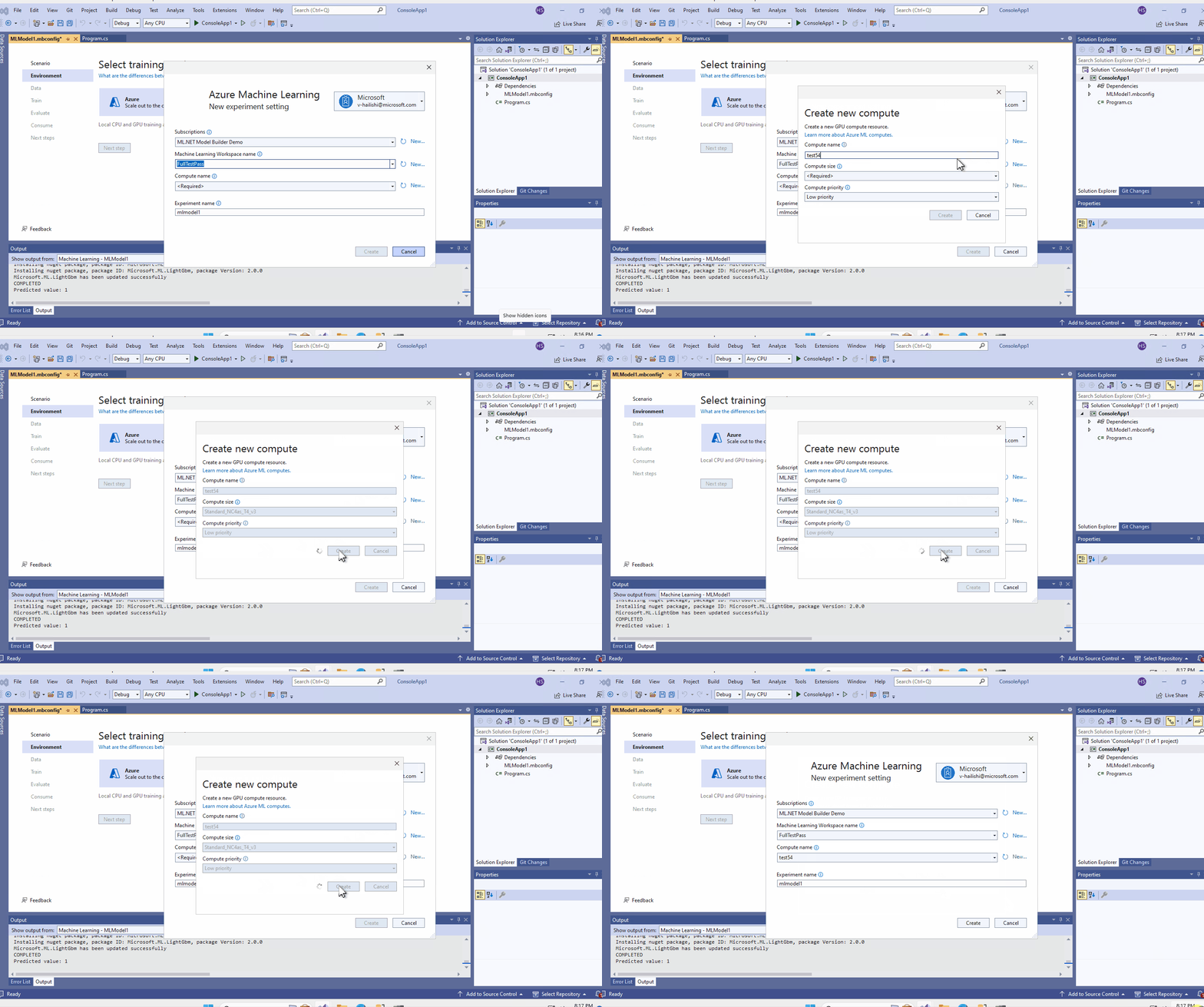
The bug has been fixed on the latest main build 17.14.4.2318101.
johnseed commentedon Apr 6, 2023
I have created a STANDARD_NC64As_T4_V3, but it does not appear when selecting Compute. Only the sizes that are displayed in the drop-down menu when creating Compute are shown.
ML Model Builder Version : 17.14.4.2312404