You signed in with another tab or window. Reload to refresh your session.You signed out in another tab or window. Reload to refresh your session.You switched accounts on another tab or window. Reload to refresh your session.Dismiss alert
Devices:
Nokia 8 with Android 9
Huawei AGS2-W09 with Android 8
Steps to Reproduce
I've followed the steps outlined at https://docs.sentry.io/platforms/unity/
I've added the package and copied more or less what happens inside the sample provided to get a native crash in C++.
However, once the application crashed on the device I get the following error on the next start: logcat.txt, which I just assumed happens because it is trying to upload the dump.
The documentation did not mention any special build steps/requirements to support native crashes for Android (https://docs.sentry.io/platforms/unity/native-support/), so I was under the impression that it should just work.
Hey @RiederAlex. Sorry to hear you're running into this issue because you are right, it should just work.
So the app starts without any issue after building? Can you capture any non-native issues
Are you using a custom Gradle template by any chance?
Yes, the application starts without any other issues.
Non-native issues (exceptions/errors) show up on the dashboard.
No, there is no custom Gradle template - I've tried this with a new empty Unity project based on the 3D template (so also no Play Services resolver ect ect which could interfere with the gradle build).
I could try to initialize the SDK with Debug = true, but I guess the problem is that some dependencies are missing, as the build.gradle file only includes: dependencies { implementation fileTree(dir: 'libs', include: ['*.jar']) implementation(name: 'sentry-android-core-release', ext:'aar') implementation(name: 'sentry-android-ndk-release', ext:'aar') }
Thank you so much for the detailed issue description and logs.
~It looks like the error is bubbling through all the way, does the app launch? ~
The Android SDK has AndroidX dependencies as optional and should handle the errors internally and downgrade any features that are added through AndroidX. So something we need to investigate.
Seems like this is just a 'warning' in a way, there are other such errors for other types, for example:
2021/11/02 11:02:26.863 14010 14039 Info zygote64 at boolean com.unity3d.player.UnityPlayer.nativeRender() ((null):-2)
2021/11/02 11:02:26.863 14010 14039 Info zygote64 at boolean com.unity3d.player.UnityPlayer.access$300(com.unity3d.player.UnityPlayer) ((null):-1)
2021/11/02 11:02:26.863 14010 14039 Info zygote64 at boolean com.unity3d.player.UnityPlayer$e$1.handleMessage(android.os.Message) ((null):-1)
2021/11/02 11:02:26.863 14010 14039 Info zygote64 at void android.os.Handler.dispatchMessage(android.os.Message) (Handler.java:104)
2021/11/02 11:02:26.863 14010 14039 Info zygote64 at void android.os.Looper.loop() (Looper.java:166)
2021/11/02 11:02:26.863 14010 14039 Info zygote64 at void com.unity3d.player.UnityPlayer$e.run() ((null):-1)
So this shouldn't be a reason why the event isnt' sent:
2021/11/02 11:02:26.621 14010 14010 Info zygote64 Rejecting re-init on previously-failed class java.lang.Class<io.sentry.android.core.LifecycleWatcher>: java.lang.NoClassDefFoundError: Failed resolution of: Landroidx/lifecycle/DefaultLifecycleObserver;
2021/11/02 11:02:26.621 14010 14010 Info zygote64 at void io.sentry.android.core.AndroidOptionsInitializer.installDefaultIntegrations(android.content.Context, io.sentry.SentryOptions, io.sentry.android.core.IBuildInfoProvider, io.sentry.android.core.LoadClass, io.sentry.android.core.ActivityFramesTracker) (AndroidOptionsInitializer.java:149)
2021/11/02 11:02:26.621 14010 14010 Info zygote64 at void io.sentry.android.core.AndroidOptionsInitializer.init(io.sentry.android.core.SentryAndroidOptions, android.content.Context, io.sentry.ILogger, io.sentry.android.core.IBuildInfoProvider, io.sentry.android.core.LoadClass) (AndroidOptionsInitializer.java:110)
2021/11/02 11:02:26.621 14010 14010 Info zygote64 at void io.sentry.android.core.AndroidOptionsInitializer.init(io.sentry.android.core.SentryAndroidOptions, android.content.Context, io.sentry.ILogger, io.sentry.android.core.IBuildInfoProvider) (AndroidOptionsInitializer.java:75)
2021/11/02 11:02:26.621 14010 14010 Info zygote64 at void io.sentry.android.core.AndroidOptionsInitializer.init(io.sentry.android.core.SentryAndroidOptions, android.content.Context, io.sentry.ILogger) (AndroidOptionsInitializer.java:59)
2021/11/02 11:02:26.621 14010 14010 Info zygote64 at void io.sentry.android.core.SentryAndroid.lambda$init$1(android.content.Context, io.sentry.ILogger, io.sentry.Sentry$OptionsConfiguration, io.sentry.android.core.SentryAndroidOptions) (SentryAndroid.java:74)
2021/11/02 11:02:26.621 14010 14010 Info zygote64 at void io.sentry.android.core.-$$Lambda$SentryAndroid$g99QaqNwcEFxja-3CMUNWZ36_g4.configure(io.sentry.SentryOptions) (lambda:-1)
2021/11/02 11:02:26.621 14010 14010 Info zygote64 at void io.sentry.Sentry.init(io.sentry.OptionsContainer, io.sentry.Sentry$OptionsConfiguration, boolean) (Sentry.java:116)
2021/11/02 11:02:26.621 14010 14010 Info zygote64 at void io.sentry.android.core.SentryAndroid.init(android.content.Context, io.sentry.ILogger, io.sentry.Sentry$OptionsConfiguration) (SentryAndroid.java:71)
2021/11/02 11:02:26.621 14010 14010 Info zygote64 at void io.sentry.android.core.SentryAndroid.init(android.content.Context, io.sentry.ILogger) (SentryAndroid.java:40)
2021/11/02 11:02:26.621 14010 14010 Info zygote64 at boolean io.sentry.android.core.SentryInitProvider.onCreate() (SentryInitProvider.java:27)
2021/11/02 11:02:26.621 14010 14010 Info zygote64 at void android.content.ContentProvider.attachInfo(android.content.Context, android.content.pm.ProviderInfo, boolean) (ContentProvider.java:1921)
2021/11/02 11:02:26.621 14010 14010 Info zygote64 at void android.content.ContentProvider.attachInfo(android.content.Context, android.content.pm.ProviderInfo) (ContentProvider.java:1896)
2021/11/02 11:02:26.621 14010 14010 Info zygote64 at void io.sentry.android.core.SentryInitProvider.attachInfo(android.content.Context, android.content.pm.ProviderInfo) (SentryInitProvider.java:44)
2021/11/02 11:02:26.621 14010 14010 Info zygote64 at android.app.ContentProviderHolder android.app.ActivityThread.installProvider(android.content.Context, android.app.ContentProviderHolder, android.content.pm.ProviderInfo, boolean, boolean, boolean) (ActivityThread.java:7212)
2021/11/02 11:02:26.621 14010 14010 Info zygote64 at void android.app.ActivityThread.installContentProviders(android.content.Context, java.util.List) (ActivityThread.java:6699)
2021/11/02 11:02:26.621 14010 14010 Info zygote64 at void android.app.ActivityThread.handleBindApplication(android.app.ActivityThread$AppBindData) (ActivityThread.java:6600)
2021/11/02 11:02:26.621 14010 14010 Info zygote64 at void android.app.ActivityThread.-wrap2(android.app.ActivityThread, android.app.ActivityThread$AppBindData) (ActivityThread.java:-1)
2021/11/02 11:02:26.621 14010 14010 Info zygote64 at void android.app.ActivityThread$H.handleMessage(android.os.Message) (ActivityThread.java:2066)
2021/11/02 11:02:26.621 14010 14010 Info zygote64 at void android.os.Handler.dispatchMessage(android.os.Message) (Handler.java:108)
2021/11/02 11:02:26.621 14010 14010 Info zygote64 at void android.os.Looper.loop() (Looper.java:166)
2021/11/02 11:02:26.621 14010 14010 Info zygote64 at void android.app.ActivityThread.main(java.lang.String[]) (ActivityThread.java:7529)
2021/11/02 11:02:26.621 14010 14010 Info zygote64 at java.lang.Object java.lang.reflect.Method.invoke(java.lang.Object, java.lang.Object[]) (Method.java:-2)
2021/11/02 11:02:26.621 14010 14010 Info zygote64 at void com.android.internal.os.Zygote$MethodAndArgsCaller.run() (Zygote.java:245)
2021/11/02 11:02:26.621 14010 14010 Info zygote64 at void com.android.internal.os.ZygoteInit.main(java.lang.String[]) (ZygoteInit.java:921)
2021/11/02 11:02:26.621 14010 14010 Info zygote64 Caused by: java.lang.ClassNotFoundException: Didn't find class "androidx.lifecycle.DefaultLifecycleObserver" on path: DexPathList[[zip file "/data/app/com.zeppelinstudio.unitytemplate-7o6RoXZ9BqaEg26YQN7xsQ==/base.apk"],nativeLibraryDirectories=[/data/app/com.zeppelinstudio.unitytemplate-7o6RoXZ9BqaEg26YQN7xsQ==/lib/arm64, /data/app/
@RiederAlex There are no logs from the Sentry SDK in the logcat output. This is the default behavior (so there's no overhead of the SDK logging in your player builds). But could you please enable it so we can see the native SDK logs?
In the Debug setting in Sentry Window you can select Only In Editor. So that logging happens also in the player builds.
Here is the complete logcat output of 2 runs where "Advanced -> Enable Debug Output -> Only in Editor" was set to false.
There is one run where I produced the crash and one where I started up the application afterwards once again (not sure how/when sentry is supposed to upload the crash dumps, so just did that for good measure).
Interestingly enough setting the verbosity level to "debug" (Advanced -> Verbosity Level) produced less logs and did not show the missing class exception, so there might be something funky going on there as well. crash run debug.txt next run debug.txt
Just to make sure I understand the feature of sentry correctly - I would expect these crash dumps to show up in my dashboard, but all I see are the other errors triggered for testing purposes via C# exceptions:
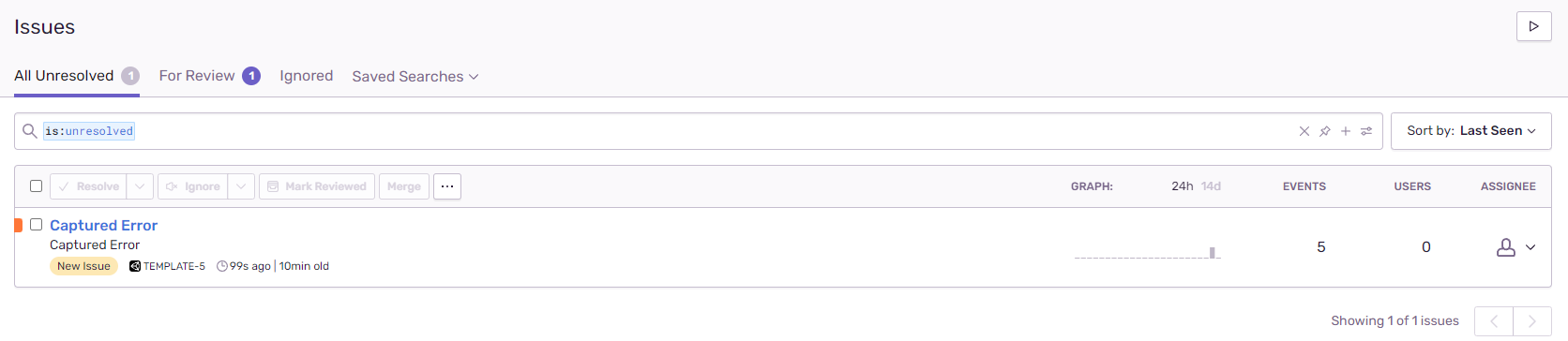
@marandaneto these errors come from unity directly and happen on any project, it has nothing to do with sentry or the problem at hand from my experience.
I did some more testing and played around with the sample that is provided in this repository. I've started from it but used the released 0.0.6 version of the SDK instead of building my own + replaced the sentry url.
With Unity 2020.3.18f1 native crashes on Android do not work correctly - I cannot see them on the dashboard. crash 2020.txt after crash 2020.txt
From the logs I failed to understand what exactly is going on - it seems like in both instances something is sent, but I'm not sure how to further debug it on my side without your support.
@RiederAlex I don't see the log Envelope sent successfully on after crash 2020 and this is serialization time that depends on Gson, does Unity 2020 ships Google Gson and which version?
That's great news! Thanks for letting us know!
Just a heads-up, there's been a mix-up and the 0.6.1 release is missing the .framework for Sentry to work on iOS. 0.6.2 resolves this new issue. Apologies for the inconvenience.
Activity
bitsandfoxes commentedon Nov 2, 2021
Hey @RiederAlex. Sorry to hear you're running into this issue because you are right, it should just work.
So the app starts without any issue after building? Can you capture any non-native issues
Are you using a custom Gradle template by any chance?
RiederAlex commentedon Nov 2, 2021
Yes, the application starts without any other issues.
Non-native issues (exceptions/errors) show up on the dashboard.
No, there is no custom Gradle template - I've tried this with a new empty Unity project based on the 3D template (so also no Play Services resolver ect ect which could interfere with the gradle build).
I could try to initialize the SDK with Debug = true, but I guess the problem is that some dependencies are missing, as the build.gradle file only includes:
dependencies { implementation fileTree(dir: 'libs', include: ['*.jar']) implementation(name: 'sentry-android-core-release', ext:'aar') implementation(name: 'sentry-android-ndk-release', ext:'aar') }bruno-garcia commentedon Nov 2, 2021
Thank you so much for the detailed issue description and logs.
~It looks like the error is bubbling through all the way, does the app launch? ~
The Android SDK has AndroidX dependencies as optional and should handle the errors internally and downgrade any features that are added through AndroidX. So something we need to investigate.
Seems like this is just a 'warning' in a way, there are other such errors for other types, for example:
So this shouldn't be a reason why the event isnt' sent:
bruno-garcia commentedon Nov 2, 2021
Possibly we need a change similar to the AndroidX.Core done here: getsentry/sentry-java#1718
@marandaneto thoughts?
bruno-garcia commentedon Nov 2, 2021
@RiederAlex There are no logs from the Sentry SDK in the logcat output. This is the default behavior (so there's no overhead of the SDK logging in your player builds). But could you please enable it so we can see the native SDK logs?
In the Debug setting in Sentry Window you can select
Only In Editor. So that logging happens also in the player builds.marandaneto commentedon Nov 2, 2021
we already do that, See https://github.com/getsentry/sentry-java/blob/main/sentry-android-core/src/main/java/io/sentry/android/core/AppLifecycleIntegration.java#L57-L66
RiederAlex commentedon Nov 2, 2021
Here is the complete logcat output of 2 runs where "Advanced -> Enable Debug Output -> Only in Editor" was set to false.
There is one run where I produced the crash and one where I started up the application afterwards once again (not sure how/when sentry is supposed to upload the crash dumps, so just did that for good measure).
Logs where I've left the verbosity level on warning:
crash run warning.txt
next run warning.txt
Interestingly enough setting the verbosity level to "debug" (Advanced -> Verbosity Level) produced less logs and did not show the missing class exception, so there might be something funky going on there as well.
crash run debug.txt
next run debug.txt
Just to make sure I understand the feature of sentry correctly - I would expect these crash dumps to show up in my dashboard, but all I see are the other errors triggered for testing purposes via C# exceptions:

marandaneto commentedon Nov 3, 2021
@RiederAlex I see in the logs:
is that by any chance missing on your project? could that be the reason for crashing? that's not from our SDK.
Sentry Unity SDK + Sentry Android SDK seems to be doing its job, see:
RiederAlex commentedon Nov 4, 2021
@marandaneto these errors come from unity directly and happen on any project, it has nothing to do with sentry or the problem at hand from my experience.
I did some more testing and played around with the sample that is provided in this repository. I've started from it but used the released 0.0.6 version of the SDK instead of building my own + replaced the sentry url.
With Unity 2019.4.31f1 native crashes on Android work correctly - I can see them in the dashboard
crash 2019.txt
after crash 2019.txt
With Unity 2020.3.18f1 native crashes on Android do not work correctly - I cannot see them on the dashboard.
crash 2020.txt
after crash 2020.txt
From the logs I failed to understand what exactly is going on - it seems like in both instances something is sent, but I'm not sure how to further debug it on my side without your support.
marandaneto commentedon Nov 4, 2021
@RiederAlex I don't see the log
Envelope sent successfullyon after crash 2020 and this is serialization time that depends on Gson, does Unity 2020 ships Google Gson and which version?bruno-garcia commentedon Nov 4, 2021
I could be wrong but seems like it brings Gson 2.8.0. IIRC that causes conflict with Sentry Android, is that correct @marandaneto ?
If that's the case, we really need to bring in
sentry-androidv6 which drops support to Gson.marandaneto commentedon Nov 4, 2021
Min is 2.7 so it should not be a problem if Gson is available at runtime as 2.8, but better confirming that
marandaneto commentedon Nov 11, 2021
We've managed to reproduce it and have a fix coming out soon, sorry for the inconvenience, and thanks for reporting and helping us out.
RiederAlex commentedon Nov 11, 2021
Thank you very much!
I will retest with my unity project once the related PR bubbles up to this repository.
RiederAlex commentedon Nov 16, 2021
Can confirm 0.6.1 works now on Android for 2020.3.18f1 and my non-test project.
bitsandfoxes commentedon Nov 16, 2021
That's great news! Thanks for letting us know!
Just a heads-up, there's been a mix-up and the 0.6.1 release is missing the .framework for Sentry to work on iOS. 0.6.2 resolves this new issue. Apologies for the inconvenience.