Repository navigation
Kodi integration broken since 2021.1.3 #45249

Description

The problem
Kodi integration stopped working since version 2021.1.3. The state is always shown as "off". At the startup HA hangs a few minutes on setup of Kodi integration. If you remove and try to add the integration via the UI again there will be the message "Unknown error occurred" after about 30 seconds. If I switch the docker container back to 2021.1.2 the integration immediately is working again. The issue persists in 2021.1.4.
Environment
- Home Assistant Core release with the issue: 2021.1.3
- Last working Home Assistant Core release (if known): 2021.1.2
- Operating environment (OS/Container/Supervised/Core): Docker
- Integration causing this issue: Kodi
- Link to integration documentation on our website: https://www.home-assistant.io/integrations/kodi/
Problem-relevant configuration.yaml
Integration is set up via UI so no yaml
Traceback/Error logs
WARNING (MainThread) [homeassistant.bootstrap] Waiting on integrations to complete setup: kodi
WARNING (MainThread) [homeassistant.bootstrap] Setup timed out for stage 2 - moving forward
Additional information
I tried reverting the the change to the integration introduced in 2fb3be5 but that didn't fix the issue. So my wild guess would be a relation to the XSS hardenings introduced in 2021.1.3.
Metadata
Metadata
Assignees
Type
Fields
Priority
None yet
Activity
probot-home-assistant commentedon Jan 16, 2021
kodi documentation
kodi source
(message by IssueLinks)
probot-home-assistant commentedon Jan 16, 2021
Hey there @OnFreund, @cgtobi, mind taking a look at this issue as its been labeled with an integration (
kodi) you are listed as a codeowner for? Thanks!(message by CodeOwnersMention)
OnFreund commentedon Jan 18, 2021
Upgraded to 2021.1.3 and all of my Kodi instances are still working. I am getting sporadic timeouts, but I can't really tell if this is related to the new changes in this version or to my environment, or were there before (I was generating way more traffic for this test than I do in my normal day to day).
Are you communicating with kodi over websocket? Can you share your configuration (redact the username/password, but do note if you're using them)? Can you also increase the log level of the kodi integration to debug and attach the logs?
L-Henke commentedon Jan 18, 2021
The integration is configured via the UI so there is no yaml to present. No username/password is required for the connection to the Kodi instance.
I added the following logger and restarted HA:
The start was delayed by about 5 minutes with this message:
If I try to interact with the media player, e.g. browse media, I get the following error:
I am able to connect to the Kodi API from the HA docker image or my computer without any problem, so there is no network issue present.
#45254 seems to have the same issue.
I honestly doubt that this issue is in the Kodi integration, because there are literary no changed between 2012.1.3 and 2021.1.2 2021.1.2...2021.1.3. I still think that this might be a side effect from the newly integrated security filter, but I'm not firm enough with the home assistant core yet to confirm this claim.
Edit:
I reverted the docker container again to 2021.1.2 without changing anything else and the Kodi integration immediately starts working again.
I also manually removed the security filter, but that didn't fix the issue. So maybe the issue is related to one of the updated libraries?
OnFreund commentedon Jan 18, 2021
You can see the config entry in
.storage/core.config_entries. Specifically, I'd like to know if you're connecting over websocket or not.I need all the logs from the Kodi integration, not just the media_player platform. The fact that the platform isn't outputting any logs probably points to a failure in initialization of the integration, before the entity is created.
Definitely possible - specifically, aiohttp was upgraded. Can you try to downgrade that?
L-Henke commentedon Jan 18, 2021
This issue is really related to aiohttp. I downgraded it to 3.7.1 and the Kodi integration is working again. (HA 2021.1.4 with aiohttp 3.7.1)
Integration configuration:
There aren't any information in the logs without the debug logger. With the debug logger, the logs are absolutely massive and I need to trim them down, which will take a while. I'll have a further look if I can get more output from aiohttp or see which change might cause this issue and will provide a reasonable trimmed log output.
The new issue #45285 might be pointing in the same direction, because it seems that there are also some http calls which are hanging for 5 minutes - like I observed with the calls to the Kodi API.
OnFreund commentedon Jan 18, 2021
OK, we're making progress. Also, you're communicating over websocket, so the 8080 test in docker doesn't mean much (and I'm also using websocket and have no problem with the latest aiohttp 🤷♂️ ).
As for logging, use
homeassistant.components.kodi: debugL-Henke commentedon Jan 18, 2021
@OnFreund the issue seems to be with your library, aiohttp, websockets and specific Kodi (or maybe not Kodi) versions.
I have to add, that I tried to connect to a modified version of Kodi called MrMC. Contrary to Kodi, this version is provided via Apples AppStore for the Apple TV. It is possible to sideload the real Kodi to the Apple TV, but this was to bothersome for me which is why I bought MrMc. Till now it was completely compatible to the Kodi APIs for my use cases.
I created this rather ugly test script using your library directly:
If I try to connect to MrMC with only http port set (8080, None), both versions of aiohttp are working fine:
If I try to connect to MrMC with only ws_port set (None, 9090), aiohttp 3.7.1 is working, but 3.7.3 hangs:
If I try the same tests to a current version and older version of Kodi (18.9 and 18.6) everything works as expected:
Connection to Kodi with only http port set (8080, None)
Connection to Kodi with only ws_port set (None, 9090)
This means, your library is working correctly against the supported versions of Kodi and the problem seems to only occurs with an unsupported, rebranded version of Kodi, although it seems that the user in #45254 is using the real Kodi 18.9). Nevertheless, feel free to close this issue.
I'll try to force HA to only use a http-connection to Kodi or try to sideload the original Kodi version to my Apple TV. I also might be sending a PR to the library repo if I can locate the problem and fix it in a way that both the official and rebranded version of Kodi are working with it.
I'm sorry if I caused you unnecessary efforts.
Edit:
I replaced the ws_port in .storage/core.config_entries with null, and now everything is working again with HA 2021.1.4 and the included aiohttp version 3.7.3.
OnFreund commentedon Jan 18, 2021
Thanks for the detailed response.
You can force the kodi integration to use the http connection by editing the config entry.
Feel free to close the issue (I don't have these permission, but you as the person who opened it do).
If you manage to get a PR, I'm more than happy to review it, although that PR will most likely be to lower level components (one of the json-rpc libraries, or to aiohttp itself).
L-Henke commentedon Jan 18, 2021
@OnFreund in case you have to face this issue again. The problem was introduces in this commit in aiohttp. The parent commit is the last running version.
OnFreund commentedon Jan 18, 2021
Thanks @L-Henke
When looking through this, one thing that comes to mind is this:
aio-libs/aiohttp@3c4ba8f#diff-f334e752b4894ef951105572ab8b195aeb8db90eb6e48b1dfbd9a01da4c854f5R733
Can you try changing
upgradetoUpgradeand see if it works?L-Henke commentedon Jan 18, 2021
Thats it! aiohttp 3.7.3 with the line changed to
Upgradeis working.I'm not a web development expert, but the RFC section 2.1 states, that strings should be compared case insensitive. This means, that the changed string in aiohttp is compliant to the RFC and the problem is in the called jsonrpc API of MrMC. But maybe a widely used library shouldn't change headers without a reason. I'll open an issue in aiohttp, maybe they will change it back or have a good reason to use the lowercase variable.
Edit: aio-libs/aiohttp#5417
OnFreund commentedon Jan 18, 2021
Great. I would also suggest opening an issue with MrMC, as it seems it's their implementation that is broken.
dperfect commentedon Jan 18, 2021
I'm seeing this same issue with a stock version of Kodi (18.9) and the latest homeassistant/home-assistant:stable docker image, trying to configure the integration via the UI (as recommended here: https://www.home-assistant.io/integrations/kodi/).
If this has been resolved (either through fixes to dependencies and updated in HA or via a workaround in HA) but just hasn't made it to the stable image, then ignore this and keep the issue closed. If not, however, (just my opinion) I'd like to see this issue remain open until it is actually resolved.
L-Henke commentedon Jan 18, 2021
@dperfect you might want to try to also force the integration to use simple http connection instead of a websocket connection like I did in #45249 (comment). (replace
"ws_port": "9090"with"ws_port": nullin.storage/core.config_entriesIf that also solves the issue for you, I guess we ran into the same problem and this should be reopened.
dperfect commentedon Jan 18, 2021
@L-Henke Thanks for the suggestion. My
.storage/core.config_entriesdoesn't containws_portanywhere in the file, presumably because I haven't been able to configure the Kodi integration to begin with (it just shows the "Unknown error occurred" when trying to set it up).L-Henke commentedon Jan 18, 2021
Another quick and dirty workaround would be:
Spawn a shell into your home assistant docker container:
docker exec -it <container-id> bashand change line 733 in/usr/local/lib/python3.8/site-packages/aiohttp/client.pyfromhdrs.CONNECTION: "upgrade"tohdrs.CONNECTION: "Upgrade"and restart the container. Of course this line applies only to the current image (2021.1.4).If you have the same problem as me, you should be able to add the integration afterwards via the UI and can then change the ws_port in the config, since the fix in the docker image won't (and shouldn't) persist.
OnFreund commentedon Jan 18, 2021
@dperfect I don't think it's the same problem. If websocket communication fails when adding the integration UI, you can simply remove the port and add it.
Please open a new issue, describe the exact flow, and add the relevant logs (with Kodi set to
debug).dperfect commentedon Jan 18, 2021
@OnFreund - Thank you. After further investigation, I got it to work (without any of the
aiohttpchanges). Apparently the issue was on the Kodi configuration side. The HA UI says this when configuring the Kodi integration:I had that enabled, but "Allow remote control from applications on other systems" was disabled (default). I noticed that the integration UI does mention enabling that also, but only after the first step completes and it asks to optionally enable websocket communication. Since I never got to that step, I never saw that, and apparently (from what I'm experiencing) it needs that setting enabled in Kodi, even for the first step to complete.
So yes, different issue. Possibly a UI/documentation issue, or maybe it's trying the websocket connection prematurely in the configuration flow.
OnFreund commentedon Jan 19, 2021
If websocket isn't enabled, you're supposed to go to the second step. Not sure why you didn't get past the first. Can you explain exactly what happened?
dperfect commentedon Jan 19, 2021
@OnFreund This is easily reproducible for me, but appears to be at least somewhat related to the Windows 10 firewall.
With Kodi configured with

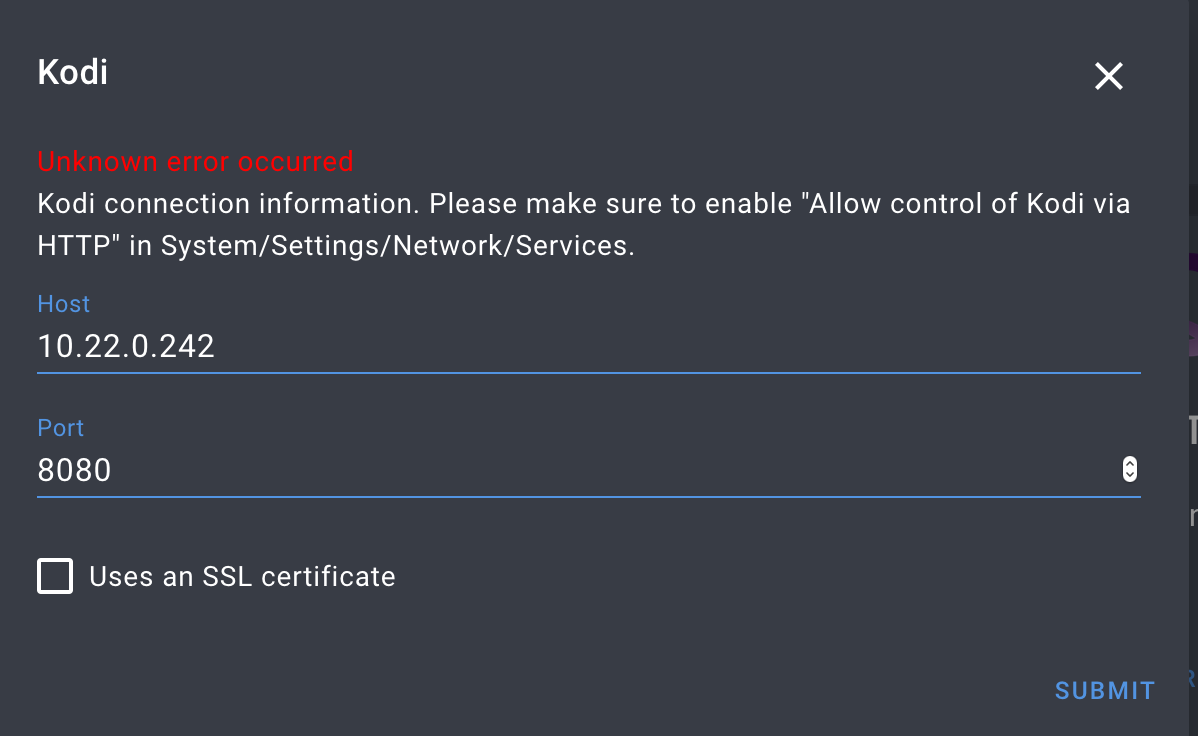
Allow remote control from applications on other systemsdisabled, it never gets past the first step.But when that option is enabled (no changes on the HA side), it all works:
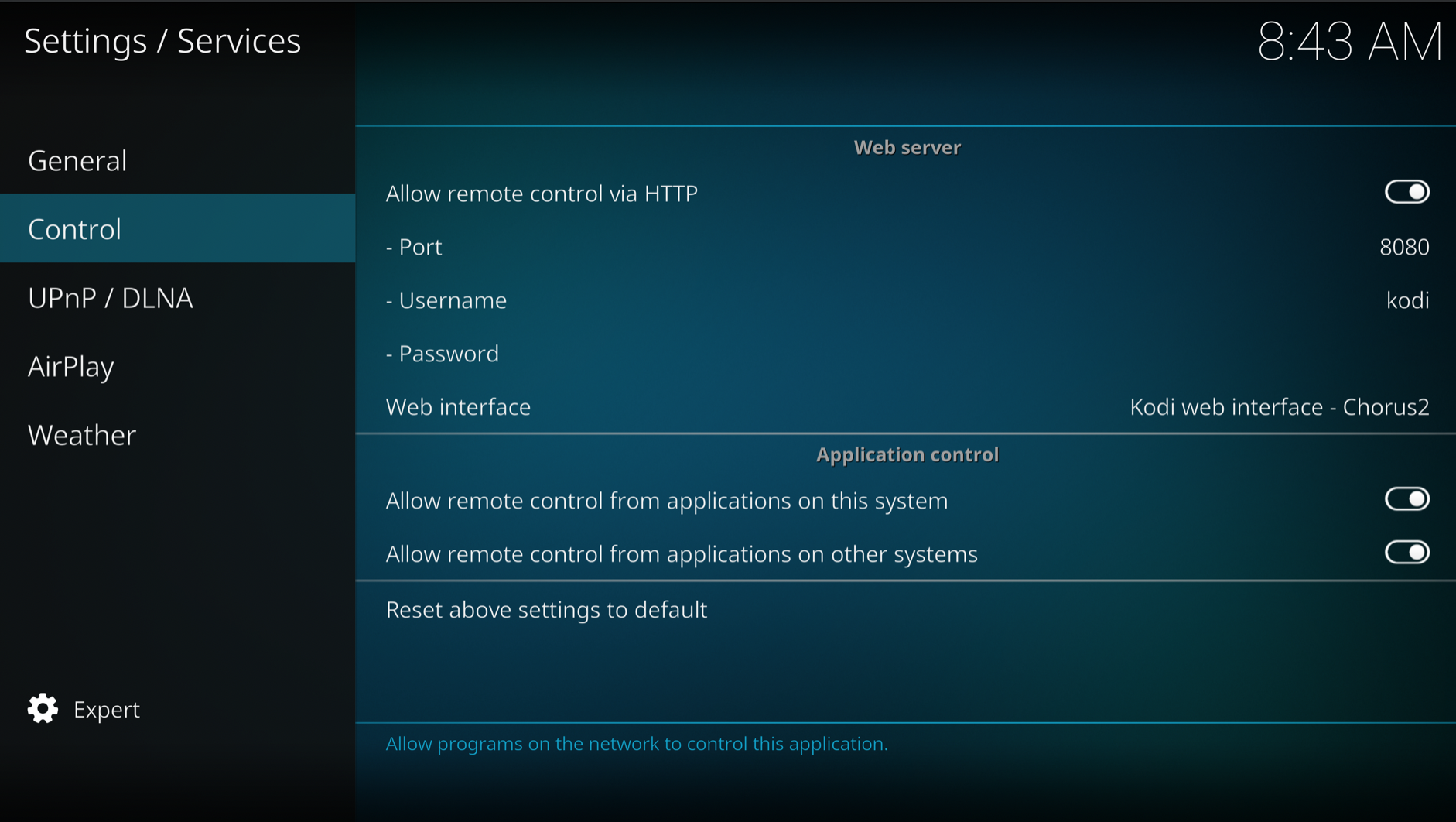
With the Windows firewall completely disabled, it works as intended (passes the first step but prompts for the websocket port when
Allow remote control from applications on other systemsis disabled).So to summarize:
Allow... other systemsdisabled: can't pass first step (but can access the web UI on port 8080 from other computers on network)Allow... other systemsenabled: works, no prompt for ws port (since ws works also)Allow... other systemsdisabled: passes first step, prompts for websocket portAllow... other systemsenabled: works, no prompt for ws port (since ws works also)I completely cleared the Kodi entries from the firewall and re-launched Kodi, and the behavior is the same, but I haven't found any differences in the firewall configuration whether
Allow... other systemsis enabled or disabled. So... maybe a Kodi bug? The only thing that makes me think otherwise is that port 8080 is accessible from other computers on the LAN in all of the cases mentioned.My theory is that in the first scenario (firewall on, but
Allow... other systemsdisabled), maybe the integration is succeeding in connecting to port 8080, but then when trying a ws connection (to determine whether or not to prompt in the 2nd step), the firewall is causing the connection attempt to be rejected (rather than just dropped), and for some reason, the integration is seeing that as a complete failure to connect (even though 8080 was fine). With the firewall disabled, the ws connection is just dropped, prompting the 2nd step in the UI as intended.Edit: On second thought, it could be the reverse of what I described since the first scenario failure is slow (more likely a dropped connection timing out), whereas with the firewall completely off, the ws failure (and prompt) is fast, suggesting a rejected connection. All just speculation though 😄
OnFreund commentedon Jan 19, 2021
Thanks @dperfect, this is really helpful. You're most likely right with the edit - the firewall is probably dropping the connection rather than rejecting it.
Are you proficient in Python? If so, can you try to change the code in https://github.com/OnFreund/PyKodi/blob/master/pykodi/kodi.py#L136 to understand which Exception is raised?
In any case, this seems like a problem in my package, not in the integration, so please open an issue there with your findings and I'll change it accordingly. (I don't have access to a Windows computer to do it myself...)
dperfect commentedon Jan 19, 2021
@OnFreund Ok, looks like it's raising
asyncio.exceptions.CancelledError. I opened an issue in OnFreund/PyKodi:xbmc/PyKodi#7
dperfect commentedon Jan 22, 2021
In case anyone else comes across this thread experiencing "Unknown error occurred" while trying to connect Kodi (with
Allow remote control via HTTPenabled andAllow remote control from applications on other systemsdisabled in Kodi), you might want to check to see if you have:If that describes your environment, you can either enable
Allow ... other systemsin Kodi (if security policy allows), or configure your reverse proxy to use a longer timeout period.