
Warning
This project is in alpha.
Atwood's Law:
“Any application that can be written in JavaScript, will eventually be written in JavaScript.” - Jeff Atwood
AliaJS: Atwood's Law Infrastructure as JavaScript
If you or your team care about JavaScript, then maybe AliaJS is a solution for your infrastructure orchestration.
- Infrastructure orchestrator designed for small operation-infrastructure teams that want to use JavaScript as their definition & execution language.
- Designed with architecture and code simplicity. AliaJS takes HTTP as an input & can talk HTTP as a first-class citizen. It's an Express.js service that runs shell commands & Node.js code.
- All-in-one solution to manage the service infrastructure, including the secret vault integration, monitoring & alerting.
- NGINX-oriented.
- Tool for big operation-infrastructure teams.
- Project that is well supported by a community.
./src/app.js, ./src/main.js & ./src/routes.js: Main Express.js files that define the server.
./src/deploy.js: Update a service that is up and running. ./src/new-image.js: Create & keep updated the virtual machine images according to the scheduled job (104 lines). ./src/new-instance.js: Create new instances according to its definition in ./configurations/instances.js (302 lines). ./src/renew-certificates.js: Create & keep updated the SSL certificates (46 lines).
./src/items.js, vault management utils.js(152 lines). ./src/logger.js, utils.js: Util code used by the project (200 lines).
./templates: Where the EJS templates files are. ./configurations: Where the instance & image configuration definitions are.
AliaJS lets you self-host a cloud system in two command lines; 5 minutes of your attention time.
Running commands from the Internet into your computer is not the best security practice. If you don't fully trust the source of what you are running you should take easy precautions. Recommended read: Reflections on Trusting Trust by Ken Thompson.
- Running commands inside a virtual machine, sandbox or security wrapper, example: Socket CLI
- Blank cloud account, or sandboxed project
- Virtual credit card, limited in credit (amount you are comfortable to risk)
- Throwaway domain name with limited scope DNS API record access
- Cloud account (only Hetzner for now)
- Transfer the name servers of your domain to Hetzner authoritative name servers:
hydrogen.ns.hetzner.com.oxygen.ns.hetzner.com.helium.ns.hetzner.de.
- Node.js version >=
22.18.0installed locally
# More install options
# https://nodejs.org/en/download

curl -o- https://raw.githubusercontent.com/nvm-sh/nvm/v0.40.8/install.sh | bash
\. "$HOME/.nvm/nvm.sh"
nvm install 24- Login to your cloud console.
- Create a new project (+ New project): https://console.hetzner.com/projects
- You will be asked two sets of secrets (API token, S3 credential), run the first command below and wait for the first question:
- What is your Hetzner API key (token)?
Security > API tokens, then clickGenerate API token, set as (Read & Write) - What is your S3 access key?
Security > S3 credentials, then clickGenerate credentials
- What is your Hetzner API key (token)?
Pick one of the following:
Blank
# Specific version context
# https://github.com/dani-garcia/vaultwarden/discussions/7615#discussioncomment-18140443
npm install -g @bitwarden/cli@2026.6

npx aliajs new
ERPNext
# Specific version context
# https://github.com/dani-garcia/vaultwarden/discussions/7615#discussioncomment-18140443
npm install -g @bitwarden/cli@2026.6

# AliaJS works best in an empty directory
mkdir aliajs
cd aliajs && git clone git@github.com:jdecaron/aliajs.git && cd aliajs
git checkout erpnext-15
npm install && npm run new
# Answer the questions ...
n8n
# Specific version context
# https://github.com/dani-garcia/vaultwarden/discussions/7615#discussioncomment-18140443
npm install -g @bitwarden/cli@2026.6

# AliaJS works best in an empty directory
mkdir aliajs
cd aliajs && git clone git@github.com:jdecaron/aliajs.git && cd aliajs
git checkout n8n
npm install && npm run new
# Answer the questions ...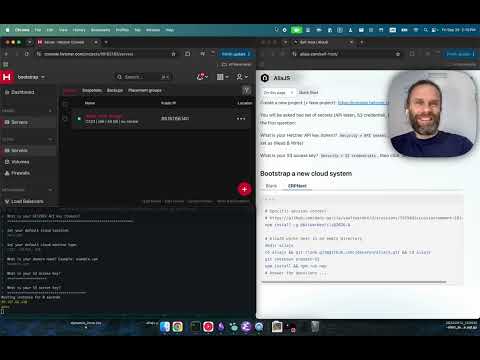
npm run new is the whole setup path, run it before npm run dev.
npm install
npm run new
# Answer the questions ...
Changing the values in .env
Setup your environment variables according to the Bitwarden vault.
npm run dev$ALIAJS_AUTHORIZATION must be defined in your shell environment.
Updating running services:
CHECKOUT=main curl -v -N --header "Authorization: ${ALIAJS_AUTHORIZATION}" "https://aliajs-production.rotat.io/deploy?checkout=${CHECKOUT}&service_name=aliajs&tier=production"Starting new instances:
CHECKOUT=main curl -v -N --header "Authorization: ${ALIAJS_AUTHORIZATION}" "https://aliajs-production.rotat.io/new-instance?address=1.1.1.1&checkout=${CHECKOUT}&instance_name=aliajs-production&replace=false"address, default undefined: possible values: allocate, ip: examples address=allocate address=1.1.1.1: address=allocate will request a permanent IP from the cloud provider and associate it to the new instance.
ephemeral, default false: create a new ephemeral instance with a new unique DNS.
exclude, optional: used to filter (exclude) operation types, examples exclude=backup, exclude=initial&exclude=restore.
replace, default false: will replace the current running instance.
target, optional: used to filter (target) operation types, examples target=initial&target=restore.