You signed in with another tab or window. Reload to refresh your session.You signed out in another tab or window. Reload to refresh your session.You switched accounts on another tab or window. Reload to refresh your session.Dismiss alert
{{ message }}
Repository navigation
Cannot delete file from field in modal dialog #1832
❌ Please edit your post and use the provided template when creating a new issue. This helps everyone to understand your post better and asks for essential information to quicker review the issue.
@jadsonlourenco Thanks for opening this issue. Can you please use the provided template when opening an issue and explain in more detail what specifically you want to change and why. The template should guide you with that.
@jadsonlourenco Under the new UI, deleting a file works just like deleting any other field value by pressing the delete key. If this does not work in the modal dialog, then this would be a bug.
Could you clarify what the issue is - are you just preferring the old UI or are you unable to delete the file?
Good, but I don't know about this keyboard shortcut, most of the time on desktop and mobile we use mouse/touch. On the preview version, as we can see on the images, was three buttons, including one to delete by clicking/touching on it.
So, how can we delete a file with mouse/touch now?
I personally don't need it, but some else may need it, like you need the file buttons. 🙂
No, but the "fields" are different types of data, can have different approaches in the UI.
Different approaches for the same UI object seems rather confusing, and it means more code to maintain. Can you say which action specifically is difficult for you in a touch UI - adding a new file or deleting an existing file?
Different approaches for the same UI object seems rather confusing, and it means more code to maintain. Can you say which action specifically is difficult for you in a touch UI - adding a new file or deleting an existing file?
I mean for the same input type, so, like the File with buttons, the same on data browser and the dialog, on previews version.
No, I never used mobile to send or change "File" input, and discovered now that the "delete" key can be used.
No, I never used mobile to send or change "File" input, and discovered now that the "delete" key can be used.
I understand that you want to have the buttons back, but can you help me understand why. Which action specifically do you find difficult to do without the buttons, and is that on touch or desktop?
I understand that you want to have the buttons back...
No, I have the buttons on my Parse Dashboard installation, 2.1.0, and it works, so, no problem.
This issue is just to share that in the current version we don't have an option to delete the File with "click", just with the keyboard - which is not easy to know - on the dialog and data browser.
I want the same as you, a good UI/UX (we have) for this project.
This issue is just to share that in the current version we don't have an option to delete the File with "click", just with the keyboard
That is consistent behavior with all other fields. That is why the buttons have been removed, to have a consistent UI.
The issue I see though is that the modal dialog behaves differently than the data browser. In the modal dialog it's not possible to delete any field (set it to undefined). I think that should be fixed, and it also seems to be the issue you originally brought up.
Do you have any suggestion how to solve that in the dialog UI for any field (not just file field).


Activity
parse-github-assistant commentedon Oct 5, 2021
Thanks for opening this issue!
mtrezza commentedon Oct 5, 2021
@jadsonlourenco Thanks for opening this issue. Can you please use the provided template when opening an issue and explain in more detail what specifically you want to change and why. The template should guide you with that.
mtrezza commentedon Oct 9, 2021
@jadsonlourenco Under the new UI, deleting a file works just like deleting any other field value by pressing the
deletekey. If this does not work in the modal dialog, then this would be a bug.Could you clarify what the issue is - are you just preferring the old UI or are you unable to delete the file?
jadsonlourenco commentedon Oct 9, 2021
Good, but I don't know about this keyboard shortcut, most of the time on desktop and mobile we use mouse/touch. On the preview version, as we can see on the images, was three buttons, including one to delete by clicking/touching on it.
So, how can we delete a file with mouse/touch now?
mtrezza commentedon Oct 9, 2021
It should work the same as with every other field. How do you delete the content of a file/text/pointer field in the data browser?
19 remaining items
jadsonlourenco commentedon Oct 10, 2021
As you said, and as we have before, using the buttons for the "File" type was the same UI on the data browser and dialog.
mtrezza commentedon Oct 10, 2021
And how would you save an empty string then?
Do you have an idea for a UI that works for all fields, not just for the file field?
jadsonlourenco commentedon Oct 10, 2021
Did you need it? Example?
No, but the "fields" are different types of data, can have different approaches in the UI.
mtrezza commentedon Oct 10, 2021
I personally don't need it, but some else may need it, like you need the file buttons. 🙂
Different approaches for the same UI object seems rather confusing, and it means more code to maintain. Can you say which action specifically is difficult for you in a touch UI - adding a new file or deleting an existing file?
jadsonlourenco commentedon Oct 10, 2021
I mean for the same input type, so, like the File with buttons, the same on data browser and the dialog, on previews version.
No, I never used mobile to send or change "File" input, and discovered now that the "delete" key can be used.
mtrezza commentedon Oct 10, 2021
I understand that you want to have the buttons back, but can you help me understand why. Which action specifically do you find difficult to do without the buttons, and is that on touch or desktop?
jadsonlourenco commentedon Oct 11, 2021
No, I have the buttons on my Parse Dashboard installation, 2.1.0, and it works, so, no problem.
This issue is just to share that in the current version we don't have an option to delete the File with "click", just with the keyboard - which is not easy to know - on the dialog and data browser.
I want the same as you, a good UI/UX (we have) for this project.
mtrezza commentedon Oct 11, 2021
That is consistent behavior with all other fields. That is why the buttons have been removed, to have a consistent UI.
The issue I see though is that the modal dialog behaves differently than the data browser. In the modal dialog it's not possible to delete any field (set it to
undefined). I think that should be fixed, and it also seems to be the issue you originally brought up.Do you have any suggestion how to solve that in the dialog UI for any field (not just file field).
jadsonlourenco commentedon Oct 11, 2021
Well, can be an icon/button to "unset", more clean to say what this action will do. But visually, not a hidden key shortcut.
Another suggestion for the File field: edit the file URL as a string, someone can need it too.
mtrezza commentedon Oct 11, 2021
Do you mean like this?
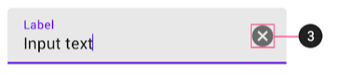
Good idea! Feel free to open a separate issue for this.
jadsonlourenco commentedon Oct 11, 2021
Yes, I will do research about it, and back with ideas and solutions. Keep this issue for now.
mtrezza commentedon Oct 11, 2021
Great, thanks for your effort Jadson!