Repository navigation
docs: setting up source maps for server-side code #7320
Description

Describe the bug
source maps don't seem to work on server-side code.
i enabled them in like 4 different spots because i have no idea which one is supposed to work:
svelte.config.js
import adapter from '@sveltejs/adapter-auto';
import preprocess from 'svelte-preprocess';

const config = {
    compilerOptions: {
        enableSourcemap: true, // here
    },
    preprocess: preprocess({
        sourceMap: true, // here
    }),
    kit: {
       adapter: adapter()
    }
};

export default config;
vite.config.ts
import { sveltekit } from '@sveltejs/kit/vite';
import type { UserConfig } from 'vite';

const config: UserConfig = {
	plugins: [sveltekit()],
    build: {
        sourcemap: true, // here
    },
};

export default config;
tsconfig.json
{
	"extends": "./.svelte-kit/tsconfig.json",
	"compilerOptions": {
		"allowJs": true,
		"checkJs": true,
		"esModuleInterop": true,
		"forceConsistentCasingInFileNames": true,
		"resolveJsonModule": true,
		"skipLibCheck": true,
		"sourceMap": true, // here
		"strict": true
	}
}
to reproduce
- clone the repro repo (link below)
npm install && npm run dev- navigate to the site and click the button
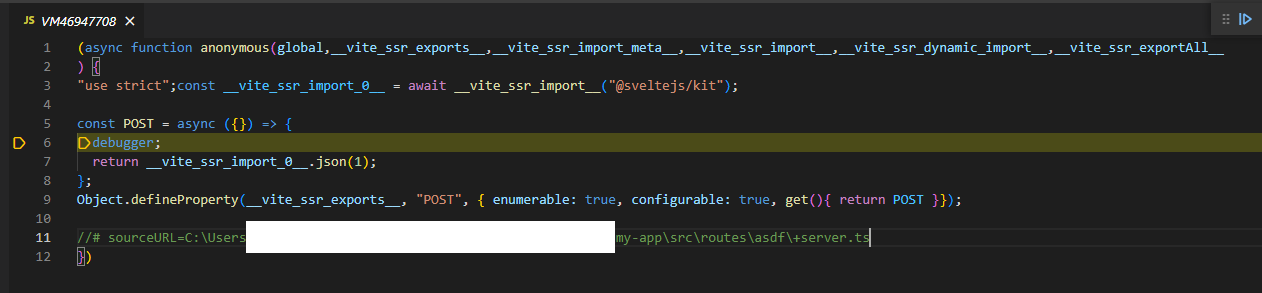
the debugger statement is hit but the compiled js is displayed instead of the source code:
Reproduction
https://github.com/DetachHead/sveltekit-issue
Logs
No response
System Info
System:
    OS: Windows 10 10.0.19044
    CPU: (12) x64 11th Gen Intel(R) Core(TM) i5-11500T @ 1.50GHz
    Memory: 952.27 MB / 15.73 GB
  Binaries:
    Node: 18.10.0 - C:\Program Files\nodejs\node.EXE
    npm: 8.19.2 - C:\Program Files\nodejs\npm.CMD
  Browsers:
    Edge: Spartan (44.19041.1266.0), Chromium (103.0.1264.62)
    Internet Explorer: 11.0.19041.1566
  npmPackages:
    @sveltejs/adapter-auto: next => 1.0.0-next.84
    @sveltejs/kit: next => 1.0.0-next.520
    svelte: ^3.44.0 => 3.52.0
    vite: ^3.1.0 => 3.1.8
Severity
serious, but I can work around it
Additional Information
No response
Activity
benmccann commentedon Oct 20, 2022
This is an issue in Vite: vitejs/vite#3288
giacomoran commentedon Jan 9, 2024
I think this issue can be closed.
The linked Vite issue (vitejs/vite#3288) has been closed.
The original example works, the
debuggerstatement is presented in the source file by VSCode.I've also created a skeleton SvelteKit project configured to generate and auto-load source maps: https://github.com/giacomoran/sveltekit-source-maps
benmccann commentedon Jul 2, 2024
It looks to me like @giacomoran was able to get this working with the following in
package.json:And the following in
vite.config.js:Perhaps we need to update https://kit.svelte.dev/docs/debugging with these steps
[-]source maps don't work on server-side code[/-][+]docs: setting up source maps for server-side code[/+]theetrain commentedon Jul 21, 2024
I added a demo: https://github.com/theetrain/7320-svelte-server-debugging
Despite following #7320 (comment), I could not get breakpoints to work within
src/routes/+page.server.js@load.The source maps appear in Chrome Dev tools when I manually add the repository to the "sources" workspace, but breakpoints in server-side files won't trigger. Not sure what I'm missing.
theetrain commentedon Jul 21, 2024
Scratch that, I forgot to add
--inspectand to launch the Node debugger, and it works! I can probably resolve this in the docs.