Fix global module executable path on Windows - #3233
Merged
Merged
Conversation


This was referenced Apr 23, 2017

|
Can confirm the additional if statement fixes the issue. Not sure whether changing |

Member
Author
|
Member
Author
|
Just realised this is broken for non-root users on Linux too... Need to fix that as well. |


Contributor
|
Thanks for the fix. |

|
Sorry for asking question here, is the PATH environment variable added only when yarn was installed by Windows Installer and not by npm? |
Member
Author
|
Yeah, that's right. We could probably also do it as a post install script,
but it was much easier to do in the installer so we just have it there for
now.
Sent from my phone.
…On May 27, 2017 4:41 AM, "W.T. Chang" ***@***.***> wrote:
Sorry for asking question here, is the PATH environment variable added
only when yarn was installed by Windows Installer and not by npm?
—
You are receiving this because you authored the thread.
Reply to this email directly, view it on GitHub
<#3233 (comment)>, or mute
the thread
<https://github.com/notifications/unsubscribe-auth/AAFnHaM7jFJCgpLk4wt_alzj4T9CsASiks5r9xzcgaJpZM4NFTcP>
.
|
This file contains hidden or bidirectional Unicode text that may be interpreted or compiled differently than what appears below. To review, open the file in an editor that reveals hidden Unicode characters.
Learn more about bidirectional Unicode characters
Sign up for free
to join this conversation on GitHub.
Already have an account?
Sign in to comment
5 participants


Add this suggestion to a batch that can be applied as a single commit.This suggestion is invalid because no changes were made to the code.Suggestions cannot be applied while the pull request is closed.Suggestions cannot be applied while viewing a subset of changes.Only one suggestion per line can be applied in a batch.Add this suggestion to a batch that can be applied as a single commit.Applying suggestions on deleted lines is not supported.You must change the existing code in this line in order to create a valid suggestion.Outdated suggestions cannot be applied.This suggestion has been applied or marked resolved.Suggestions cannot be applied from pending reviews.Suggestions cannot be applied on multi-line comments.Suggestions cannot be applied while the pull request is queued to merge.Suggestion cannot be applied right now. Please check back later.
Summary
Node.js is almost always installed in
C:\Program Files\Yarn, which regular users can't write to. However, Yarn defaults to installing the executables for global modules in the Node directory. This means that the out-of-the-box experience for people installing global modules on Windows is totally broken.It should instead place them in a directory that the user can write to. I'm going with
%LocalAppData\Yarn\bin(eg.C:\Users\Daniel\AppData\Local\Yarn\bin) as it makes the most sense given all the config and cache is already in that directory. I also updated the path in the installer, as the path the installer was using didn't actually exist (.bininstead ofbin).Test plan
Tested
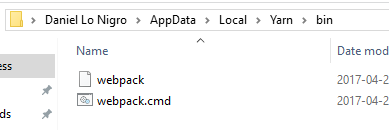
bin\yarn global add webpack, it placed the files in the right directory:Closes #3055