Skip to content

Open beta overrides over the screen the test tools modal was opened from - #100849

Merged
mountiny merged 5 commits into
Expensify:mainfrom
software-mansion-labs:korytko/beta-overrides-back-navigation
Sep 14, 2026
Merged

mountiny merged 5 commits into
Expensify:mainfrom
software-mansion-labs:korytko/beta-overrides-back-navigation

Conversation

@JakubKorytko

@JakubKorytko JakubKorytko commented Sep 10, 2026 •

Copy link
Copy Markdown
Member

Explanation of Change

The "Beta overrides" page was a static route under Settings > Troubleshoot, so opening it from the Test Tools modal mounted the Troubleshoot page under the RHP, and reloading the page always landed there as well. The page is now a dynamic route (<current-path>/beta-overrides) that can be opened from any screen. The URL carries the screen the Test Tools modal was opened from, so both the back arrow and a page reload keep that screen underneath. Opening from Settings > Troubleshoot is unchanged.

Fixed Issues

$ #100769
PROPOSAL: N/A

Tests

  1. Sign in and stay on the Home page
  2. Open the Test Tools modal (Cmd+D on macOS / Ctrl+D on Windows and Linux; 4-finger tap on mobile)
  3. In the "Beta overrides" row, press "View"
  4. Verify that the Beta overrides page opens in the right hand pane
  5. Reload the page (web only)
  6. Verify that the Beta overrides page is still open and the Home page is still underneath, not Settings > Troubleshoot
  7. Press the back arrow in the page header
  8. Verify that you are back on the Home page, not on Settings > Troubleshoot
  9. Go to Settings > Troubleshoot
  10. In the "Beta overrides" row, press "View", then press the back arrow
  11. Verify that you are back on the Troubleshoot page

Offline tests

N/A

QA Steps

Same as tests

PR Author Checklist

  • I linked the correct issue in the ### Fixed Issues section above
  • I wrote clear testing steps that cover the changes made in this PR
    • I added steps for local testing in the Tests section
    • I added steps for the expected offline behavior in the Offline steps section
    • I added steps for Staging and/or Production testing in the QA steps section
    • I added steps to cover failure scenarios (i.e. verify an input displays the correct error message if the entered data is not correct)
    • I turned off my network connection and tested it while offline to ensure it matches the expected behavior (i.e. verify the default avatar icon is displayed if app is offline)
    • I tested this PR with a High Traffic account against the staging or production API to ensure there are no regressions (e.g. long loading states that impact usability).
  • I included screenshots or videos for tests on all platforms
  • I ran the tests on all platforms & verified they passed on:
    • Android: Native
    • Android: mWeb Chrome
    • iOS: Native
    • iOS: mWeb Safari
    • MacOS: Chrome / Safari
  • I verified there are no console errors (if there's a console error not related to the PR, report it or open an issue for it to be fixed)
  • I followed proper code patterns (see Reviewing the code)
    • I verified that comments were added to code that is not self explanatory
    • I verified that any new or modified comments were clear, correct English, and explained "why" the code was doing something instead of only explaining "what" the code was doing.
    • I verified any copy / text that was added to the app is grammatically correct in English. It adheres to proper capitalization guidelines (note: only the first word of header/labels should be capitalized), and is either coming verbatim from figma or has been approved by marketing (in order to get marketing approval, ask the Bug Zero team member to add the Waiting for copy label to the issue)
  • If a new code pattern is added I verified it was agreed to be used by multiple Expensify engineers
  • I followed the guidelines as stated in the Review Guidelines
  • I tested other components that can be impacted by my changes (i.e. if the PR modifies a shared library or component like Avatar, I verified the components using Avatar are working as expected)
  • If a new CSS style is added I verified that:
    • A similar style doesn't already exist
    • The style can't be created with an existing StyleUtils function (i.e. StyleUtils.getBackgroundAndBorderStyle(theme.componentBG))
  • If new assets were added or existing ones were modified, I verified that:
    • The assets are optimized and compressed (for SVG files, run npm run compress-svg)
    • The assets load correctly across all supported platforms.
  • If the PR modifies code that runs when editing or sending messages, I tested and verified there is no unexpected behavior for all supported markdown - URLs, single line code, code blocks, quotes, headings, bold, strikethrough, and italic.
  • If the PR modifies a generic component, I tested and verified that those changes do not break usages of that component in the rest of the App (i.e. if a shared library or component like Avatar is modified, I verified that Avatar is working as expected in all cases)
  • If the PR modifies a component related to any of the existing Storybook stories, I tested and verified all stories for that component are still working as expected.
  • If the PR modifies a component or page that can be accessed by a direct deeplink, I verified that the code functions as expected when the deeplink is used - from a logged in and logged out account.
  • If the PR modifies the UI (e.g. new buttons, new UI components, changing the padding/spacing/sizing, moving components, etc) or modifies the form input styles:
    • I verified that all the inputs inside a form are aligned with each other.
    • I added Design label and/or tagged @Expensify/design so the design team can review the changes.
  • I added unit tests for any new feature or bug fix in this PR to help automatically prevent regressions in this user flow.
  • If the main branch was merged into this PR after a review, I tested again and verified the outcome was still expected according to the Test steps.

Screenshots/Videos

Android: Native
Android.mov
Android: mWeb Chrome
iOS: Native
iOS.mov
iOS: mWeb Safari
MacOS: Chrome / Safari
Web.mov

@JakubKorytko

Copy link
Copy Markdown
Member Author

@codex review

@JakubKorytko

Copy link
Copy Markdown
Member Author

@MelvinBot review

@chatgpt-codex-connector chatgpt-codex-connector Bot left a comment

Copy link
Copy Markdown

Choose a reason for hiding this comment

The reason will be displayed to describe this comment to others. Learn more.

💡 Codex Review

Here are some automated review suggestions for this pull request.

Reviewed commit: 13701e65bc

ℹ️ About Codex in GitHub

Codex has been enabled to automatically review pull requests in this repo. Reviews are triggered when you

  • Open a pull request for review
  • Mark a draft as ready
  • Comment "@codex review".

If Codex has suggestions, it will comment; otherwise it will react with 👍.

When you sign up for Codex through ChatGPT, Codex can also answer questions or update the PR, like "@codex address that feedback".

Comment thread src/components/TestToolMenu.tsx Resolved
@JakubKorytko

Copy link
Copy Markdown
Member Author

@codex review

@MelvinBot

MelvinBot commented Sep 10, 2026 •

Copy link
Copy Markdown
Contributor

🤖 Review: the fix is correct and minimal. skipMatchingFullScreenRoute is the purpose-built option for exactly this problem, and the Troubleshoot path really is unchanged. Two non-blocking notes below.

Why the fix is right

Without the flag, linkTo/index.ts:244 resolves the RHP's canonical parent and dispatches an extra tab navigate before pushing the RHP. For Beta overrides that parent is SCREENS.SETTINGS.TROUBLESHOOT (via SETTINGS_TO_RHP.ts:132), so the central pane got swapped to Settings > Troubleshoot underneath the overlay — that's #100769. With the flag, only the minimal push dispatches, so the existing TAB_NAVIGATOR is left in place. No orphaned state: Beta overrides is a plain RHP route (config.ts:2045), pushed as a root-stack sibling above whatever is already there.

The dismissModal() → navigate() order is also correct and load-bearing: both dispatch synchronously, so by the time linkTo reads currentState the Test Tools modal is already popped and the top route is the underlying tab. Reversing them would push the RHP over the still-open modal.

Verification that "Settings > Troubleshoot is unchanged" holds

Confirmed, though not for the reason the guard suggests. On the Troubleshoot page the top route is TAB_NAVIGATOR, not RIGHT_MODAL_NAVIGATOR, so pre-PR the :244 branch was entered. It was a no-op anyway because shouldChangeToMatchingFullScreen returns false on all three checks: matching and last full-screen route are both SETTINGS_SPLIT_NAVIGATOR, neither is TAB_NAVIGATOR, and the focused route isn't ADD_PAYMENT_CARD. Pre-PR: branch entered, dispatches nothing. Post-PR: branch skipped, dispatches nothing. Identical — and confirmed live below.

Precedent checked: EnableGlobalReimbursementsPayModal.tsx:57 is the same class of problem, and the option's own doc comment describes this use case (linkTo/types.ts:19). I also checked backTo as a simpler lever — unavailable, since SETTINGS_TROUBLESHOOT_BETA_OVERRIDES is a static paramless route (ROUTES.ts:2611) and adding param support to the route, screen type and page would be strictly more invasive. forceReplace doesn't touch full-screen matching at all. This is the minimal change.

Two notes

1. The tests assert the argument, not the behavior. TestToolMenuTest.tsx:368 now checks that {skipMatchingFullScreenRoute: true} was passed to a mocked Navigation. That pins the call site but not the outcome — if the option's semantics change in linkTo, these stay green while the bug returns. tests/navigation/ already has the harness for the real thing (TestNavigationContainer with a seeded initialState, as in NavigateTests.tsx): seed [TAB_NAVIGATOR(REPORTS_SPLIT), TEST_TOOLS_MODAL_NAVIGATOR], run the flow, assert the surviving TAB_NAVIGATOR is still REPORTS_SPLIT_NAVIGATOR. Worth adding, given the author checklist claims unit tests for the bug fix.

2. Missing platform evidence. The checklist has all five platforms ticked, but the Screenshots section only has videos for iOS: Native and MacOS: Chrome — Android: Native, Android: mWeb Chrome and iOS: mWeb Safari are empty. #100769 reproduced on Android: App specifically, so an Android Native recording is the one that matters most here.

Not a defect, just so it's on the record: after a browser refresh directly on /settings/troubleshoot/beta-overrides, back still goes to Troubleshoot, because a cold deeplink has no prior screen and has to synthesize a parent. Correct behavior, and the existing usage behaves the same way.

Web verification: ⚠️ partial

The Troubleshoot half of the test steps passes on web. The Test Tools modal half could not be driven: opening it on web requires Ctrl+D (useDebugShortcut.tsx) and the harness has no way to send a modifier-key combo; the only other trigger is a 4-finger PanResponder gesture, unusable with one pointer. So steps 2–4 are unverified by me on web, not failing — your iOS Native and MacOS Chrome recordings cover that path.

Back navigation lands on Settings > Troubleshoot

Step Status
Signed in and on the Home page (Inbox)Snapshot showed heading "Home" with tabs Home/Inbox/Spend/Workspaces/Account and Home page content.
✅
Open the Test Tools modal with Ctrl+D and confirm the "Beta overrides" rowNot executable: the web harness exposes no keyboard-modifier command, so Ctrl+D could not be sent. Tooling gap, not a product observation.
⚠️
Beta overrides opens in the RHP over Home, not over Settings > TroubleshootBlocked by the same Ctrl+D limitation; not exercised.
⚠️
Back arrow returns to Home, not Settings > TroubleshootBlocked by the same Ctrl+D limitation; not exercised.
⚠️
Settings > Troubleshoot > Beta overrides "View" opens the pageRHP opened with heading "Beta overrides" and the beta toggle list, Troubleshoot still visible underneath.
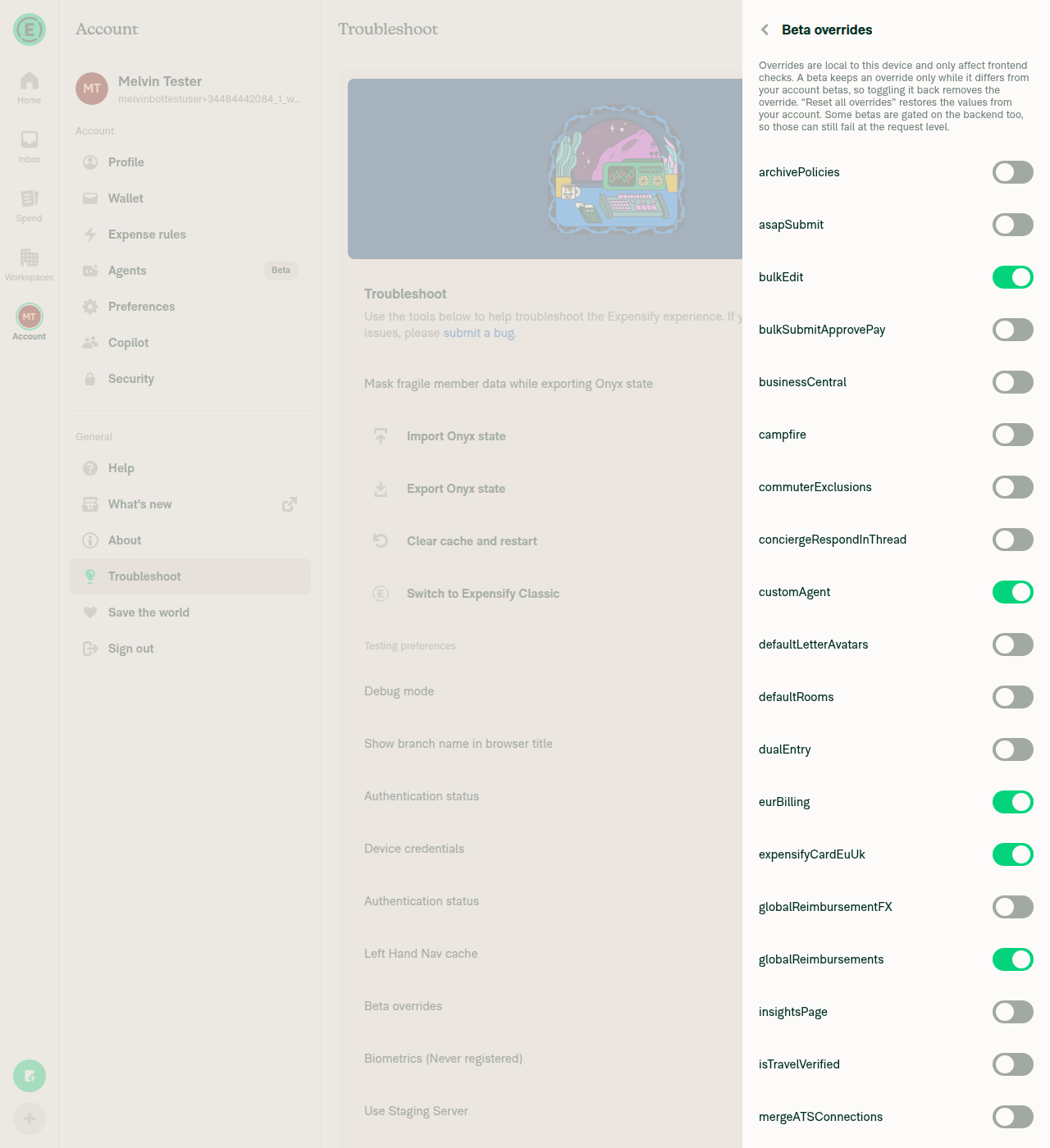
Beta overrides RHP opened over Settings > Troubleshoot
✅
Back arrow returns to Settings > TroubleshootLanded back on the Troubleshoot page with the Troubleshoot tab highlighted and the Beta overrides row visible again.
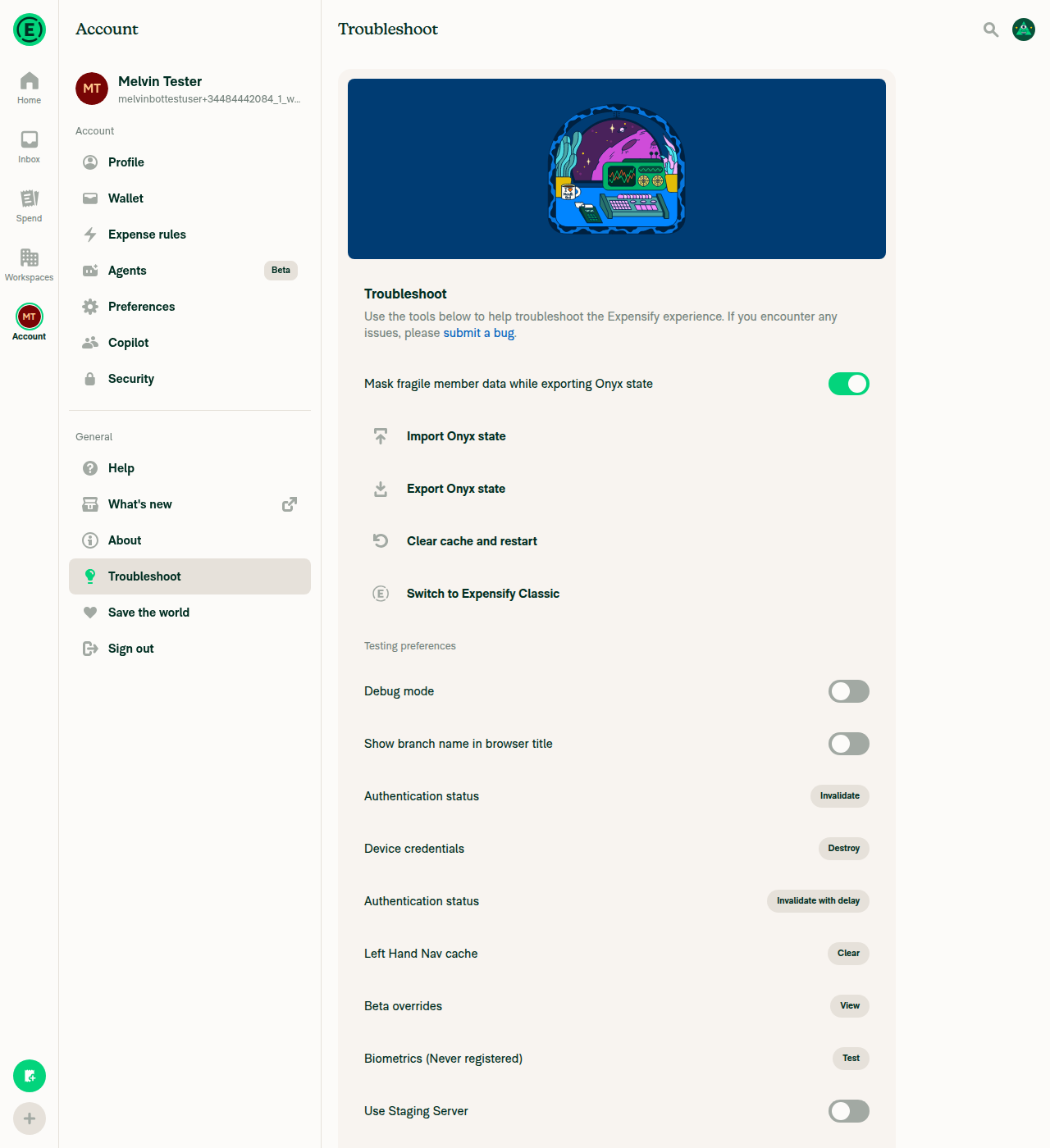
Back navigation lands on Settings > Troubleshoot
✅

No blank or broken layout on any reachable screen. CI is green on d7222c4 — the only failing check is Check independent approval, which is just the missing review.


view run · no recording available

@chatgpt-codex-connector

Copy link
Copy Markdown

Codex Review: Didn't find any major issues. 🚀

Reviewed commit: d7222c4c19

ℹ️ About Codex in GitHub

Codex has been enabled to automatically review pull requests in this repo. Reviews are triggered when you

  • Open a pull request for review
  • Mark a draft as ready
  • Comment "@codex review".

If Codex has suggestions, it will comment; otherwise it will react with 👍.

When you sign up for Codex through ChatGPT, Codex can also answer questions or update the PR, like "@codex address that feedback".

@JakubKorytko
JakubKorytko marked this pull request as ready for review September 10, 2026 14:00
@JakubKorytko
JakubKorytko requested review from a team as code owners September 10, 2026 14:00
@melvin-bot
melvin-bot Bot requested a review from DylanDylann September 10, 2026 14:01
@melvin-bot

melvin-bot Bot commented Sep 10, 2026

Copy link
Copy Markdown

@DylanDylann Please copy/paste the Reviewer Checklist from here into a new comment on this PR and complete it. If you have the K2 extension, you can simply click: [this button]

@melvin-bot
melvin-bot Bot requested review from garrettmknight and removed request for a team September 10, 2026 14:01
@JakubKorytko

Copy link
Copy Markdown
Member Author

@MelvinBot fair point about the test, addressed. Please re-review

@MelvinBot

MelvinBot commented Sep 10, 2026 •

Copy link
Copy Markdown
Contributor

🤖 Addressed — this is exactly the test I was asking for. No further changes needed from me.

NavigateTests.tsx:308 pins the actual regression rather than the argument: it seeds the Reports tab as active, runs the navigate, and asserts the surviving active tab is still REPORTS_SPLIT_NAVIGATOR with SCREENS.REPORT on top. If skipMatchingFullScreenRoute ever stopped being honored in linkTo, the SETTINGS_TO_RHP relation would resolve Beta overrides to Troubleshoot, the active tab would become SETTINGS_SPLIT_NAVIGATOR, and this fails.

What makes it convincing is that it pairs with NavigateTests.tsx:257 directly above it — same seeded state, same shape of assertion, but navigating without the option and asserting the tab does get swapped to SETTINGS_SPLIT_NAVIGATOR. Two tests from the same starting state with opposite outcomes is a genuine demonstration that the flag is doing the work, not just an assertion that happens to hold.

Coverage of the bug is now complete across two links, which is the right way to split it given TestToolMenu mocks Navigation wholesale:

The TestNavigationContainer.tsx registration is the necessary plumbing for the RHP stack to resolve BETA_OVERRIDES. Both files pass in CI — I confirmed PASS tests/navigation/NavigateTests.tsx and PASS tests/ui/TestToolMenuTest.tsx in the run for 0b171f4.

The red CI is not yours

test (job 1) and test (job 8) both fail on the same unrelated cause, and neither touches anything in your diff:

#100068 merged to main at 13:59 UTC — two minutes before your run started — adding addMiddleware(ReplaceOptimisticAgentAccountID) as a 16th middleware without bumping either hardcoded count. The failing assertion even names it: [Function replaceOptimisticAgentAccountID]. Your previous commit d7222c4 had all 8 test jobs green, and the only files added since are test files, which cannot change middleware registration.

Nothing for you to do here — the counts need bumping to 16 on main, and this is currently breaking every open PR. Worth a heads-up in the deploy channel if nobody has caught it yet.

Leftover nit

Android: Native now has a recording, which was the one that mattered — the issue reproduced there. Android: mWeb Chrome and iOS: mWeb Safari are still empty boxes with all five platforms ticked. Low stakes, since mWeb runs the same navigation code as the macOS Chrome recording you already attached, but the checklist and the body still disagree.

I did not re-run the web check: TestToolMenu.tsx:133 is byte-identical to what I verified last round, and the Test Tools modal path still can't be driven on web because opening it needs Ctrl+D and the harness has no way to send a modifier-key combo. A second run would reproduce the same partial result without telling either of us anything new.


view run · view recording

@JakubKorytko

Copy link
Copy Markdown
Member Author

Tests failing on main

@JakubKorytko

Copy link
Copy Markdown
Member Author

@DylanDylann all yours

@DylanDylann

Copy link
Copy Markdown
Contributor

@JakubKorytko I see a similar problem

  1. Sign in and stay on the Home page
  2. Open the Test Tools modal (Cmd+D on macOS / Ctrl+D on Windows and Linux; 4-finger tap on mobile)
  3. In the "Beta overrides" row, press "View"
  4. Verify that the Beta overrides page opens in the right hand pane
  5. Reloading page
  6. You are back on the Settings > Troubleshoot
Screen.Recording.2026-09-11.at.11.15.39.mov

@JakubKorytko

Copy link
Copy Markdown
Member Author

@DylanDylann fair, fixed, please re-test

@codecov

codecov Bot commented Sep 14, 2026 •

Copy link
Copy Markdown

Codecov Report

❌ Looks like you've decreased code coverage for some files. Please write tests to increase, or at least maintain, the existing level of code coverage. See our documentation here for how to interpret this table.

Files with missing lines Coverage Δ
src/ROUTES.ts 28.91% <ø> (ø)
src/SCREENS.ts 100.00% <ø> (ø)
src/components/TestToolMenu.tsx 93.87% <100.00%> (+0.39%) ⬆️
...on/AppNavigator/Navigators/RightModalNavigator.tsx 4.05% <ø> (-0.62%) ⬇️
...igation/linkingConfig/RELATIONS/SETTINGS_TO_RHP.ts 100.00% <ø> (ø)
src/libs/Navigation/linkingConfig/config.ts 71.42% <ø> (ø)
src/libs/actions/TestTool.ts 18.51% <ø> (+14.81%) ⬆️
...settings/Troubleshoot/DynamicBetaOverridesPage.tsx 100.00% <100.00%> (ø)
...gation/AppNavigator/ModalStackNavigators/index.tsx 6.02% <0.00%> (-0.01%) ⬇️
... and 16 files with indirect coverage changes

@DylanDylann

DylanDylann commented Sep 14, 2026 •

Copy link
Copy Markdown
Contributor

Reviewer Checklist

  • I have verified the author checklist is complete (all boxes are checked off).
  • I verified the correct issue is linked in the ### Fixed Issues section above
  • I verified testing steps are clear and they cover the changes made in this PR
    • I verified the steps for local testing are in the Tests section
    • I verified the steps for Staging and/or Production testing are in the QA steps section
    • I verified the steps cover any possible failure scenarios (i.e. verify an input displays the correct error message if the entered data is not correct)
    • I turned off my network connection and tested it while offline to ensure it matches the expected behavior (i.e. verify the default avatar icon is displayed if app is offline)
  • I checked that screenshots or videos are included for tests on all platforms
  • I included screenshots or videos for tests on all platforms
  • I verified that the composer does not automatically focus or open the keyboard on mobile unless explicitly intended. This includes checking that returning the app from the background does not unexpectedly open the keyboard.
  • I verified tests pass on all platforms & I tested again on:
    • Android: HybridApp
    • Android: mWeb Chrome
    • iOS: HybridApp
    • iOS: mWeb Safari
    • MacOS: Chrome / Safari
  • If there are any errors in the console that are unrelated to this PR, I either fixed them (preferred) or linked to where I reported them in Slack
  • I verified proper code patterns were followed (see Reviewing the code)
    • I verified that any callback methods that were added or modified are named for what the method does and never what callback they handle (i.e. toggleReport and not onIconClick).
    • I verified that comments were added to code that is not self explanatory
    • I verified that any new or modified comments were clear, correct English, and explained "why" the code was doing something instead of only explaining "what" the code was doing.
    • I verified any copy / text that was added to the app is grammatically correct in English. It adheres to proper capitalization guidelines (note: only the first word of header/labels should be capitalized), and is either coming verbatim from figma or has been approved by marketing (in order to get marketing approval, ask the Bug Zero team member to add the Waiting for copy label to the issue)
  • If a new code pattern is added I verified it was agreed to be used by multiple Expensify engineers
  • I verified that this PR follows the guidelines as stated in the Review Guidelines
  • I verified other components that can be impacted by these changes have been tested, and I retested again (i.e. if the PR modifies a shared library or component like Avatar, I verified the components using Avatar have been tested & I retested again)
  • If a new component is created I verified that:
    • A similar component doesn't exist in the codebase
    • All props are defined accurately and each prop has a /** comment above it */
    • The file is named correctly
    • The component has a clear name that is non-ambiguous and the purpose of the component can be inferred from the name alone
    • The only data being stored in the state is data necessary for rendering and nothing else
    • For Class Components, any internal methods passed to components event handlers are bound to this properly so there are no scoping issues (i.e. for onClick={this.submit} the method this.submit should be bound to this in the constructor)
    • Any internal methods bound to this are necessary to be bound (i.e. avoid this.submit = this.submit.bind(this); if this.submit is never passed to a component event handler like onClick)
    • All JSX used for rendering exists in the render method
    • The component has the minimum amount of code necessary for its purpose, and it is broken down into smaller components in order to separate concerns and functions
  • If any new file was added I verified that:
    • The file has a description of what it does and/or why is needed at the top of the file if the code is not self explanatory
  • If a new CSS style is added I verified that:
    • A similar style doesn't already exist
    • The style can't be created with an existing StyleUtils function (i.e. StyleUtils.getBackgroundAndBorderStyle(theme.componentBG)
  • If the PR modifies code that runs when editing or sending messages, I tested and verified there is no unexpected behavior for all supported markdown - URLs, single line code, code blocks, quotes, headings, bold, strikethrough, and italic.
  • If the PR modifies a generic component, I tested and verified that those changes do not break usages of that component in the rest of the App (i.e. if a shared library or component like Avatar is modified, I verified that Avatar is working as expected in all cases)
  • If the PR modifies a component related to any of the existing Storybook stories, I tested and verified all stories for that component are still working as expected.
  • If the PR modifies a component or page that can be accessed by a direct deeplink, I verified that the code functions as expected when the deeplink is used - from a logged in and logged out account.
  • If the PR modifies the UI (e.g. new buttons, new UI components, changing the padding/spacing/sizing, moving components, etc) or modifies the form input styles:
    • I verified that all the inputs inside a form are aligned with each other.
    • I added Design label and/or tagged @Expensify/design so the design team can review the changes.
  • For any bug fix or new feature in this PR, I verified that sufficient unit tests are included to prevent regressions in this flow.
  • If the main branch was merged into this PR after a review, I tested again and verified the outcome was still expected according to the Test steps.
  • I have checked off every checkbox in the PR reviewer checklist, including those that don't apply to this PR.

Screenshots/Videos

Android: HybridApp
Screen.Recording.2026-09-14.at.16.54.29.mov
Android: mWeb Chrome
Screen.Recording.2026-09-14.at.16.32.18.mov
iOS: HybridApp
Screen.Recording.2026-09-14.at.16.52.34.mov
iOS: mWeb Safari
Screen.Recording.2026-09-14.at.16.29.45.mov
MacOS: Chrome / Safari
Screen.Recording.2026-09-14.at.16.25.35.mov

@melvin-bot
melvin-bot Bot requested a review from mountiny September 14, 2026 09:55
@garrettmknight
garrettmknight removed their request for review September 14, 2026 11:56

@mountiny mountiny left a comment

Copy link
Copy Markdown
Contributor

Choose a reason for hiding this comment

The reason will be displayed to describe this comment to others. Learn more.

Thanks

@mountiny
mountiny merged commit 574c623 into Expensify:main Sep 14, 2026
35 of 37 checks passed
@github-actions

Copy link
Copy Markdown
Contributor

🚧 mountiny has triggered a test Expensify/App build. You can view the workflow run here.

@OSBotify

Copy link
Copy Markdown
Contributor

✋ This PR was not deployed to staging yet because QA is ongoing. It will be automatically deployed to staging after the next production release.

@OSBotify

Copy link
Copy Markdown
Contributor

🚀 Deployed to staging by https://github.com/mountiny in version: 9.4.78-0 🚀

platform result
🕸 web 🕸 success ✅
🤖 android 🤖 success ✅
🍎 iOS 🍎 success ✅

@MelvinBot

MelvinBot commented Sep 15, 2026 •

Copy link
Copy Markdown
Contributor

No help site changes are required for this PR, so I did not create a draft PR.

This change only affects how the Beta overrides page is routed when opened from the Test Tools modal. That is a developer/QA tool, not a customer-facing feature:

  • The Beta overrides row renders behind !isProduction in src/components/TestToolMenu.tsx:126, so customers on production never see it.
  • The diff touches only routes, navigation config, the Test Tools menu, the Beta overrides page, and tests. No src/languages/* file changed, so no user-facing copy changed either.
  • Nothing under docs/articles mentions Beta overrides or Test Tools — grep -ril "beta override" and grep -ril "test tool" over docs/ both return zero matches. There is no existing article whose navigation steps would go stale.

The only troubleshooting article on the help site, General Product Troubleshooting, covers browser-level steps and the JavaScript console. It never references the in-app Troubleshoot page or any route this PR changes, so it stays accurate as written.

Because no docs PR was needed, I also skipped the HelpDot label and the assignment. If you want an article created for the Test Tools menu from scratch, say the word and I'll draft one — note it would document a non-production surface, which the help site does not currently cover anywhere.


view run · no recording available

@OSBotify

Copy link
Copy Markdown
Contributor

🚀 Deployed to production by https://github.com/luacmartins in version: 9.4.78-3 🚀

platform result
🕸 web 🕸 success ✅
🤖 android 🤖 success ✅
🍎 iOS 🍎 success ✅

Bundle Size Analysis (Sentry):

Sign up for free to join this conversation on GitHub. Already have an account? Sign in to comment

Labels

None yet

Projects

None yet

Development

Successfully merging this pull request may close these issues.

6 participants