Skip to content

Keep non-reimbursable-only reports out of Ready to pay before their expenses load - #105618

Merged
joekaufmanexpensify merged 2 commits into
mainfrom
claude-payOptionalUnloadedNonReimbursableReports
Nov 17, 2026
Merged

joekaufmanexpensify merged 2 commits into
mainfrom
claude-payOptionalUnloadedNonReimbursableReports

Conversation

@MelvinBot

@MelvinBot MelvinBot commented Nov 2, 2026 •

Copy link
Copy Markdown
Contributor

Explanation of Change

Approved reports that contain only non-reimbursable expenses showed up in Ready to pay until their transactions loaded. When you opened one, it dropped out of the list and the count went down by one.

The cause is that isPayOptional() decided only from loaded transactions. With no transactions in Onyx, both hasOnlyNonReimbursableTransactions() and hasSettledZeroReimbursableSpend() return false, so the report counted as payable. The report object already had the right answer in its totals (reimbursableTotal: 0, non-zero nonReimbursableTotal).

This PR changes isPayOptional() in src/libs/ReportUtils.ts:

  • If the report has no loaded transactions (ignoring pending deletes), it uses a new helper, hasOnlyNonReimbursableTotal(). That helper returns true for an expense report whose total is loaded and not pending, with zero reimbursable spend and non-zero non-reimbursable spend.
  • If transactions are loaded, the existing transaction-based checks run unchanged. This keeps the fail-closed behavior for receipts that are still scanning.
  • The "total is loaded and not pending" guard is now shared by both helpers through isReportTotalLoadedAndSettled().

The fix is in isPayOptional(), so every caller now behaves the same way before transactions load: the Pay to-do, the LHN Pay badge, and the Search row Pay action.

One edge case for reviewers: an approved report with card expenses and a reimbursable receipt that is still scanning has a $0 reimbursable total. Before its transactions load, it is now treated as pay-optional. After they load, the existing fail-closed check treats it as payable. This is rare, and the totals give no way to detect a scanning receipt.

AI tests run (by MelvinBot):

  • Unit tests: added cases to tests/unit/ReportUtilsTest.ts (isPayOptional) and tests/unit/TodosUtilsTest.ts (Pay bucket). The new to-do test fails without the fix and passes with it.
  • Passed: ReportUtilsTest, TodosUtilsTest, Search/SearchUIUtilsTest, Search/SearchUIUtils.test, hooks/useTodoSearchResultsTest, SidebarUtilsTest, ReportPrimaryActionUtilsTest, ui/SearchPageTest (2,609 tests).
  • Passed: npm run typecheck, npm run lint-changed, npm run spell-changed, oxfmt (no formatting changes).
  • Not run: the full npm test suite, which took longer than 10 minutes, and manual UI testing.

Fixed Issues

$ #105413
PROPOSAL: #105413 (comment)

Tests

Prerequisites

  1. Log in with two users: User A and User B. Ideally, User A should be a high-traffic account.
  2. User A should have a workspace with User B added as a member.
  3. Ensure that Workflows and Payments are enabled in the workspace, with User A assigned as the Payer.

Steps to reproduce

  1. User B creates a few non-reimbursable expenses.
  2. User A approves the expenses.
  3. Verify that approving the reports does not increase the Ready to pay count on the Spend tab.
  4. Log out User A or clear the data using Clear cache and restart.
  5. Open the Spend page and check the Ready to pay section and its count.
  6. Open one of the reports containing only non-reimbursable expenses, then navigate back.
  7. Verify that reports containing only non-reimbursable expenses never appear in the Ready to pay section.

Alternative scenario

We can also test with three users:

  • User A: Workspace owner

  • User B: Approver and Payer

  • User C: Submitter

  • Verify that no errors appear in the JS console

Offline tests

N/A

QA Steps

Same as Tests, including the prerequisites and alternative three-user scenario.

  • Verify that no errors appear in the JS console

PR Author Checklist

Checklist marked at jayeshmangwani's explicit request; these selections are not additional test evidence or human sign-off. The unloaded-transaction UI regression, offline testing, High Traffic testing, and full platform coverage remain unverified. The human co-author must still complete Tests and QA with actual results and attach the promised videos.

  • I linked the correct issue in the ### Fixed Issues section above
  • I wrote clear testing steps that cover the changes made in this PR
    • I added steps for local testing in the Tests section
    • I added steps for the expected offline behavior in the Offline steps section
    • I added steps for Staging and/or Production testing in the QA steps section
    • I added steps to cover failure scenarios (i.e. verify an input displays the correct error message if the entered data is not correct)
    • I turned off my network connection and tested it while offline to ensure it matches the expected behavior (i.e. verify the default avatar icon is displayed if app is offline)
    • I tested this PR with a High Traffic account against the staging or production API to ensure there are no regressions (e.g. long loading states that impact usability).
  • I included screenshots or videos for tests on all platforms
  • I ran the tests on all platforms & verified they passed on:
    • Android: Native
    • Android: mWeb Chrome
    • iOS: Native
    • iOS: mWeb Safari
    • MacOS: Chrome / Safari
  • I verified there are no console errors (if there's a console error not related to the PR, report it or open an issue for it to be fixed)
  • I verified any copy / text that was added to the app is either coming verbatim from figma or has been approved by marketing (in order to get marketing approval, ask the Bug Zero team member to add the Waiting for copy label to the issue)
  • If a new code pattern is added I verified it was agreed to be used by multiple Expensify engineers
  • I tested other components that can be impacted by my changes (i.e. if the PR modifies a shared library or component like Avatar, I verified the components using Avatar are working as expected)
  • If new assets were added or existing ones were modified, I verified that:
    • The assets are optimized and compressed (for SVG files, run npm run compress-svg)
    • The assets load correctly across all supported platforms.
  • If the PR modifies code that runs when editing or sending messages, I tested and verified there is no unexpected behavior for all supported markdown - URLs, single line code, code blocks, quotes, headings, bold, strikethrough, and italic.
  • If the PR modifies a generic component, I tested and verified that those changes do not break usages of that component in the rest of the App (i.e. if a shared library or component like Avatar is modified, I verified that Avatar is working as expected in all cases)
  • If the PR modifies a component related to any of the existing Storybook stories, I tested and verified all stories for that component are still working as expected.
  • If the PR modifies a component or page that can be accessed by a direct deeplink, I verified that the code functions as expected when the deeplink is used - from a logged in and logged out account.
  • If the PR modifies the UI (e.g. new buttons, new UI components, changing the padding/spacing/sizing, moving components, etc) or modifies the form input styles:
    • I verified that all the inputs inside a form are aligned with each other.
    • I added Design label and/or tagged @Expensify/design so the design team can review the changes.
  • If the PR adds or modifies the UI:
    • I asked an AI agent to review the changes for accessibility issues and addressed its findings.
    • I tested with a screen reader (VoiceOver on macOS) and verified all new/changed elements are reachable with a logical focus order.
    • I verified all new/changed elements have meaningful accessible names and roles.
    • I verified state changes are announced (e.g. checked/unchecked, expanded/collapsed, selected).
  • I added unit tests for any new feature or bug fix in this PR to help automatically prevent regressions in this user flow.
  • If the main branch was merged into this PR after a review, I tested again and verified the outcome was still expected according to the Test steps.

Screenshots/Videos

Android: Native
Android: mWeb Chrome
iOS: Native
iOS: mWeb Safari
MacOS: Chrome / Safari

MelvinBot and others added 2 commits November 2, 2026 12:57
…to pay before their expenses load

Co-authored-by: Jayesh Mangwani <jayeshmangwani@users.noreply.github.com>
@MelvinBot
MelvinBot requested a review from a team November 2, 2026 13:18
@melvin-bot melvin-bot Bot added Melvin-Test-Android Melvin-Test-Web Triggers Melvin to run the testing steps of the PR on web labels Nov 2, 2026
@MelvinBot

Copy link
Copy Markdown
Contributor Author

I opened this PR from an upstream branch because I can't push to your fork.

To take over this branch and push updates, run:

git remote add upstream https://github.com/Expensify/App.git
git fetch upstream claude-payOptionalUnloadedNonReimbursableReports
git checkout -b claude-payOptionalUnloadedNonReimbursableReports upstream/claude-payOptionalUnloadedNonReimbursableReports
git push -u origin claude-payOptionalUnloadedNonReimbursableReports

Then close this PR and open a new one from your fork.

@MelvinBot

MelvinBot commented Nov 2, 2026 •

Copy link
Copy Markdown
Contributor Author

🤖 Android test steps verification results: ⚠️ partial

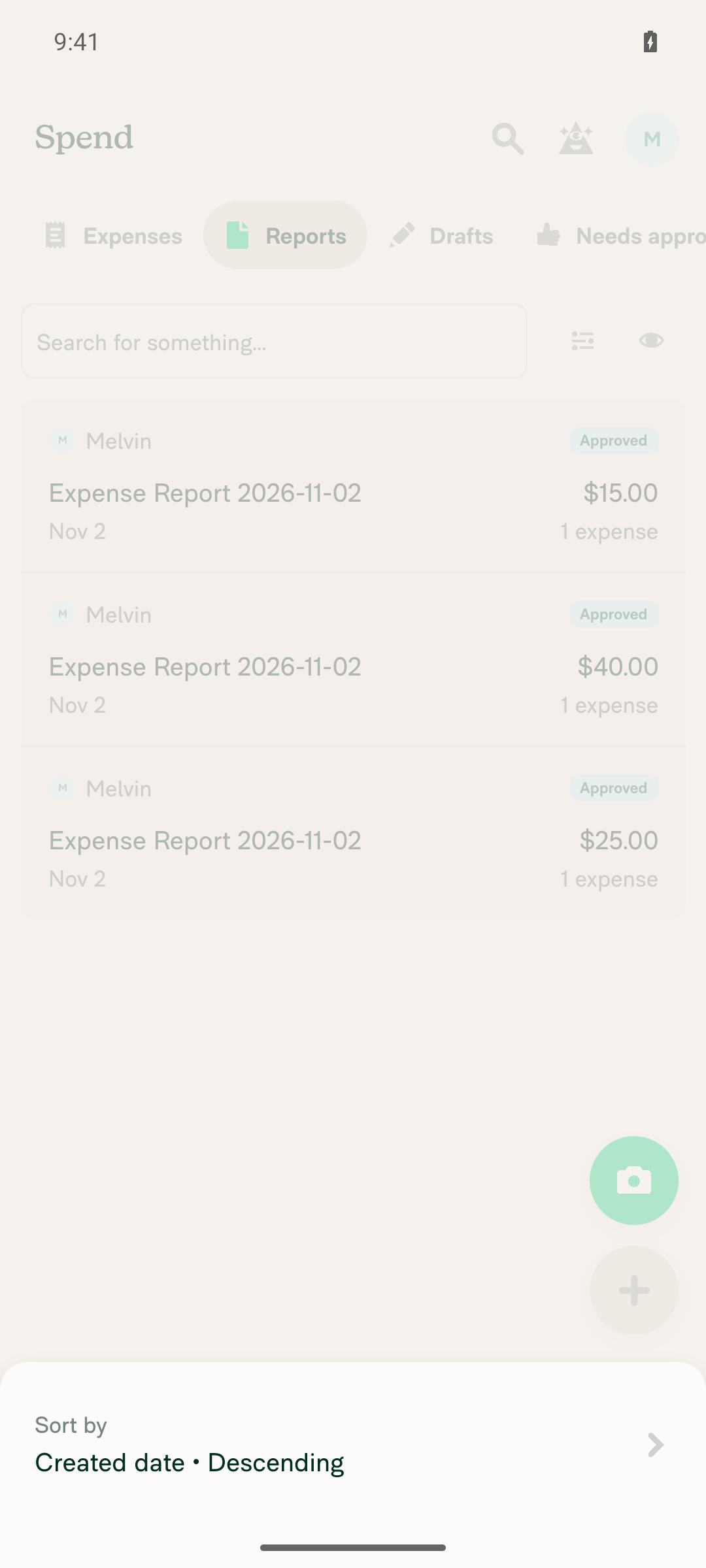
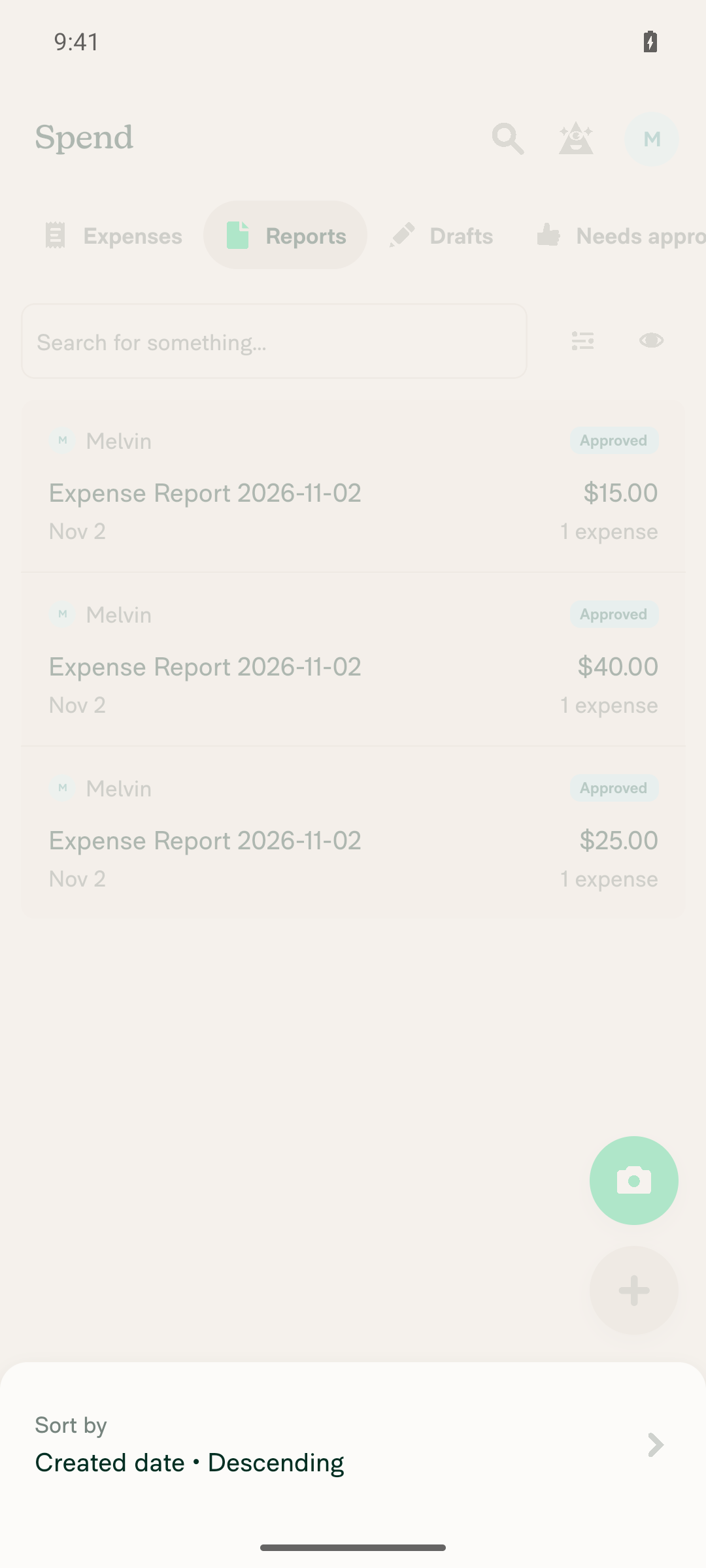
I set up 2 approved non-reimbursable-only reports and 1 approved reimbursable control report as a workspace admin, using the linked issue's repro steps because this PR's Tests section is still empty. I couldn't check the Ready to pay section or its count: after I opened the Display sort sheet on Spend > Reports, the screen stopped responding to every tap, back, and swipe, and the tester isn't allowed to relaunch the app.
Display sort sheet that stopped responding

Step Status
Workspace admin has several approved expense reports that contain only non-reimbursable expensesCreated a workspace and 2 manual expenses with Reimbursable turned off: NonReimb Test 1 ($25) and NonReimb Test 2 ($40). Submitted and approved both. Each report showed Approved, and Spend > Reports listed both as Approved. These reports were opened in the same session to approve them, so their transactions were already loaded.
Spend Reports tab showing the 3 approved reports
✅
A reimbursable control report exists for comparisonCreated Reimbursable Control ($15, Reimbursable on, category Other), then submitted and approved it. The report showed Approved with a Pay $15.00 action.
✅
Ready to pay excludes non-reimbursable-only approved reports and includes the reimbursable control reportNot reached. After I tapped Display on Spend > Reports, a "Sort by: Created date • Descending" sheet opened and ignored about 20 attempts to close it, including taps, in-app back, system back, and swipes. Screenshots taken minutes apart showed the same state. Metro showed no JS errors at that time.
Display sort sheet that stopped responding
❌
Opening a non-reimbursable-only report and going back leaves the Ready to pay count and list unchangedNot reached because the frozen sheet blocked the previous step.
❌

view run · view recording

@MelvinBot

MelvinBot commented Nov 2, 2026 •

Copy link
Copy Markdown
Contributor Author

🤖 Web test steps verification results: ⚠️ partial

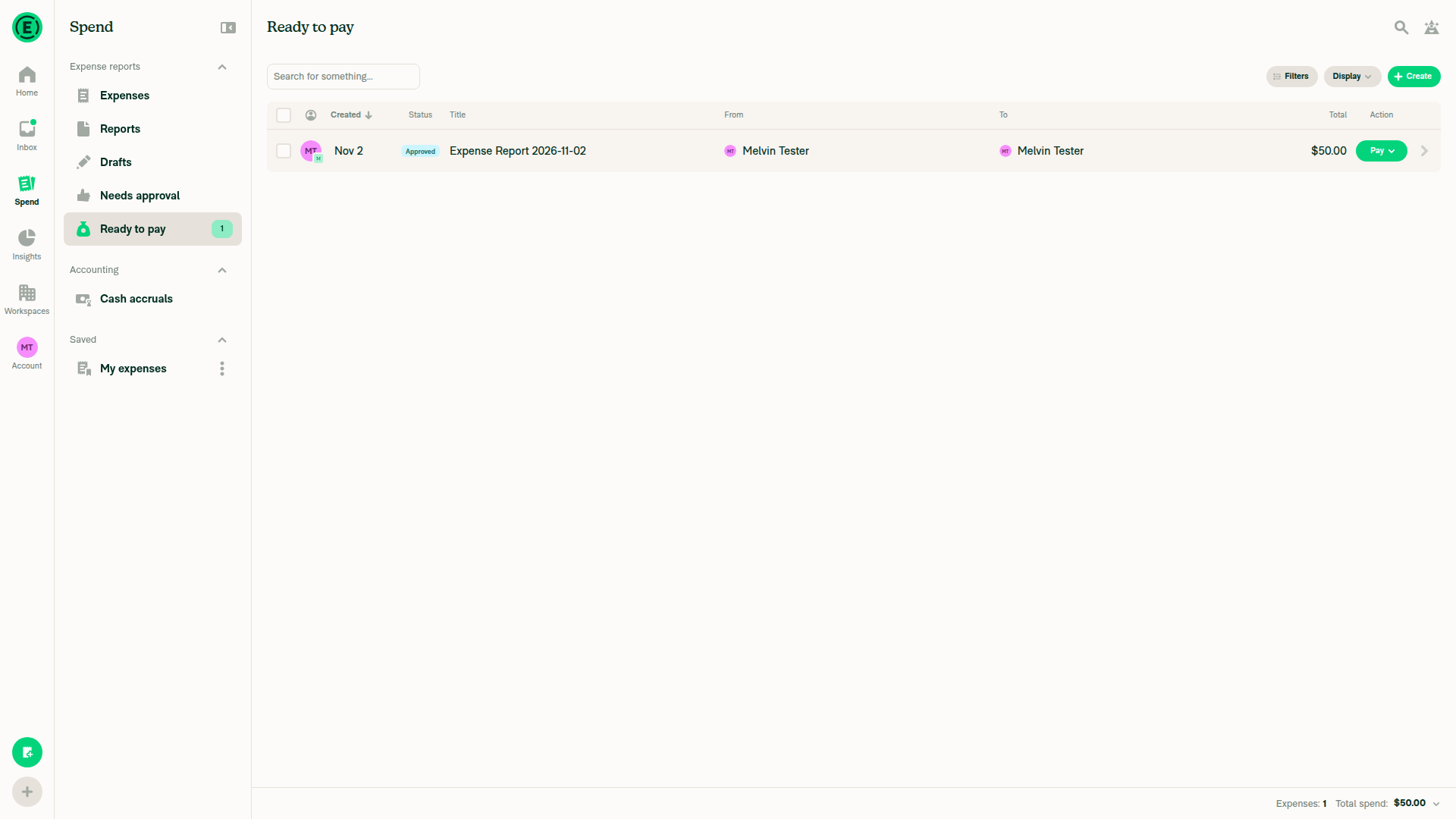
Ready to pay correctly excludes the non-reimbursable-only approved reports, and opening one of them and going back doesn't change the count. However, I couldn't reach the state this PR fixes, where the reports' expenses haven't loaded yet: I created the reports in this session, so their expenses were already loaded, and the tester can't clear local storage or sign out and back in.
Ready to pay unchanged after opening and returning from a non-reimbursable-only report

Step Status
As a workspace admin, have several approved expense reports that contain only non-reimbursable expenses, not opened in this sessionCreated a workspace and 3 approved non-reimbursable-only reports ($25, $15, $10), plus 1 approved reimbursable control report ($50). Creating and approving them in this session loaded their expenses, so the "not loaded" condition wasn't met. The PR's Tests section is still empty, so these steps come from the linked issue.
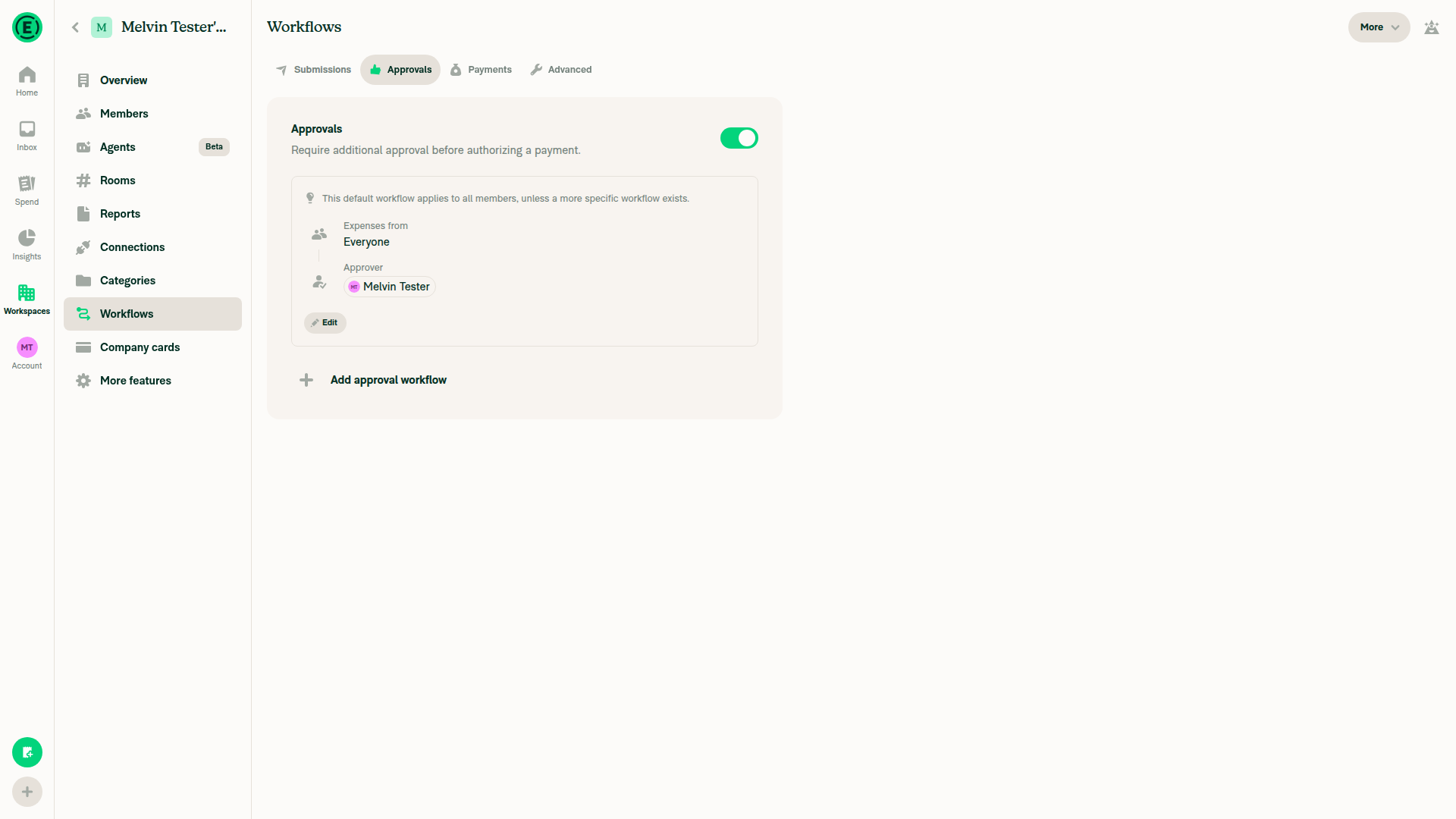
Workspace created for test setupApprovals configured with the tester as approver
❌
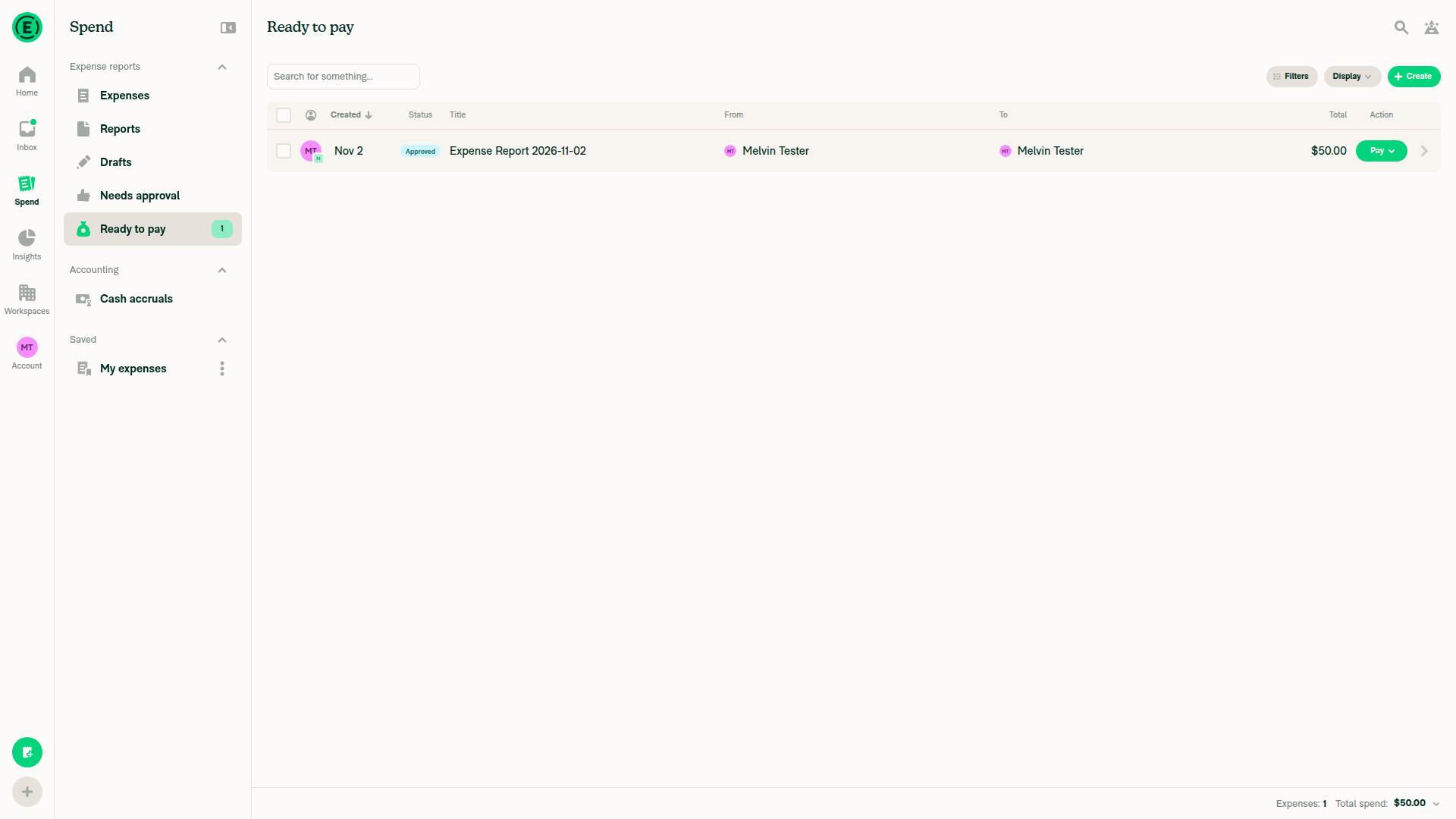
Spend > Ready to pay excludes non-reimbursable-only approved reports from the list and count, and shows the reimbursable control reportReady to pay listed only the $50.00 control report. The $25, $15, and $10 reports did not appear. The badge and footer read "Expenses: 1, Total spend: $50.00". The expenses were already loaded, so this checks the existing path, not the new fallback.
Ready to pay showing only the 50 dollar reimbursable control report, count 1
✅
Opening a non-reimbursable-only report and going back leaves the Ready to pay count and list unchangedOpened Non-Reimbursable Vendor 1 ($25, Approved), went back, and reopened Ready to pay. It still showed only the $50.00 control report with "Expenses: 1, Total spend: $50.00". No console errors.
Ready to pay unchanged after opening and returning from a non-reimbursable-only report
✅

view run · view recording

@jayeshmangwani

Copy link
Copy Markdown
Contributor

@MelvinBot , please add the Tests, QA, and Offline test sections and select all the checklist items. I can’t edit those.

I’ll add the videos to the Reviewer checklist, so please check the corresponding boxes in the PR Author checklist.

@jayeshmangwani

Copy link
Copy Markdown
Contributor

@MelvinBot please check this comment #105618 (comment)

@jayeshmangwani

Copy link
Copy Markdown
Contributor

@MelvinBot could you please add the Tests section?

@jayeshmangwani

Copy link
Copy Markdown
Contributor

@MelvinBot , please add the Tests, QA, and Offline test sections and select all the checklist items. I can’t edit those.

I’ll add the videos to the Reviewer checklist, so please check the corresponding boxes in the PR Author checklist.

@MelvinBot

Copy link
Copy Markdown
Contributor Author

Tests, QA Steps, and Offline tests now contain proposed testing instructions. Human results and sign-off remain pending.

All PR Author checklist boxes were already selected, so I left them unchanged. Those selections do not verify the outstanding unloaded-transaction, offline, High Traffic, or all-platform tests; the promised reviewer videos still need to be added.


view run

@jayeshmangwani

Copy link
Copy Markdown
Contributor

@MelvinBot, could you please clean up the Tests and QA Tests sections and update them with the test below? There’s currently too much vague information in those sections. Also, please add N/A to the offline test section.

### Prerequisites

1. Log in with two users: User A and User B. Ideally, User A should be a high-traffic account.
2. User A should have a workspace with User B added as a member.
3. Ensure that Workflows and Payments are enabled in the workspace, with User A assigned as the Payer.

### Steps to reproduce

1. User B creates a few non-reimbursable expenses.
2. User A approves the expenses.
3. Verify that approving the reports does not increase the `Ready to pay` count on the Spend tab.
4. Log out User A or clear the data using **Clear cache and restart**.
5. Open the Spend page and check the `Ready to pay` section and its count.
6. Open one of the reports containing only non-reimbursable expenses, then navigate back.
7. Verify that reports containing only non-reimbursable expenses never appear in the `Ready to pay` section.

### Alternative scenario

We can also test with three users:

- **User A:** Workspace owner
- **User B:** Approver and Payer
- **User C:** Submitter

@MelvinBot

Copy link
Copy Markdown
Contributor Author

Updated Tests with your prerequisites, seven steps, and three-user alternative. QA Steps now says “Same as Tests,” Offline tests is “N/A,” and the duplicate vague test plan has been removed.


view run

@jayeshmangwani

Copy link
Copy Markdown
Contributor

Reviewer Checklist

  • I have verified the author checklist is complete (all boxes are checked off).
  • I verified the correct issue is linked in the ### Fixed Issues section above
  • I verified testing steps are clear and they cover the changes made in this PR
    • I verified the steps for local testing are in the Tests section
    • I verified the steps for Staging and/or Production testing are in the QA steps section
    • I verified the steps cover any possible failure scenarios (i.e. verify an input displays the correct error message if the entered data is not correct)
    • I turned off my network connection and tested it while offline to ensure it matches the expected behavior (i.e. verify the default avatar icon is displayed if app is offline)
  • I checked that screenshots or videos are included for tests on all platforms
  • I included screenshots or videos for tests on all platforms
  • I verified that the composer does not automatically focus or open the keyboard on mobile unless explicitly intended. This includes checking that returning the app from the background does not unexpectedly open the keyboard.
  • I verified tests pass on all platforms & I tested again on:
    • Android: HybridApp
    • Android: mWeb Chrome
    • iOS: HybridApp
    • iOS: mWeb Safari
    • MacOS: Chrome / Safari
  • If there are any errors in the console that are unrelated to this PR, I either fixed them (preferred) or linked to where I reported them in Slack
  • I verified any copy / text that was added to the app is either coming verbatim from figma or has been approved by marketing (in order to get marketing approval, ask the Bug Zero team member to add the Waiting for copy label to the issue)
  • If a new code pattern is added I verified it was agreed to be used by multiple Expensify engineers
  • I verified other components that can be impacted by these changes have been tested, and I retested again (i.e. if the PR modifies a shared library or component like Avatar, I verified the components using Avatar have been tested & I retested again)
  • If a new component is created I verified that:
    • A similar component doesn't exist in the codebase
    • All props are defined accurately
    • The component has a clear name that is non-ambiguous and the purpose of the component can be inferred from the name alone
    • The only data being stored in the state is data necessary for rendering and nothing else
    • The component has the minimum amount of code necessary for its purpose, and it is broken down into smaller components in order to separate concerns and functions
  • If the PR modifies code that runs when editing or sending messages, I tested and verified there is no unexpected behavior for all supported markdown - URLs, single line code, code blocks, quotes, headings, bold, strikethrough, and italic.
  • If the PR modifies a generic component, I tested and verified that those changes do not break usages of that component in the rest of the App (i.e. if a shared library or component like Avatar is modified, I verified that Avatar is working as expected in all cases)
  • If the PR modifies a component related to any of the existing Storybook stories, I tested and verified all stories for that component are still working as expected.
  • If the PR modifies a component or page that can be accessed by a direct deeplink, I verified that the code functions as expected when the deeplink is used - from a logged in and logged out account.
  • If the PR modifies the UI (e.g. new buttons, new UI components, changing the padding/spacing/sizing, moving components, etc) or modifies the form input styles:
    • I verified that all the inputs inside a form are aligned with each other.
    • I added Design label and/or tagged @Expensify/design so the design team can review the changes.
  • If the PR adds or modifies the UI:
    • I asked an AI agent to review the changes for accessibility issues and addressed its findings.
    • I tested with a screen reader (VoiceOver on macOS) and verified all new/changed elements are reachable with a logical focus order.
    • I verified all new/changed elements have meaningful accessible names and roles.
    • I verified state changes are announced (e.g. checked/unchecked, expanded/collapsed, selected).
  • For any bug fix or new feature in this PR, I verified that sufficient unit tests are included to prevent regressions in this flow.
  • If the main branch was merged into this PR after a review, I tested again and verified the outcome was still expected according to the Test steps.
  • I have checked off every checkbox in the PR reviewer checklist, including those that don't apply to this PR.

Screenshots/Videos

Android: HybridApp
android.mov
Android: mWeb Chrome
mweb-chrome.mov
iOS: HybridApp
ios.mov
iOS: mWeb Safari
mweb-safari.mov
MacOS: Chrome / Safari

This video shows the side-by-side behavior for the same user on Staging and with this PR. On Staging, the count is incorrect and decreases after opening a child expense.

web.mov

@jayeshmangwani

Copy link
Copy Markdown
Contributor

@MelvinBot Please mark this PR as "Ready for review" , it looks good to go.

@MelvinBot
MelvinBot marked this pull request as ready for review November 5, 2026 21:37
@MelvinBot
MelvinBot requested a review from a team as a code owner November 5, 2026 21:37
@melvin-bot
melvin-bot Bot requested a review from jayeshmangwani November 5, 2026 21:37
@MelvinBot

Copy link
Copy Markdown
Contributor Author

Marked this PR as Ready for review.


view run

@melvin-bot
melvin-bot Bot removed the request for review from a team November 5, 2026 21:37
@melvin-bot

melvin-bot Bot commented Nov 5, 2026

Copy link
Copy Markdown

@jayeshmangwani Please copy/paste the Reviewer Checklist from here into a new comment on this PR and complete it. If you have the K2 extension, you can simply click: [this button]

@chatgpt-codex-connector

chatgpt-codex-connector Bot commented Nov 5, 2026 •

Copy link
Copy Markdown

Codex Review Summary

This comment shows the latest Codex review activity on this pull request.

Review Status Commit Review trigger
📝 Code Review ✅ Completed 2026-11-05T21:43:07.481392Z 6bc93c3 Draft marked ready
ℹ️ About Codex in GitHub

Your team has set up Codex to review pull requests in this repo. Reviews are triggered when you

  • Open a pull request for review
  • Mark a draft as ready
  • Comment "@codex review" or "@codex security review".

Codex reacts with 👀 while any review is running, comments if it has suggestions, and reacts with 👍 once all reviews finish with no findings.

@melvin-bot
melvin-bot Bot removed the request for review from a team November 5, 2026 21:37

@jayeshmangwani jayeshmangwani left a comment

Copy link
Copy Markdown
Contributor

Choose a reason for hiding this comment

The reason will be displayed to describe this comment to others. Learn more.

LGTM 🚀

@melvin-bot

melvin-bot Bot commented Nov 5, 2026

Copy link
Copy Markdown

We did not find an internal engineer to review this PR, trying to assign a random engineer to #105413 as well as to this PR... Please reach out for help on Slack if no one gets assigned!

@melvin-bot
melvin-bot Bot requested a review from marcochavezf November 5, 2026 21:40

@chatgpt-codex-connector chatgpt-codex-connector Bot left a comment

Copy link
Copy Markdown

Choose a reason for hiding this comment

The reason will be displayed to describe this comment to others. Learn more.

💡 Codex Review

Here are some automated review suggestions for this pull request.

Reviewed commit: 6bc93c3e23

ℹ️ About Codex in GitHub

Codex has been enabled to automatically review pull requests in this repo. Reviews are triggered when you

  • Open a pull request for review
  • Mark a draft as ready
  • Comment "@codex review".

If Codex has suggestions, it will comment; otherwise it will react with 👍.

When you sign up for Codex through ChatGPT, Codex can also answer questions or update the PR, like "@codex address that feedback".

Comment thread src/libs/ReportUtils.ts
Comment on lines +5539 to +5540
if (transactions.length === 0) {
return hasOnlyNonReimbursableTotal(report);

Copy link
Copy Markdown

Choose a reason for hiding this comment

The reason will be displayed to describe this comment to others. Learn more.

P1 Badge Keep unsettled reimbursements in the pay queue

When an approved report combines non-reimbursable spend with an unloaded reimbursable SmartScan expense whose amount is not known yet, the report totals still look like reimbursableTotal: 0 with a nonzero non-reimbursable total. This empty-transaction branch therefore marks the report pay-optional and removes it from the Pay to-do, LHN badge, and Search Pay action; once its transactions load, the existing unsettled-expense check reverses that decision, so a payer may not discover the reimbursement unless they independently open or fetch the report. Avoid trusting this totals-only classification until the absence of scanning or otherwise unsettled reimbursable expenses can be established.

Useful? React with 👍 / 👎.

Copy link
Copy Markdown
Contributor

Choose a reason for hiding this comment

The reason will be displayed to describe this comment to others. Learn more.

@MelvinBot please review this suggestion

Copy link
Copy Markdown
Contributor Author

Choose a reason for hiding this comment

The reason will be displayed to describe this comment to others. Learn more.

The suggestion identifies a real classification gap, but the P1 impact is not yet demonstrated.

Recommendation: Validate approval and scan-completion recovery for the mixed case. If reachable, preserve fail-closed behavior until complete transactions or an authoritative report-level signal rules out unsettled reimbursements. Add regression coverage for unloaded → loaded → scan-completed transitions; the new tests do not cover them.

No code changes made or runtime tests run for this review.


view run

@github-actions

github-actions Bot commented Nov 6, 2026

Copy link
Copy Markdown
Contributor

🚧 joekaufmanexpensify has triggered a test Expensify/App build. You can view the workflow run here.

@github-actions

This comment has been minimized.

@joekaufmanexpensify joekaufmanexpensify left a comment

Copy link
Copy Markdown
Contributor

Choose a reason for hiding this comment

The reason will be displayed to describe this comment to others. Learn more.

Tested in the customer account who was originally experiencing this issue and confirmed the fix is working well on the ad hoc build.

@jayeshmangwani

Copy link
Copy Markdown
Contributor

@marcochavezf, the PR is good to go for merging.

@joekaufmanexpensify

Copy link
Copy Markdown
Contributor

All checks pass, and this PR passed internal engineering review, so I'm going to go ahead with merging it.

@joekaufmanexpensify
joekaufmanexpensify merged commit 6b74e96 into main Nov 17, 2026
64 of 69 checks passed
@joekaufmanexpensify
joekaufmanexpensify deleted the claude-payOptionalUnloadedNonReimbursableReports branch November 17, 2026 21:46
@OSBotify

Copy link
Copy Markdown
Contributor

✋ This PR was not deployed to staging yet because QA is ongoing. It will be automatically deployed to staging after the next production release.

@github-actions

Copy link
Copy Markdown
Contributor

🚧 joekaufmanexpensify has triggered a test Expensify/App build. You can view the workflow run here.

@github-actions

Copy link
Copy Markdown
Contributor

@OSBotify

Copy link
Copy Markdown
Contributor

🚀 Deployed to staging by https://github.com/joekaufmanexpensify in version: 9.5.41-0 🚀

platform result
🕸 web 🕸 success ✅
🤖 android 🤖 success ✅
🍎 iOS 🍎 success ✅

@MelvinBot

Copy link
Copy Markdown
Contributor Author

No help site update needed — this fixes non-reimbursable-only reports incorrectly appearing as payable before their expenses load, restoring expected behavior without adding a feature or making existing guidance incorrect.


view run

@OSBotify

Copy link
Copy Markdown
Contributor

🚀 Deployed to production by https://github.com/marcaaron in version: 9.5.41-2 🚀

platform result
🕸 web 🕸 success ✅
🤖 android 🤖 success ✅
🍎 iOS 🍎 success ✅

Bundle Size Analysis (Sentry):

Sign up for free to join this conversation on GitHub. Already have an account? Sign in to comment

Labels

Melvin-Test-Android Melvin-Test-Web Triggers Melvin to run the testing steps of the PR on web

Projects

None yet

Development

Successfully merging this pull request may close these issues.

5 participants