Repository navigation
Create Insights Help page - #25954
Conversation


|
@sobitneupane Please copy/paste the Reviewer Checklist from here into a new comment on this PR and complete it. If you have the K2 extension, you can simply click: [this button] |


|
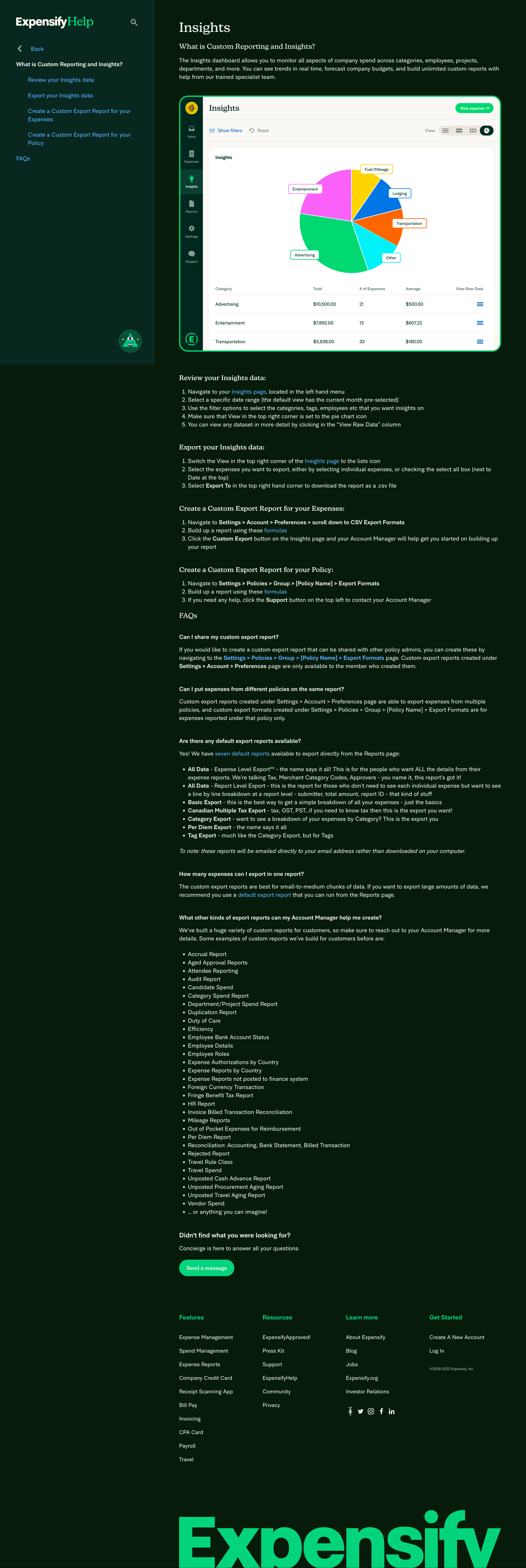
Here's the latest screenshot. |


Reviewer Checklist
Screenshots/VideosWebMobile Web - ChromeMobile Web - SafariSimulator.Screen.Recording.-.iPhone.SE.3rd.generation.-.2023-08-29.at.15.30.28.mp4DesktopiOSAndroid |


|
✋ This PR was not deployed to staging yet because QA is ongoing. It will be automatically deployed to staging after the next production release. |

 ArekChr
left a comment
ArekChr
left a comment
There was a problem hiding this comment.
I added some minor suggestions 🙌
|
|
||
| #### What other kinds of export reports can my Account Manager help me create? | ||
|
|
||
| We’ve built a huge variety of custom reports for customers, so make sure to reach out to your Account Manager for more details. Some examples of custom reports we’ve build for customers before are: |
There was a problem hiding this comment.
| We’ve built a huge variety of custom reports for customers, so make sure to reach out to your Account Manager for more details. Some examples of custom reports we’ve build for customers before are: | |
| We’ve built a huge variety of custom reports for customers, so make sure to reach out to your Account Manager for more details. Some examples of custom reports we’ve built for customers before are: |
| Yes! We have [seven default reports](https://community.expensify.com/discussion/5602/deep-dive-default-export-templates) available to export directly from the Reports page: | ||
|
|
||
| - **All Data** - Expense Level Export** - the name says it all! This is for the people who want ALL the details from their expense reports. We're talking Tax, Merchant Category Codes, Approvers - you name it, this report's got it! | ||
| - **All Data** - Report Level Export - this is the report for those who don't need to see each individual expense but want to see a line by line breakdown at a report level - submitter, total amount, report ID - that kind of stuff |
There was a problem hiding this comment.
| - **All Data** - Report Level Export - this is the report for those who don't need to see each individual expense but want to see a line by line breakdown at a report level - submitter, total amount, report ID - that kind of stuff | |
| - **All Data** - Report Level Export - this is the report for those who don't need to see each individual expense but want to see a line-by-line breakdown at a report level - submitter, total amount, report ID - that kind of stuff |
|
|
||
| 1. Switch the View in the top right corner of the [Insights page](https://www.expensify.com/expenses?param={"fromInsightsTab":true,"viewMode":"charts"}) to the lists icon | ||
| 2. Select the expenses you want to export, either by selecting individual expenses, or checking the select all box (next to Date at the top) | ||
| 3. Select **Export To** in the top right hand corner to download the report as a .csv file |
There was a problem hiding this comment.
| 3. Select **Export To** in the top right hand corner to download the report as a .csv file | |
| 3. Select **Export To** in the top right-hand corner to download the report as a .csv file |
| 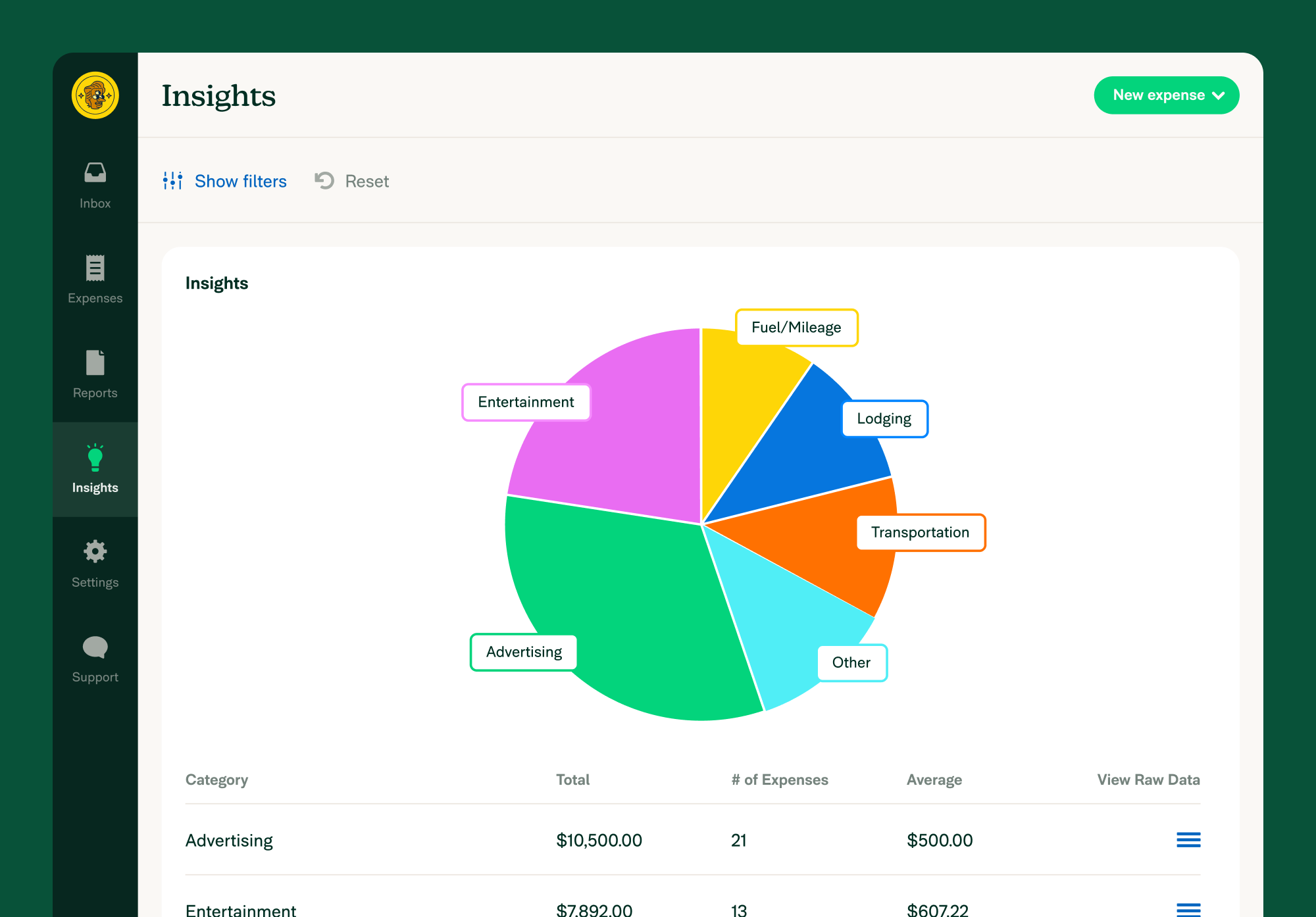{:width="100%"} | ||
| ## Review your Insights data | ||
|
|
||
| 1. Navigate to your [Insights page](https://www.expensify.com/expenses?param={"fromInsightsTab":true,"viewMode":"charts"}), located in the left hand menu |
There was a problem hiding this comment.
| 1. Navigate to your [Insights page](https://www.expensify.com/expenses?param={"fromInsightsTab":true,"viewMode":"charts"}), located in the left hand menu | |
| 1. Navigate to your [Insights page](https://www.expensify.com/expenses?param={"fromInsightsTab":true,"viewMode":"charts"}), located in the left-hand menu |
|
|
||
| 1. Navigate to your [Insights page](https://www.expensify.com/expenses?param={"fromInsightsTab":true,"viewMode":"charts"}), located in the left hand menu | ||
| 2. Select a specific date range (the default view has the current month pre-selected) | ||
| 3. Use the filter options to select the categories, tags, employees etc that you want insights on |
There was a problem hiding this comment.
| 3. Use the filter options to select the categories, tags, employees etc that you want insights on | |
| 3. Use the filter options to select the categories, tags, employees etc. that you want insights on |
| <!-- The lines above are required by Jekyll to process the .md file --> | ||
| {% raw %} | ||
| # What is Custom Reporting and Insights? | ||
| The Insights dashboard allows you to monitor all aspects of company spend across categories, employees, projects, departments, and more. You can see trends in real time, forecast company budgets, and build unlimited custom reports with help from our trained specialist team. |
There was a problem hiding this comment.
| The Insights dashboard allows you to monitor all aspects of company spend across categories, employees, projects, departments, and more. You can see trends in real time, forecast company budgets, and build unlimited custom reports with help from our trained specialist team. | |
| The Insights dashboard allows you to monitor all aspects of company spending across categories, employees, projects, departments, and more. You can see trends in real-time, forecast company budgets, and build unlimited custom reports with help from our trained specialist team. |
|
|
||
| 1. Navigate to **Settings > Account > Preferences > scroll down to CSV Export Formats** | ||
| 2. Build up a report using these [formulas](https://community.expensify.com/discussion/5795/deep-dive-expense-level-formula/p1?new=1) | ||
| 3. Click the **Custom Export** button on the Insights page and your Account Manager will help get you started on building up your report |
There was a problem hiding this comment.
| 3. Click the **Custom Export** button on the Insights page and your Account Manager will help get you started on building up your report | |
| 3. Click the **Custom Export** button on the Insights page, and your Account Manager will help get you started on building up your report |
| - **All Data** - Expense Level Export** - the name says it all! This is for the people who want ALL the details from their expense reports. We're talking Tax, Merchant Category Codes, Approvers - you name it, this report's got it! | ||
| - **All Data** - Report Level Export - this is the report for those who don't need to see each individual expense but want to see a line by line breakdown at a report level - submitter, total amount, report ID - that kind of stuff | ||
| - **Basic Export** - this is the best way to get a simple breakdown of all your expenses - just the basics | ||
| - **Canadian Multiple Tax Export** - tax, GST, PST...if you need to know tax then this is the export you want! |
There was a problem hiding this comment.
| - **Canadian Multiple Tax Export** - tax, GST, PST...if you need to know tax then this is the export you want! | |
| - **Canadian Multiple Tax Export** - tax, GST, PST...if you need to know tax, this is the export you want! |
|
@francoisl Please copy/paste the Reviewer Checklist from here into a new comment on this PR and complete it. If you have the K2 extension, you can simply click: [this button] |
|
@laurenreidexpensify let me know if you want to make those changes @ArekChr suggested! I think most of them are good ideas (adding the hyphens, updating that |

|
🚀 Deployed to staging by https://github.com/MariaHCD in version: 1.3.59-0 🚀
|
|
🚀 Deployed to staging by https://github.com/MariaHCD in version: 1.3.60-0 🚀
|
|
🚀 Deployed to staging by https://github.com/MariaHCD in version: 1.3.60-0 🚀
|
|
🚀 Deployed to production by https://github.com/luacmartins in version: 1.3.59-5 🚀
|
|
🚀 Deployed to production by https://github.com/luacmartins in version: 1.3.60-3 🚀
|


https://github.com/Expensify/Expensify/issues/311034
Details
See screenshot here (with the note that I removed the colons from the nav titles after that was taken).
If you want to test this locally, you'll need to:
http://127.0.0.1:4000/assets...instead ofhttps://help.expensify.com/assets...Fixed Issues
$
PROPOSAL:
Tests
Reviewed locally
Offline tests
NA
QA Steps
PR Author Checklist
### Fixed Issuessection aboveTestssectionOffline stepssectionQA stepssectiontoggleReportand notonIconClick)myBool && <MyComponent />.src/languages/*files and using the translation methodWaiting for Copylabel for a copy review on the original GH to get the correct copy.STYLE.md) were followedAvatar, I verified the components usingAvatarare working as expected)/** comment above it */thisproperly so there are no scoping issues (i.e. foronClick={this.submit}the methodthis.submitshould be bound tothisin the constructor)thisare necessary to be bound (i.e. avoidthis.submit = this.submit.bind(this);ifthis.submitis never passed to a component event handler likeonClick)StyleUtils.getBackgroundAndBorderStyle(themeColors.componentBG))Avataris modified, I verified thatAvataris working as expected in all cases)ScrollViewcomponent to make it scrollable when more elements are added to the page.mainbranch was merged into this PR after a review, I tested again and verified the outcome was still expected according to theTeststeps.Screenshots/Videos
Web
Mobile Web - Chrome
Mobile Web - Safari
Desktop
iOS
Android