Skip to content

fix: stop showing the canceled status on expense previews - #99097

Merged
JS00001 merged 7 commits into
Expensify:mainfrom
Krishna2323:fix/99091-canceled-status
Sep 4, 2026
Merged

JS00001 merged 7 commits into
Expensify:mainfrom
Krishna2323:fix/99091-canceled-status

Conversation

@Krishna2323

@Krishna2323 Krishna2323 commented Aug 20, 2026 •

Copy link
Copy Markdown
Contributor

Explanation of Change

#98758 moved Canceled from the expense preview line up to the report level, but dropped the precedence it had before.

On production, Canceled was the last branch in the if/else chain. Cancelling a payment in a workspace with approvals puts the report back in APPROVED/APPROVED, so the Approved branch matched first and Canceled was never shown for that flow. Moving it to the report level made it show for the first time, and only in the Inbox, which is the inconsistency QA reported.

Fix: Keep the approved report-level placement, but don't show it when the badge is already Approved.

So:

  • Approval flow → [Approved] 1 expense
  • Other flows that don't end up approved, like optional approvals or Send Money → [Done] Canceled • 1 expense

Fixed Issues

$ #99091
$ #99093
PROPOSAL:

Tests

Canceled must NOT show anywhere on the expense preview

  1. Workspace with approvals enabled: create a manual expense, submit, approve, mark as paid. Go offline and cancel the payment.
  2. Workspace chat preview: header reads 1 expense next to the Approved badge — no Canceled anywhere, on the header line or the expense's supporting line.
  3. Spend → Filters → Type: Chats — same preview, no Canceled. Both surfaces match.
  4. Come back online and confirm nothing appears once the API succeeds either.
  5. Workspace with approvals disabled (optional approval): manual expense, mark as paid, go offline, cancel the payment. Header reads 1 expense next to the Done badge — no Canceled. This is the case that used to show it, both on production and earlier in this PR.
  6. Send money in a 1:1 DM, then cancel the payment. No Canceled on the preview.
  7. Repeat 5 and 6 in Spend → Type: Chats.
  8. Verify the cancellation is still recorded by its system message in the chat — that's now the only place it's reported.

Regression checks

  1. For an ordinary expense (not cancelled, not held), the supporting line reads Date • Category, with no stray • when the category is missing.
  2. The expense report page still shows • Canceled on the expense itself — MoneyRequestView is intentionally untouched by this PR.
  3. Pending (card transaction) and Pending match (RTER) still appear on the supporting line where applicable.
  4. Hold an expense: the red RBR row reads This expense was put on hold and the text is not repeated on the supporting line. With an extra violation: Category missing • This expense was put on hold.
  5. Tag is still not shown on the expense preview, and the tag row on the expense detail page is unaffected.
  6. Report status badges are unchanged: Draft / Outstanding / Approved / Done / Paid all render as before, with the correct expense count beside them.
  7. Open a cancelled expense's detail page — the amount field no longer shows • Canceled. If the report is approved or paid, it now shows • Approved / • Paid there instead.
  8. Same for a card-imported expense that was cancelled — no • Canceled next to the amount, and the Purchase <amount> hint and Posted <date> are unaffected.
  • Verify that no errors appear in the JS console

Offline tests

  • Same as tests

QA Steps

  • Same as tests

  • Verify that no errors appear in the JS console

PR Author Checklist

  • I linked the correct issue in the ### Fixed Issues section above
  • I wrote clear testing steps that cover the changes made in this PR
    • I added steps for local testing in the Tests section
    • I added steps for the expected offline behavior in the Offline steps section
    • I added steps for Staging and/or Production testing in the QA steps section
    • I added steps to cover failure scenarios (i.e. verify an input displays the correct error message if the entered data is not correct)
    • I turned off my network connection and tested it while offline to ensure it matches the expected behavior (i.e. verify the default avatar icon is displayed if app is offline)
    • I tested this PR with a High Traffic account against the staging or production API to ensure there are no regressions (e.g. long loading states that impact usability).
  • I included screenshots or videos for tests on all platforms
  • I ran the tests on all platforms & verified they passed on:
    • Android: Native
    • Android: mWeb Chrome
    • iOS: Native
    • iOS: mWeb Safari
    • MacOS: Chrome / Safari
    • MacOS: Desktop
  • I verified there are no console errors (if there's a console error not related to the PR, report it or open an issue for it to be fixed)
  • I verified there are no new alerts related to the canBeMissing param for useOnyx
  • I followed proper code patterns (see Reviewing the code)
    • I verified that any callback methods that were added or modified are named for what the method does and never what callback they handle (i.e. toggleReport and not onIconClick)
    • I verified that comments were added to code that is not self explanatory
    • I verified that any new or modified comments were clear, correct English, and explained "why" the code was doing something instead of only explaining "what" the code was doing.
    • I verified any copy / text shown in the product is localized by adding it to src/languages/* files and using the translation method
      • If any non-english text was added/modified, I used JaimeGPT to get English > Spanish translation. I then posted it in #expensify-open-source and it was approved by an internal Expensify engineer. Link to Slack message:
    • I verified all numbers, amounts, dates and phone numbers shown in the product are using the localization methods
    • I verified any copy / text that was added to the app is grammatically correct in English. It adheres to proper capitalization guidelines (note: only the first word of header/labels should be capitalized), and is either coming verbatim from figma or has been approved by marketing (in order to get marketing approval, ask the Bug Zero team member to add the Waiting for copy label to the issue)
    • I verified proper file naming conventions were followed for any new files or renamed files. All non-platform specific files are named after what they export and are not named "index.js". All platform-specific files are named for the platform the code supports as outlined in the README.
    • I verified the JSDocs style guidelines (in STYLE.md) were followed
  • If a new code pattern is added I verified it was agreed to be used by multiple Expensify engineers
  • I followed the guidelines as stated in the Review Guidelines
  • I tested other components that can be impacted by my changes (i.e. if the PR modifies a shared library or component like Avatar, I verified the components using Avatar are working as expected)
  • I verified all code is DRY (the PR doesn't include any logic written more than once, with the exception of tests)
  • I verified any variables that can be defined as constants (ie. in CONST.ts or at the top of the file that uses the constant) are defined as such
  • I verified that if a function's arguments changed that all usages have also been updated correctly
  • If any new file was added I verified that:
    • The file has a description of what it does and/or why is needed at the top of the file if the code is not self explanatory
  • If a new CSS style is added I verified that:
    • A similar style doesn't already exist
    • The style can't be created with an existing StyleUtils function (i.e. StyleUtils.getBackgroundAndBorderStyle(theme.componentBG))
  • If new assets were added or existing ones were modified, I verified that:
    • The assets are optimized and compressed (for SVG files, run npm run compress-svg)
    • The assets load correctly across all supported platforms.
  • If the PR modifies code that runs when editing or sending messages, I tested and verified there is no unexpected behavior for all supported markdown - URLs, single line code, code blocks, quotes, headings, bold, strikethrough, and italic.
  • If the PR modifies a generic component, I tested and verified that those changes do not break usages of that component in the rest of the App (i.e. if a shared library or component like Avatar is modified, I verified that Avatar is working as expected in all cases)
  • If the PR modifies a component related to any of the existing Storybook stories, I tested and verified all stories for that component are still working as expected.
  • If the PR modifies a component or page that can be accessed by a direct deeplink, I verified that the code functions as expected when the deeplink is used - from a logged in and logged out account.
  • If the PR modifies the UI (e.g. new buttons, new UI components, changing the padding/spacing/sizing, moving components, etc) or modifies the form input styles:
    • I verified that all the inputs inside a form are aligned with each other.
    • I added Design label and/or tagged @Expensify/design so the design team can review the changes.
  • If a new page is added, I verified it's using the ScrollView component to make it scrollable when more elements are added to the page.
  • I added unit tests for any new feature or bug fix in this PR to help automatically prevent regressions in this user flow.
  • If the main branch was merged into this PR after a review, I tested again and verified the outcome was still expected according to the Test steps.

Screenshots/Videos

Android: Native
Android: mWeb Chrome
iOS: Native
iOS: mWeb Safari
MacOS: Chrome / Safari
Monosnap.screencast.2026-09-03.10-11-34.mp4

Signed-off-by: krishna2323 <belivethatkg@gmail.com>
…ata assertion

Signed-off-by: krishna2323 <belivethatkg@gmail.com>
@Krishna2323
Krishna2323 marked this pull request as ready for review August 20, 2026 18:21
@Krishna2323
Krishna2323 requested review from a team as code owners August 20, 2026 18:21
@melvin-bot
melvin-bot Bot requested review from situchan and trjExpensify August 20, 2026 18:21
@melvin-bot

melvin-bot Bot commented Aug 20, 2026

Copy link
Copy Markdown

@situchan Please copy/paste the Reviewer Checklist from here into a new comment on this PR and complete it. If you have the K2 extension, you can simply click: [this button]

@melvin-bot
melvin-bot Bot removed request for a team August 20, 2026 18:21
Signed-off-by: krishna2323 <belivethatkg@gmail.com>

@chatgpt-codex-connector chatgpt-codex-connector Bot left a comment

Copy link
Copy Markdown

Choose a reason for hiding this comment

The reason will be displayed to describe this comment to others. Learn more.

💡 Codex Review

Here are some automated review suggestions for this pull request.

Reviewed commit: 2375cfbc61

ℹ️ About Codex in GitHub

Your team has set up Codex to review pull requests in this repo. Reviews are triggered when you

  • Open a pull request for review
  • Mark a draft as ready
  • Comment "@codex review".

If Codex has suggestions, it will comment; otherwise it will react with 👍.

Codex can also answer questions or update the PR. Try commenting "@codex address that feedback".

Comment thread src/libs/TransactionPreviewUtils.ts Resolved

@trjExpensify trjExpensify left a comment

Copy link
Copy Markdown
Contributor

Choose a reason for hiding this comment

The reason will be displayed to describe this comment to others. Learn more.

I'm a bit confused by this. With approvals enabled, why wouldn't we show [Approved] Canceled * 1 expense like we do if approvals are disabled: [Done] Canceled * 1 expense`?

CC: @Expensify/design

@Krishna2323

Krishna2323 commented Aug 20, 2026 •

Copy link
Copy Markdown
Contributor Author

I'm a bit confused by this. With approvals enabled, why wouldn't we show [Approved] Canceled * 1 expense like we do if approvals are disabled: [Done] Canceled * 1 expense`?

That is indeed confusing and even with approvals disabled it disappears once API is successful, I'm just trying to match the prod behaviour in this PR. If we want to completely remove the "Canceled" text (for now), we can do that here and discuss the actual intended behaviour in a follow-up.

@situchan

Copy link
Copy Markdown
Contributor

Both blockers were demoted so no need to hurry up merging this PR.
We can discuss the expected behavior here and update accordingly.

@Krishna2323

Copy link
Copy Markdown
Contributor Author

@Expensify/design, bump on this when you get a chance: #99097 (review)

@dannymcclain

dannymcclain commented Aug 26, 2026 •

Copy link
Copy Markdown
Contributor

I'm a bit confused by this. With approvals enabled, why wouldn't we show [Approved] Canceled * 1 expense like we do if approvals are disabled: [Done] Canceled * 1 expense`?

I'm not sure I'm totally following, and honestly didn't even know we displayed Canceled anywhere aside from the system message that records the action. But I think Tom's suggestion makes sense. Maybe a stupid question: why do we even need to show Canceled on the preview? Also, is it supposed to only show on the preview until you open the report?

@dubielzyk-expensify

Copy link
Copy Markdown
Contributor

With approvals enabled, why wouldn't we show [Approved] Canceled * 1 expense like we do if approvals are disabled: [Done] Canceled * 1 expense`?

You got a screenshot of this Tom?

@dannymcclain

Copy link
Copy Markdown
Contributor

@dubielzyk-expensify @trjExpensify I think this is what Tom is talking about? Please correct me if I'm wrong!

CleanShot.2026-08-27.at.08.10.46.mp4

@shawnborton

Copy link
Copy Markdown
Contributor

Okay cool, that seems good to me? So no need to show it in the expense preview, just show it at the top report title line.

@dubielzyk-expensify

Copy link
Copy Markdown
Contributor

Seeing done and cancelled next to each other is soooo confusing 🙃 Why is it marked as done when it's not paid? Or even if it's technically done and doesn't need to be marked as paid, saying cancelled in the top seems odd to me. A cancelled payment seems more like a system message-only thing to me as it's just an action that was undone. 🤷‍♀️

@dannymcclain

Copy link
Copy Markdown
Contributor

A cancelled payment seems more like a system message-only thing to me as it's just an action that was undone.

Yah I feel the same.

@shawnborton

Copy link
Copy Markdown
Contributor

Yeah that is a good point, I could get down with that. Maybe let's see what @trjExpensify thinks when he is back from OOO?

@trjExpensify

Copy link
Copy Markdown
Contributor

I'm down to remove it from the expense preview too, but @Krishna2323 do you have eyes on the history of when it was added in the first place so we can check the reasons why that was? (I too wasn't aware until this issue, or well, I have forgotten).

@Krishna2323

Copy link
Copy Markdown
Contributor Author

@trjExpensify Yep, traced it. It came from #29344 (merged Dec 2023) for #29319, the P2P activation work.

It was originally scoped to exactly one case, a wallet payment auto-cancelled because the recipient didn't enable their Expensify Wallet within 30 days, but CONST.IOU.CANCEL_REASON.PAYMENT_EXPIRED doesn't exist in the app now.

} else if (props.iouReport.originalMessage.reason === CONST.IOU.CANCEL_REASON.PAYMENT_EXPIRED) {
    message += ` • ${props.translate('iou.canceled')}`;

@trjExpensify

Copy link
Copy Markdown
Contributor

Nice sleuth. Kill it. 🔪

Signed-off-by: krishna2323 <belivethatkg@gmail.com>
@codecov

codecov Bot commented Sep 3, 2026 •

Copy link
Copy Markdown

Codecov Report

❌ Looks like you've decreased code coverage for some files. Please write tests to increase, or at least maintain, the existing level of code coverage. See our documentation here for how to interpret this table.

Files with missing lines Coverage Δ
.../MoneyRequestReportPreview/ReportPreviewHeader.tsx 100.00% <100.00%> (ø)
...c/components/ReportActionItem/MoneyRequestView.tsx 79.22% <ø> (+0.26%) ⬆️
...m/TransactionPreview/TransactionPreviewContent.tsx 81.89% <ø> (-0.31%) ⬇️
src/libs/TransactionPreviewUtils.ts 85.71% <100.00%> (-0.21%) ⬇️
src/pages/iou/DynamicSplitExpensePage.tsx 0.00% <0.00%> (ø)
... and 9 files with indirect coverage changes

@Krishna2323

Copy link
Copy Markdown
Contributor Author

The cancelled text is removed from the preview as well as the amount row on details page:

Monosnap.screencast.2026-09-03.10-11-34.mp4

@situchan ready for your review

@situchan

situchan commented Sep 4, 2026 •

Copy link
Copy Markdown
Contributor

Reviewer Checklist

  • I have verified the author checklist is complete (all boxes are checked off).
  • I verified the correct issue is linked in the ### Fixed Issues section above
  • I verified testing steps are clear and they cover the changes made in this PR
    • I verified the steps for local testing are in the Tests section
    • I verified the steps for Staging and/or Production testing are in the QA steps section
    • I verified the steps cover any possible failure scenarios (i.e. verify an input displays the correct error message if the entered data is not correct)
    • I turned off my network connection and tested it while offline to ensure it matches the expected behavior (i.e. verify the default avatar icon is displayed if app is offline)
  • I checked that screenshots or videos are included for tests on all platforms
  • I included screenshots or videos for tests on all platforms
  • I verified that the composer does not automatically focus or open the keyboard on mobile unless explicitly intended. This includes checking that returning the app from the background does not unexpectedly open the keyboard.
  • I verified tests pass on all platforms & I tested again on:
    • Android: HybridApp
    • Android: mWeb Chrome
    • iOS: HybridApp
    • iOS: mWeb Safari
    • MacOS: Chrome / Safari
  • If there are any errors in the console that are unrelated to this PR, I either fixed them (preferred) or linked to where I reported them in Slack
  • I verified proper code patterns were followed (see Reviewing the code)
    • I verified that any callback methods that were added or modified are named for what the method does and never what callback they handle (i.e. toggleReport and not onIconClick).
    • I verified that comments were added to code that is not self explanatory
    • I verified that any new or modified comments were clear, correct English, and explained "why" the code was doing something instead of only explaining "what" the code was doing.
    • I verified any copy / text that was added to the app is grammatically correct in English. It adheres to proper capitalization guidelines (note: only the first word of header/labels should be capitalized), and is either coming verbatim from figma or has been approved by marketing (in order to get marketing approval, ask the Bug Zero team member to add the Waiting for copy label to the issue)
  • If a new code pattern is added I verified it was agreed to be used by multiple Expensify engineers
  • I verified that this PR follows the guidelines as stated in the Review Guidelines
  • I verified other components that can be impacted by these changes have been tested, and I retested again (i.e. if the PR modifies a shared library or component like Avatar, I verified the components using Avatar have been tested & I retested again)
  • If a new component is created I verified that:
    • A similar component doesn't exist in the codebase
    • All props are defined accurately and each prop has a /** comment above it */
    • The file is named correctly
    • The component has a clear name that is non-ambiguous and the purpose of the component can be inferred from the name alone
    • The only data being stored in the state is data necessary for rendering and nothing else
    • For Class Components, any internal methods passed to components event handlers are bound to this properly so there are no scoping issues (i.e. for onClick={this.submit} the method this.submit should be bound to this in the constructor)
    • Any internal methods bound to this are necessary to be bound (i.e. avoid this.submit = this.submit.bind(this); if this.submit is never passed to a component event handler like onClick)
    • All JSX used for rendering exists in the render method
    • The component has the minimum amount of code necessary for its purpose, and it is broken down into smaller components in order to separate concerns and functions
  • If any new file was added I verified that:
    • The file has a description of what it does and/or why is needed at the top of the file if the code is not self explanatory
  • If a new CSS style is added I verified that:
    • A similar style doesn't already exist
    • The style can't be created with an existing StyleUtils function (i.e. StyleUtils.getBackgroundAndBorderStyle(theme.componentBG)
  • If the PR modifies code that runs when editing or sending messages, I tested and verified there is no unexpected behavior for all supported markdown - URLs, single line code, code blocks, quotes, headings, bold, strikethrough, and italic.
  • If the PR modifies a generic component, I tested and verified that those changes do not break usages of that component in the rest of the App (i.e. if a shared library or component like Avatar is modified, I verified that Avatar is working as expected in all cases)
  • If the PR modifies a component related to any of the existing Storybook stories, I tested and verified all stories for that component are still working as expected.
  • If the PR modifies a component or page that can be accessed by a direct deeplink, I verified that the code functions as expected when the deeplink is used - from a logged in and logged out account.
  • If the PR modifies the UI (e.g. new buttons, new UI components, changing the padding/spacing/sizing, moving components, etc) or modifies the form input styles:
    • I verified that all the inputs inside a form are aligned with each other.
    • I added Design label and/or tagged @Expensify/design so the design team can review the changes.
  • For any bug fix or new feature in this PR, I verified that sufficient unit tests are included to prevent regressions in this flow.
  • If the main branch was merged into this PR after a review, I tested again and verified the outcome was still expected according to the Test steps.
  • I have checked off every checkbox in the PR reviewer checklist, including those that don't apply to this PR.

Screenshots/Videos

Android: HybridApp
Android: mWeb Chrome
iOS: HybridApp
ios.mov
iOS: mWeb Safari
MacOS: Chrome / Safari
web.mov

@chatgpt-codex-connector

Copy link
Copy Markdown

Codex Review: Didn't find any major issues. Bravo.

Reviewed commit: c61b320dd2

ℹ️ About Codex in GitHub

Codex has been enabled to automatically review pull requests in this repo. Reviews are triggered when you

  • Open a pull request for review
  • Mark a draft as ready
  • Comment "@codex review".

If Codex has suggestions, it will comment; otherwise it will react with 👍.

When you sign up for Codex through ChatGPT, Codex can also answer questions or update the PR, like "@codex address that feedback".

@MelvinBot

Copy link
Copy Markdown
Contributor

🤖 Reviewed c61b320 — the change looks correct and complete. Two non-blocking notes below.

Verified

  • Nothing else surfaces Canceled on an expense. After this PR, iou.canceled is only referenced by the Travel components (TripRoomPreview.tsx:98, TripDetailsView, UpcomingTravelItem, DynamicTripDetailsPage), which are a different concept and correctly untouched. So both linked issues collapse to the same fix and the design call ("kill it") is fully applied.
  • No • Paid can leak onto a cancelled payment. This was my main worry with dropping the else if (isCancelled) branch in MoneyRequestView, since the chain now falls through to isApproved / shouldShowPaid. Every cancel path resets stateNum/statusNum in the same optimistic merge that sets isCancelledIOU: true — PayMoneyRequest.ts:552-556 and PayMoneyRequest.ts:691-697 — so isSettled is never true while cancelled. Approvals flow lands on APPROVED → • Approved, no-approvals flow lands on CLOSED → no suffix. Matches what the PR description claims.
  • No dead symbols left behind. isCancelled is still needed at MoneyRequestView.tsx:796, CONST is still used in ReportPreviewHeader, and iouReport is still used in both preview utils. ESLint, typecheck, knip and all 8 test jobs pass on the head SHA.
  • The test edit tightens, not loosens. ^date regex → exact date in MoneyRequestReportPreview.test.tsx:185 means a stray category or status now fails the assertion instead of passing it. Good change.

Two notes

  1. No regression test on the surface that actually broke. The report-preview header has flip-flopped twice now — refactor: align expense preview card metadata line with mobile row styling, fix scanning and split layouts #98758 added Canceled • there, this PR removes it — but the only new assertion is in TransactionPreviewUtils.test.ts, which covers the transaction line, not ReportPreviewHeader.tsx:125. Worth adding a case to tests/ui/MoneyRequestReportPreview.test.tsx with isCancelledIOU: true asserting the header supporting text is exactly the expense count.

  2. shouldShowTag removal is out of scope. It's safe — TransactionPreviewContent's destructure never took it, so it was dead — but it's unrelated to the canceled fix and it deletes an existing unit test. Either call it out in the PR description so situchan doesn't have to prove it's unused, or split it out.

I could not verify any of this in a browser on this run, so the behavioral claims above come from reading the code and the optimistic-update paths, not from running the app. The test steps still need a human pass.


view run

@situchan

situchan commented Sep 4, 2026

Copy link
Copy Markdown
Contributor
  1. Send money in a 1:1 DM, then cancel the payment. No Canceled on the preview.

How to cancel this?

@MelvinBot

Copy link
Copy Markdown
Contributor

🤖 Web test steps verification results: ✅ pass

No regressions found. A full submit → approve → pay → cancel-payment cycle plus a separate hold flow on dev NewDot web produced no Canceled text anywhere, the status correctly fell back to Approved, and both the cancellation and the hold are still recorded by their system message / RBR row. Statically I also confirmed the one thing that looked like scope creep in my earlier review is not: #98758 deleted the tag rendering and the shouldShowTag destructure from TransactionPreviewContent but left the conditional dangling in createTransactionPreviewConditionals, so this PR is finishing that cleanup, not adding unrelated churn. Three things this run did not cover and still need a human pass: Spend → Filters → Type: Chats (the surface in #99091 — consistent with Inbox by construction now that ReportPreviewHeader.tsx:125 renders expenseCount unconditionally, but unverified in the UI), Send money cancel in a 1:1 DM, and the DynamicSplitExpensePage.tsx change.

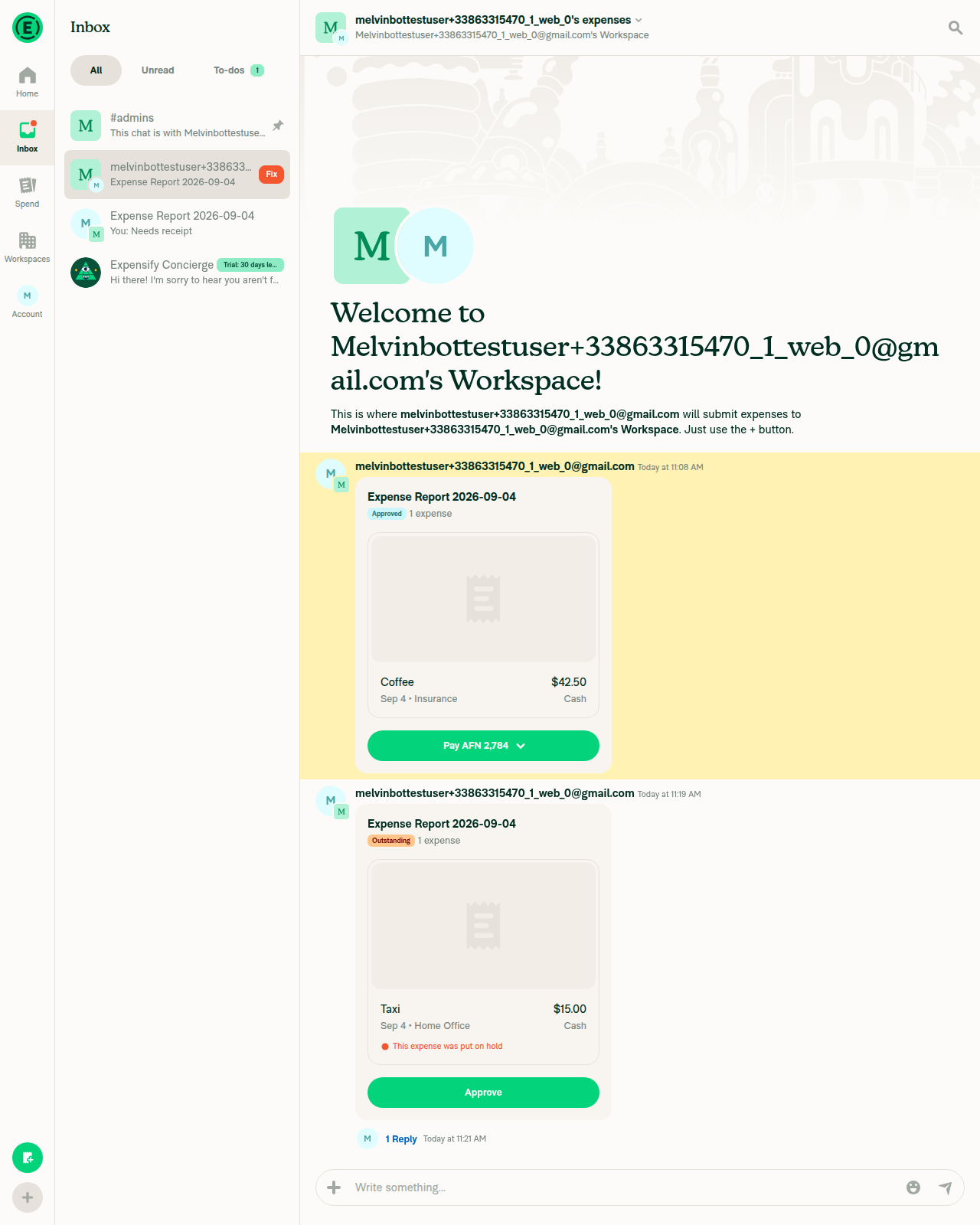
Report preview header still Approved and 1 expense after cancelling the payment, plus held Taxi expense RBR row

Step Status
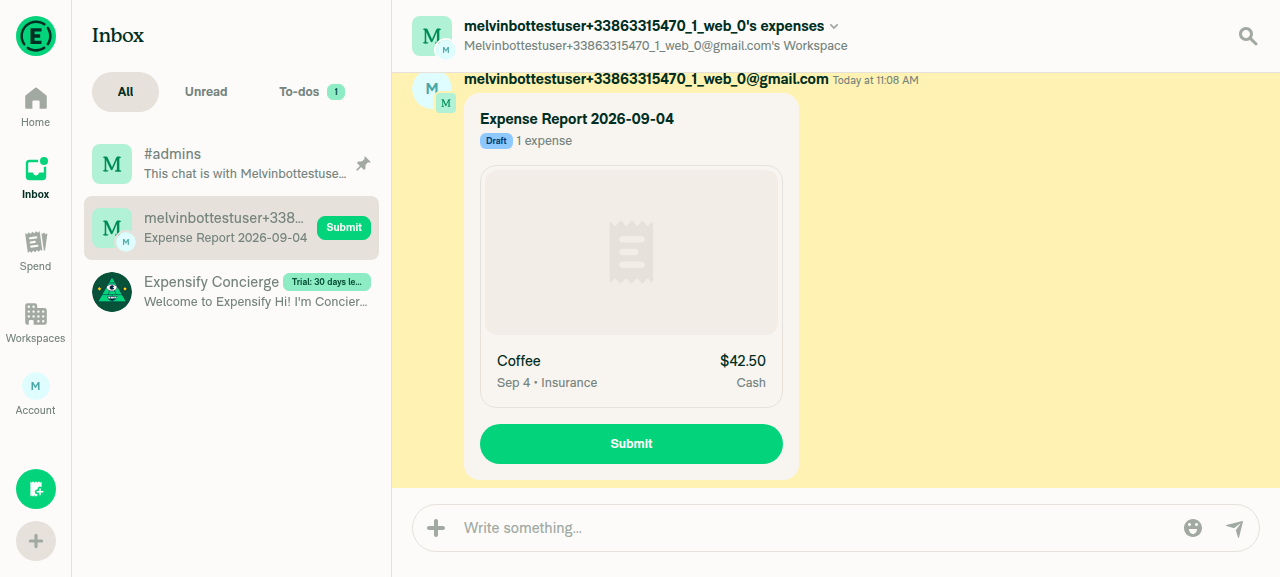
Ordinary (non-cancelled, non-held) expense preview shows "Date • Category" with no stray leading/trailing separatorExpense preview in workspace chat read "Sep 4 • Insurance" cleanly for the Coffee expense.
Expense preview supporting line reading Sep 4 dot Insurance
✅
Report preview header shows status badge + expense count only, no "Canceled" textHeader showed "Approved" badge + "1 expense" immediately after approval, and still showed "Approved" + "1 expense" after the payment was marked paid and then cancelled — never "Canceled".
Report preview header showing Approved badge and 1 expense before payment
Report preview header still Approved and 1 expense after cancelling the payment
✅
Full submit → approve → pay → cancel-payment cycle produces no "Canceled" text on the report preview header or the expense preview supporting lineAfter Mark as paid then Cancel payment, the report preview header reverted to "Approved" + "1 expense" and the expense preview supporting line stayed "Sep 4 • Insurance" — no "Canceled" text anywhere.
Post-cancel report preview and expense preview with no Canceled text
✅
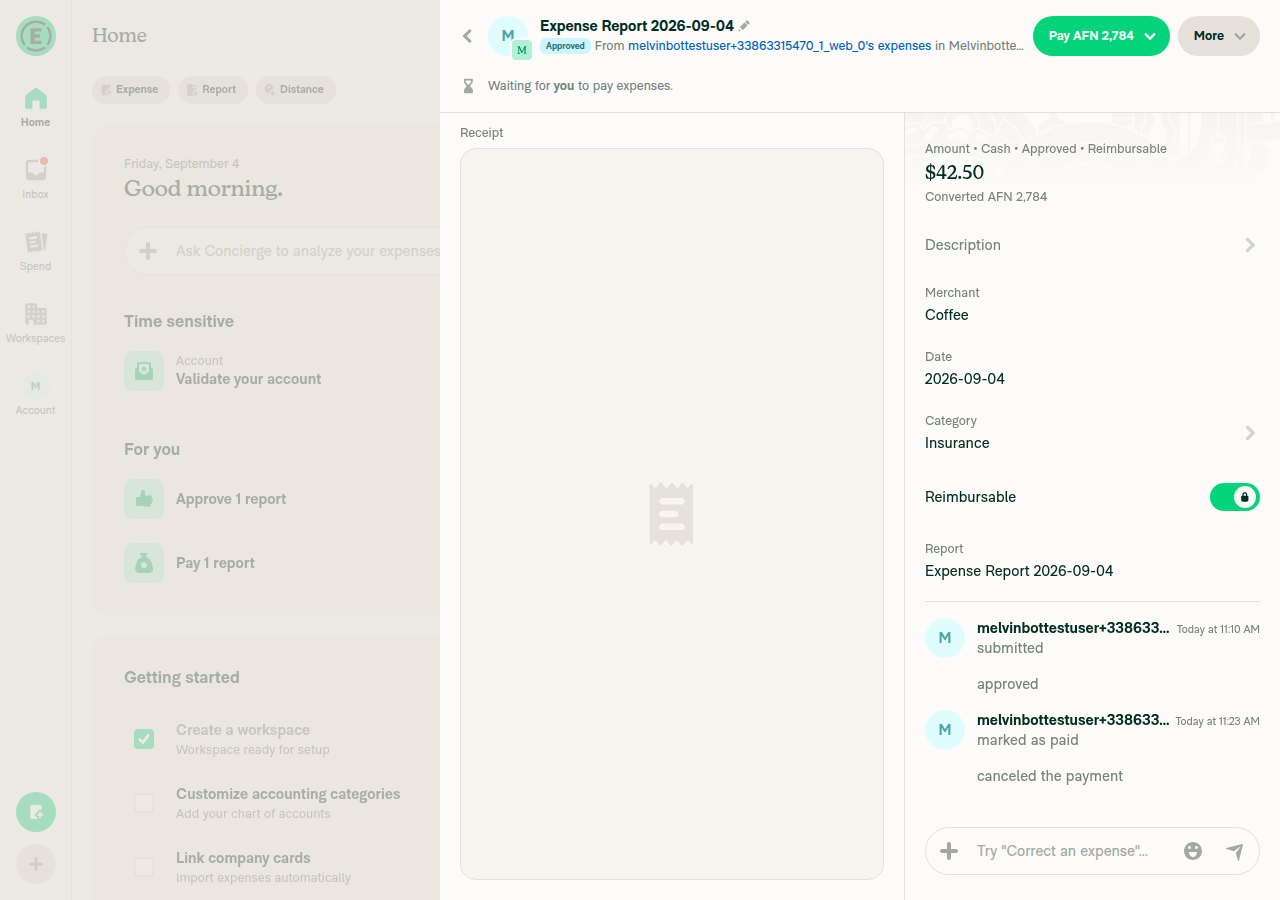
Cancellation is still recorded via a system message in the chatTransaction thread showed sequential system messages: "submitted" → "approved" → "marked as paid" → "canceled the payment".
System messages including canceled the payment
✅
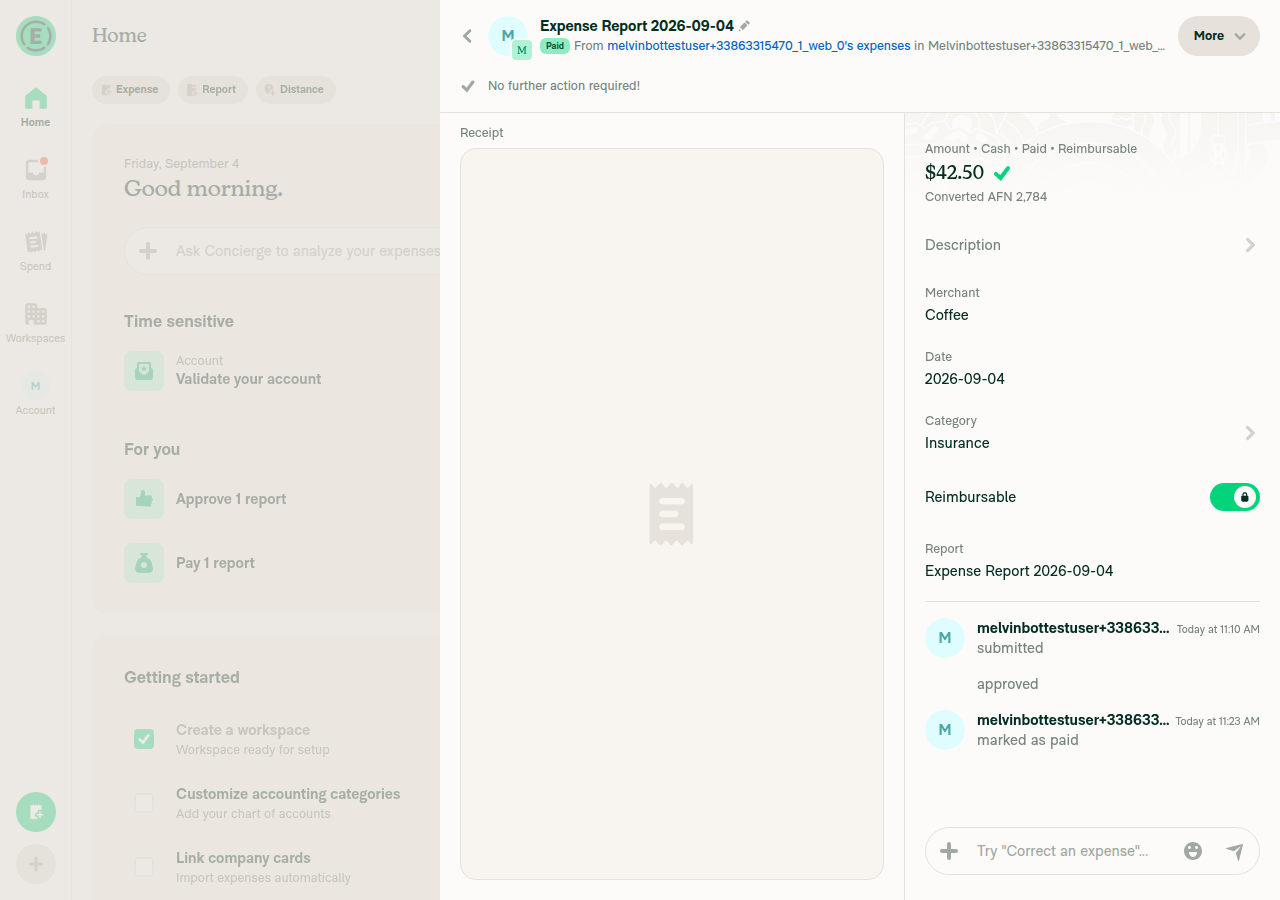
Cancelled expense's detail page amount field shows no "• Canceled", and shows "• Approved" since the report reverted to ApprovedAmount field description read "Amount • Cash • Approved • Reimbursable" after cancelling the payment, matching cancelPayment's stateNum/statusNum reset.
Amount field showing Amount Cash Approved Reimbursable
✅
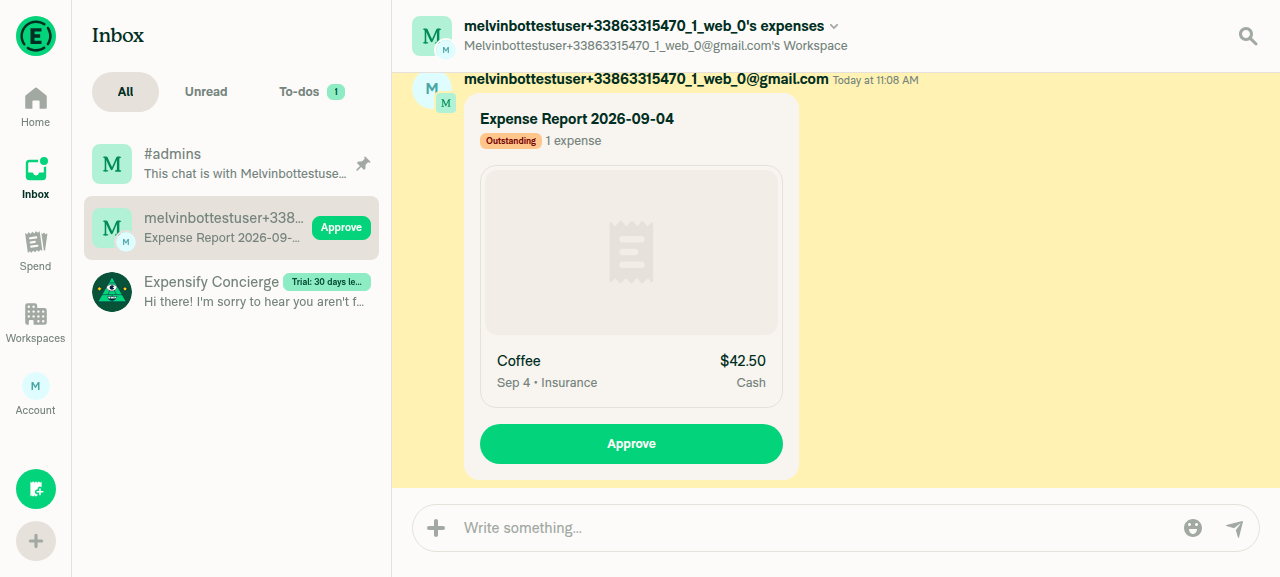
Report status badges render correctly (Draft / Outstanding / Approved / Paid) with the correct expense countObserved "Draft" → "Outstanding" → "Approved" → "Paid" badges across the flow, each paired with "1 expense".
Expenses list showing Draft and Approved status badges
Paid badge with Amount Cash Paid Reimbursable
✅
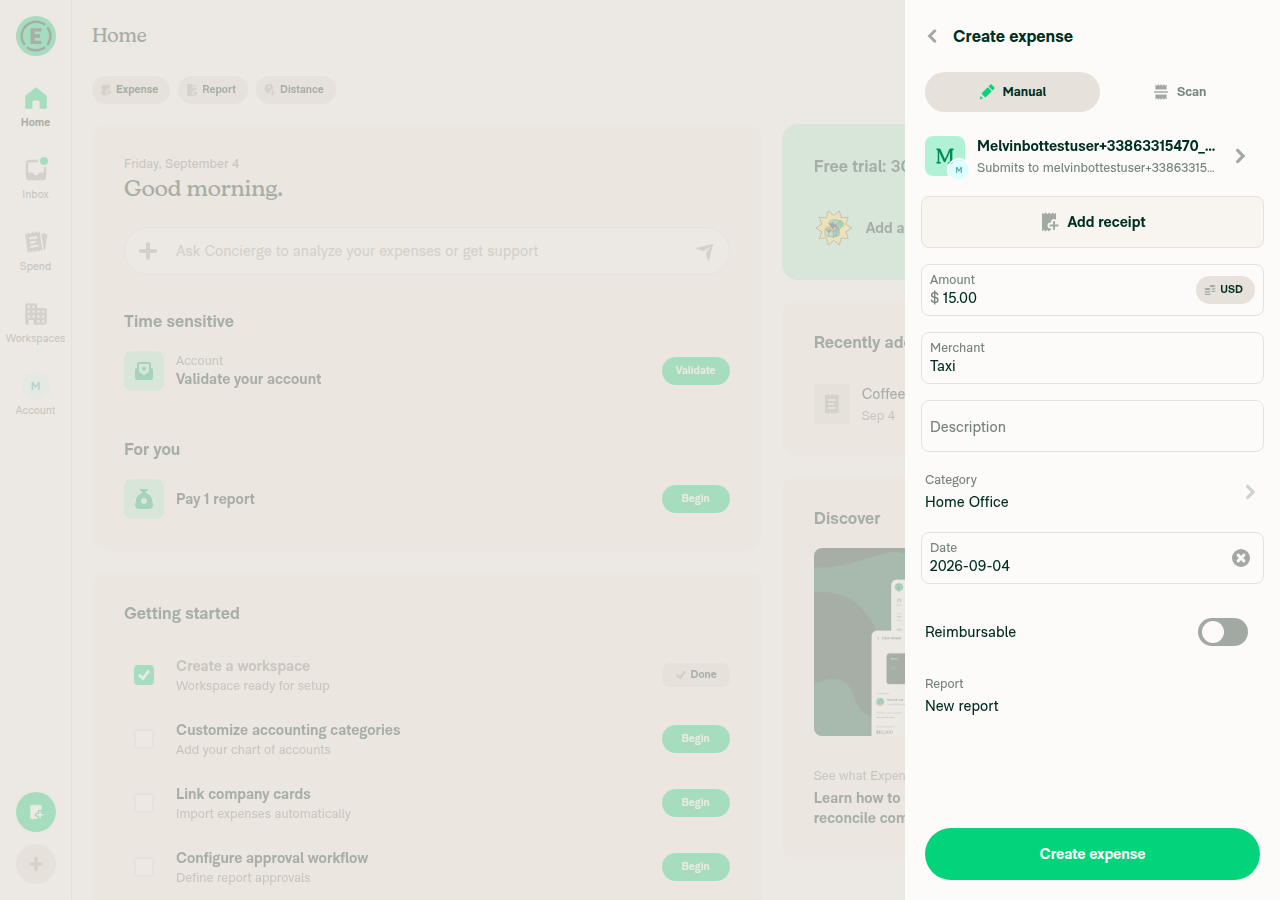
Held expense shows the red RBR row "This expense was put on hold" without duplicating that text on the supporting lineExpense preview for "Taxi" showed supporting line "Sep 4 • Home Office" and a separate red RBR row reading "This expense was put on hold".
Taxi expense preview with red This expense was put on hold RBR row
✅

view run

@melvin-bot
melvin-bot Bot requested a review from JS00001 September 4, 2026 11:41
@JS00001
JS00001 merged commit d1db3f2 into Expensify:main Sep 4, 2026
38 of 40 checks passed
@github-actions

github-actions Bot commented Sep 4, 2026

Copy link
Copy Markdown
Contributor

🚧 JS00001 has triggered a test Expensify/App build. You can view the workflow run here.

@OSBotify

OSBotify commented Sep 4, 2026

Copy link
Copy Markdown
Contributor

✋ This PR was not deployed to staging yet because QA is ongoing. It will be automatically deployed to staging after the next production release.

@OSBotify

OSBotify commented Sep 7, 2026

Copy link
Copy Markdown
Contributor

🚀 Deployed to staging by https://github.com/JS00001 in version: 9.4.73-0 🚀

platform result
🕸 web 🕸 success ✅
🤖 android 🤖 success ✅
🍎 iOS 🍎 failure ❌

@MelvinBot

Copy link
Copy Markdown
Contributor

🤖 Yes — help site changes are needed, and I opened a draft PR: #100487

Nothing on the help site became wrong because of this PR. No article ever claimed a Canceled label appeared anywhere. But this PR makes the report chat system message the only place a canceled payment is reported, and the help site never said where to look. That gap is now worth filling.

I verified every label against the live UI before writing.

What changed on the help site

File Change
Expense-and-Report-Actions.md Added Cancel payment to What happens after you take a report action, plus a new FAQ: How can I tell that a payment was canceled?
Managing-Expenses-in-a-Report.md Cancel Payment → Cancel payment
Attach-and-edit-receipts-on-expenses.md Cancel Payment → Cancel payment

The capitalization fix is separate from your change — it was already wrong. The UI uses sentence case, so Cancel Payment violated HELPSITE_NAMING_CONVENTIONS.md.

Live UI verification and why I scoped it this way

I drove the flow on web: created a workspace expense, approved it, marked it as paid, then canceled the payment.

  • Report overflow menu is More; its item is Cancel payment (capital C only).
  • Confirmation modal title Cancel payment, body Are you sure that you want to cancel this payment?, buttons Cancel payment and Dismiss.
  • After canceling, the report chat showed the cancellation system message.
  • Report preview header read 1 expense beside the badge. No Canceled on the preview or on the expense's supporting line (Test Merchant · $25.00 · Sep 7 · Cash · Missing category).
  • The badge reverted to Approved, and the expense detail amount line read Amount • Cash • Approved • Reimbursable — no • Canceled.

That matches the code: after this PR, iou.canceled is only referenced by travel surfaces (TripDetailsView, TripRoomPreview, UpcomingTravelItem, DynamicTripDetailsPage). No expense surface uses it.

One thing worth a look, unrelated to the docs: the cancellation system message has a spelling mismatch between its accessibility label and its visible text. The a11y tree reads "cancelled the payment" (double L) while the rendered pixels read "canceled the payment" (single L). Not caused by this PR — en.ts:1586 has adminCanceledRequest: 'canceled the payment' — but you may want to file it separately.

I did not touch the travel articles, MoneyRequestView docs, or anything about report statuses generally. This PR only removed a status indicator, so widening the docs scope past that would be unrelated churn.

@Krishna2323, please review the linked help site PR and confirm it reflects the current behavior. Then mark the linked help site PR Ready for review

@m-natarajan

Copy link
Copy Markdown

@Krishna2323 @situchan Step 11 and 16 are card related steps and will be hard to validate

@m-natarajan

m-natarajan commented Sep 7, 2026 •

Copy link
Copy Markdown

@Krishna2323 @situchan Step 6 - there is no Cancel payment option after sending money. Selected option as Marked as paid. Is this expected?

also steps 10 and 15 are contradict each other The Canceled is not shown in report page, it shows Approved instead (step 15)

No.cancel.in.1.1.mp4
No.Canceled.mp4

@OSBotify

OSBotify commented Sep 8, 2026

Copy link
Copy Markdown
Contributor

🚀 Deployed to production by https://github.com/mountiny in version: 9.4.73-3 🚀

platform result
🕸 web 🕸 success ✅
🤖 android 🤖 success ✅
🍎 iOS 🍎 success ✅

Bundle Size Analysis (Sentry):

Sign up for free to join this conversation on GitHub. Already have an account? Sign in to comment

Labels

None yet

Projects

None yet

Development

Successfully merging this pull request may close these issues.

10 participants