Skip to content

[No QA] Docs updates for E/A#99431 document account validation step in US bank account flow - #99960

Closed
MelvinBot wants to merge 2 commits into
mainfrom
melvin-docs-us-bank-account-verify-step
Closed

MelvinBot wants to merge 2 commits into
mainfrom
melvin-docs-us-bank-account-verify-step

Conversation

@MelvinBot

Copy link
Copy Markdown
Contributor

Explanation of Change

Help site follow-up to #99431, which fixed the international deposit account US flow so an unvalidated user who validates mid-flow lands on the Log into your bank / Connect manually choice instead of dropping straight into Plaid.

docs/articles/new-expensify/wallet-and-payments/Connect-a-Personal-Bank-Account.md already described that choice, so the fix brings the app back in line with the docs. What the article never covered is the account validation step itself, which is a real, working part of the US flow now that its destination is correct. Clicking Add bank account in the Wallet routes an unvalidated member to a Validate your account magic code screen before the flow continues.

Changes:

  • Added the Validate your account magic code step to the numbered US steps, and stated that validated and unvalidated members both reach the same Log into your bank / Connect manually choice before entering any bank details. This is the behavior Fix - International deposit account US flow skips the Plaid or manual choice after verification #99431 restored.
  • Added an FAQ entry, Why am I asked for a magic code when I add a bank account?, so the question is retrievable on its own.
  • Named the country step by its on-screen header, Where's your bank account located?, and its confirm button, Next, which the steps previously left implicit.
  • Corrected UI label capitalization to match the product, per docs/HELPSITE_NAMING_CONVENTIONS.md: Add Bank Account → Add bank account, and Bank Accounts → Bank accounts in three places.
  • Updated the alt text on the country selection screenshot, which said the member follows the Plaid prompts next. That skipped the connection choice.
  • Added validate your account, magic code, log into your bank, and connect manually to the article keywords.

All labels were verified against src/languages/en.ts and the components that render them, not from memory:

The non-US deposit account flow is unaffected by #99431, so Global-Reimbursement-Add-a-Deposit-Account.md was left alone.

Fixed Issues

$ #98067
PROPOSAL:

Tests

// TODO: The human co-author must fill out the tests you ran before marking this PR as "ready for review"
// Please describe what tests you performed that validates your changed worked.

  • Verify that no errors appear in the JS console

Offline tests

N/A — documentation only.

QA Steps

// TODO: The human co-author must fill out the QA tests you ran before marking this PR as "ready for review".
// Please describe what QA needs to do to validate your changes and what areas do they need to test for regressions.

  • Verify that no errors appear in the JS console

PR Author Checklist

  • I linked the correct issue in the ### Fixed Issues section above
  • I wrote clear testing steps that cover the changes made in this PR
    • I added steps for local testing in the Tests section
    • I added steps for the expected offline behavior in the Offline steps section
    • I added steps for Staging and/or Production testing in the QA steps section
    • I added steps to cover failure scenarios (i.e. verify an input displays the correct error message if the entered data is not correct)
    • I turned off my network connection and tested it while offline to ensure it matches the expected behavior (i.e. verify the default avatar icon is displayed if app is offline)
    • I tested this PR with a High Traffic account against the staging or production API to ensure there are no regressions (e.g. long loading states that impact usability).
  • I included screenshots or videos for tests on all platforms
  • I ran the tests on all platforms & verified they passed on:
    • Android: Native
    • Android: mWeb Chrome
    • iOS: Native
    • iOS: mWeb Safari
    • MacOS: Chrome / Safari
  • I verified there are no console errors (if there's a console error not related to the PR, report it or open an issue for it to be fixed)
  • I followed proper code patterns (see Reviewing the code)
    • I verified that comments were added to code that is not self explanatory
    • I verified that any new or modified comments were clear, correct English, and explained "why" the code was doing something instead of only explaining "what" the code was doing.
    • I verified any copy / text that was added to the app is grammatically correct in English. It adheres to proper capitalization guidelines (note: only the first word of header/labels should be capitalized), and is either coming verbatim from figma or has been approved by marketing (in order to get marketing approval, ask the Bug Zero team member to add the Waiting for copy label to the issue)
  • If a new code pattern is added I verified it was agreed to be used by multiple Expensify engineers
  • I followed the guidelines as stated in the Review Guidelines
  • I tested other components that can be impacted by my changes (i.e. if the PR modifies a shared library or component like Avatar, I verified the components using Avatar are working as expected)
  • If a new CSS style is added I verified that:
    • A similar style doesn't already exist
    • The style can't be created with an existing StyleUtils function (i.e. StyleUtils.getBackgroundAndBorderStyle(theme.componentBG))
  • If new assets were added or existing ones were modified, I verified that:
    • The assets are optimized and compressed (for SVG files, run npm run compress-svg)
    • The assets load correctly across all supported platforms.
  • If the PR modifies code that runs when editing or sending messages, I tested and verified there is no unexpected behavior for all supported markdown - URLs, single line code, code blocks, quotes, headings, bold, strikethrough, and italic.
  • If the PR modifies a generic component, I tested and verified that those changes do not break usages of that component in the rest of the App (i.e. if a shared library or component like Avatar is modified, I verified that Avatar is working as expected in all cases)
  • If the PR modifies a component related to any of the existing Storybook stories, I tested and verified all stories for that component are still working as expected.
  • If the PR modifies a component or page that can be accessed by a direct deeplink, I verified that the code functions as expected when the deeplink is used - from a logged in and logged out account.
  • If the PR modifies the UI (e.g. new buttons, new UI components, changing the padding/spacing/sizing, moving components, etc) or modifies the form input styles:
    • I verified that all the inputs inside a form are aligned with each other.
    • I added Design label and/or tagged @Expensify/design so the design team can review the changes.
  • I added unit tests for any new feature or bug fix in this PR to help automatically prevent regressions in this user flow.
  • If the main branch was merged into this PR after a review, I tested again and verified the outcome was still expected according to the Test steps.

Screenshots/Videos

Android: Native

N/A — documentation only.

Android: mWeb Chrome

N/A — documentation only.

iOS: Native

N/A — documentation only.

iOS: mWeb Safari

N/A — documentation only.

MacOS: Chrome / Safari

N/A — documentation only.


@jmusial, please review the files changed and confirm they reflect the current behavior. Then post a new comment saying @MelvinBot mark this PR as ready for review.

…t flow

Co-authored-by: Jan Musiał <jmusial@users.noreply.github.com>
@MelvinBot
MelvinBot requested a review from a team August 31, 2026 19:08
@MelvinBot MelvinBot added the HelpDot Apply this label if the issue relates to ExpensifyHelp label Aug 31, 2026
The Check validateCode terminology CI job requires user-facing copy to say
'security code'. The Validate your account screen renders
contacts.enterSecurityCode, which says 'security code', so this also
matches what members actually see.

Co-authored-by: Jan Musiał <jmusial@users.noreply.github.com>
@MelvinBot

MelvinBot commented Aug 31, 2026 •

Copy link
Copy Markdown
Contributor Author

Fixed and pushed — Check validateCode terminology now passes.

What broke: the new copy in Connect-a-Personal-Bank-Account.md said "magic code". scripts/checkValidateCodeTerminology.sh fails the build on any .md file containing that phrase — user-facing copy must say "security code".

Fix: replaced "magic code" with "security code" in four places (keywords, US step 3, and the FAQ heading and body). This also matches what members actually see: the Validate your account screen renders contacts.enterSecurityCode, which reads "Please enter the security code sent to …". So the docs were wrong on the product term, not just the lint rule.

Ran ./scripts/checkValidateCodeTerminology.sh and npm run spell-changed locally before pushing; both pass, and CI confirms.

Check independent approval is still red. That one isn't fixable by a code change — it needs a review approval from someone other than the PR author.


view run

Evidence (1)

Recordings

- [▶ Session recording of the verification run](https://melvinbot-assets.exops.io/session-33428915515-1-f2881b6c-1577-41bc-a18e-690b2795286f.webm)

@github-actions github-actions Bot changed the title Docs updates for E/A#99431 document account validation step in US bank account flow [No QA] Docs updates for E/A#99431 document account validation step in US bank account flow Aug 31, 2026
@OSBotify

Copy link
Copy Markdown
Contributor

A preview of your ExpensifyHelp changes have been deployed to https://bd80232a.helpdot.pages.dev ⚡️

Updated articles:

@stephanieelliott

Copy link
Copy Markdown
Contributor

@jmusial, please review the files changed and confirm they reflect the current behavior. Then post a new comment saying @MelvinBot mark this PR as ready for review.

@jmusial bump on this!

@MelvinBot

Copy link
Copy Markdown
Contributor Author

🤖 Web test steps verification results: ⚠️ partial

jmusial — I went ahead and checked the changed article against current behavior so your review is quicker. Every claim in the diff holds up. Two steps I confirmed live on web; the last three I confirmed against main at 347fbe7 because the test session got signed out mid-flow (an artifact of the automated harness, not the product — see the note below).

Session signed out after clicking Add bank account

Step Status
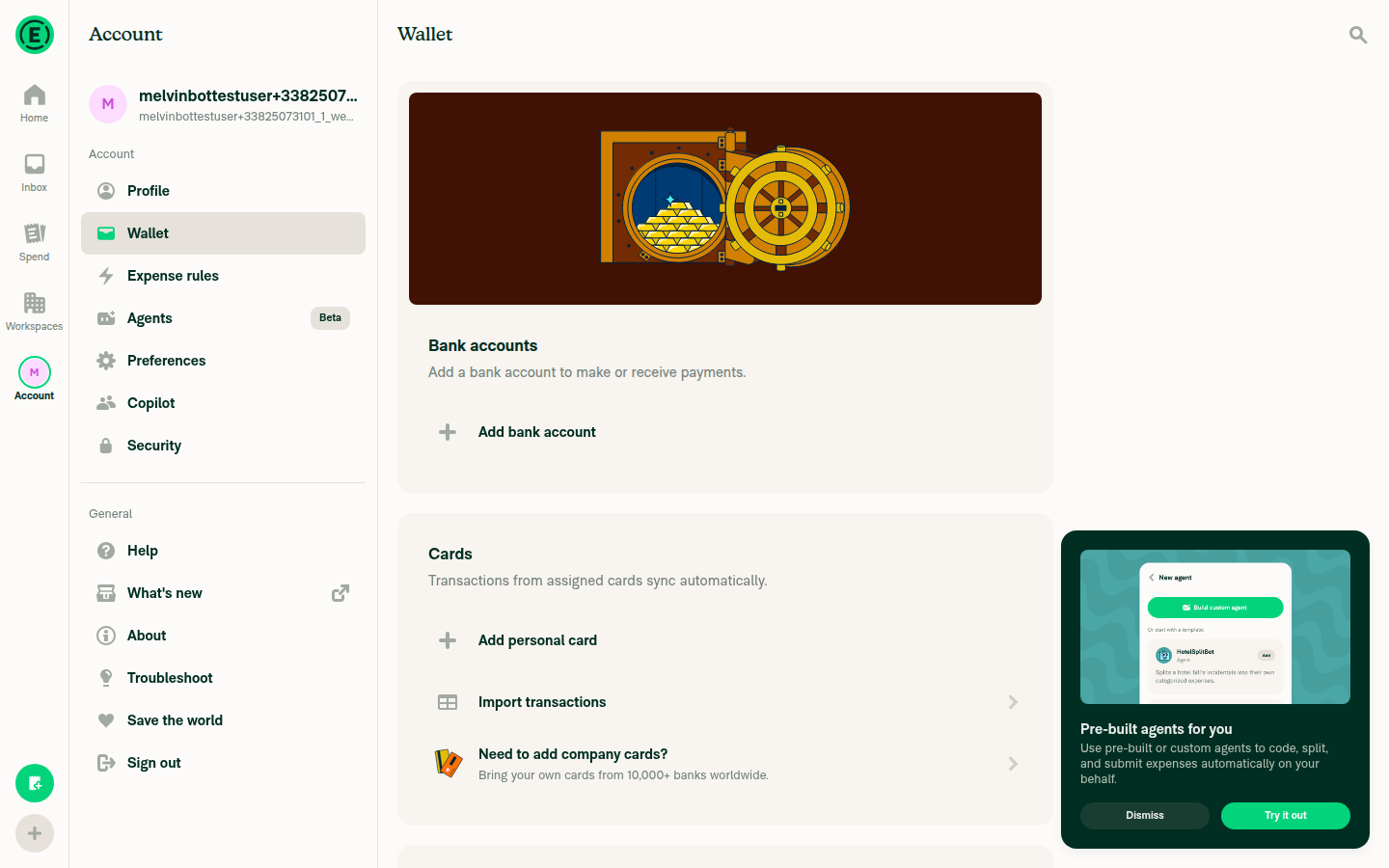
Wallet section reads Bank accounts, not Bank AccountsConfirmed live — accessibility snapshot showed the heading "Bank accounts". Source: en.ts:424
Wallet page showing the 'Bank accounts' section heading and the 'Add bank account' button
✅
Button reads Add bank account, not Add Bank AccountConfirmed live — button label was exactly "Add bank account". Source: en.ts:3888
✅
Unvalidated member hits a Validate your account security-code screen (new step 3)Code-confirmed, not reached live. PaymentMethodList.tsx:646-657 routes to the verify page when !isUserValidated. The screen's title is "Validate your account" (en.ts:2276) and its body says security code, not magic code (en.ts:2281) — so the wording fix in this PR is right. It then forwards to the country step (DynamicAddBankAccountVerifyAccountPage.tsx:26-33), matching the article's step order.
⚠️
Country screen header is Where's your bank account located? with a Next buttonCode-confirmed, not reached live. Header at CountrySelectionList.tsx:85, confirm button resolves to "Next" when not editing at CountrySelectionList.tsx:75-80.
⚠️
Selecting United States leads to the Log into your bank / Connect manually choice, not straight into PlaidCode-confirmed, not reached live — and this is the sentence the article now adds. CountrySelection.tsx:23-31 sends a validated member straight to the entry point, and an unvalidated one to the verify route — which forwards to that same entry point (useDynamicForwardPath.ts:36). The entry point renders both options and nothing else (AccountFlowEntryPoint.tsx:115-129). So "whether or not you had to validate, you always reach the same choice" is exactly what the code does.
⚠️

One thing to know before you flip it ready: the Tests and QA Steps sections in the PR body still hold the // TODO: The human co-author must fill out… placeholders, and the author checklist is unchecked. Those are yours to fill — I shouldn't write them on your behalf. Once they're in, reply with @MelvinBot mark this PR as ready for review and I'll take it out of draft.

About the sign-out during testing

After clicking Add bank account, the test session fired POST /api/OpenPaymentsPage and then immediately POST /api/LogOut, dropping to the signed-out landing page. That looks like an auth-state quirk of the throwaway test account rather than product behavior, and re-authenticating isn't something I can do mid-run. It's unrelated to this docs PR, but worth a manual re-check if you see it too.


view run

@stephanieelliott

Copy link
Copy Markdown
Contributor

Handling in #101954

hungvu193 pushed a commit to hungvu193/App that referenced this pull request Sep 25, 2026
Sign up for free to join this conversation on GitHub. Already have an account? Sign in to comment

Labels

HelpDot Apply this label if the issue relates to ExpensifyHelp

Projects

None yet

Development

Successfully merging this pull request may close these issues.

4 participants