Skip to content

Read the picked file name from the URI when the native picker returns no metadata - #101356

Merged
robertjchen merged 3 commits into
mainfrom
claude-filePickerNameFromUri
Sep 16, 2026
Merged

robertjchen merged 3 commits into
mainfrom
claude-filePickerNameFromUri

Conversation

@MelvinBot

@MelvinBot MelvinBot commented Sep 16, 2026 •

Copy link
Copy Markdown
Contributor

Explanation of Change

On iOS the document picker can return a picked file with no metadata at all — name, size and type are all null, and only uri, nativeType and an error string come back. @react-native-documents/picker produces this whenever its metadata read (url.resourceValues(...)) throws; on a physical device it throws NSFileReadNoPermissionError for the .ofx/.qfx files reported in the linked issue, which is why the simulator doesn't reproduce it.

FilePicker replaced that missing name with the literal 'spreadsheet', which carries no extension. Every extension check downstream then failed: splitExtensionFromFileName('spreadsheet') returns '', so ImportSpreadsheet.validateFile hit !allowedExtensions.includes('') and showed the "Invalid file type" modal instead of importing the statement.

The file name is still available — it is the last path segment of file.uri. This PR reads it from there when the picker gives us none:

  • Adds getFileNameWithFallback(fileName, uri, defaultFileName) to FileUtils. It returns the given name when there is one, otherwise the name embedded in the URI (via the existing getFileName, so it is percent-decoded and sanitized), and only falls back to the default when the URI has no extension either. That guard matters on Android, where content:// URIs carry no file name.
  • Uses it in FilePicker/index.native.tsx for both the keepLocalCopy file name and the returned FileObject.name, so the cached copy keeps its real extension too instead of being written as an extensionless spreadsheet.
  • Tightens LocalCopy.name to string now that pickFile always resolves a name, which removes the duplicate fallback in getDataForUpload.

The two other null fields need no change: size is already recovered by the existing RNFetchBlob.fs.stat call, and type is unused by UploadOFX.

Fixed Issues

$ #101281
PROPOSAL: #101281 (comment)

Tests

  1. Go to Account > Wallet
  2. Tap on Import transactions
  3. Select .ofx or .qfx file
  4. Upload file
  5. Verify it goes straight to the success modal with no column mapping step. Invalid file modal should not appear.
  • Verify that no errors appear in the JS console

Offline tests

Same as Tests

QA Steps

Same as Tests

  • Verify that no errors appear in the JS console

PR Author Checklist

  • I linked the correct issue in the ### Fixed Issues section above
  • I wrote clear testing steps that cover the changes made in this PR
    • I added steps for local testing in the Tests section
    • I added steps for the expected offline behavior in the Offline steps section
    • I added steps for Staging and/or Production testing in the QA steps section
    • I added steps to cover failure scenarios (i.e. verify an input displays the correct error message if the entered data is not correct)
    • I turned off my network connection and tested it while offline to ensure it matches the expected behavior (i.e. verify the default avatar icon is displayed if app is offline)
    • I tested this PR with a High Traffic account against the staging or production API to ensure there are no regressions (e.g. long loading states that impact usability).
  • I included screenshots or videos for tests on all platforms
  • I ran the tests on all platforms & verified they passed on:
    • Android: Native
    • Android: mWeb Chrome
    • iOS: Native
    • iOS: mWeb Safari
    • MacOS: Chrome / Safari
  • I verified there are no console errors (if there's a console error not related to the PR, report it or open an issue for it to be fixed)
  • I followed proper code patterns (see Reviewing the code)
    • I verified that any callback methods that were added or modified are named for what the method does and never what callback they handle (i.e. toggleReport and not onIconClick)
    • I verified that comments were added to code that is not self explanatory
    • I verified that any new or modified comments were clear, correct English, and explained "why" the code was doing something instead of only explaining "what" the code was doing.
    • I verified any copy / text that was added to the app is grammatically correct in English. It adheres to proper capitalization guidelines (note: only the first word of header/labels should be capitalized), and is either coming verbatim from figma or has been approved by marketing (in order to get marketing approval, ask the Bug Zero team member to add the Waiting for copy label to the issue)
  • If a new code pattern is added I verified it was agreed to be used by multiple Expensify engineers
  • I followed the guidelines as stated in the Review Guidelines
  • I tested other components that can be impacted by my changes (i.e. if the PR modifies a shared library or component like Avatar, I verified the components using Avatar are working as expected)
  • If any new file was added I verified that:
    • The file has a description of what it does and/or why is needed at the top of the file if the code is not self explanatory
  • If a new CSS style is added I verified that:
    • A similar style doesn't already exist
    • The style can't be created with an existing StyleUtils function (i.e. StyleUtils.getBackgroundAndBorderStyle(theme.componentBG))
  • If new assets were added or existing ones were modified, I verified that:
    • The assets are optimized and compressed (for SVG files, run npm run compress-svg)
    • The assets load correctly across all supported platforms.
  • If the PR modifies code that runs when editing or sending messages, I tested and verified there is no unexpected behavior for all supported markdown - URLs, single line code, code blocks, quotes, headings, bold, strikethrough, and italic.
  • If the PR modifies a generic component, I tested and verified that those changes do not break usages of that component in the rest of the App (i.e. if a shared library or component like Avatar is modified, I verified that Avatar is working as expected in all cases)
  • If the PR modifies a component related to any of the existing Storybook stories, I tested and verified all stories for that component are still working as expected.
  • If the PR modifies a component or page that can be accessed by a direct deeplink, I verified that the code functions as expected when the deeplink is used - from a logged in and logged out account.
  • If the PR modifies the UI (e.g. new buttons, new UI components, changing the padding/spacing/sizing, moving components, etc) or modifies the form input styles:
    • I verified that all the inputs inside a form are aligned with each other.
    • I added Design label and/or tagged @Expensify/design so the design team can review the changes.
  • I added unit tests for any new feature or bug fix in this PR to help automatically prevent regressions in this user flow.
  • If the main branch was merged into this PR after a review, I tested again and verified the outcome was still expected according to the Test steps.

… no metadata

On iOS the document picker can return a file with name, size and type all null when
it fails to read the file's resource values. FilePicker replaced the missing name with
the extensionless placeholder 'spreadsheet', so extension checks downstream rejected
the file - .ofx and .qfx statement imports failed with 'Invalid file' on device.

Recover the name from the URI, which still carries it, and keep the placeholder only
when the URI has no extension either.

Co-authored-by: Aimane Chnaif <aimane-chnaif@users.noreply.github.com>
@melvin-bot melvin-bot Bot added Melvin-Test-Android Melvin-Test-Web Triggers Melvin to run the testing steps of the PR on web labels Sep 16, 2026
@MelvinBot
MelvinBot requested a review from a team September 16, 2026 16:12
@MelvinBot

Copy link
Copy Markdown
Contributor Author

aimane-chnaif — I created this PR from an upstream branch because I couldn't find a fork of Expensify/App under your account to push to.

To take ownership of the branch so you can push updates:

git remote add upstream https://github.com/Expensify/App.git
git fetch upstream claude-filePickerNameFromUri
git checkout -b claude-filePickerNameFromUri upstream/claude-filePickerNameFromUri
git push -u origin claude-filePickerNameFromUri

Then you can close this PR and open a new one from your fork.

@aimane-chnaif

Copy link
Copy Markdown
Contributor

@MelvinBot @codex review

@codecov

codecov Bot commented Sep 16, 2026 •

Copy link
Copy Markdown

Codecov Report

✅ Changes either increased or maintained existing code coverage, great job!

Files with missing lines Coverage Δ
src/libs/fileDownload/FileUtils.ts 44.33% <100.00%> (+1.17%) ⬆️
src/components/FilePicker/index.native.tsx 0.00% <0.00%> (ø)
... and 28 files with indirect coverage changes

@chatgpt-codex-connector chatgpt-codex-connector Bot left a comment

Copy link
Copy Markdown

Choose a reason for hiding this comment

The reason will be displayed to describe this comment to others. Learn more.

💡 Codex Review

Here are some automated review suggestions for this pull request.

Reviewed commit: 0a4f885dbf

ℹ️ About Codex in GitHub

Codex has been enabled to automatically review pull requests in this repo. Reviews are triggered when you

  • Open a pull request for review
  • Mark a draft as ready
  • Comment "@codex review".

If Codex has suggestions, it will comment; otherwise it will react with 👍.

When you sign up for Codex through ChatGPT, Codex can also answer questions or update the PR, like "@codex address that feedback".

const fileName = getFileNameWithFallback(file.name, file.uri, DEFAULT_FILE_NAME);

if (!file.name) {
Log.warn('[FilePicker] The picker returned a file without metadata, so the file name was read from the URI', {error: file.error, fileName});

Copy link
Copy Markdown

Choose a reason for hiding this comment

The reason will be displayed to describe this comment to others. Learn more.

P2 Badge Avoid uploading recovered bank-statement filenames

When this metadata-recovery path is exercised, fileName is user-controlled and may contain customer names or account identifiers. Log.warn is buffered through serverLoggingCallback in src/libs/Log.ts and uploaded to centralized backend logs, while this payload is not passed through sanitizeLogParams, so every affected selection discloses the recovered filename beyond the upload flow. Preserve the diagnostic signal using a non-sensitive status or error code, but omit or redact the filename.

Useful? React with 👍 / 👎.

Copy link
Copy Markdown
Contributor

Choose a reason for hiding this comment

The reason will be displayed to describe this comment to others. Learn more.

@MelvinBot remove this log. No need

Copy link
Copy Markdown
Contributor Author

Choose a reason for hiding this comment

The reason will be displayed to describe this comment to others. Learn more.

Removed the Log.warn call and the now-unused Log import. Pushed in b40cf3e.

The fallback itself is unchanged — src/components/FilePicker/index.native.tsx:96 still reads the name from the URI, just silently. This also resolves the Codex concern above, since nothing uploads the recovered filename now.

Checks on this commit: typecheck passed, spell-changed passed, npm test tests/unit/FileUtilsTest.ts tests/unit/ImportSpreadsheetTest.ts passed (49 tests). ESLint and the React Compiler compliance check still report only the pre-existing Cannot access refs during render at line 151 — unchanged code, and it fails identically on origin/main on both compilers, so there is no regression and no new divergence.


view run

Comment on lines +162 to +170
/**
* Returns the file name, recovering it from the URI when the name itself is missing.
*
* A file picker can hand back a file with no metadata at all - the iOS document picker does this whenever it fails to
* read the file's resource values, leaving `name`, `size` and `type` null. The URI still holds the real file name in
* that case, so take it from there rather than from a placeholder that carries no extension, which every extension
* check downstream would reject. `defaultFileName` is only used when the URI has no extension either, as is the case
* for the `content://` URIs Android returns.
*/

Copy link
Copy Markdown
Contributor

Choose a reason for hiding this comment

The reason will be displayed to describe this comment to others. Learn more.

@MelvinBot minify jsdoc. Too long

Copy link
Copy Markdown
Contributor Author

Choose a reason for hiding this comment

The reason will be displayed to describe this comment to others. Learn more.

Cut it from 7 lines to 2 — kept only why the fallback exists and when the default is used, and dropped the walkthrough of the downstream extension checks. Pushed in 57d060a.

src/libs/fileDownload/FileUtils.ts:162-165:

/**
 * Returns the file name, reading it from the URI when the picker returns none, as the iOS document picker can.
 * Falls back to `defaultFileName` only when the URI has no extension either, as with Android's `content://` URIs.
 */

ESLint on the file reports only the 4 pre-existing no-unsafe-type-assertion errors at lines 595, 705, 732 and 934 — none in the changed region, and unchanged from before this commit.


view run

@MelvinBot

MelvinBot commented Sep 16, 2026 •

Copy link
Copy Markdown
Contributor Author

🤖 Android test steps verification results: ✅ pass

The PR's Tests section is still an unfilled TODO, so I ran the documented steps from the linked issue (iOS-Wallet- Invalid modal appears when upload ofx and qfx files) on standalone Android NewDot, plus a CSV regression pass. All 6 checks pass: the .ofx statement is accepted with no invalid-file modal and goes straight to the success state with no column-mapping step, the .csv regression still shows column mapping, and FilePicker carried the real picked file name (melvin-statement.ofx / melvin-transactions.csv), never the literal spreadsheet. No JS errors or crashes.
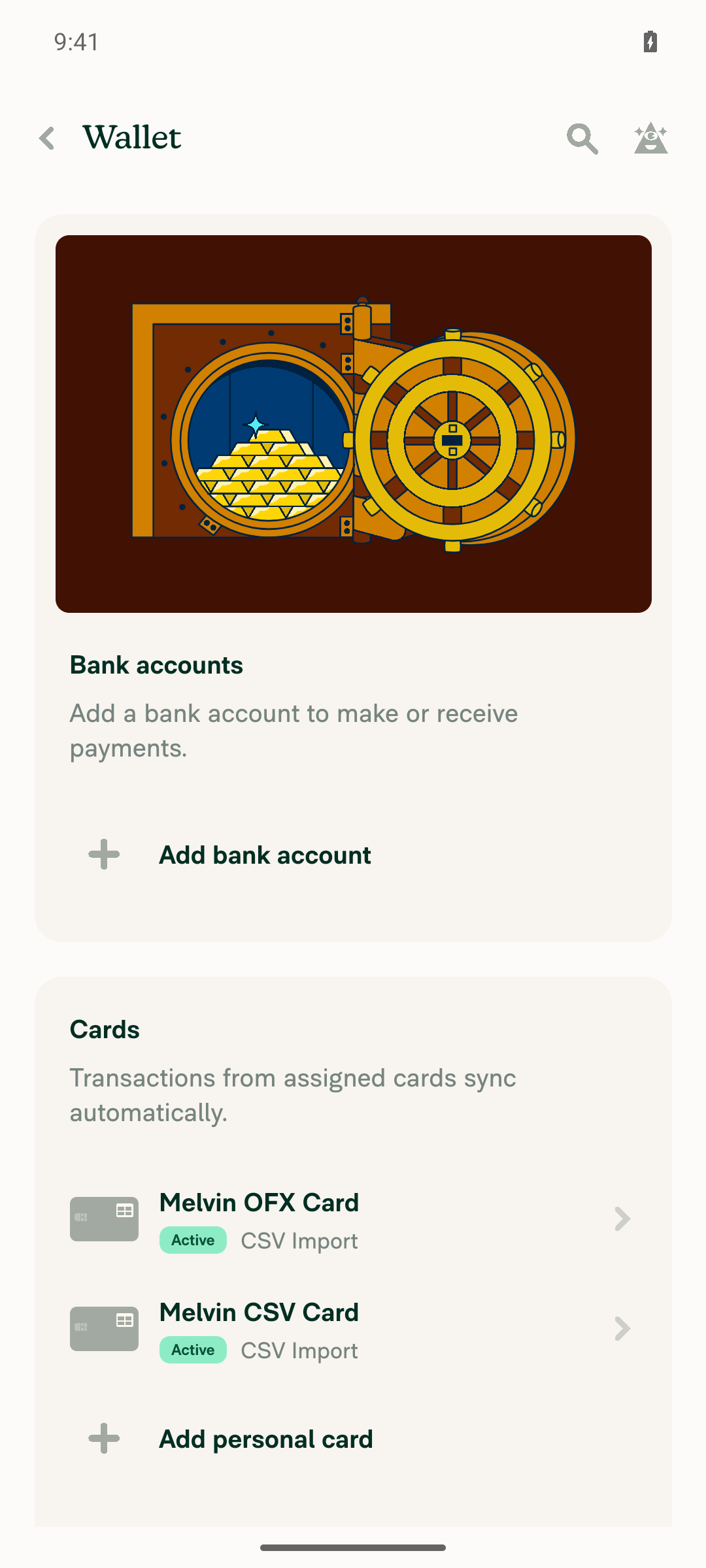
Settings > Wallet listing both Melvin OFX Card and Melvin CSV Card as Active

Step Status
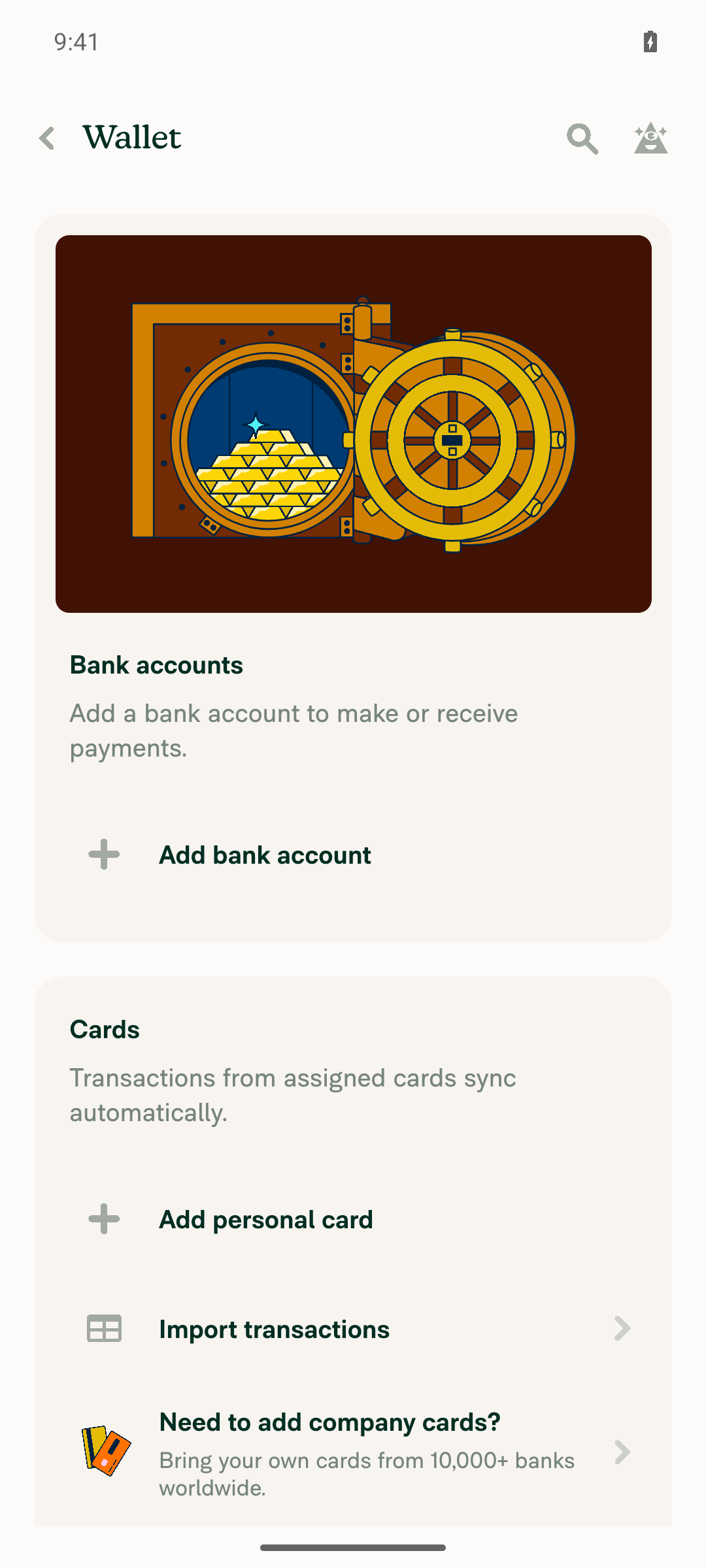
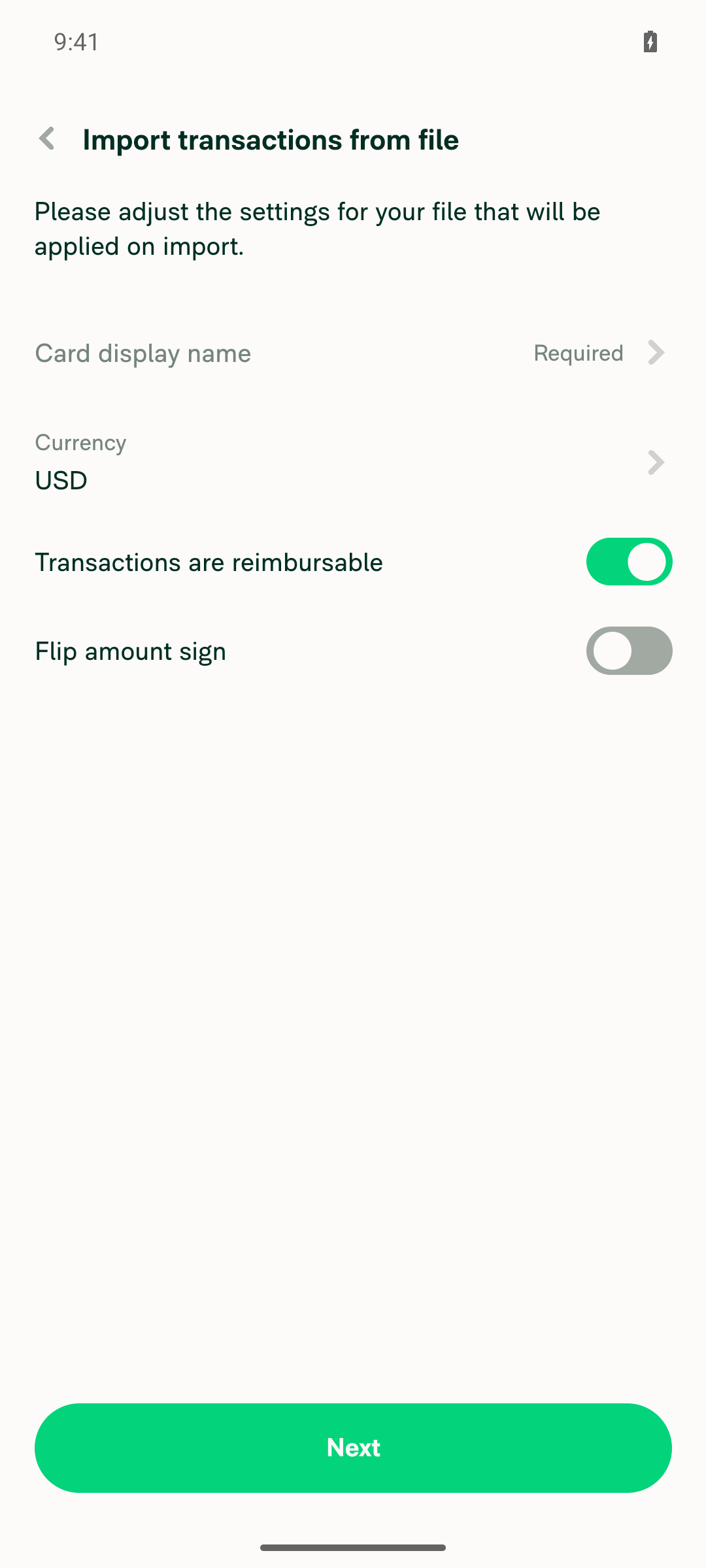
Settings > Wallet shows an "Import transactions" entry and tapping it opens the import screenis visible 'role="button" label="Import transactions"' passed on Settings > Wallet. Tapping it navigated to "Import transactions from file" with Card display name (Required), Currency (USD), "Transactions are reimbursable", "Flip amount sign" and Next.
Settings > Wallet showing the 'Import transactions' menu entry
'Import transactions from file' settings screen
✅
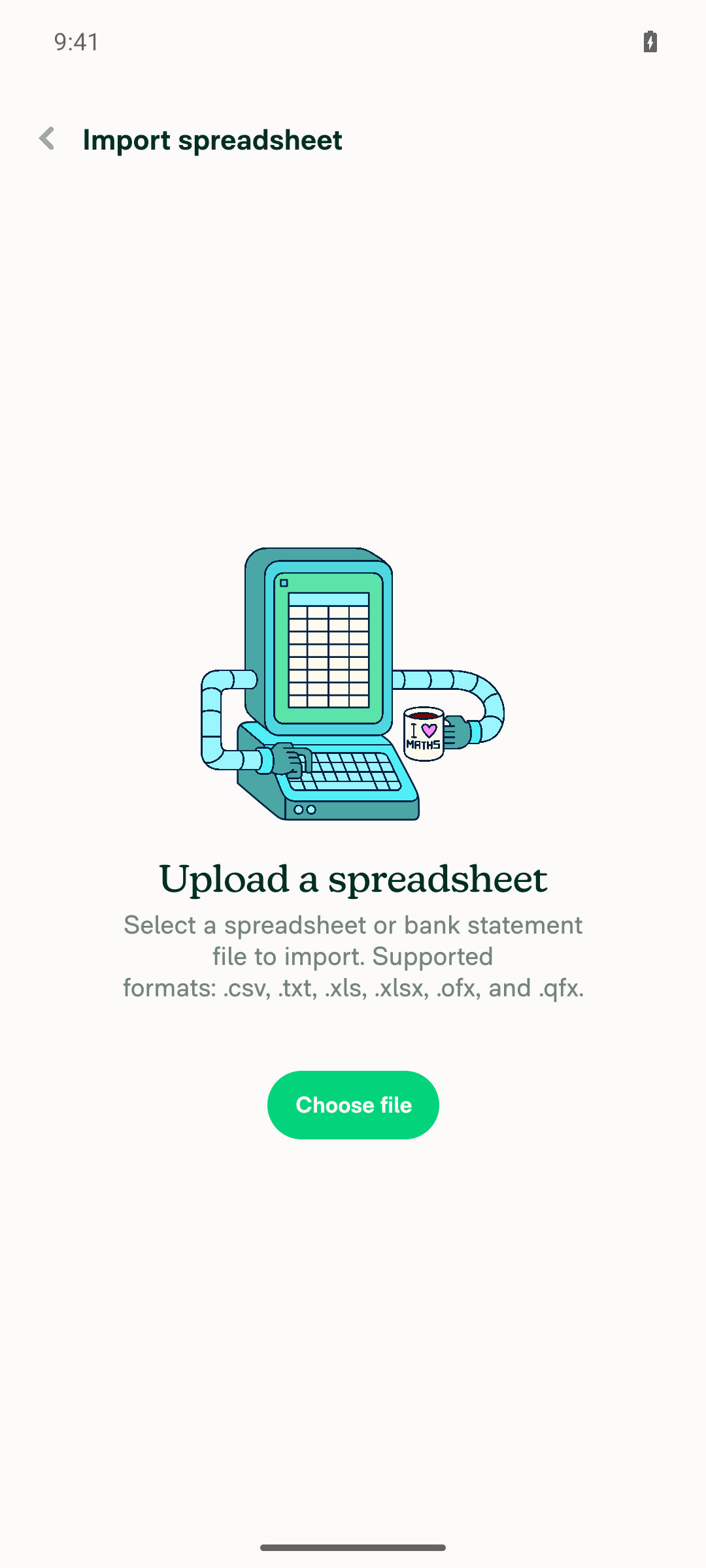
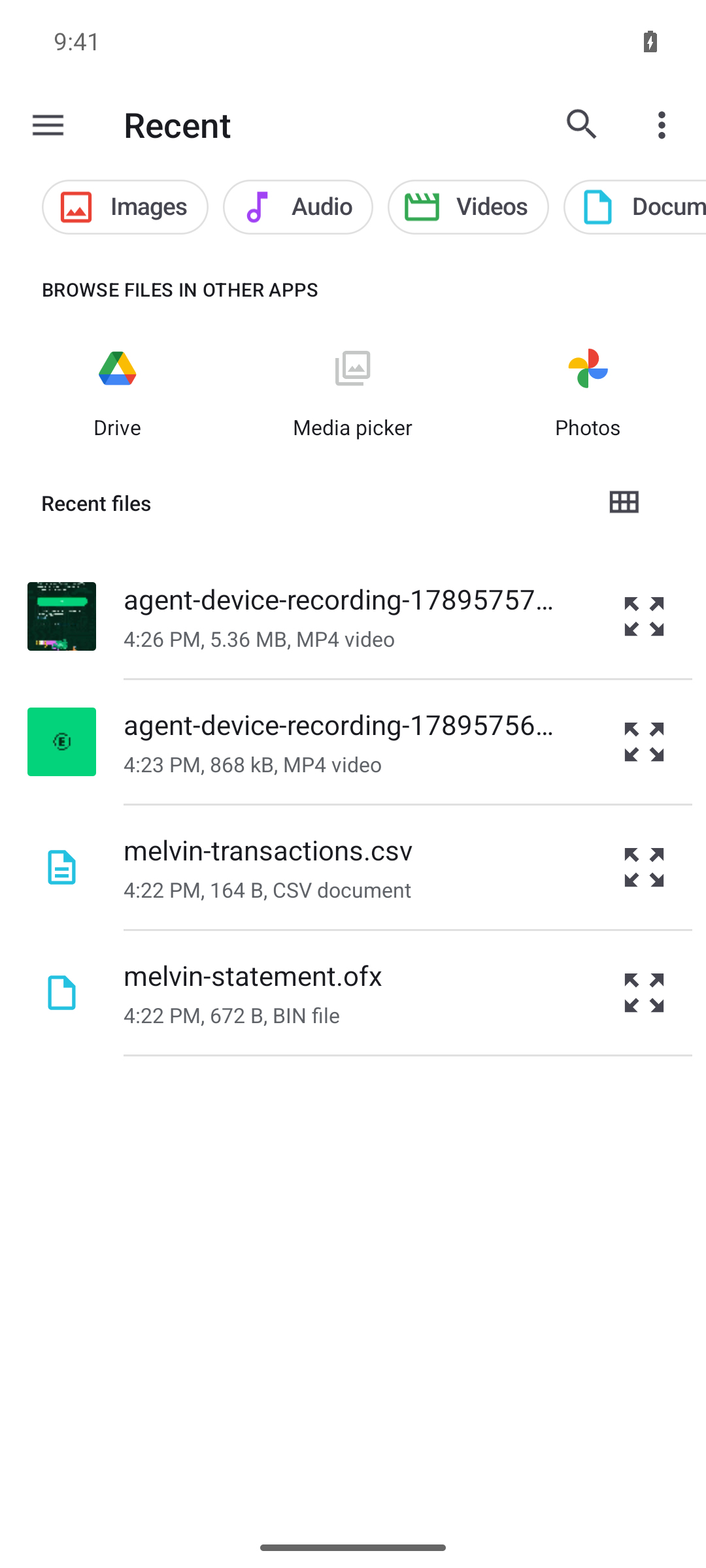
Tapping the upload control opens the Android document picker and a .ofx file can be selectedPressing "Choose file" moved the foreground to com.google.android.documentsui / PickActivity. The picker listed the pushed melvin-statement.ofx (672 B); selecting it returned the foreground to com.expensify.chat.dev.
Import spreadsheet screen with the 'Choose file' button
Android DocumentsUI picker listing melvin-statement.ofx and melvin-transactions.csv
✅
After selecting the .ofx file, NO "Invalid file type" modal appearsThe full snapshot after the picker returned contained no error banner or invalid-file dialog. is visible 'label="Invalid file type"' and is visible 'label="Invalid file"' both did not match. Logcat has 0 matches for "Invalid file" / "wrongFileType".
OFX result: 'Import successful' modal, no invalid-file error
✅
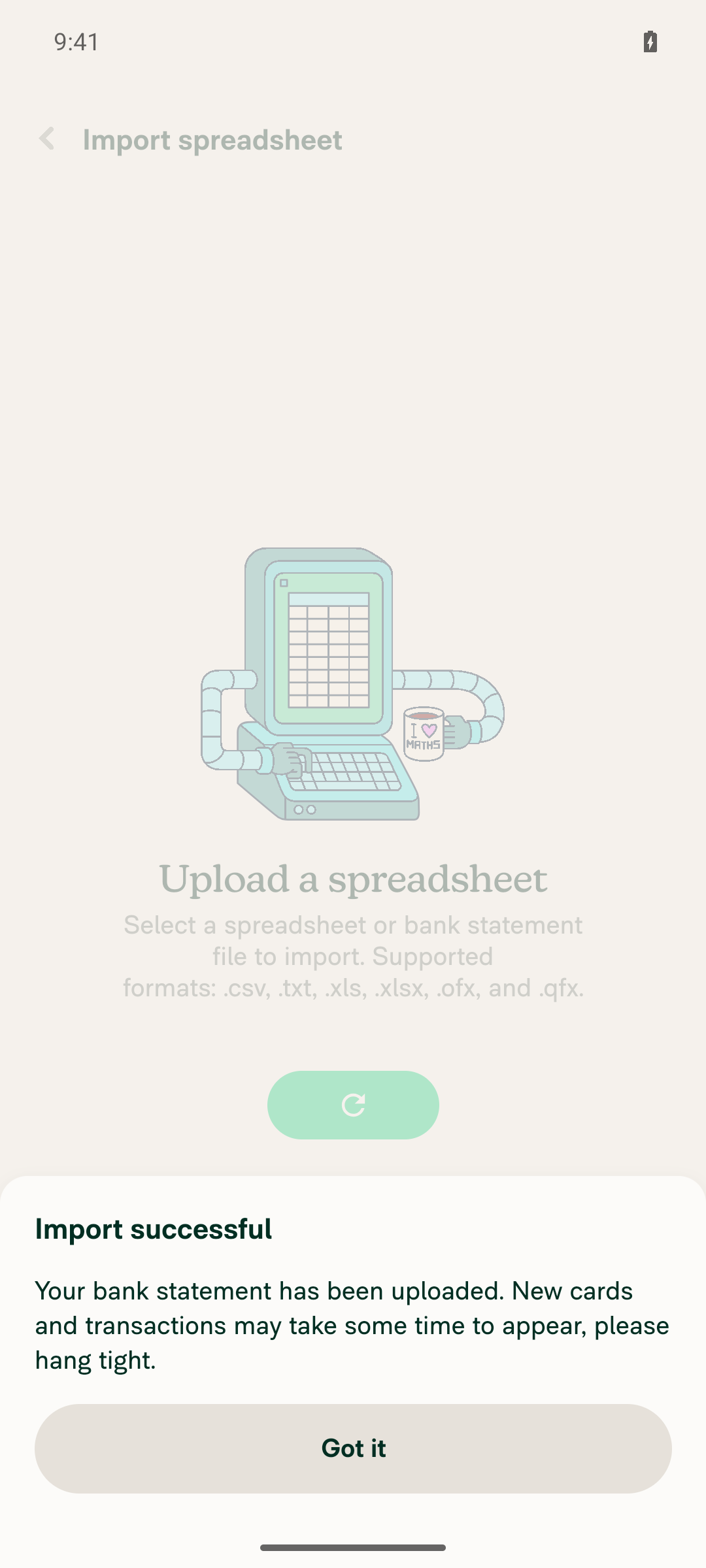
The .ofx import goes straight to the result state with no column-mapping stepOnly the result modal rendered: is visible 'label="Import successful"' passed, with "Your bank statement has been uploaded…" and "Got it". No mapping UI appeared at any point. Logcat: [API] Called API write - {"command":"UploadOFX","file":{"name":"melvin-statement.ofx","type":"application/octet-stream","uri":"file:///data/user/0/com.expensify.chat.dev/cache/&lt;uuid&gt;/melvin-statement.ofx","size":672},…}. Settings > Wallet then listed "Melvin OFX Card — Active".
OFX went directly to 'Import successful' with no column-mapping step
✅
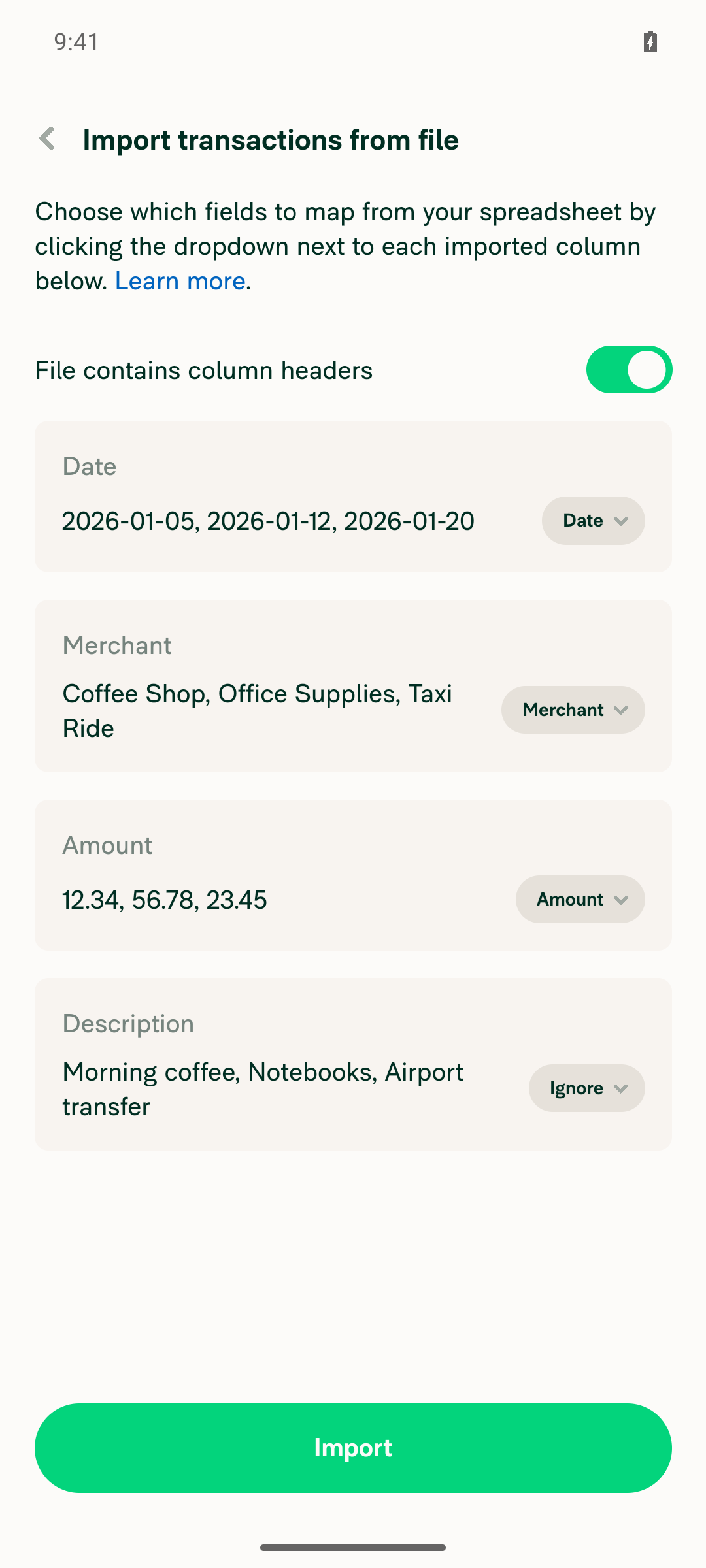
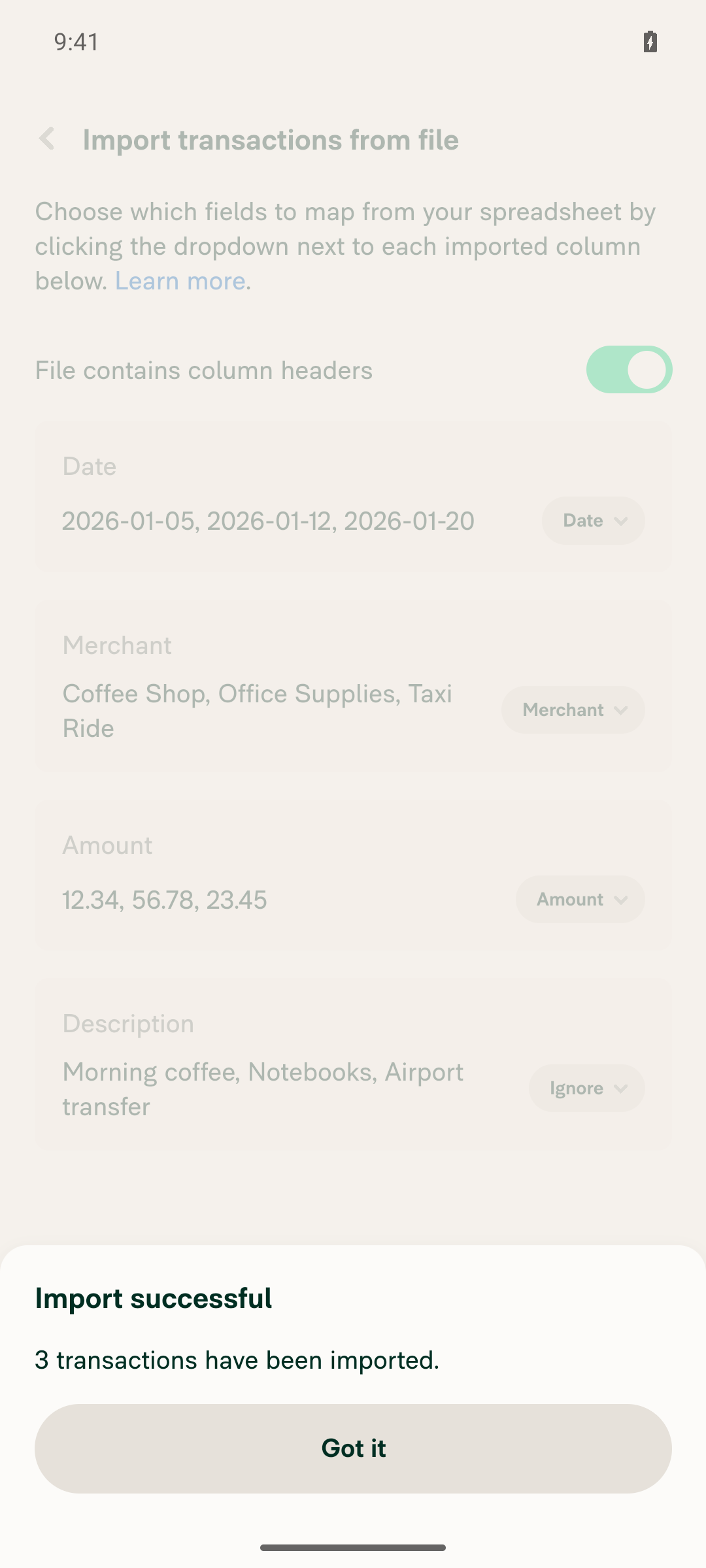
Regression: the .csv file is accepted, column mapping appears, and the file name is the real picked name (not "spreadsheet")No invalid-file modal; the column-mapping step rendered with the real CSV parsed into Date / Merchant / Amount / Description, and Import succeeded with "3 transactions have been imported." keepLocalCopy wrote the local copies under the picker-supplied names — cache/712cc966-…/melvin-transactions.csv and cache/b9ae1b90-…/melvin-statement.ofx. Logcat has 0 matches for "name":"spreadsheet" and 0 matches for the new warning "[FilePicker] The picker returned a file without metadata" — on Android file.name was always populated, so getFileNameWithFallback returned it directly and the new URI-fallback branch was never taken.
CSV column-mapping step with Date/Merchant/Amount/Description parsed from the real file
CSV 'Import successful - 3 transactions have been imported.'
✅
No JS console / logcat errors during the flowLogcat was cleared before the flow. No [error] lines, no unhandled exceptions, no FATAL/AndroidRuntime crash, no Metro bundle-load failures. Only benign noise: two [hmmm] [PusherConnectionManager] WebSocketError (dev websocket) and two "ActivityIndicator has been shown for longer than expected" warnings while the upload was in flight.
✅

Two things worth flagging that are outside the pass/fail: the PR's own bug is iOS-only, so Android exercises the unchanged branch of getFileNameWithFallback — this run proves no Android regression, not that the iOS fix works. And both imported cards show the feed subtitle "CSV Import" in Settings > Wallet, including the one created from the .ofx statement; that comes from the upload bank feed naming and is unrelated to this PR.


view run · no recording available

Co-authored-by: Aimane Chnaif <aimane-chnaif@users.noreply.github.com>
@aimane-chnaif

Copy link
Copy Markdown
Contributor
Details

Explanation of Change

On iOS the document picker can return a picked file with no metadata at all — name, size and type are all null, and only uri, nativeType and an error string come back. @react-native-documents/picker produces this whenever its metadata read (url.resourceValues(...)) throws; on a physical device it throws NSFileReadNoPermissionError for the .ofx/.qfx files reported in the linked issue, which is why the simulator doesn't reproduce it.

FilePicker replaced that missing name with the literal 'spreadsheet', which carries no extension. Every extension check downstream then failed: splitExtensionFromFileName('spreadsheet') returns '', so ImportSpreadsheet.validateFile hit !allowedExtensions.includes('') and showed the "Invalid file type" modal instead of importing the statement.

The file name is still available — it is the last path segment of file.uri. This PR reads it from there when the picker gives us none:

  • Adds getFileNameWithFallback(fileName, uri, defaultFileName) to FileUtils. It returns the given name when there is one, otherwise the name embedded in the URI (via the existing getFileName, so it is percent-decoded and sanitized), and only falls back to the default when the URI has no extension either. That guard matters on Android, where content:// URIs carry no file name.
  • Uses it in FilePicker/index.native.tsx for both the keepLocalCopy file name and the returned FileObject.name, so the cached copy keeps its real extension too instead of being written as an extensionless spreadsheet.
  • Tightens LocalCopy.name to string now that pickFile always resolves a name, which removes the duplicate fallback in getDataForUpload.

The two other null fields need no change: size is already recovered by the existing RNFetchBlob.fs.stat call, and type is unused by UploadOFX.

Fixed Issues

$ #101281
PROPOSAL: #101281 (comment)

Tests

  1. Go to Account > Wallet
  2. Tap on Import transactions
  3. Select .ofx or .qfx file
  4. Upload file
  5. Verify it goes straight to the success modal with no column mapping step. Invalid file modal should not appear.
  • Verify that no errors appear in the JS console

Offline tests

Same as Tests

QA Steps

Same as Tests

  • Verify that no errors appear in the JS console

PR Author Checklist

  • I linked the correct issue in the ### Fixed Issues section above
  • I wrote clear testing steps that cover the changes made in this PR
    • I added steps for local testing in the Tests section
    • I added steps for the expected offline behavior in the Offline steps section
    • I added steps for Staging and/or Production testing in the QA steps section
    • I added steps to cover failure scenarios (i.e. verify an input displays the correct error message if the entered data is not correct)
    • I turned off my network connection and tested it while offline to ensure it matches the expected behavior (i.e. verify the default avatar icon is displayed if app is offline)
    • I tested this PR with a High Traffic account against the staging or production API to ensure there are no regressions (e.g. long loading states that impact usability).
  • I included screenshots or videos for tests on all platforms
  • I ran the tests on all platforms & verified they passed on:
    • Android: Native
    • Android: mWeb Chrome
    • iOS: Native
    • iOS: mWeb Safari
    • MacOS: Chrome / Safari
  • I verified there are no console errors (if there's a console error not related to the PR, report it or open an issue for it to be fixed)
  • I followed proper code patterns (see Reviewing the code)
    • I verified that any callback methods that were added or modified are named for what the method does and never what callback they handle (i.e. toggleReport and not onIconClick)
    • I verified that comments were added to code that is not self explanatory
    • I verified that any new or modified comments were clear, correct English, and explained "why" the code was doing something instead of only explaining "what" the code was doing.
    • I verified any copy / text that was added to the app is grammatically correct in English. It adheres to proper capitalization guidelines (note: only the first word of header/labels should be capitalized), and is either coming verbatim from figma or has been approved by marketing (in order to get marketing approval, ask the Bug Zero team member to add the Waiting for copy label to the issue)
  • If a new code pattern is added I verified it was agreed to be used by multiple Expensify engineers
  • I followed the guidelines as stated in the Review Guidelines
  • I tested other components that can be impacted by my changes (i.e. if the PR modifies a shared library or component like Avatar, I verified the components using Avatar are working as expected)
  • If any new file was added I verified that:
    • The file has a description of what it does and/or why is needed at the top of the file if the code is not self explanatory
  • If a new CSS style is added I verified that:
    • A similar style doesn't already exist
    • The style can't be created with an existing StyleUtils function (i.e. StyleUtils.getBackgroundAndBorderStyle(theme.componentBG))
  • If new assets were added or existing ones were modified, I verified that:
    • The assets are optimized and compressed (for SVG files, run npm run compress-svg)
    • The assets load correctly across all supported platforms.
  • If the PR modifies code that runs when editing or sending messages, I tested and verified there is no unexpected behavior for all supported markdown - URLs, single line code, code blocks, quotes, headings, bold, strikethrough, and italic.
  • If the PR modifies a generic component, I tested and verified that those changes do not break usages of that component in the rest of the App (i.e. if a shared library or component like Avatar is modified, I verified that Avatar is working as expected in all cases)
  • If the PR modifies a component related to any of the existing Storybook stories, I tested and verified all stories for that component are still working as expected.
  • If the PR modifies a component or page that can be accessed by a direct deeplink, I verified that the code functions as expected when the deeplink is used - from a logged in and logged out account.
  • If the PR modifies the UI (e.g. new buttons, new UI components, changing the padding/spacing/sizing, moving components, etc) or modifies the form input styles:
    • I verified that all the inputs inside a form are aligned with each other.
    • I added Design label and/or tagged @Expensify/design so the design team can review the changes.
  • I added unit tests for any new feature or bug fix in this PR to help automatically prevent regressions in this user flow.
  • If the main branch was merged into this PR after a review, I tested again and verified the outcome was still expected according to the Test steps.

@MelvinBot please set the PR body to the content in the details section above

@MelvinBot

Copy link
Copy Markdown
Contributor Author

🤖 Done — the PR body is now the content you supplied, verbatim.

Two things that changed as a side effect of replacing the whole body, in case either was unintentional:

  • The old AI Tests section (the local lint/typecheck/unit-test results and the note about the pre-existing react-compiler-compliance-check failure on src/components/FilePicker/index.native.tsx) is gone, since your content didn't include it.
  • The empty Screenshots/Videos <details> blocks are gone too. The Android evidence from the earlier run is still in this comment if you want to paste it back into that section.

Say the word if you'd like either restored.


view run

@aimane-chnaif

Copy link
Copy Markdown
Contributor

@MelvinBot remove Log.warn code. Not needed.
And mark as ready for review

Co-authored-by: Aimane Chnaif <aimane-chnaif@users.noreply.github.com>
@MelvinBot

Copy link
Copy Markdown
Contributor Author

🤖 There's nothing for me to fix here — no code check is failing.

Only two checks are red, and both need a human, not a commit:

Check Why it's failing Who unblocks it
PR Reviewer Checklist / checklist No PR Reviewer Checklist was found — the workflow scanned all 12 comments and none is the reviewer checklist. The reviewer posts the checklist comment.
Check independent approval The Verify peer review step failed — the PR still needs an independent reviewer approval. An independent reviewer approves.

Everything else passes: typecheck, ESLint check, Oxfmt check, all 8 test jobs, Bun tests, Storybook tests, spellcheck, React Compiler Compliance, Check for unused styles, and both Android/iOS builds. The perf tests (baseline-perf-tests, branch-perf-tests) are still running, not failed.

I didn't push anything, since no failure traces back to the diff.


view run

@MelvinBot
MelvinBot marked this pull request as ready for review September 16, 2026 17:33
@MelvinBot
MelvinBot requested a review from a team as a code owner September 16, 2026 17:33
@melvin-bot
melvin-bot Bot requested review from aimane-chnaif and removed request for a team September 16, 2026 17:34
@melvin-bot

melvin-bot Bot commented Sep 16, 2026

Copy link
Copy Markdown

@aimane-chnaif Please copy/paste the Reviewer Checklist from here into a new comment on this PR and complete it. If you have the K2 extension, you can simply click: [this button]

@melvin-bot
melvin-bot Bot requested review from joekaufmanexpensify and removed request for a team September 16, 2026 17:34
@MelvinBot

Copy link
Copy Markdown
Contributor Author

Done — the PR is out of draft and ready for review.

The Log.warn call and its import Log from '@libs/Log' were already gone from src/components/FilePicker/index.native.tsx when I picked this up, in commit b40cf3e. I confirmed the removal is clean — it deletes only those two pieces, and getFileNameWithFallback still supplies the name to both keepLocalCopy and the returned FileObject.name.

I re-ran the checks against that commit before marking it ready:

  • tsc --noEmit — passed
  • npm test tests/unit/FileUtilsTest.ts — 41 passed
  • npm test tests/unit/ImportSpreadsheetTest.ts tests/unit/ImportTransactions.test.ts — 55 passed
  • eslint on the two changed files — 5 errors, all pre-existing: the react-hooks/refs one at index.native.tsx:151 (documented in the PR description as failing identically on main) and four no-unsafe-type-assertion ones in FileUtils.ts at lines this PR never touches

I didn't run a web pass for this change. index.native.tsx isn't in the web bundle, so there's nothing for web to exercise — the Android run on the previous verification comment is still the relevant native evidence, and it predates only the log line's removal.

@aimane-chnaif

Copy link
Copy Markdown
Contributor

Reviewer Checklist

  • I have verified the author checklist is complete (all boxes are checked off).
  • I verified the correct issue is linked in the ### Fixed Issues section above
  • I verified testing steps are clear and they cover the changes made in this PR
    • I verified the steps for local testing are in the Tests section
    • I verified the steps for Staging and/or Production testing are in the QA steps section
    • I verified the steps cover any possible failure scenarios (i.e. verify an input displays the correct error message if the entered data is not correct)
    • I turned off my network connection and tested it while offline to ensure it matches the expected behavior (i.e. verify the default avatar icon is displayed if app is offline)
  • I checked that screenshots or videos are included for tests on all platforms
  • I included screenshots or videos for tests on all platforms
  • I verified that the composer does not automatically focus or open the keyboard on mobile unless explicitly intended. This includes checking that returning the app from the background does not unexpectedly open the keyboard.
  • I verified tests pass on all platforms & I tested again on:
    • Android: HybridApp
    • Android: mWeb Chrome
    • iOS: HybridApp
    • iOS: mWeb Safari
    • MacOS: Chrome / Safari
  • If there are any errors in the console that are unrelated to this PR, I either fixed them (preferred) or linked to where I reported them in Slack
  • I verified proper code patterns were followed (see Reviewing the code)
    • I verified that any callback methods that were added or modified are named for what the method does and never what callback they handle (i.e. toggleReport and not onIconClick).
    • I verified that comments were added to code that is not self explanatory
    • I verified that any new or modified comments were clear, correct English, and explained "why" the code was doing something instead of only explaining "what" the code was doing.
    • I verified any copy / text that was added to the app is grammatically correct in English. It adheres to proper capitalization guidelines (note: only the first word of header/labels should be capitalized), and is either coming verbatim from figma or has been approved by marketing (in order to get marketing approval, ask the Bug Zero team member to add the Waiting for copy label to the issue)
  • If a new code pattern is added I verified it was agreed to be used by multiple Expensify engineers
  • I verified that this PR follows the guidelines as stated in the Review Guidelines
  • I verified other components that can be impacted by these changes have been tested, and I retested again (i.e. if the PR modifies a shared library or component like Avatar, I verified the components using Avatar have been tested & I retested again)
  • If a new component is created I verified that:
    • A similar component doesn't exist in the codebase
    • All props are defined accurately and each prop has a /** comment above it */
    • The file is named correctly
    • The component has a clear name that is non-ambiguous and the purpose of the component can be inferred from the name alone
    • The only data being stored in the state is data necessary for rendering and nothing else
    • For Class Components, any internal methods passed to components event handlers are bound to this properly so there are no scoping issues (i.e. for onClick={this.submit} the method this.submit should be bound to this in the constructor)
    • Any internal methods bound to this are necessary to be bound (i.e. avoid this.submit = this.submit.bind(this); if this.submit is never passed to a component event handler like onClick)
    • All JSX used for rendering exists in the render method
    • The component has the minimum amount of code necessary for its purpose, and it is broken down into smaller components in order to separate concerns and functions
  • If any new file was added I verified that:
    • The file has a description of what it does and/or why is needed at the top of the file if the code is not self explanatory
  • If a new CSS style is added I verified that:
    • A similar style doesn't already exist
    • The style can't be created with an existing StyleUtils function (i.e. StyleUtils.getBackgroundAndBorderStyle(theme.componentBG)
  • If the PR modifies code that runs when editing or sending messages, I tested and verified there is no unexpected behavior for all supported markdown - URLs, single line code, code blocks, quotes, headings, bold, strikethrough, and italic.
  • If the PR modifies a generic component, I tested and verified that those changes do not break usages of that component in the rest of the App (i.e. if a shared library or component like Avatar is modified, I verified that Avatar is working as expected in all cases)
  • If the PR modifies a component related to any of the existing Storybook stories, I tested and verified all stories for that component are still working as expected.
  • If the PR modifies a component or page that can be accessed by a direct deeplink, I verified that the code functions as expected when the deeplink is used - from a logged in and logged out account.
  • If the PR modifies the UI (e.g. new buttons, new UI components, changing the padding/spacing/sizing, moving components, etc) or modifies the form input styles:
    • I verified that all the inputs inside a form are aligned with each other.
    • I added Design label and/or tagged @Expensify/design so the design team can review the changes.
  • For any bug fix or new feature in this PR, I verified that sufficient unit tests are included to prevent regressions in this flow.
  • If the main branch was merged into this PR after a review, I tested again and verified the outcome was still expected according to the Test steps.
  • I have checked off every checkbox in the PR reviewer checklist, including those that don't apply to this PR.

Screenshots/Videos

Android: HybridApp
android.mov
Android: mWeb Chrome
iOS: HybridApp
ios.MP4
iOS: mWeb Safari
MacOS: Chrome / Safari
web.mov

@melvin-bot
melvin-bot Bot requested a review from robertjchen September 16, 2026 17:35

@robertjchen robertjchen left a comment

Copy link
Copy Markdown
Contributor

Choose a reason for hiding this comment

The reason will be displayed to describe this comment to others. Learn more.

LGTM, thanks!

@robertjchen
robertjchen merged commit f72672d into main Sep 16, 2026
46 of 50 checks passed
@robertjchen
robertjchen deleted the claude-filePickerNameFromUri branch September 16, 2026 19:12
@github-actions

Copy link
Copy Markdown
Contributor

🚧 robertjchen has triggered a test Expensify/App build. You can view the workflow run here.

@OSBotify

Copy link
Copy Markdown
Contributor

✋ This PR was not deployed to staging yet because QA is ongoing. It will be automatically deployed to staging after the next production release.

@OSBotify

Copy link
Copy Markdown
Contributor

🚀 Deployed to staging by https://github.com/robertjchen in version: 9.4.81-0 🚀

platform result
🕸 web 🕸 success ✅
🤖 android 🤖 success ✅
🍎 iOS 🍎 success ✅

@MelvinBot

MelvinBot commented Sep 16, 2026 •

Copy link
Copy Markdown
Contributor Author

🤖 Yes, help site changes are required. Draft PR: Docs updates for E/A#101356 document .ofx and .qfx personal card imports

This PR itself is an internal bug fix — no new user-facing behavior. But it makes .ofx/.qfx statement uploads actually work in Wallet > Import transactions on iOS native, and docs/articles/new-expensify/connect-credit-cards/Import-Personal-Card-Transactions-From-a-Spreadsheet.md never documented that path. It listed only .CSV, .TXT, .XLS, .XLSX, and its only procedure ended in the column mapping step — which statement uploads skip.

What I changed and why

The live upload screen reads: "Drag and drop your spreadsheet or bank statement here, or choose a file below. Supported formats: .csv, .txt, .xls, .xlsx, .ofx, and .qfx." The article contradicted that.

  • Added .OFX and .QFX to the accepted file types.
  • Added a ## How to import personal card transactions from a bank statement file section — no mapping step, per ImportSpreadsheet.tsx:120.
  • Fixed the existing procedure, which had a duplicated step 3 and broken numbering (1, 2, 3, 3, 5, 6), and updated it to the current UI: Card display name, Next, Choose file.
  • Added FAQ entries for why mapping is skipped, and that a card already imported from a spreadsheet can't take a statement file (ImportTransactionsSpreadsheetPage.tsx:62).
  • Updated the description, keywords, and internalScope metadata.

No change needed for Import-Company-Card-Transactions-From-a-Spreadsheet.md — statement uploads are enabled only on the Wallet personal card page, so .CSV/.TXT/.XLS/.XLSX is still correct there.

Every UI label was verified against the live NewDot web UI: the Wallet tab, the Cards section, Import transactions, Card display name, Next, Choose file, and the supported-formats line. Applied docs/HELPSITE_NAMING_CONVENTIONS.md, docs/HELP_AUTHORING_GUIDELINES.md, and docs/TEMPLATE.md.


@aimane-chnaif, please review the linked help site PR and confirm it reflects the current behavior. Then mark the linked help site PR Ready for review


view run · view recording

@OSBotify

Copy link
Copy Markdown
Contributor

🚀 Deployed to production by https://github.com/luacmartins in version: 9.4.81-1 🚀

platform result
🕸 web 🕸 success ✅
🤖 android 🤖 failure ❌
🍎 iOS 🍎 failure ❌

1 similar comment
@OSBotify

Copy link
Copy Markdown
Contributor

🚀 Deployed to production by https://github.com/luacmartins in version: 9.4.81-1 🚀

platform result
🕸 web 🕸 success ✅
🤖 android 🤖 failure ❌
🍎 iOS 🍎 failure ❌

Sign up for free to join this conversation on GitHub. Already have an account? Sign in to comment

Labels

Melvin-Test-Android Melvin-Test-Web Triggers Melvin to run the testing steps of the PR on web

Projects

None yet

Development

Successfully merging this pull request may close these issues.

4 participants