Skip to content

Reland expense defaults for tags and amounts - #105893

Merged
JS00001 merged 43 commits into
Expensify:mainfrom
Krishna2323:krishna2323/reapply-104155-expense-defaults-beta
Nov 13, 2026
Merged

JS00001 merged 43 commits into
Expensify:mainfrom
Krishna2323:krishna2323/reapply-104155-expense-defaults-beta

Conversation

@Krishna2323

@Krishna2323 Krishna2323 commented Nov 4, 2026 •

Copy link
Copy Markdown
Contributor

Explanation of Change

Relands #104155 after it was reverted in #105888, and fixes the frontend deploy blockers it caused.

#104155 added three things to expense default rules:

Added Problem
Matching on a tag The engine does not apply tag-matched rules yet
Matching without a merchant (category alone) Same, an admin could save a rule that silently never fires
Setting an amount default Had its own bugs on top of that

Eleven deploy blockers followed, so the whole PR was reverted.

No beta

This PR first relanded the feature behind CONST.BETAS.EXPENSE_DEFAULT_CONDITIONS. That beta is gone again, because @situchan and @JS00001 were right that it covered too little to be worth having.

The gate only reached the save validator, the Tag condition row and the Amount default row. Everything else the editor offers was left ungated, so off the beta an admin could fill in a category condition and a reimbursable default and then be told to add a condition, because the validator counted neither. Covering the rest would have meant gating most of the editor. The feature ships whole instead, and QA runs the full flow on an ad-hoc build before this merges.

Nothing here needs a server-side beta to be created.

Commits

One issue per commit, so they read on their own. In order:

  1. Reapply — a revert of the revert. The resulting tree is byte for byte identical to main at 90b4be42da4, so this commit carries no behavior change of its own.
  2. Put the newer expense default conditions behind a beta — undone by commit 13, kept in history rather than rewritten.
  3. Keep the category tax default creatable off the beta — same, undone by commit 13.
  4. Stop the report crashing on a rule that set the amount ([Due for payment 2026-11-11] Expense - App crashes when opening expense with amount edited by a rule. #105805)
  5. Format a rule's amount with the workspace currency's decimals ([Due for payment 2026-11-11] Rules - After changing to currency that does not support cents, rule shows amount with cents #105812)
  6. Let the merchant be cleared once a rule can match on something else ([Due for payment 2026-11-11] Merchant field cannot be saved when it is empty when rule can be created without merchant #105817)
  7. Keep an expense default amount of zero ([Due for payment 2026-11-11] Rule - "0" amount is not saved on "Amount" field while creating a new rule. #105819)
  8. Preview a rule with the command that reads its whole filter tree ([Due for payment 2026-11-11] Rules - Expense shows up in preview list when category does not match #105828, [Due for payment 2026-11-11] Rules - Expense with matching category does not show up in preview list #105829)
  9. Ask for the preview once per filter tree rather than once per render
  10. Read the preview matches from the collection the command writes
  11. Keep the masked Onyx keys alphabetical after the rename
  12. Apply the generated translations
  13. Remove the expense default conditions beta — also fixes the editor refusing defaults it offers
  14. Apply a category's tax default to a track expense being submitted

Commits 2, 3 and 13 are reviewable as a pair of opposites. If you are reading commit by commit and want to skip the detour, the net of the three is that no beta exists and the merchant field can always be cleared.

The blocker fixes

Jack triaged the eleven blockers. Five are not ours, listed under Fixed Issues below. The six here are.

Crash opening an expense a rule repriced (#105805). iou.rulesModifiedFields.common looked the field label up as translations.common[key]. The backend sends {amount: '$10.00'} and common had no amount, so .toLowerCase() ran on undefined. A rule can also set the vendor, whose key has no label either, so an unknown field is now left out of the message rather than looked up.

Note

This is the reason the fixes are in this PR rather than a follow-up. A rule created while #104155 was on staging still exists, the backend still applies it, and the report still crashes.

Cents on a currency that has none (#105812). The Expense defaults table formatted the amount with convertAmountToDisplayString, which is the tax rate formatter: it forces two to four decimals and never reads the currency's. The table now uses the same convertToDisplayString the rule editor does, so a rule reads the same in both places.

Merchant could not be cleared (#105817). The merchant editor rejected an empty value, which was right while a merchant was the only condition a rule could carry. A rule can now match on a category or a tag, so clearing the merchant is how an admin swaps one condition for another. The rule editor still refuses a rule that matches on nothing.

An amount of zero was dropped (#105819). Three places dropped it independently: the editor saved an empty string, the rule builder returned no action, and reading a rule back refused any amount that was not negative. The editor closed with no error and no amount saved. Zero is now a default like any other. An empty input still means the rule sets no amount, which is a different thing.

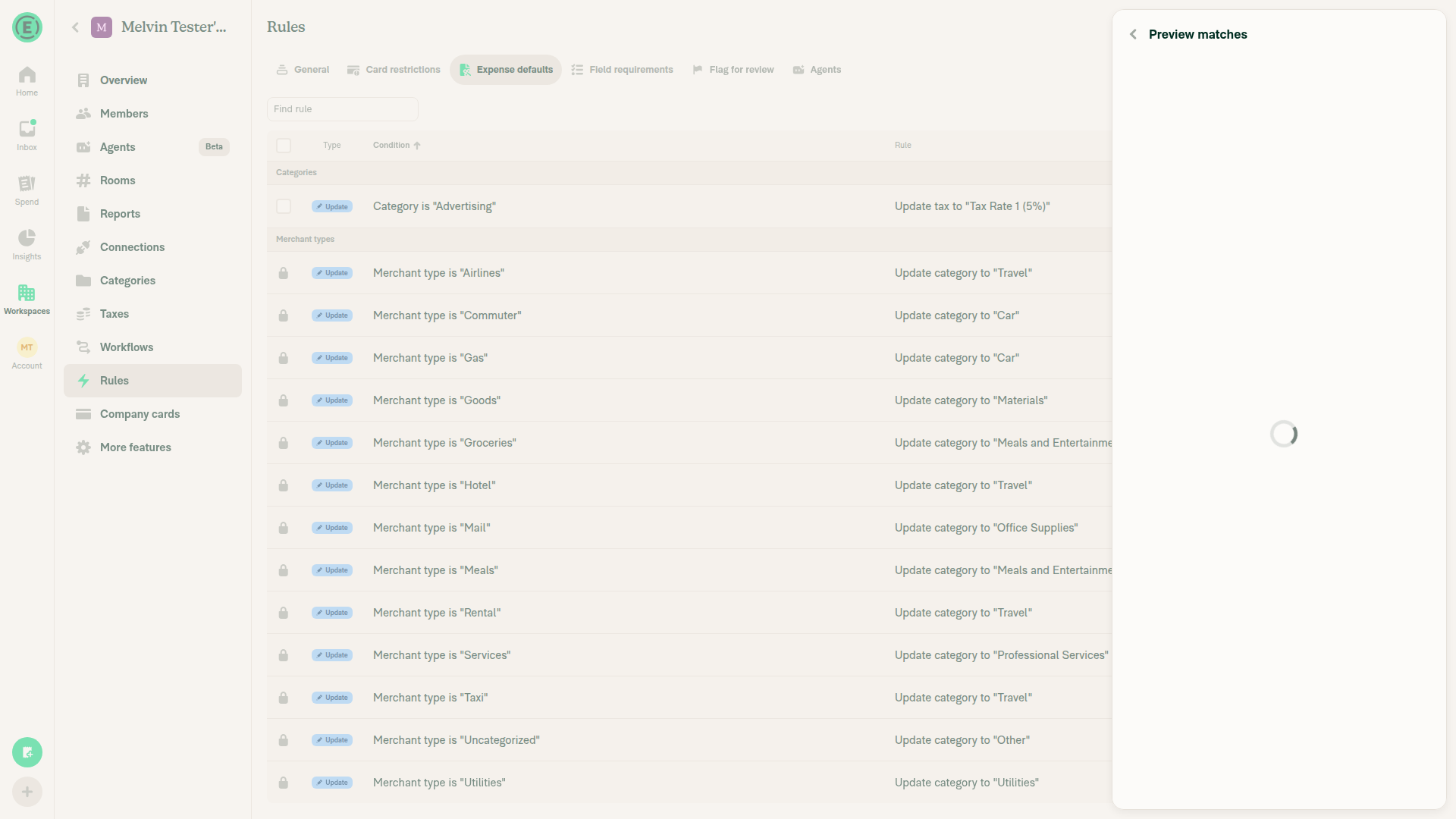
Preview listed the wrong expenses (#105828, #105829). The preview asked a command that only read the merchant leaf of the filter tree, so a category or tag rule matched nothing. The answer is also keyed by transaction in Onyx, so a preview matching fewer expenses than the last one kept showing the ones it no longer matched. The command now reads the whole tree, and the previous answer is cleared before the new one is asked for.

The two bugs found in review

Categorizing a tracked expense did not apply the category's tax rate. Reported by @situchan. Before #104155, picking a category wrote the rate its rule asked for straight onto the draft, from setMoneyRequestCategory, reading the rules off the policy. The rules moved into their own collection, so that write was dropped and TaxController was left as the only writer. TaxController holds everything back while an expense is moving off a track expense, so nothing applied the rule.

That guard protects the rate the expense arrived with, so it stays for the workspace default, which is a rate nobody chose for this expense. A category rule is a rate the destination's admin chose, so it applies now, and the tax amount is charged again at it rather than kept from the rate it replaced.

The category settings rule editor offered defaults it then refused. Also reported by @situchan, and caused by the beta gate. Fixed by removing it.

Fixed Issues

$ #102277
$ #105805
$ #105812
$ #105817
$ #105819
$ #105828
$ #105829

Not fixed here, per Jack's triage, and left off the list above: #105811 (negative amounts are intentional), #105822 and #105855 (intended current behavior), #105859 and #105862 (backend).

PROPOSAL: N/A, reland of a reverted PR

Tests

Precondition: a Control workspace with Rules, Categories, Tags and Taxes enabled.

Conditions and defaults

  1. Go to workspace settings > Rules > Add rule > Apply expense defaults.
  2. Verify the matching section offers Merchant, Category and Tag, and the defaults section includes Amount.
  3. Create a rule matching only a category and verify it saves.
  4. Create a rule matching only a tag and verify it saves.
  5. Create a rule matching only a merchant and verify it saves.
  6. Open an existing rule that matches on a merchant and a category, open Merchant, clear the field and save.
  7. Verify it is accepted, because the category still carries the rule.
  8. Clear the category too and try to save, and verify "Please add at least one condition" shows, because the rule now matches on nothing.
  9. Set a default without any condition and verify saving is refused the same way.

Category settings entry point

  1. Go to workspace settings > Categories, open a category, and tap Create new rule > Apply expense defaults.
  2. Verify the category is pre-filled and locked.
  3. Set Reimbursable to Yes and tap Save, and verify it saves rather than asking for another condition.
  4. Reopen it, add a tax rate, and verify it saves.
  5. Verify the rule is listed under that category and on the Expense defaults tab.

Category tax defaults are applied

  1. On a category, create a rule that sets only a tax rate that is not the workspace default.
  2. Create an expense in that category from the workspace chat, and verify the Tax field on the confirmation page shows the rule's rate.
  3. Create a tracked expense in selfDM, then Submit to my employer, pick the workspace, and pick that category.
  4. Verify the Tax field shows the rule's rate rather than the expense's old tax or none, and that the submitted expense carries it.
  5. Repeat step 17 with a category that has no rule, and verify the expense keeps the tax it arrived with rather than taking the workspace default.

The amount

  1. Set an Amount default of 10.50 and verify it is stored and shown in the rule summary.
  2. Go to workspace settings > Overview and change the workspace currency to JPY.
  3. Go back to Rules > Expense defaults and verify the rule row shows the amount without decimals, matching what the rule editor shows.
  4. Open Amount, enter 0 and save, and verify 0 is kept rather than the row going empty.
  5. Reopen the rule and verify the amount is still 0.
  6. Open Amount, clear the field entirely and save, and verify the Amount row is now empty.
  7. Set an amount again, create an expense that the rule matches, and open it from the report.
  8. Verify it opens without crashing and the report history reads set the amount to "..." via workspace rules.

Preview

  1. Create two expenses with clearly different merchants, for example "Starbucks" and "Uber".
  2. Create a rule matching on the first merchant and tap Preview.
  3. Verify only that merchant's expense is listed.
  4. Go back, change the merchant to the second one, and tap Preview again.
  5. Verify only the second merchant's expense is listed, and the first is gone.
  6. Create a rule matching only a category and tap Preview, and verify the expenses in that category are listed.
  7. Create a rule matching only a tag and tap Preview, and verify the expenses with that tag are listed.
  • Verify that no errors appear in the JS console

Offline tests

  1. Go offline.
  2. Create an expense default rule matching on a merchant.
  3. Verify the rule appears in the list greyed out with a pending style.
  4. Delete it and verify it stays listed with a struck-through pending delete.
  5. Go back online.
  6. Verify the pending styles clear and the list matches what the server returns.
  7. Go offline again and open Preview on a rule, and verify the offline blocking view is shown rather than an empty list.

QA Steps

Precondition: a Control workspace with Rules, Categories, Tags and Taxes enabled. No beta is needed.

  1. Go to workspace settings > Rules > Add rule > Apply expense defaults.
  2. Verify the matching section offers Merchant, Category and Tag, and the defaults section includes Amount.
  3. Create a rule matching only a category, set a description default, and verify it saves.
  4. Create a rule matching only a tag and verify it saves.
  5. Create a rule matching only a merchant and verify it saves.
  6. Open the merchant rule, open Merchant, clear the field and save, and verify it is accepted while another condition remains.
  7. Clear every condition and try to save, and verify an error asks for a condition.
  8. Create a rule that sets an Amount, and verify the amount shows in the rule summary with the workspace currency.
  9. Change the workspace currency to one with no decimals, such as JPY, and verify the Expense defaults table and the rule editor show the amount the same way.
  10. Set the Amount to 0 and verify it is saved rather than cleared, then clear the field entirely and verify the Amount row goes empty.
  11. Create two expenses with different merchants, one of which matches a rule. Tap Preview and verify only the matching expense is listed.
  12. Change the rule's merchant to the other one, tap Preview again, and verify only that expense is listed now.
  13. Tap Preview on the category rule and on the tag rule, and verify the listed expenses are the ones that match, and only those.
  14. Create an expense that matches each rule, open each one from the report, and verify it opens without crashing and the defaults are applied.
  15. Go to workspace settings > Categories, open a category, tap Create new rule > Apply expense defaults, set Reimbursable to Yes and tap Save, and verify it saves.
  16. On a category, create a rule that sets only a tax rate that is not the workspace default.
  17. Create an expense in that category and verify the rule's tax rate is applied.
  18. Create a tracked expense in selfDM, Submit to my employer, pick the workspace, pick that category, and verify the Tax field shows the rule's rate.
  19. Verify the rules survive a reload and read the same after it.
  • Verify that no errors appear in the JS console

PR Author Checklist

  • I linked the correct issue in the ### Fixed Issues section above
  • I wrote clear testing steps that cover the changes made in this PR
    • I added steps for local testing in the Tests section
    • I added steps for the expected offline behavior in the Offline steps section
    • I added steps for Staging and/or Production testing in the QA steps section
    • I added steps to cover failure scenarios (i.e. verify an input displays the correct error message if the entered data is not correct)
    • I turned off my network connection and tested it while offline to ensure it matches the expected behavior (i.e. verify the default avatar icon is displayed if app is offline)
    • I tested this PR with a High Traffic account against the staging or production API to ensure there are no regressions (e.g. long loading states that impact usability).
  • I included screenshots or videos for tests on all platforms
  • I ran the tests on all platforms & verified they passed on:
    • Android: Native
    • Android: mWeb Chrome
    • iOS: Native
    • iOS: mWeb Safari
    • MacOS: Chrome / Safari
    • MacOS: Desktop
  • I verified there are no console errors (if there's a console error not related to the PR, report it or open an issue for it to be fixed)
  • I verified there are no new alerts related to the canBeMissing param for useOnyx
  • I followed proper code patterns (see Reviewing the code)
    • I verified that any callback methods that were added or modified are named for what the method does and never what callback they handle (i.e. toggleReport and not onIconClick)
    • I verified that comments were added to code that is not self explanatory
    • I verified that any new or modified comments were clear, correct English, and explained "why" the code was doing something instead of only explaining "what" the code was doing.
    • I verified any copy / text shown in the product is localized by adding it to src/languages/* files and using the translation method
      • If any non-english text was added/modified, I used JaimeGPT to get English > Spanish translation. I then posted it in #expensify-open-source and it was approved by an internal Expensify engineer. Link to Slack message:
    • I verified all numbers, amounts, dates and phone numbers shown in the product are using the localization methods
    • I verified any copy / text that was added to the app is grammatically correct in English. It adheres to proper capitalization guidelines (note: only the first word of header/labels should be capitalized), and is either coming verbatim from figma or has been approved by marketing (in order to get marketing approval, ask the Bug Zero team member to add the Waiting for copy label to the issue)
    • I verified proper file naming conventions were followed for any new files or renamed files. All non-platform specific files are named after what they export and are not named "index.js". All platform-specific files are named for the platform the code supports as outlined in the README.
    • I verified the JSDocs style guidelines (in STYLE.md) were followed
  • If a new code pattern is added I verified it was agreed to be used by multiple Expensify engineers
  • I followed the guidelines as stated in the Review Guidelines
  • I tested other components that can be impacted by my changes (i.e. if the PR modifies a shared library or component like Avatar, I verified the components using Avatar are working as expected)
  • I verified all code is DRY (the PR doesn't include any logic written more than once, with the exception of tests)
  • I verified any variables that can be defined as constants (ie. in CONST.ts or at the top of the file that uses the constant) are defined as such
  • I verified that if a function's arguments changed that all usages have also been updated correctly
  • If any new file was added I verified that:
    • The file has a description of what it does and/or why is needed at the top of the file if the code is not self explanatory
  • If a new CSS style is added I verified that:
    • A similar style doesn't already exist
    • The style can't be created with an existing StyleUtils function (i.e. StyleUtils.getBackgroundAndBorderStyle(theme.componentBG))
  • If new assets were added or existing ones were modified, I verified that:
    • The assets are optimized and compressed (for SVG files, run npm run compress-svg)
    • The assets load correctly across all supported platforms.
  • If the PR modifies code that runs when editing or sending messages, I tested and verified there is no unexpected behavior for all supported markdown - URLs, single line code, code blocks, quotes, headings, bold, strikethrough, and italic.
  • If the PR modifies a generic component, I tested and verified that those changes do not break usages of that component in the rest of the App (i.e. if a shared library or component like Avatar is modified, I verified that Avatar is working as expected in all cases)
  • If the PR modifies a component related to any of the existing Storybook stories, I tested and verified all stories for that component are still working as expected.
  • If the PR modifies a component or page that can be accessed by a direct deeplink, I verified that the code functions as expected when the deeplink is used - from a logged in and logged out account.
  • If the PR modifies the UI (e.g. new buttons, new UI components, changing the padding/spacing/sizing, moving components, etc) or modifies the form input styles:
    • I verified that all the inputs inside a form are aligned with each other.
    • I added Design label and/or tagged @Expensify/design so the design team can review the changes.
  • If a new page is added, I verified it's using the ScrollView component to make it scrollable when more elements are added to the page.
  • I added unit tests for any new feature or bug fix in this PR to help automatically prevent regressions in this user flow.
  • If the main branch was merged into this PR after a review, I tested again and verified the outcome was still expected according to the Test steps.

Screenshots/Videos

Android: Native
Android: mWeb Chrome
iOS: Native
iOS: mWeb Safari
MacOS: Chrome / Safari
Monosnap.screencast.2026-11-05.17-14-44.mp4

…2323/issue-102277-expense-defaults"

This reverts commit 9f34259, restoring the amount and tag conditions on
expense default rules exactly as they were.

The resulting tree is byte for byte identical to main at 90b4be4, so this
commit carries no behavior change of its own. The beta gate that keeps the
feature off follows in the next commit.

Signed-off-by: krishna2323 <belivethatkg@gmail.com>
A rule could match on a tag and set an amount, and could match on a category
alone rather than needing a merchant. The engine does not apply those rules
yet, so an admin could save one that silently never fires, which is where the
deploy blockers on the release came from.

Off the beta the editor behaves as it did before those conditions existed: a
merchant is the only thing a rule may match on, and the tag and amount rows
are hidden. A rule that already carries a tag or an amount keeps its row, so a
value the rule still applies is not saved out of sight.

Signed-off-by: krishna2323 <belivethatkg@gmail.com>
@codecov

codecov Bot commented Nov 4, 2026 •

Copy link
Copy Markdown

Codecov Report

❌ Looks like you've decreased code coverage for some files. Please write tests to increase, or at least maintain, the existing level of code coverage. See our documentation here for how to interpret this table.

Files with missing lines Coverage Δ
src/CONST/SENTRY_LABEL.ts 100.00% <ø> (ø)
src/CONST/index.ts 96.15% <ø> (ø)
src/ONYXKEYS.ts 100.00% <ø> (ø)
src/SCREENS.ts 100.00% <ø> (ø)
...MoneyRequestConfirmationList/FieldAutoSelector.tsx 92.00% <100.00%> (-0.31%) ⬇️
...estConfirmationList/SplitCategoryTaxController.tsx 100.00% <100.00%> (ø)
...nts/MoneyRequestConfirmationList/TaxController.tsx 100.00% <100.00%> (+3.22%) ⬆️
...tConfirmationList/hooks/useConfirmationListData.ts 98.95% <100.00%> (+0.03%) ⬆️
...MoneyRequestConfirmationList/hooks/useTaxAmount.ts 100.00% <100.00%> (ø)
...oneyRequestConfirmationList/sections/DateField.tsx 72.83% <100.00%> (+0.68%) ⬆️
... and 58 more
... and 14 files with indirect coverage changes

…-104155-expense-defaults-beta

Signed-off-by: krishna2323 <belivethatkg@gmail.com>

# Conflicts:
#	config/oxlint/oxlint.seatbelt.tsv
#	tests/actions/IOU/MoneyRequestSettersTest.ts
#	tests/actions/IOUTest/SplitTest.ts
#	tests/actions/IOUTest/UpdateMoneyRequestTest.ts
@melvin-bot

melvin-bot Bot commented Nov 5, 2026

Copy link
Copy Markdown

Hey, I noticed you changed src/languages/en.ts in a PR from a fork. For security reasons, translations are not generated automatically for PRs from forks.

If you want to automatically generate translations for other locales, an Expensify employee will have to:

  1. Look at the code and make sure there are no malicious changes.
  2. Run the Generate static translations GitHub workflow. If you have write access and the K2 extension, you can simply click: [this button]

Alternatively, if you are an external contributor, you can run the translation script locally with your own OpenAI API key. To learn more, try running:

npx bun ./scripts/generateTranslations.ts --help

Typically, you'd want to translate only what you changed by running npx bun ./scripts/generateTranslations.ts --compare-ref main

@Krishna2323 Krishna2323 changed the title Krishna2323/reapply 104155 expense defaults beta Reland expense defaults for tags and amounts behind a beta Nov 5, 2026
@Krishna2323
Krishna2323 marked this pull request as ready for review November 5, 2026 01:36
@Krishna2323
Krishna2323 requested review from a team as code owners November 5, 2026 01:36
@melvin-bot
melvin-bot Bot requested review from situchan and removed request for a team November 5, 2026 01:36
@melvin-bot

melvin-bot Bot commented Nov 5, 2026

Copy link
Copy Markdown

@situchan Please copy/paste the Reviewer Checklist from here into a new comment on this PR and complete it. If you have the K2 extension, you can simply click: [this button]

@chatgpt-codex-connector

chatgpt-codex-connector Bot commented Nov 5, 2026 •

Copy link
Copy Markdown

Codex Review Summary

This comment shows the latest Codex review activity on this pull request.

Review Status Commit Review trigger
📝 Code Review ⚠️ Failed 2026-11-05T01:54:11.720068Z
We couldn’t complete this review. Comment @codex review to try again.
99fa82c Draft marked ready
ℹ️ About Codex in GitHub

Your team has set up Codex to review pull requests in this repo. Reviews are triggered when you

  • Open a pull request for review
  • Mark a draft as ready
  • Comment "@codex review" or "@codex security review".

Codex reacts with 👀 while any review is running, comments if it has suggestions, and reacts with 👍 once all reviews finish with no findings.

@melvin-bot
melvin-bot Bot removed the request for review from a team November 5, 2026 01:36
@Krishna2323

Copy link
Copy Markdown
Contributor Author

@MelvinBot review

@MelvinBot

MelvinBot commented Nov 5, 2026 •

Copy link
Copy Markdown
Contributor

🤖 Web test steps verification results: ❌ fail

On dev NewDot web, the category-tax regression reproduces: saving a category-scoped, non-default tax rule incorrectly requires another condition. Original steps 1–7 pass; expense creation and Preview filtering remain unverified.

Category-scoped tax-only rule incorrectly blocked by condition validation

Step Status
1. Open Rules > Add rule > Apply expense defaultsExpense defaults editor opened.
✅
2. No Tag matching rowMatching section contained Merchant and Category only; beta state was not independently confirmed.
✅
3. No Amount default rowNo Amount row appeared.
✅
4. Select category-only matching plus a default and SaveSelected Advertising and a description default, then Save rule.
✅
5. Saving blocked with condition errorEditor displayed “Please add at least one condition”.
✅
6. Add merchant matching and SaveAdded a merchant condition; saving succeeded.
✅
7. Rule listed in Expense defaultsSaved rule listed merchant/category conditions and the description default.
✅
8. Preview lists only matching-merchant expensesUnverified: required expense fixtures were not created.
⚠️
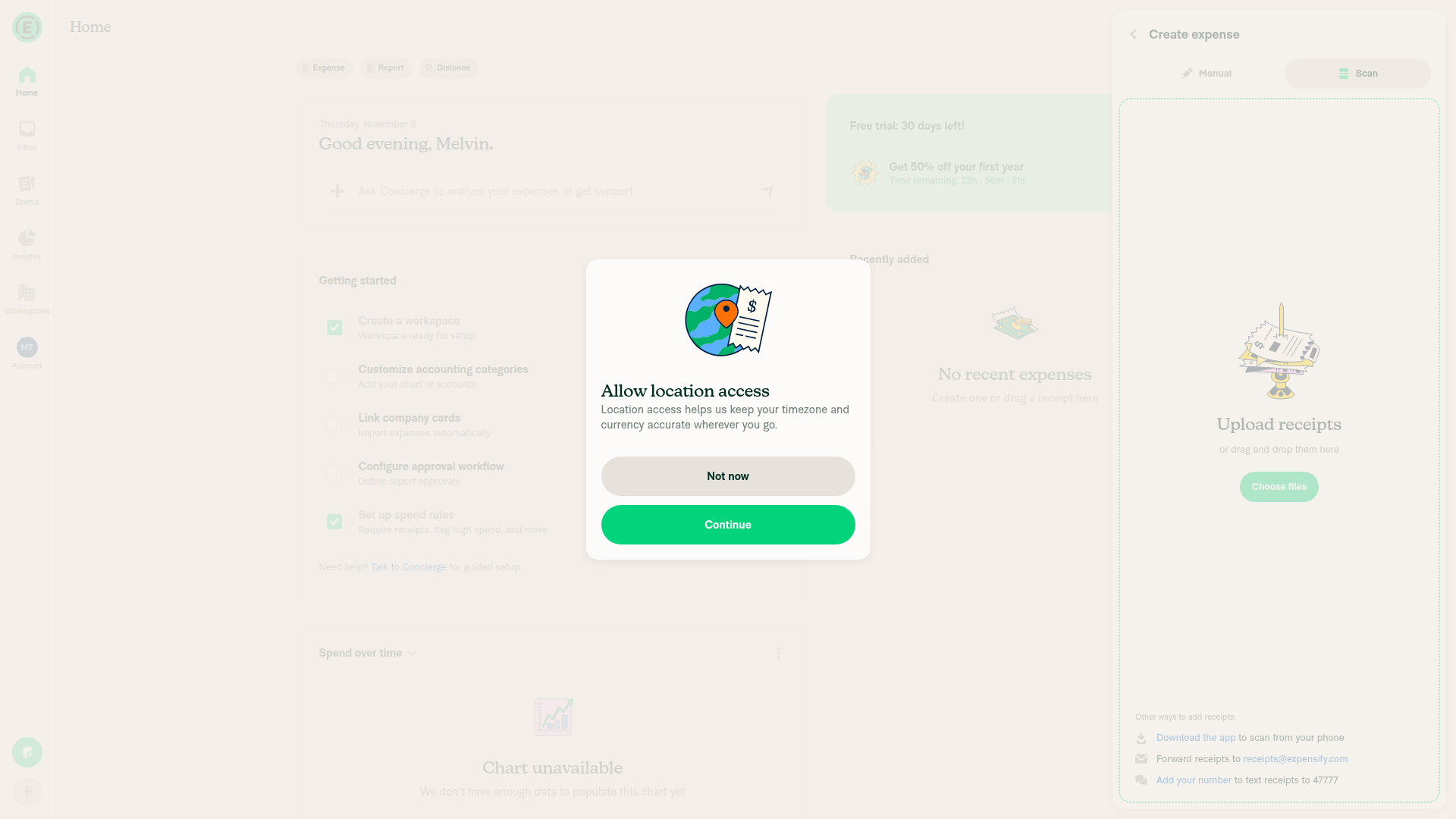
9. Create matching expense and open from reportUnverified: creation reached a location-access dialog that the driver could not dismiss.
Location-access dialog blocking expense creation
⚠️
10. Expense opens without crashing and default appliesUnverified because expense creation was blocked.
⚠️
11. Summary correct without amountList summary correctly showed merchant/category conditions and description update without amount; detailed summary was not checked.
⚠️
Category-only Preview blockedPreview retained the editor with the condition error.
✅
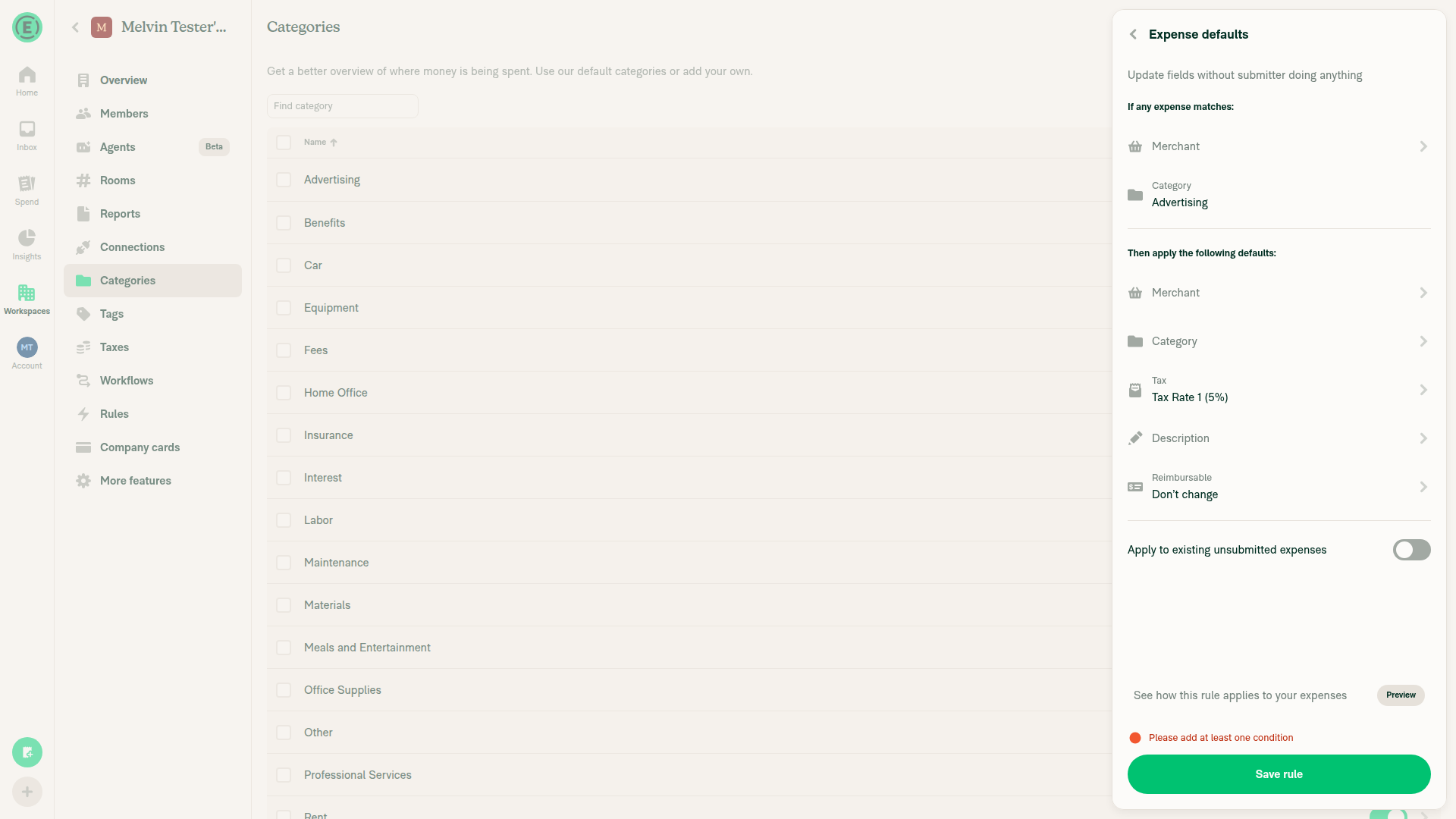
[P2] Preserve existing category-tax creation outside the betaReproduced: Categories > Advertising > Create new rule > Apply expense defaults, select Tax Rate 1 (5%), then Save. The workspace default was Tax exempt (0%); saving incorrectly displayed “Please add at least one condition” despite the fixed category.
The replacement AddCategoryTaxRulePage.tsx:22–25 routes this existing workflow through the generic editor, whose ExpenseDefaultRuleUtils.ts:269–274 requires a merchant off-beta. This blocks a previously supported category-tax default before any API request. Adding a merchant narrows its scope and is not equivalent.
Recommendation: retain the legacy category-tax editor/save path while the beta is off, rather than enabling unsupported generic category-only rules.
Category-scoped tax-only rule incorrectly blocked by condition validation
❌
No new console errorsUnverified: console inspection was unavailable through the permitted driver.
⚠️
Beta-on, existing-value and offline pathsUnverified.
⚠️

view run · view recording

…-104155-expense-defaults-beta

Signed-off-by: krishna2323 <belivethatkg@gmail.com>
Requiring a merchant off the beta blocked the rule the category settings page
creates, which has matched on a category alone since before expense defaults
could match on anything else. An admin picking a rate for a category was told to
add a condition, and adding a merchant narrows the rule rather than fixing it.

Off the beta a rule may now match on a merchant, or on a category when all it
sets is a tax. The client reads a category tax default itself when an expense is
categorized, so that one applies whatever the engine matches on.

Signed-off-by: krishna2323 <belivethatkg@gmail.com>
@Krishna2323

Copy link
Copy Markdown
Contributor Author

@situchan ready for review

Opening an expense a rule changed builds the "via workspace rules" message from
policyRulesModifiedFields. The message looks the field label up in
translations.common by its key, and common had no amount, so the lookup returned
undefined and toLowerCase threw.

A rule can set the vendor too, whose key has no label either, so an unknown field
is now dropped from the message rather than looked up.

Fixes Expensify#105805

Signed-off-by: krishna2323 <belivethatkg@gmail.com>
The Expense defaults table built the amount with convertAmountToDisplayString,
which is the tax rate formatter. It always shows two to four decimals and never
reads how many the currency has, so a rule still read "10.50" on a workspace
switched to a currency with no subunit, while the rule editor read "11".

The table now uses the same convertToDisplayString the editor does, so a rule
reads the same in both places.

Fixes Expensify#105812

Signed-off-by: krishna2323 <belivethatkg@gmail.com>
The merchant editor refused an empty value, which was right while a merchant was
the only thing an expense default rule could match on. A rule can now match on a
category or a tag instead, so an admin who wanted to swap one condition for
another had no way to remove the merchant.

The field is still required off the expense default conditions beta, where a
merchant remains the only condition. The rule editor keeps refusing a rule that
matches on nothing either way.

Fixes Expensify#105817

Signed-off-by: krishna2323 <belivethatkg@gmail.com>
Zero was dropped in three places. The editor saved an empty string for it, the
rule builder returned no action for it, and reading a rule back refused any
amount that was not negative, which a zero is not. Together they let the editor
close with no error and no amount saved.

Zero is now a default like any other, so an admin can write a rule that zeroes an
expense out. An empty input still means the rule sets no amount at all, which is
a different thing.

This reverses the decision that zero is not a default, which the amount tests
stated. QA and the issue both read the silent close as a bug rather than as the
field refusing a value.

Fixes Expensify#105819

Signed-off-by: krishna2323 <belivethatkg@gmail.com>
The preview asked GetTransactionsMatchingCodingRule, which reads a merchant, so a
rule matching on a category listed none of the expenses it would apply to. It now
asks GetTransactionsMatchingRule with the rule's scope and its filters, which is
the command the rules engine answers for a rule of any shape.

The previous answer is also dropped before asking again. The results are a
collection keyed by transaction, so a preview that matched fewer expenses than the
last one left the ones it no longer matched on screen.

Fixes Expensify#105829
Fixes Expensify#105828

Signed-off-by: krishna2323 <belivethatkg@gmail.com>
@Krishna2323

Copy link
Copy Markdown
Contributor Author

@MelvinBot review

Since your last run, there have been 6 new commits. The [P2] category-tax regression you found has been fixed, and the five fixes from #106054 are now included, one per commit.

Please focus on the areas that were unverified last time, with the beta disabled:

  1. Category tax: Categories > any category > Create new rule > Apply expense defaults, select a tax rate, and Save. This should now save successfully without asking for another condition.
  2. Manual expense creation: Create a manual expense rather than using a scan, so the location-access dialog that blocked you last time doesn't appear.
  3. Steps 8–11: Verify that the preview lists only matching expenses, that an expense can be opened from the report, and that the rule summary is correct.
  4. Merchant switching (new): Create expenses from two different merchants. Preview a rule matching the first merchant, go back, change the merchant to the second, and preview again. Only the second merchant's expense should be listed.

The tag, amount, and category-only paths require the expenseDefaultConditions beta, so skip those unless you can enable it.

The preview built a fresh filter tree on every render and keyed its request on
that object, so the request went out again every time the page rendered. Clearing
the previous answer before each request made every answer render the page again,
which asked again, and the spinner never stopped.

The request is now keyed on what the tree holds rather than on its identity, and
the action takes the filters already serialized, which is what the command sends.

Signed-off-by: krishna2323 <belivethatkg@gmail.com>
@MelvinBot

MelvinBot commented Nov 5, 2026 •

Copy link
Copy Markdown
Contributor

🤖 Web test steps verification results: ⚠️ partial

Verified category-tax rules, manual expense creation, merchant-rule summary, report navigation, and the persisted description default on dev NewDot web. Both merchant previews remained loading; beta-disabled status is unverified.

New ReviewRide expense with persisted workspace-rule description

Step Status
1. Category → Create new rule → Apply expense defaults opens with category lockedAdvertising appeared as fixed category-condition text, without an editable category-condition control.
✅
2. Non-default tax saves without an extra conditionTax Rate 1 (5%) saved with only the Advertising category condition. The previously reported validation failure did not reproduce.
✅
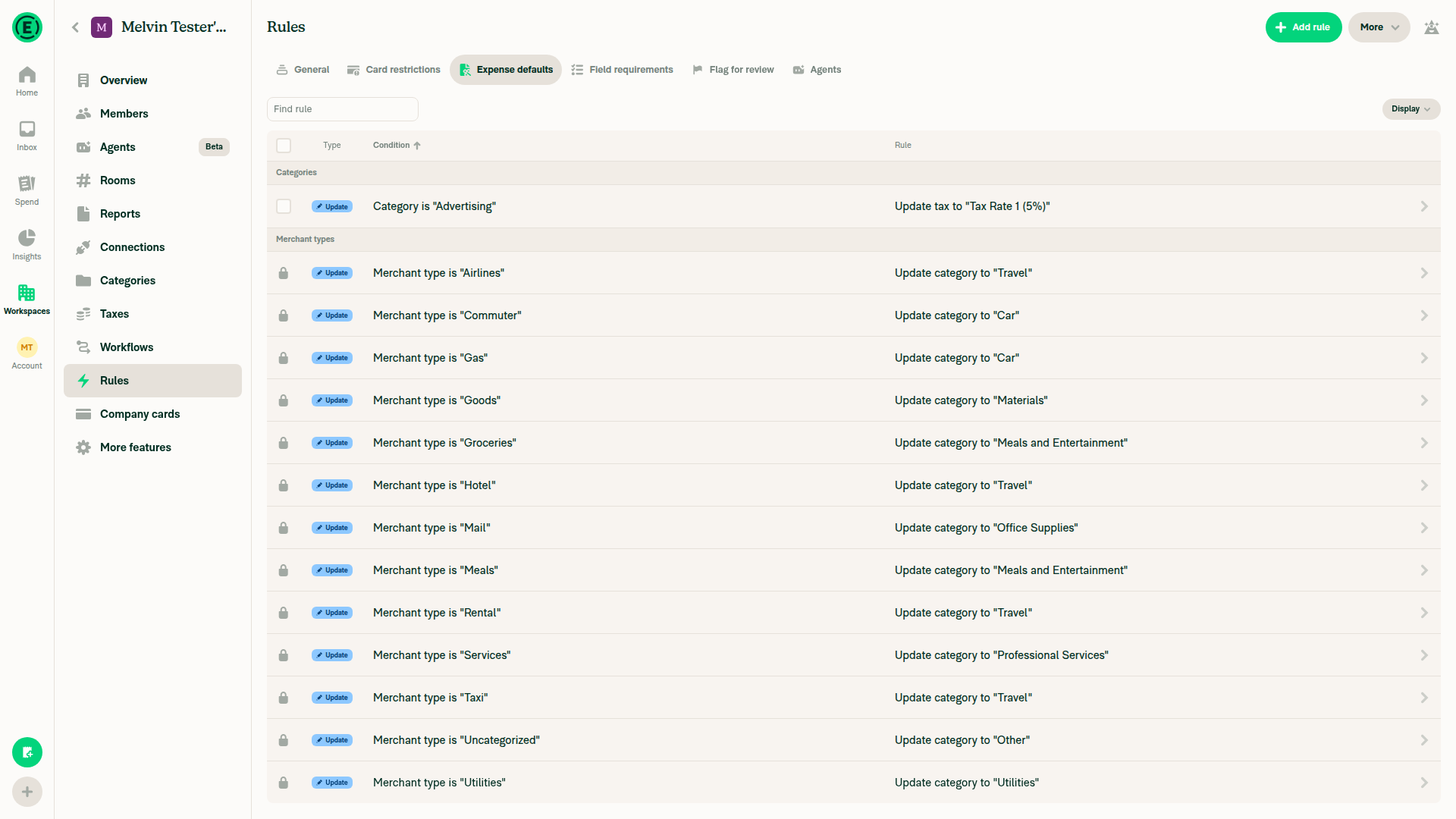
3. Saved rule appears under category and Expense defaultsBoth listings showed the Advertising rule updating tax to Tax Rate 1 (5%).
Saved category-tax rule in Expense defaults
✅
4. Create two manual workspace expenses with distinct merchantsCreated ReviewCoffee / Advertising / $21.00 and ReviewRide / Travel / $42.00; both appeared in the workspace report. No scanning used.
✅
5. Category tax applies to an expenseSelecting Advertising automatically set Tax Rate 1 (5%), calculating $1.00 tax on ReviewCoffee. Subsequent report read-back confirmed Tax $1.00.
✅
6. Merchant-description rule has correct summary and no amountSaved summary read: Merchant contains “ReviewRide” → Update description to “Review merchant default”. No amount appeared in the editor or saved summary.
✅
7. ReviewCoffee preview lists only its expenseBlocked: preview remained loading after a 15-second wait; read-back contained no expense results. Matching accuracy remains unverified.
ReviewCoffee preview remained loading
⚠️
8. Change merchant to ReviewRide; preview shows only ReviewRide without stale CoffeeConfirmed the merchant changed to ReviewRide, but its preview also remained loading after 15 seconds. Result replacement and stale-result removal remain unverified.
⚠️
9. Open matching expense from report without crashingOpened ReviewRide through View details in the expense report. Detail read-back showed $42.00, ReviewRide, Travel, and the workspace report link.
✅
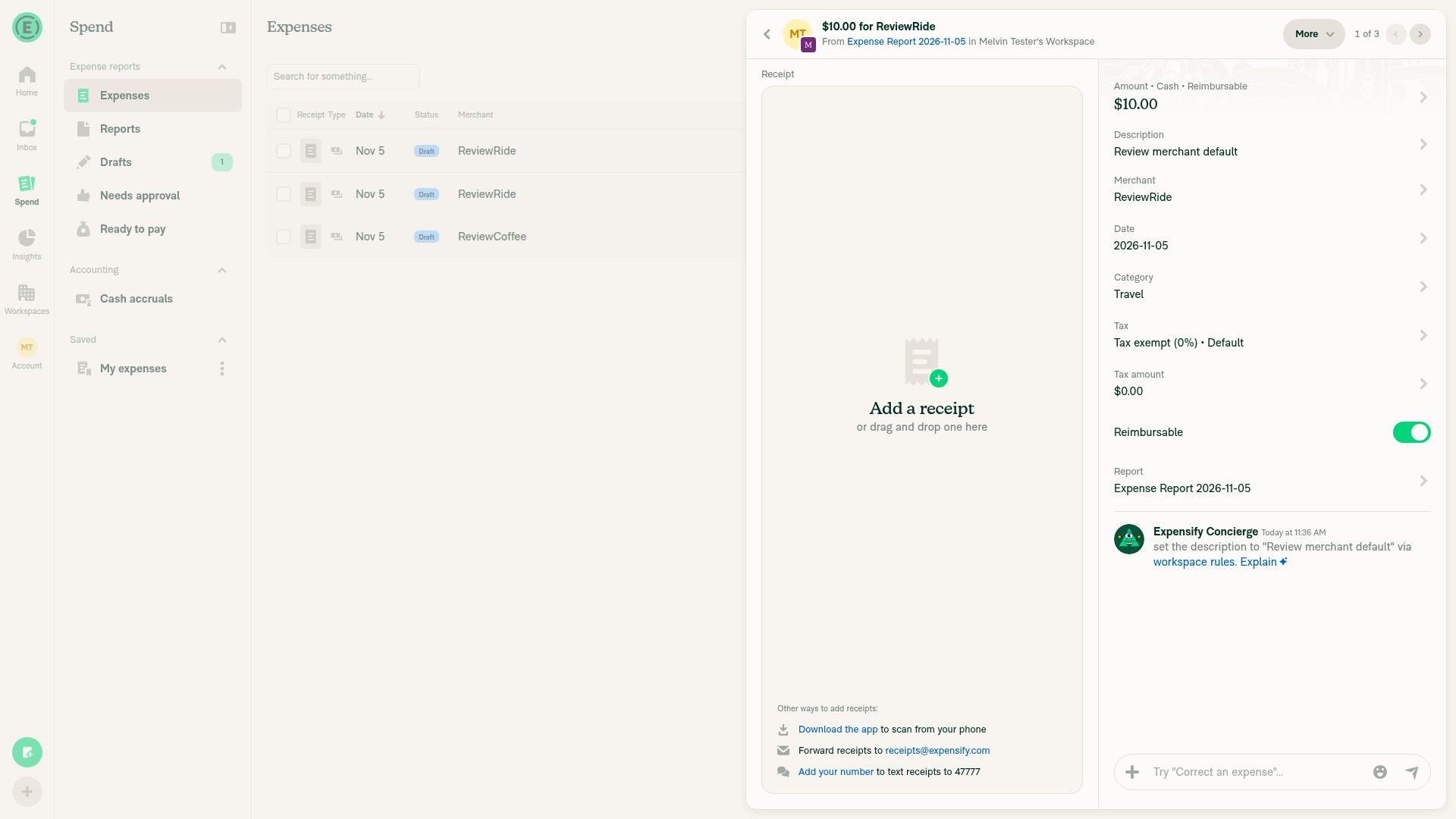
10. Merchant description default applies to a newly created matching expenseCreated another manual ReviewRide expense for $10 with Description untouched. Reopened details showed “Review merchant default”; activity confirmed it was set via workspace rules.
New ReviewRide expense with persisted workspace-rule description
✅

view run · view recording

…-104155-expense-defaults-beta

Signed-off-by: krishna2323 <belivethatkg@gmail.com>
A transaction's taxAmount is stored in the smallest currency units, but it was passed through
convertToBackendAmount alongside the freshly calculated amount, which is in major units. A moved
track expense keeping $5.00 of tax was written back as $500.00.

Two tests asserted the inflated value, so they are corrected too.

Signed-off-by: krishna2323 <belivethatkg@gmail.com>
Clearing a category falls back to the workspace default tax, and that fallback is gated on the
policy having a category tax rule, which is read from the rules collection. Clearing before
GetRules lands left the previous category's tax in place, and the replay skipped it.

Signed-off-by: krishna2323 <belivethatkg@gmail.com>
The rules engine applies every matching rule in turn and each one writes over what the last left,
so where two rules set a tax on the same category the newest is the rate the expense ends up with.
Stopping at the first match predicted a rate the server then replaced.

A later rule that matches but sets no tax leaves the earlier rate alone, since the engine writes
only the fields a rule sets.

Signed-off-by: krishna2323 <belivethatkg@gmail.com>
@Krishna2323

Copy link
Copy Markdown
Contributor Author

Two more tax issues:

Thanks, both confirmed and fixed, along with precedence.

1. Tax amount inflated. transaction.taxAmount is already in the smallest currency units, but it went through convertToBackendAmount alongside the freshly calculated amount, which is in major units. Only the calculated branch is converted now. Heads up that this one is on main too: the same mix sits in useTaxAmount for any moved track expense carrying tax, no category rule involved. Two tests asserted the inflated value and are corrected.

2. Cleared split category. SplitCategoryTaxController skipped the replay whenever the category was falsy. Clearing is the case that needs it most, since the workspace default it falls back to is itself gated on the rules having loaded. It is replayed now.

3. Precedence. Switched to the last matching rule, so the newest rule's tax wins. A later rule that matches but sets no tax leaves the earlier rate alone, since the engine only writes the fields a rule sets. One thing this contradicts: the duplicate rule prompt on main says "Your existing rule for X will take priority over this one." Should that copy change to say the new rule wins?

4. Member access. This one needs your call. GetRules is the only thing that populates the collection for a member, so if it is admin only, members get no tax prediction until the server responds and nothing at all offline. Does GetRules return policy rules to members? If not, what should the confirmation page read instead?

The hooks this PR adds below it split the block React Compiler used to cache the category
computation in, which left getDistanceRateCustomUnit running on every render of the confirmation
page. Reading the rate into its own value gives the compiler an object to key the guard on.

Signed-off-by: krishna2323 <belivethatkg@gmail.com>
Comment thread src/libs/ExpenseDefaultRuleUtils.ts Resolved
A category tax default migrated from policy.rules.expenseRules carries a priority of 40000 while
one written by the merchant rule editor carries 10000, so the backend applies the migrated rule
last and it writes over the newer one. Sorting on age alone picked the newer rule's rate, which
the server then replaced.

Signed-off-by: krishna2323 <belivethatkg@gmail.com>
A failed GetRules settles the wait with no rules, so the expense is given the workspace default.
When a reconnect landed the rules, that default differed from the category rule's rate and so read
as a rate the user had picked, which held it in place and left the rule unapplied. Tracking the
default the hook handed over tells the two apart.

Signed-off-by: krishna2323 <belivethatkg@gmail.com>
Comment thread src/libs/TransactionUtils/tax.ts Resolved
…ory rule

The manual branch of getCategoryTaxDetails already does this, so a category with no rule does not
carry the rate its predecessor set. The distance branch returned nothing instead, which left the
previous category's tax on the draft. getDistanceRateTaxUpdates has already charged the tax at the
rate's own default, so the fallback is the value we were discarding.

Signed-off-by: krishna2323 <belivethatkg@gmail.com>
A failed GetRules settles the wait, so a category picked in that window resolved against an empty
collection and was then recorded as resolved. The reconnect that landed the rules hit the equality
check and skipped, leaving the previous category's tax on the split. useRulesPrefetch now reports
whether the collection actually arrived, so that pick is replayed once it has. The category the
screen opened with is still left alone.

Signed-off-by: krishna2323 <belivethatkg@gmail.com>
A rule migrated from the old policy rules carries a higher priority than anything the merchant rule
editor creates, and priority decides which of two matching rules the engine applies last. Saving
the editor's priority over it changed which tax an expense ended up with on an edit that never
touched the tax. Mirrors what this function already does for created.

Signed-off-by: krishna2323 <belivethatkg@gmail.com>
The retry replays the category to resolve it against rules the first pass never had, which also
rewrote a tax the user had chosen in between. A resolution with no rules to read leaves the draft's
tax alone, so recording the tax going in gives the retry something to recognise its own work by,
and a draft carrying anything else is left as it is.

Signed-off-by: krishna2323 <belivethatkg@gmail.com>
…-104155-expense-defaults-beta

Signed-off-by: krishna2323 <belivethatkg@gmail.com>

# Conflicts:
#	config/oxlint/oxlint.seatbelt.tsv
#	src/pages/workspace/categories/CategorySettingsPage.tsx
#	src/pages/workspace/rules/MerchantRules/ExpenseDefaultTypePage.tsx
#	src/pages/workspace/rules/RulesNewPage.tsx
@github-actions

Copy link
Copy Markdown
Contributor

🚧 JS00001 has triggered a test Expensify/App build. You can view the workflow run here.

@github-actions

This comment has been minimized.

@JS00001

JS00001 commented Nov 13, 2026

Copy link
Copy Markdown
Contributor

…beta

One conflict in TransactionUtils/tax.ts, an import line that both sides grew.
Main added isTaxCodeCustomized for getTaxCodeForDisplay, this branch added the
expense default rule helpers. Keep both.

Signed-off-by: krishna2323 <belivethatkg@gmail.com>
@JS00001
JS00001 merged commit ea90b93 into Expensify:main Nov 13, 2026
39 of 40 checks passed
@JS00001 JS00001 changed the title Reland expense defaults for tags and amounts behind a beta Reland expense defaults for tags and amounts Nov 13, 2026
@github-actions

Copy link
Copy Markdown
Contributor

🚧 JS00001 has triggered a test Expensify/App build. You can view the workflow run here.

@github-actions

Copy link
Copy Markdown
Contributor

@OSBotify

Copy link
Copy Markdown
Contributor

✋ This PR was not deployed to staging yet because QA is ongoing. It will be automatically deployed to staging after the next production release.

@IuliiaHerets

Copy link
Copy Markdown

Regression was completed
No issues were found

@OSBotify

Copy link
Copy Markdown
Contributor

🚀 Deployed to staging by https://github.com/JS00001 in version: 9.5.40-0 🚀

platform result
🕸 web 🕸 success ✅
🤖 android 🤖 success ✅
🍎 iOS 🍎 success ✅

@MelvinBot

MelvinBot commented Nov 16, 2026 •

Copy link
Copy Markdown
Contributor

Help site update needed — this releases tag/category-only conditions and amount defaults without a beta. The existing setup step incorrectly tells readers to choose between Merchant and Category.

No docs PR created: live UI verification was blocked by a Control-plan upgrade prompt, so I couldn't confirm the replacement instructions and exact labels.


view run · view recording

Sign up for free to join this conversation on GitHub. Already have an account? Sign in to comment

Labels

None yet

Projects

None yet

Development

Successfully merging this pull request may close these issues.

8 participants